

RENU SURESH
Expert
Published on: Aug 12, 2026
GSTR-3B: Due Date, Late Fee, Format, Return Filing, Eligibility & Rules
Filing the GSTR-3B form is a critical monthly obligation for businesses under the GST regime in India. This simplified return summarises inward and outward supplies, helping businesses manage their tax liabilities without delving into the complexities of detailed invoice reporting. This guide aims to streamline the process, providing a step-by-step procedure on “How to File GSTR 3B?” to help businesses file their GSTR-3B efficiently and accurately.Ready to simplify your GST return filing? Let IndiaFilings guide you through the process. Our experts are here to help you file accurately and on time. File Now!
Latest Update
GSTR-3B Filing Deadline for September 2025 Extended to October 25
The Ministry of Finance has extended the GSTR-3B filing deadline for September 2025. The new due date is October 25, 2025, instead of the original October 20. This gives businesses extra time to file their GST returns comfortably, especially during the busy festive season.
Click here to know more about GSTR 3B Due date Extension
CBIC Extends GSTR-3B Due Date for July 2025 in Mumbai & Nearby Districts
The Central Board of Indirect Taxes and Customs (CBIC) has extended the due date for filing GSTR-3B for July 2025 from 20th August 2025 to 27th August 2025. The relief is applicable to taxpayers whose principal place of business is in Mumbai (City), Mumbai (Suburban), Thane, Raigad, and Palghar districts of Maharashtra, owing to severe monsoon disruptions. No late fees or penalties will be levied if returns are filed within the extended timeline.
GSTR-3B Auto-Populated Liability Becomes Non-Editable from July 2025 Tax Period
-
Current Status (Until June 2025):
- The GSTR-3B form is auto-populated based on the outward supply data from GSTR-1/GSTR-1A/IFF.
- Taxpayers are currently allowed to edit these auto-populated values in GSTR-3B.
-
New Rule Effective from July 2025 Tax Period:
- Starting from the July 2025 tax period (to be filed in August 2025), the auto-populated liability in GSTR-3B will become non-editable.
- Any changes or corrections to outward supplies must now be done only via GSTR-1A before filing GSTR-3B.
We have also attached the official advisory for your reference.
Auto-Filled Interstate Supply Details in GSTR-3B Now Non-Editable
The Goods and Services Tax Network (GSTN) has released a new advisory regarding Table 3.2 of GSTR-3B, which deals with inter-state supplies made to unregistered persons, composition taxpayers, and UIN holders.
From the April 2025 tax period onwards, the auto-populated values in Table 3.2 of GSTR-3B, fetched from the corresponding inter-state supply details reported in GSTR-1, GSTR-1A, and IFF, will be non-editable. Taxpayers must now file GSTR-3B using these system-generated values without any manual changes.
Here are the key points of this update:
- Non-Editable Values: Table 3.2 values will be auto-filled based on GSTR-1, GSTR-1A, or IFF data and cannot be manually altered in GSTR-3B.
- How to Make Corrections: If the auto-populated values are incorrect, corrections must be made by amending the original entries in GSTR-1A or via subsequent GSTR-1/IFF filings.
- Filing Accuracy: To avoid discrepancies, taxpayers are advised to report inter-state supplies accurately in GSTR-1, GSTR-1A, or IFF to ensure correct auto-population in Table 3.2.
- Amendment Timeline: Form GSTR-1A can be filed anytime after GSTR-1 and before filing GSTR-3B. Any corrections needed for auto-populated values in Table 3.2 must be made through Form GSTR-1A before GSTR-3B is filed.
We have also attached the official advisory for your reference.
10th January 2025
The due dates for filing GSTR-1 and GSTR-3B (both monthly and quarterly) for December 2024 have been extended by two days, as notified in CGST Notifications 01/2025 and 02/2025.
29th September 2024
In response to persistent demand from the trade, GSTN has restored access to the return data for July 2017 and August 2017, which had been archived earlier on 1st August and 1st September respectively. This data will remain available until further notice.
24th September 2024
As per GSTN’s data archival policy, data for September 2017 will be removed from the GST portal on 1st October 2024. This follows the policy of retaining return data on the portal for a period of 7 years.
What is GSTR 3B?
The GSTR-3B, a simplified summary return introduced by the Government of India, is filed monthly or quarterly by all regular taxpayers. This form consolidates sales, input tax credit claims, taxes paid, and refunds claimed. It was designed to streamline the transition to the GST system, especially to accommodate the unique challenges small and medium businesses face using manual accounting methods. By implementing GSTR-3B, the government provided a straightforward mechanism to simplify tax reporting and ease the administrative burden on these businesses.Who is required to file GSTR-3B?
Every person registered under the Goods and Services Tax (GST) is required to file GSTR-3B.
The following categories of registered persons are not required to file GSTR-3B:
- Taxpayers registered under the Composition Scheme
- Input Service Distributors (ISDs)
- Non-resident suppliers providing OIDAR (Online Information and Database Access or Retrieval) services
- Non-resident taxable persons
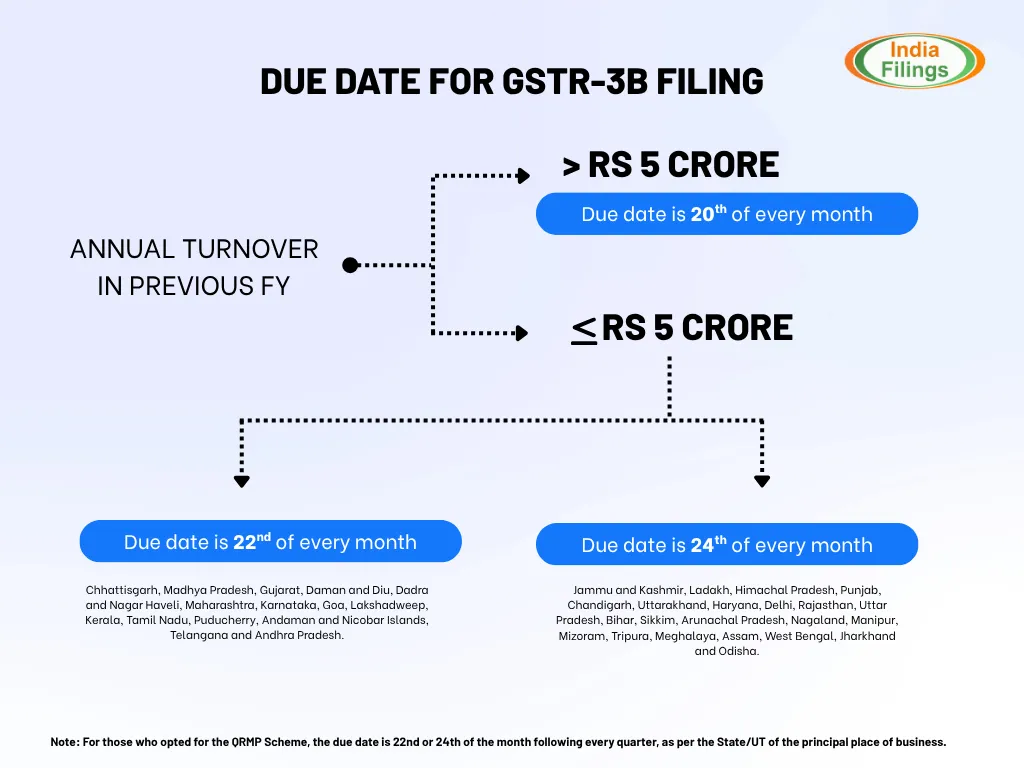
GSTR-3B Filing Due Dates
1. Up to December 2019:
- The due date for filing GSTR-3B was the 20th of the following month for all taxpayers.
2. From January 2020 onwards:
- The due dates were staggered based on turnover and location.
- Filers could be required to file by the 20th, 22nd, or 24th of the month following the tax period.
- The applicable due date depends on whether the taxpayer files monthly or quarterly.
3. QRMP Scheme (From 1st January 2021):
- Taxpayers who opt for the Quarterly Return Monthly Payment (QRMP) scheme must file GSTR-3B quarterly.
- Due dates are either the 22nd or 24th of the month following the quarter, depending on the State/UT of the principal place of business.
To view the most current GSTR-3B due dates and turnover thresholds, please refer to the GST Calendar.
Important Points to Note:
- Taxes must be paid, and GSTR-3B must be filed within the due date to avoid penalties.
- Late filing attracts a late fee and interest at 18% per annum.
- If tax is paid on time but GSTR-3B is filed late, both late fee and interest still apply.
- Taxpayers filing quarterly GSTR-1 (even if not under QRMP) must still pay taxes and file GSTR-3B monthly.
Details and Documents Required for Filing GSTR-3B
To accurately file GSTR-3B in India, taxpayers must gather and submit specific details and documents concerning their monthly business activities. This return captures information about sales, purchases, and input tax credits (ITC), which are crucial for maintaining GST compliance. Below is a breakdown of the required details and their purposes:- GSTIN: Each GST-registered individual or entity is assigned a unique 15-digit Goods and Services Tax Identification Number (GSTIN), which is essential for filing the GSTR-3B.
- Turnover Details: Comprehensive details must be provided regarding taxable, exempt, and export supplies made within the reporting period.
- Input Tax Credit Details: Taxpayers must report the ITC claimed on purchases. This includes details of invoices, the amount of tax paid, and adjustments for any credits that are not eligible.
- Payment of Tax: The tax due on outward supplies must be calculated and paid. Taxpayers can use the available ITC in their electronic credit ledger to offset this tax liability.
- Other Details: Additional information may be required, such as the method of tax payment (whether through self-assessment or deductions like TDS/TCS), any applicable late fees or interest, and adjustments from previous periods.
Prerequisites for Filing GSTR-3B
Businesses required to file monthly returns, such as GSTR-1, GSTR-2, and GSTR-3, must also submit the GSTR-3B form. This form can be filed online via the GSTN portal, and the associated tax payments can be made through challans at banks or via online payment methods. To verify the return, you need either an OTP from your registered phone for an Electronic Verification Code (EVC) or a Class 2 or higher Digital Signature Certificate. Alternatively, you can file your GST returns using an Aadhaar-based e-signature.Start simplifying your GST return filing with IndiaFilings LEDGERS Software today!
How to file GSTR 3b?
Filing GSTR-3B is a crucial process for taxpayers under the GST regime. Below is a detailed step-by-step guide to help you file GSTR-3B efficiently on the GST Portal:- Step 1: Log in to the GST Portal. Upon accessing the homepage, you can view the return filing status for the last five tax periods.

How to file GSTR 3b Step 1
- Step 2: Navigate to ‘Services’ > ‘Returns’ > ‘Returns Dashboard’ to proceed with your filing.
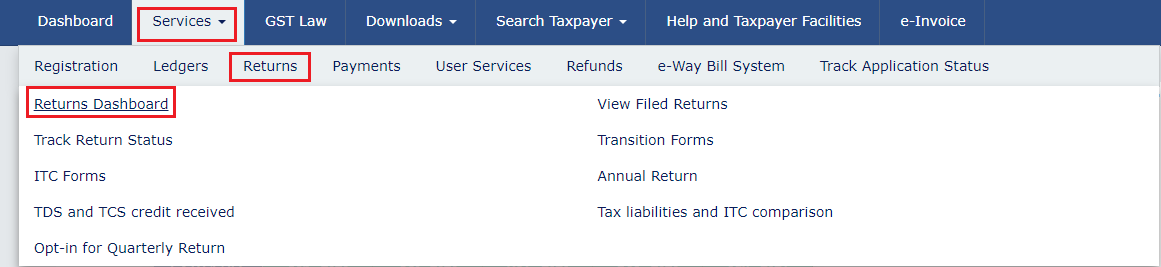
How to file GSTR 3b Step 2
- Step 3: On the ‘File Returns’ page, select the appropriate ‘Financial Year’, ‘Quarter’, and ‘Return Filing Period - Month or Quarter’ from the drop-down menus. Click the ‘SEARCH’ button to continue.
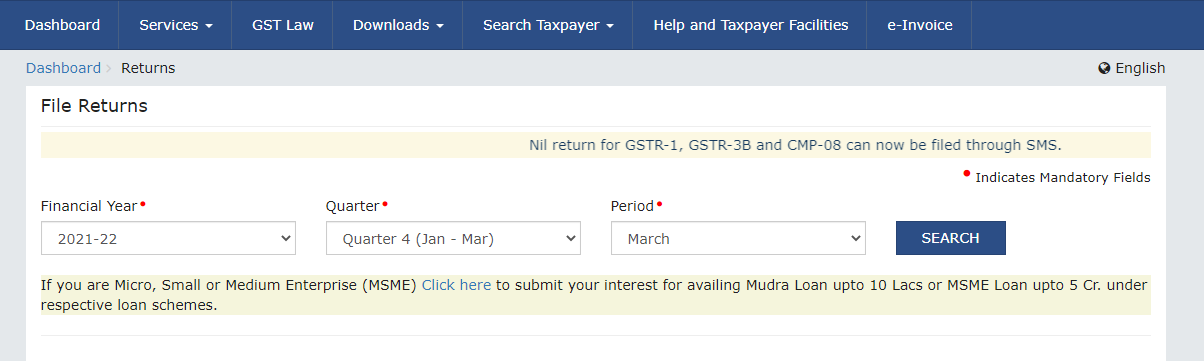
How to file GSTR 3b Step 3
Important Note: For those submitting quarterly returns, remember to file Form GSTR-3B for the final month of the quarter. The GSTR-3B form will not be accessible for the first two months of any quarter. Additional Information for MSMEs: If you are registered as a Micro, Small, or Medium Enterprise (MSME) and are interested in applying for a Mudra Loan of up to Rs.10 lakh or an MSME loan of up to Rs.5 crore, you can fill out a consent form by clicking the ‘click here’ hyperlink provided at the bottom of your screen.- Step 4: On the ‘Monthly Return GSTR-3B’ title, click the ‘PREPARE ONLINE’ button. The due date for the filing will also be displayed, helping you manage your deadlines effectively.
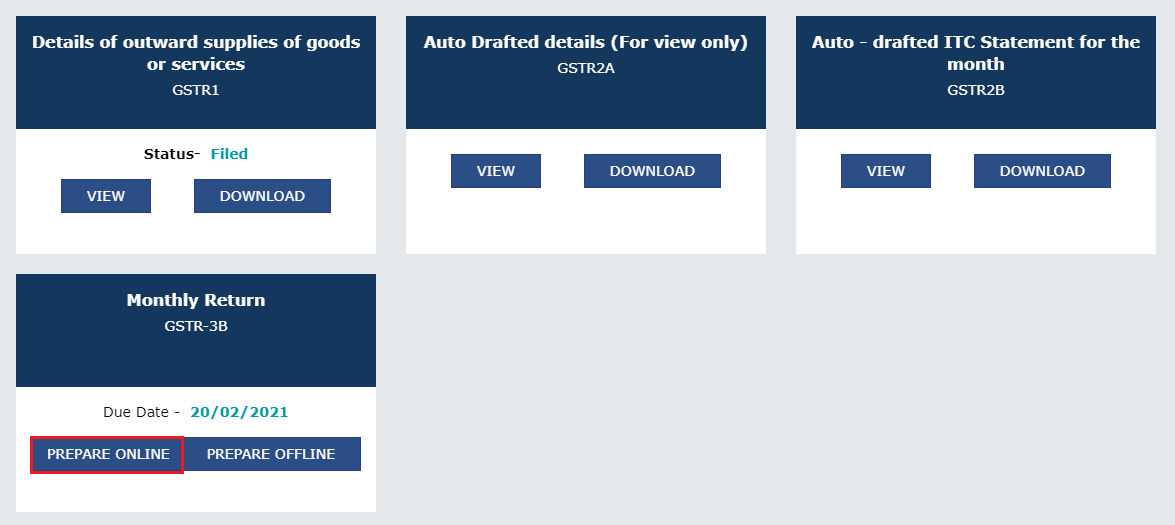
How to file GSTR 3b Step 4
- Step 5: You will be prompted with a list of questions; respond to them by selecting ‘Yes’ or ‘No’. Your answers will determine which tables and fields are necessary for you to complete in the following steps of the process.
- Step 6: Begin by entering the required values in each section of the GSTR-3B form. Input totals for each relevant head and add details for interest and late fees, if applicable.
- Outward and Inward Supplies: Enter summary details of outward and inward supplies liable to reverse charge and applicable taxes. Note that only Table 3.1 (d) is typically auto-populated from GSTR-2B.
- Interstate Supplies: Detail interstate supplies made to unregistered persons, composition taxable persons, and UIN holders. Taxes for these transactions should be entered according to the place of supply, with data from GSTR-1 available for editing if needed.
- Input Tax Credit: Provide summaries of eligible input tax credits claimed, input tax credits reversed and ineligible input tax credits.
- Exempt, Nil, and Non-GST Supplies: Record details of exempt, Nil-rated, and Non-GST inward supplies, categorized as intra-state or inter-state supplies.
- Interest and Late Fees: Enter details under each tax head (IGST, CGST, SGST/UTGST, and Cess). The system calculates late fees based on the days past the filing due date.
- Editing Entries: You can modify the entries by clicking on ‘ADD’ or ‘DELETE’ for each tile. After entering data in a tile, click ‘CONFIRM’ to save the changes.
- Step 7: Once all relevant details have been entered, click the 'SAVE GSTR-3B' button at the page's bottom. This button is also available on the main GSTR-3B page, allowing you to save your progress at any point and return later to make edits. Upon saving, a confirmation message will appear at the top of the page indicating that the data has been successfully stored. Remember, after submitting the form, the data becomes locked, and no further changes can be made. The Input Tax Credit (ITC) and Liability ledger will be updated upon submission.
- Step 8: To review your entries before the final submission, click 'PREVIEW DRAFT GSTR-3B'. This allows you to see a draft of your return and ensure all information is accurate before proceeding.
- Step 9: After reviewing and submitting your GSTR-3B, the 'Payment of Tax' tile will become active. To proceed with payment, follow these steps:
- Check Balance: Click the 'CHECK BALANCE' button to view the cash and credit balances in your Electronic Cash Ledger. This helps ensure that you have sufficient funds to cover the tax liabilities.
- Proceed to Payment: Click on the 'Proceed to Payment' tile. Your tax liabilities and credits are updated in the ledgers and displayed in the payment section's 'Tax payable' column.
- Offset Liabilities: Enter the amount of credit you wish to use from the available credits to settle the liabilities. Ensure that you follow the credit utilization rules; otherwise, the system may not allow the offsetting of liabilities.
- Confirm Payment: Click the 'OFFSET LIABILITY' button. A confirmation message will be displayed. Click 'OK' to finalize the payment.

How to file GSTR 3b Step 10
Handling Insufficient Funds:-
- If the cash balance in the Electronic Cash Ledger is less than the amount required to meet the liabilities, click on the 'CREATE CHALLAN' button to generate a challan for additional payment.
- If the cash balance exceeds the amount needed, but ITC utilization rules prevent offsetting, click on 'MAKE PAYMENT/POST CREDIT TO LEDGER' to adjust the ledger accordingly.
- These steps ensure that your GSTR-3B return is not only submitted accurately but also that your tax liabilities are settled in compliance with GST regulations.
- Step 10: After ensuring all information is accurate and payments are settled, proceed to the legal formalities of filing the return. Select the checkbox to agree to the declaration confirming the authenticity and accuracy of the information provided. Then, choose the appropriate authorized signatory from the ‘Authorised Signatory’ drop-down list. You can file the GSTR-3B using either the Digital Signature Certificate (DSC) or the Electronic Verification Code (EVC) by clicking on the corresponding button, ‘FILE GSTR-3B WITH DSC’ or ‘FILE GSTR-3B WITH EVC’.
- Step 11: To finalise the filing process, click the ‘PROCEED’ button. A confirmation message will appear once the filing is successful. Click the ‘OK’ button to acknowledge this message.
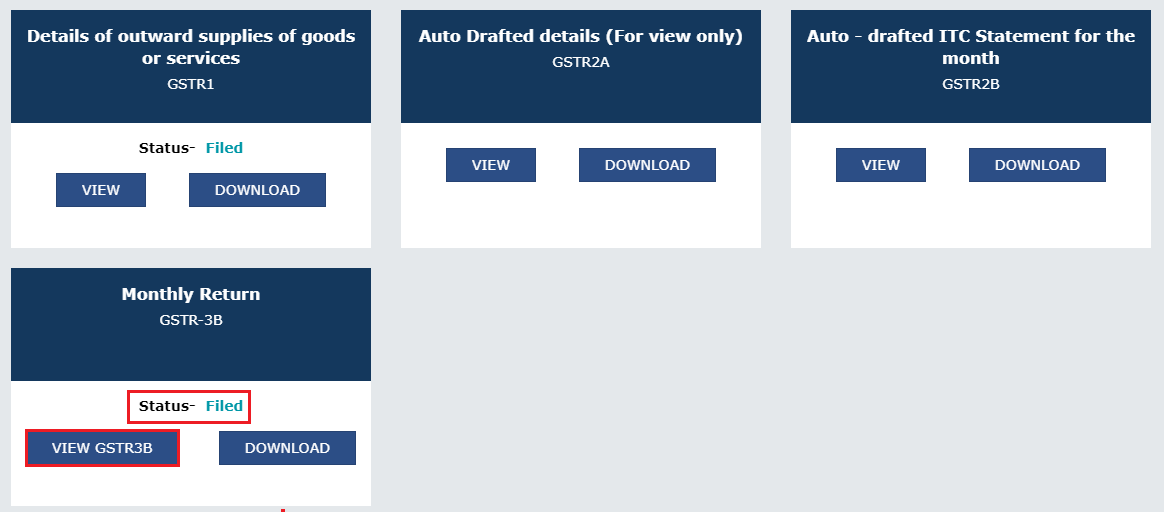
How to file GSTR 3b Step 11
Penalty for Late Filing of GSTR-3B
GSTR-3B is a mandatory return for GST-registered individuals and entities in India. Timely filing of this return is crucial to avoid penalties, interest, the forfeiture of input tax credit (ITC), and potential legal actions. Here are the key consequences of not filing GSTR-3B by the prescribed due date:
Late Fee
A late fee is levied if GSTR-3B is not filed by the due date. The fee is ₹50 per day for taxpayers with a tax liability and ₹20 per day for those with nil tax liability. The maximum late fee is capped at ₹2,000 for businesses with an annual turnover up to ₹1.5 crores, ₹5,000 for turnovers up to ₹5 crores, and ₹10,000 for turnovers exceeding ₹5 crores.
Interest
Interest at 18% per annum is charged on the outstanding tax liability. This interest is calculated from the due date of the return until the tax is fully paid.
Loss of Input Tax Credit (ITC)
Delay in filing GSTR-3B results in the loss of ITC for the month, which means the taxpayer cannot claim ITC for that period in subsequent returns.
Legal Action
Consistent failure to file GSTR-3B or deliberate tax evasion can trigger legal proceedings under GST laws.
Restriction on Filing GSTR-1
From January 1, 2022, taxpayers who do not file GSTR-3B for the previous month are barred from filing GSTR-1 for the current month. This rule also applies to those on the Quarterly Return Monthly Payment (QRMP) scheme who fail to file their quarterly GSTR-3B, preventing them from using the Invoice Furnishing Facility (IFF).
GSTR-3B vs GSTR-2A & GSTR-2B
Reconciling GSTR-3B with GSTR-2A and GSTR-2B is a crucial step in ensuring accurate input tax credit (ITC) claims and maintaining GST compliance.
Purpose of Each Form:
Form | Purpose | Update Frequency |
GSTR-3B | Summary return for outward and inward supplies, tax payment | Filed monthly/quarterly |
GSTR-2A | Auto-populated details of inward supplies from GSTR-1 (dynamic) | Real-time (live updates) |
GSTR-2B | Static ITC statement for a given period | Monthly (fixed on 14th) |
Why Reconcile GSTR-3B with GSTR-2A/2B?
- Prevent excess ITC claims — Avoid notices or demands for reversal of ineligible credits
- Identify missed ITC — Ensure all eligible credits are correctly claimed
- Encourage supplier compliance — Follow up with suppliers to upload pending invoices in GSTR-1
- Maintain GST compliance rating — Timely and accurate returns improve your standing with tax authorities
GSTR-3B vs GSTR-1: Why Reconciliation Is Important
Reconciling GSTR-1 (outward supplies) with GSTR-3B (summary return) is essential to ensure accurate tax reporting and compliance under GST.
Purpose of Each Form:
Form | Purpose | Filing Frequency |
GSTR-1 | Details of outward supplies (sales invoices) | Monthly or quarterly |
GSTR-3B | Summary return with payment of tax based on outward & inward supply | Monthly or quarterly |
Why Reconcile GSTR-1 with GSTR-3B?
- Avoid penalties and interest for short payment of tax due to discrepancies
- Detect missing or duplicate invoices, ensuring complete and accurate reporting
- Enable recipients to claim the correct ITC based on matching data in GSTR-2A and GSTR-2B
- Maintain a high GST compliance rating by ensuring consistency across returns
Conclusion
From this guide, you've learned how to file the GSTR-3B online via the GST portal. Remember, filing the GSTR-3B return is a mandatory aspect of GST compliance for businesses in India. To ensure accuracy and ease in managing your GST filings, consider consulting with our GST experts.Read our article - Difference Between GSTR 1 and GSTR 3b
Ready to streamline your GST filing process?
Discover the simplicity and efficiency of IndiaFilings LEDGERS Software. Connect with our GST experts and let us help you ensure GST compliance with ease. Start using LEDGERS today!Frequently Asked Questions
Do I need to file GSTR-3B even if there are no sales or purchases?
Yes. Every registered taxpayer must file GSTR-3B, even if there are no transactions in the tax period.
Can I revise a GSTR-3B return once filed?
No. GSTR-3B once filed cannot be revised. Any errors must be adjusted in subsequent returns.
Is invoice-wise detail required in GSTR-3B?
No. GSTR-3B requires only consolidated figures, not invoice-level data.
What is the due date for GSTR-3B filing?
- Monthly filers: 20th of the following month
- QRMP scheme: 22nd or 24th of the month following the quarter, based on the state.
What is the penalty for late GSTR-3B filing?
₹50 per day of delay (₹20 for nil returns), plus 18% annual interest on unpaid tax.
Can I file one GSTR-3B for multiple GSTINs?
No. GSTR-3B must be filed separately for each GST registration.
Who is exempt from filing GSTR-3B?
Composition taxpayers, Input Service Distributors, non-resident taxable persons, and OIDAR suppliers.
What is the difference between GSTR-1 and GSTR-3B?
GSTR-1 contains detailed outward supply data; GSTR-3B is a summary return with taxable value, ITC, and net tax liability.
Can I file GSTR-3B through the LEDGERS software?
Yes. LEDGERS allow you to prepare and file GSTR-3B directly with tools for invoice import and validation.
Is invoice matching done in GSTR-3B?
No. GSTR-3B is a self-declared summary; invoice matching is done through GSTR-2A/2B reconciliation.
What is GSTR-3 and how is it different from GSTR-3B?
GSTR-3 was a planned auto-drafted return from GSTR-1 and GSTR-2, but it's suspended. GSTR-3B is a simplified summary return used instead.
Can I use Input Tax Credit (ITC) to pay my GSTR-3B liability?
Yes. You can use available ITC to offset tax liabilities, except for certain ineligible credits.
How is ITC reported in GSTR-3B?
ITC is reported in Table 4 of GSTR-3B, covering eligible credits, reversals, and ineligible credits.
What are nil-rated, exempt, and non-GST outward supplies?
- Nil-rated: Supplies with 0% GST
- Exempt: Supplies exempted from GST by law
- Non-GST: Supplies outside the scope of GST (e.g., petrol, alcohol)
Can I file GSTR-3B offline?
You can prepare it offline using tools like Excel utilities or third-party software, but filing must be done online on the GST portal.
Related Articles on GSTR Filing
- GSTR-1 Filing
- GSTR-2 Filing
- GSTR-3 Filing
- GSTR-4 Filing
- GSTR-5 Filing
- GSTR-5A Filing
- GSTR-6 Filing
- GSTR-7 Filing
- GSTR-8 Filing
- GSTR-9 Filing
- GSTR-10 Filing
- GSTR-11 Filing