
RENU SURESH
Published on: Aug 27, 2026
How to Download GST Certificate: Step-by-Step 2025 Guide
Every business registered under GST in India receives a GST certificate (FORM GST REG-06), an essential document that validates legal registration and enables seamless operations. Whether you are an MSME, a startup, or an established enterprise, having access to your GST certificate is crucial for collecting GST, claiming input tax credit, and establishing credibility with clients and vendors. In this guide, we walk you through a step-by-step process on how to download GST certificate online.
What is a GST Certificate?
Before learning how to download a GST registration certificate, let’s first understand what a GST certificate is.
A GST certificate is an official document issued by the Goods and Services Tax Network (GSTN) to businesses registered under the GST Act in India. It serves as proof of GST registration and confirms that a business is legally authorized to collect GST on goods and services.
The GST certificate includes essential details such as
- GSTIN (Goods and Services Tax Identification Number) of your business
- Legal name of the business as registered under GST
- Trade name (if applicable)
- Constitution of the business (e.g., proprietorship, partnership, company, LLP, or private limited company)
- Date of GST registration approval
- Registered principal place of business address
Note: Under GST law, every registered business is required to display the GST certificate at its principal place of business. Keeping these details accurate and up-to-date ensures compliance, smooth audits, and hassle-free business operations.
Click here to know more about the GST Certificate.
Step-by-Step Guide to Download GST Certificate Online
The GST portal allows businesses to download their GST registration certificate anytime after completing the registration process. Follow these simple steps to get your certificate quickly:
Step 1: Visit the GST Portal
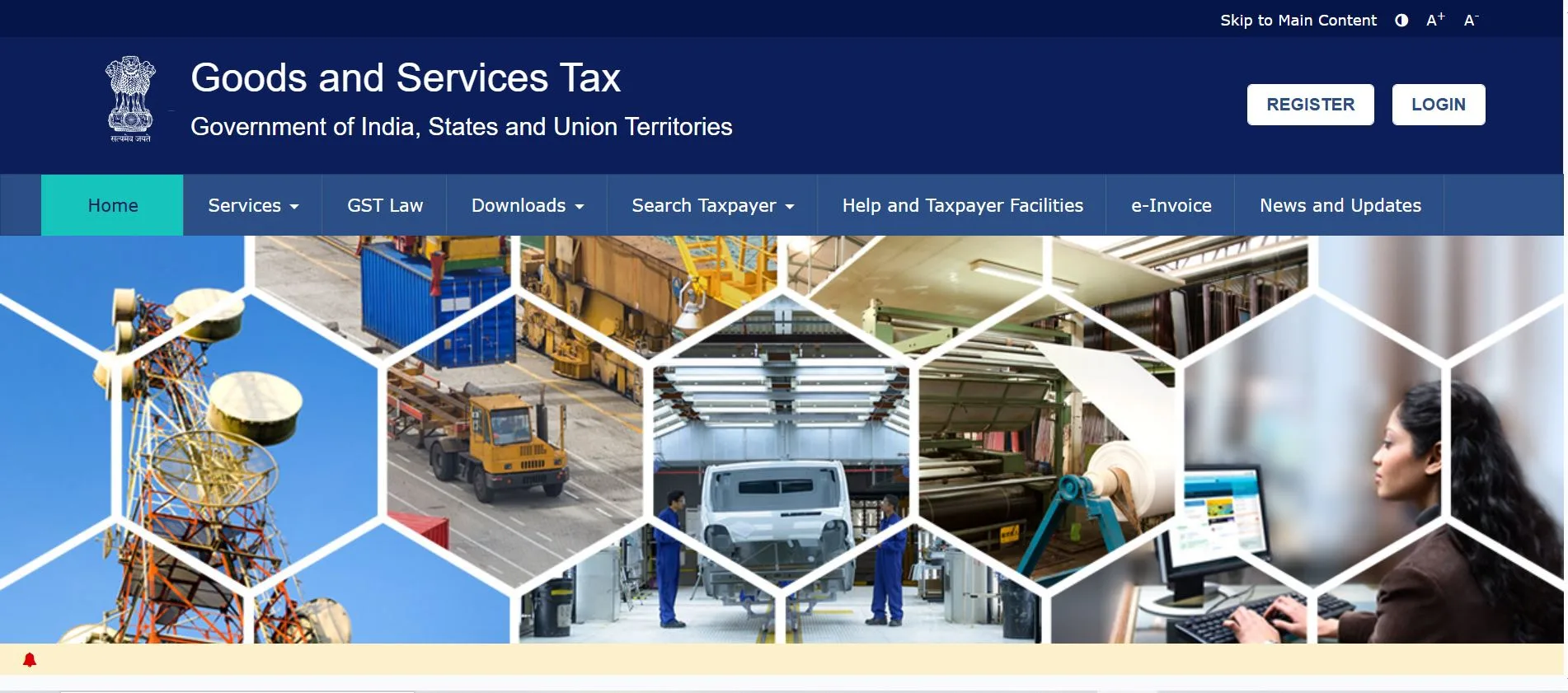
Step 2: Log in with Your Credentials
- Click Login at the top-right corner of the portal.
- Enter your GSTIN or username, password, and the captcha code.
- Click Login to access your dashboard.
.webp)
Step 3: Navigate to ‘View/Download Certificates’
- On the dashboard, click on the Services tab.
- Under User Services, select View/Download Certificates.

Step 4: Download Your GST Registration Certificate
- A list of certificates linked to your GSTIN will appear.
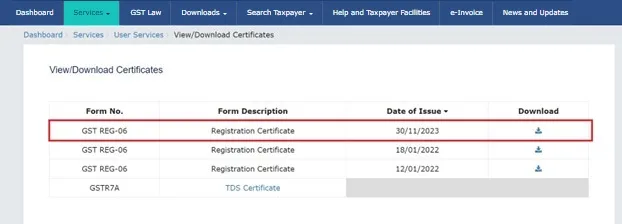
- Click Download next to GST Registration Certificate (FORM GST REG-06).
- The certificate will be downloaded in PDF format.
That’s it! Your GST certificate is now ready for business use, compliance, or submission during audits and tender processes.
Here's a sample certificate for GST registration for your reference,
Note:
- You can download your GST certificates by clicking the Download icon in the respective column.
- The updated address format will appear only in newly generated registration certificates. The address will follow this sequence:
- Floor No., Building/Flat No., Name of Premises/Building, Road/Street, Nearby Landmark, Locality/Sub-Locality, City/Town/Village, District, State, PIN Code.
- If you have amended any details, the updated or amended Registration Certificate will also be available for download.
- The GST Registration certificate is downloaded in the PDF format.
Sample Goods & Services Tax Registration Certificate
A sample registration certification of GST is reproduced below for reference. This is the format you'll find from your
GST certificate download PDF.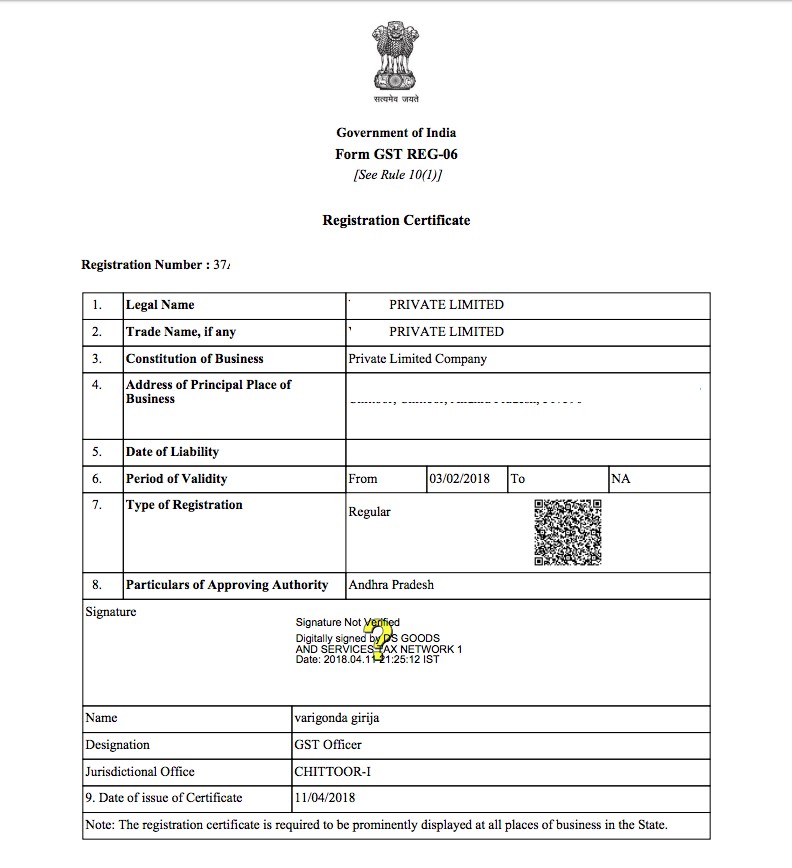
Key Sections in GST Certificate (Form GST REG-06)
When you download your GST certificate PDF (Form GST REG-06) contains several important sections that every business should review carefully:
- Basic Details: GSTIN, legal name, trade name (if applicable), and constitution of the business.
- Principal Place of Business: Address of the main registered business location.
- Additional Places of Business: Details of any other registered business locations.
- Date of GST Registration: The official approval date of registration.
- Type of Registration: Indicates whether the business is Regular, Composition, Casual, or Non-Resident.
- Approving Authority Details: Information about the officer who approved the registration.
Reviewing these details ensures accuracy and allows you to request amendments if any information is incorrect.
Amending Your GST Registration Certificate
If any details on the GST certificate are incorrect, changes can be made to the core fields on the GST portal. However, any modifications must be authorized by tax officials before a new amended certificate can be downloaded.
Key Fields on a GST Certificate That Can Be Amended
- Principal Place of Business
- Trade/Legal Name of Business (without changing PAN)
- Addition/Deletion of Karta, Partners, Members of Managing Committee, Managing Directors, CEO, Board of Trustees, or equivalent roles
- Additional Places of Business
Steps to Amend Core Fields on Your GST Certificate
- Navigate to the GST Portal
- Login with Valid Credentials – Enter your GSTIN, username, and password.
- Go to Registration → Modification – Make necessary changes in the essential fields.
- Verification Tab – Select the Verification checkbox.
- Select Authorised Signatory – Choose from the drop-down list of authorised signatories.
- Enter Place Details – Specify the location in the Place field.
- Digital Signature – Complete the changes by digitally signing with E-Signature/Digital Signature Certificate (DSC).
Update your GST registration details quickly and accurately with IndiaFilings. Ensure compliance and keep your GST certificate up-to-date with expert assistance.
Common Issues While Downloading GST Certificate
While downloading the GST certificate, business owners may sometimes face technical or account-related issues. Below are the most common problems and their solutions:
Issue | Solution |
Forgot username or password | Retrieve your login details by clicking “Forgot Username/Password” on the GST portal login page and following the instructions. |
Certificate not visible | If your GST registration is still in process, the certificate will not be available. Wait until your registration is approved to download the certificate. |
PDF not opening | Ensure your PDF reader is updated to the latest version. Alternatively, try downloading and opening the certificate on another device. |
Benefits of Downloading the GST Certificate
Downloading your GST certificate provides multiple advantages for businesses. Some of the key benefits include:
1. Proof of GST Registration
The GST certificate serves as official proof that your business is legally registered under the GST Act. It helps you collect GST on goods and services and establishes legitimacy with clients, vendors, and government authorities.
2. Compliance with GST Law
Displaying and maintaining a GST certificate ensures that your business remains compliant with GST regulations. This is especially important during audits, inspections, and filing returns.
3. Easy Access for Business Transactions
Having a downloaded GST certificate allows you to quickly provide proof of registration during business dealings, tender applications, or when entering into contracts with clients and suppliers.
4. Supports Input Tax Credit Claims
A valid GST certificate is essential for claiming input tax credits on business purchases. Without it, claiming ITC may be difficult or disallowed during GST audits.
5. Record-Keeping and Digital Documentation
Downloading the certificate in PDF format allows you to maintain digital records for your accounting and compliance purposes. This ensures easy retrieval for audits, banking, and internal record-keeping.
6. Reduces Errors and Confusion
Having an official copy of the GST certificate ensures that all key details—GSTIN, legal name, trade name, and business address—are accurate, reducing errors in invoices, returns, and business transactions.
7. Builds Business Credibility
Sharing your GST certificate with clients, partners, or vendors establishes your professional credibility and builds trust in your business operations.
Real-Life Story: How Arvind Downloaded His GST Certificate
Arvind, a new business owner based in Ahmedabad, registered his small online retail business for GST in January 2025. After completing the application process, he received an email confirming that his GSTIN had been successfully issued. While he was excited to start using his GST number for business transactions, he found himself in a bit of a dilemma—he wasn’t sure where to find his official GST Registration Certificate.
Arvind attempted to locate the certificate in the email, but there was no direct link or attachment. Unsure about the next steps, he turned to Google for help. Many websites and forums suggested that he check the GST portal but the instructions were vague, leaving him still uncertain.
Determined to solve the issue, Arvind decided to directly visit the GST portal. He logged into the official GST portal with his credentials and navigated to the "User Services" section. From there, he clicked on the "View/Download Certificates" option. To his relief, he saw his GST Registration Certificate available for download.
In just a few minutes, Arvind successfully downloaded his GST certificate in PDF format. He used this document to share his GST details with vendors and for completing the required documentation in his tax filings.
By navigating the GST portal and following the steps to download his certificate, Arvind was able to smoothly continue his business operations. Now, he keeps the certificate saved digitally and refers to it regularly when dealing with vendors or submitting GST details in tendering processes. This experience helped Arvind understand how easy it is to access vital documents from the GST portal, saving him time and hassle.
Final Thoughts
We hope that after reading this blog, you are familiar with how to download a GST registration certificate. Whether you are only starting off in business or dealing with compliance for multiple branches, the GST registration document is your key to running your business in India legally.
Therefore, in case you don’t have it yet, download your GST registration certificate now. Store a soft copy of it to be used quickly and print a copy to be displayed in your office. And if the process of filling in GST feels overwhelming to you, use a trusted GST filing software like Munim GST Return Filing.
How IndiaFilings Simplifies GST Compliance
While downloading your GST certificate is an important first step, managing GST compliance is an ongoing requirement for businesses. Filing returns, generating GST invoices, calculating taxes, and staying audit-ready can be time-consuming and prone to errors if done manually. IndiaFilings makes this process simple, seamless, and fully compliant.
With IndiaFilings, you can:
- Generate GST-compliant invoices instantly, saving time and effort.
- Automatically calculate GST on bills and transactions.
- File GST returns directly through a secure platform.
- Maintain digital records of all invoices, GST certificates, and accounting documents.
- Set payment reminders for clients to manage cash flow efficiently.
- Simplify accounting and compliance with professional-grade tools designed for businesses of all sizes.
Benefits of Using IndiaFilings Alongside Your GST Certificate
Using IndiaFilings with your GST certificate ensures your business stays compliant while gaining additional advantages:
- Time-Saving Compliance: File GST returns and manage compliance directly through IndiaFilings, reducing manual effort.
- Error-Free GST Reports: Automated calculations and reports minimise errors, helping avoid penalties.
- Professional Business Identity: Generate professional invoices that build credibility and trust with clients and partners.
By integrating your GST certificate with IndiaFilings’ compliance tools, your business can streamline operations, stay audit-ready, and focus on growth with confidence.