
IndiaFilings
Published on: Aug 11, 2026
GST Registration Number (GSTIN): Meaning, Format, and Importance & How to Apply
GST Registration Number (GSTIN) is a unique identification number assigned to every business registered under the Goods and Services Tax (GST) regime in India. If you're wondering how many digit in GST registration number, it is a 15-digit alphanumeric code. This number serves as proof of GST registration and enables businesses to comply with GST regulations. In this article, we will delve into the details of GSTIN, the GST number format, and how to obtain it, and its benefits for businesses. If you are a business owner, it's crucial to obtain a GST number to comply with GST regulations and enjoy the benefits of this simplified tax regime.
IndiaFilings is here to guide you through the process, making GST registration hassle-free and convenient.
What is GST Registration Number?
GSTIN (Goods and Services Tax Identification Number) is a unique 15-digit number issued to every taxpayer (such as dealers, suppliers, or any business entity) registered under the GST system in India. Prior to the introduction of GST, businesses registered under the state VAT laws were provided with a unique TIN (Taxpayer Identification Number) by their respective state tax authorities. With the implementation of GST, the GSTIN has replaced the TIN number, providing a standardized identification for all registered businesses under the GST framework.
GST Number Format
If you're asking how many digits are in the GST number, the answer is 15. The 15-digit GST Number Format is as follows:
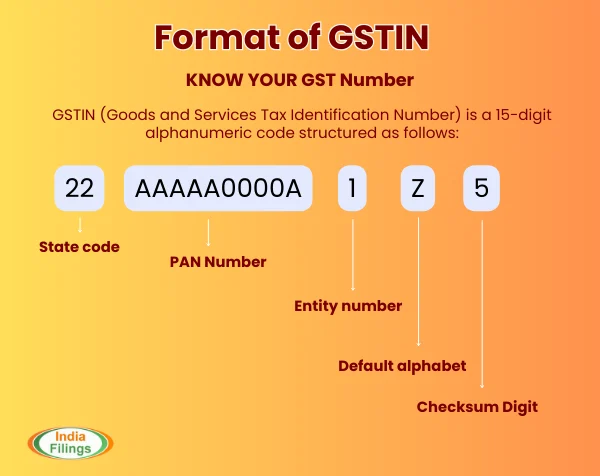
First Two Digits: State Code
The first two digits represent the state code as per the Indian Census 2011. Each state and union territory in India has a unique code. The state code in the GST registration number represents the following states:
- 01 - Jammu & Kashmir
- 02 - Himachal Pradesh
- 03 - Punjab
- 04 - Chandigarh
- 05 - Uttarakhand
- 06 - Haryana
- 07 - Delhi
- 08 - Rajasthan
- 09 - Uttar Pradesh
- 10 - Bihar
- 11 - Sikkim
- 12 - Arunachal Pradesh
- 13 - Nagaland
- 14 - Manipur
- 15 - Mizoram
- 16 - Tripura
- 17 - Meghalaya
- 18 - Assam
- 19 - West Bengal
- 20 - Jharkhand
- 21 - Orissa
- 22 - Chhattisgarh
- 23 - Madhya Pradesh
- 24 - Gujarat
- 25 - Daman & Diu
- 26 - Dadra & Nagar Haveli
- 27 - Maharashtra
- 28 - Andhra Pradesh
- 29 - Karnataka
- 30 - Goa
- 31 - Lakshadweep
- 32 - Kerala
- 33 - Tamil Nadu
- 34 - Pondicherry
- 35 - Andaman & Nicobar Islands
Next Ten Digits: PAN of the Business
The next ten digits are the Permanent Account Number (PAN) of the business or individual entity. This ensures that GST number is linked directly to the PAN, maintaining uniqueness for each taxpayer.
Thirteenth Digit: Entity Code
13th digit is alpha-numeric (1-9 and then A-Z) and is assigned based on the number of registrations a legal entity (having the same PAN) has within one State. For example, a legal entity with single registration within a State would have number 1 as the 13th digit of the GST number.
If the same legal entity goes for a second registration for a second business vertical in the same State, the 13th digit of the GST number assigned to this second entity would be 2. Hence, a legal entity can register up to 35 business verticals within a State.
Fourteenth Digit: Reserved for Future Use
The fourteenth digit is currently kept blank or assigned as "Z. It is reserved for future purposes as the GST system evolves.
Fifteenth Digit: Checksum Code
The fifteenth digit is a checksum character used to validate the correctness of the GST number. This character is generated using an algorithm and helps detect errors in the GST number. It can be both an alphabet or a number
To decode GST number, it’s important to understand each segment and how it works together to represent specific details about your business and its GST registration.
Example of GST Number Bifurcation
Let’s consider the GST number 27AAAPA1234A1Z5:
- 27: Maharashtra (State Code)
- AAAPA1234A: PAN of the business
- 1: First registration under this PAN in Maharashtra
- Z: Reserved character
- 5: Checksum digit for error detection
This GST Number Bifurcation helps simplify the GST system, ensures accuracy, and makes it easier for authorities to validate and manage GST-related activities.
Steps to Check the Authenticity of a GST Number
If you’re unsure about the authenticity of a GST number, you can verify it using the firm’s PAN (if available). The firm’s PAN is embedded in the GSTIN, specifically in the 3rd to 12th digits. To check the GST number online, follow these steps:
- Visit the GST Portal
- Click on the 'Search Taxpayers' Tab: On the homepage, click on the 'Search Taxpayers' option under the 'Search' tab.
- Choose Search by 'GST' or 'PAN': Select whether you want to search using the GST number or PAN.
- Enter GST Number or PAN: Input the GST number or PAN in the search box.
- Click 'Search': Hit the 'Search' button.
- Verify the Firm’s Details: If the GST number or PAN is valid, the portal will display the firm’s details, which you can verify for authenticity
Why Do You Need a GST Registration Number?
In order to operate your business legally in India, you must obtain a GSTIN (Goods and Services Tax Identification Number) if your annual turnover exceeds ₹40 lakh (or ₹10 lakh for businesses in Northeast states). Registering for GST and obtaining a GSTIN ensures you comply with the law and helps you avoid fines and penalties. Here are some key reasons why it’s essential to have a GST number:
Filing GST Returns
A GSTIN is required to file your GST returns, which are periodic reports of your business transactions and the tax amounts involved. This is mandatory for all GST-registered entities, even if there has been no business activity or tax liability during the reporting period.
Claiming Input Tax Credit
A GST number is necessary for claiming input tax credit. This allows you to recover the GST paid on business-related purchases. To claim this, the supplier must upload the invoice details on the GST portal and include your GSTIN on the invoice.
Avoiding Penalties
Having a GST Registration number is crucial for avoiding fines. If you are required to register for GST but fail to do so, you could face a fine of 10% of the tax owed or ₹10,000, whichever is higher. Additionally, if you collect GST from customers and fail to remit it to the government, you could face a penalty of 100% of the tax.
GSTIN Search and Verification Tool
If you have a GSTIN, you can easily verify any GSTIN with a single click using the GSTIN Search Tool, available free of charge. This tool allows you to ensure that the GSTIN you're dealing with is valid and authentic.
Benefits of Using the Online GSTIN Search and Verification Tool
- Checking for Authenticity: Ensure that the GSTIN is legitimate and properly registered with the government.
- Easy Verification: Quickly verify GSTINs for vendors, suppliers, and clients to confirm their tax registration status.
- Prevention Against Fraud: Protect yourself from associating with businesses using fake GSTINs and avoid potential legal issues.
- Correcting Reporting Errors: If there are any errors in the GSTIN provided, you can easily correct them through the tool to avoid discrepancies in your GST filings.
How to Verify GST Registration?
Fraudulent GSTINs can be used by some entities to impose extra charges and evade taxes. As per GST regulations, all service providers and traders must display their GSTIN on every invoice issued. To ensure a GSTIN is valid, follow these simple steps:
- Visit the GST Portal: Go to the official GST portal
- Search for the Taxpayer: On the portal’s homepage, click on the "Search Taxpayer" option in the menu.
- Enter GSTIN and Captcha: Enter the GSTIN you want to verify and the captcha code shown on the screen.
- View GSTIN Details: Within seconds, you’ll be able to see the GSTIN's status, registration date, and taxpayer type (such as company or sole proprietorship).
How to Verify GSTIN Using IndiaFilings GST Search Tool?
Verifying a GSTIN is essential to ensure that you are dealing with legitimate businesses and not falling victim to fraudulent activities. To verify a GSTIN, you can use the IndiaFilings GST Search Tool.
Simply visit the tool, enter the GSTIN you wish to check, and complete the captcha. In seconds, you’ll receive information about the GSTIN status, registration date, and the taxpayer type (such as sole proprietorship, company, etc.). This helps you confirm whether the GSTIN is valid and active, ensuring your transactions are secure.
Documents Required to Get GST Registration Number
To obtain a GSTIN (Goods and Services Tax Identification Number), you must submit the following documents along with your application:
- PAN Card: Provide the PAN of the business entity (company PAN for companies, etc.) and the PAN of the authorized signatory (individual PAN).
- Business Constitution Documents: Submit documents such as the partnership deed, registration certificate, memorandum of association, and articles of association.
- Identity and Address Proof of Promoters/Directors/Partners: Acceptable documents include Aadhaar card, passport, voter ID card, or other government-issued identity proofs.
- Proof of Principal Place of Business: Provide proof of the business address, such as a property tax receipt, electricity bill, or rent agreement that reflects the business address.
- Bank Account Proof: Submit a cancelled cheque or bank statement that contains details of the business bank account.
- Signed Authorisation Form: This form gives permission to a designated individual to act as your authorised signatory for GST purposes.
- Photographs: Recent passport-sized photographs of the promoter/director as required.
Click here to know more about the Documents Required for GST Registration
How to Apply for a GST Registration Number?
Registering for GST and obtaining a GSTIN is free of cost. There are two ways to apply:
- Register online on the GST portal
- Visit the GST Seva Kendra set up by the Government of India
The online registration is the easiest and most common method. Follow these steps to apply online:
- Log on to the GST Portal: Visit the official GST portal and click on the ‘Services’ tab. Hover over ‘Registration’ and select ‘New Registration’.
- Fill in the Registration Form: Carefully fill out the form with required details, ensuring all fields marked with a red dot are filled (these are compulsory). Enter your email ID and phone number, as you’ll receive an OTP on both.
- Enter OTPs: You’ll receive two OTPs, one on your email and one on your phone number. Enter them within 10 minutes, after which the OTPs will expire.
Note the TRN (Temporary Reference Number): After entering the OTPs, you’ll receive a TRN (Temporary Reference Number). Note this number and go back to the GST portal.
- Reopen the Registration Form: Go to ‘Services’ > ‘Registration’ > ‘New Registration’ and select ‘Temporary Reference Number’ instead of ‘New Registration’. Enter the TRN and the CAPTCHA code, along with a new OTP generated by the system.
- Fill the Application Form: Now, you’ll be redirected to the ‘My Saved Application’ page. Complete the form by filling details in all 10 sections. Upload the necessary scanned copies of documents like:
- Bank account number and IFSC code
- Proof of business incorporation
- Provide Details for Promoters/Partners and Authorised Signatories: Fill out the information for businesses, promoters/partners, and authorised signatories. For e-signing, use the signatory’s mobile and email ID, or sign via DSC if the PAN is linked with it.
- Fill in Business and Other Details: Complete the sections for primary place of business, goods and services, and bank accounts. Use the relevant documents for proof (e.g., bank passbook, business address proof).
- Sign the Application: Sign your application digitally using e-sign, DSC, or EVC. This step is mandatory for companies and LLPs, and the authorised signatory must sign the form.
- Submit the Application: After completing all sections and signing the application, submit it. You’ll receive an Application Reference Number (ARN) to track your application.
- GST Officer Review and GSTIN Assignment: Once your application is approved by the GST officer, a unique GSTIN will be assigned to your business. You’ll receive a notification by email and SMS with your GSTIN.
- Login and Download GST Registration Certificate: After 3-5 days, log in to the portal using your temporary username and password.
- Click on ‘First Time Login’ to set a new password. Then, visit ‘Services’ > ‘User Services’ > ‘View or Download Certificates’ to download your GST registration certificate.
Two-Step Verification Process
After approval, your GSTIN will be assigned, and you’ll be able to use it for business purposes. The two-step process ensures that you provide the necessary details and undergo the verification needed for a valid GST registration.
Also Find Complete Details of GST Registration Procedure
Need a GST Number? Get your GST registration done quickly and easily with IndiaFilings.
What is the Cost of Obtaining GSTIN?
Obtaining a GSTIN (Goods and Services Tax Identification Number) is completely free of cost. The government does not charge any fees for GST registration, which can be easily done online through the official GST portal.
However, businesses may incur additional costs if they opt to hire professionals or consultants to assist with the registration process, as these services may come with their own fees. Additionally, while the registration itself is free, maintaining compliance with GST regulations could involve ongoing costs, such as filing returns, accounting, and auditing services. These costs vary depending on the size and nature of the business.
Also read: GST Registration Fees: Everything You Need to Know!
How to Do a GST Registration Number Check?
Checking the validity of a GST number (GSTIN) is a straightforward process that helps ensure the authenticity of businesses. Here’s how you can verify a GSTIN:
Performing this quick check ensures compliance and helps avoid engaging in fraudulent transactions.
- Visit the GST Portal: Go to the official GST website.
- Navigate to Search Taxpayer: Under the "Search" tab, click on the "Search Taxpayer" option.
- Enter the GSTIN: Input the 15-digit GSTIN in the search box.
- Submit: Click on the "Search" button to proceed.
- Verify Details: The portal will display business details associated with the GSTIN, allowing you to confirm its validity.
Also read: How to Check GSTIN Validity?
Benefits of Getting GST Registration Number
Obtaining a GSTIN (Goods and Services Tax Identification Number) provides several advantages for businesses, helping them grow and compete effectively in the market. Some key benefits include:
- Legal Recognition: Having a GSTIN provides legal recognition to your business as a supplier of goods or services, which enhances credibility, attracts more customers, and contributes to business growth.
- Increased Competitiveness: With a GST Number you gain a competitive edge over smaller businesses. Purchasing from you allows customers to claim input credit, making your offerings more attractive.
- Claiming Input Credit: GST Registration allows you to claim input tax credit on purchases and services, improving your financial position and reducing overall business costs.
- No Restrictions on Interstate Sales: With a valid GST registration Number, there are no limitations on interstate sales, allowing your business to access a broader market and increase sales potential across states.
- E-Commerce Opportunities: Having aGST number enables you to register on e-commerce platforms or set up your own online store, significantly expanding your business reach and customer base.
- Compliance and Expansion: GST registration ensures your business is compliant with tax laws, resulting in a favourable GST rating. This not only avoids penalties but also supports your business’s future growth and expansion.
Also read: Advantages of GST
How to Spot a Fake GSTIN?
Be cautious when dealing with GSTINs as dishonest entities may use fake ones to evade taxes or defraud customers. Follow these steps to verify the authenticity of a GSTIN:
- Visit the GST Portal: Go to the official GST portal.
- Click on "Search Taxpayer": On the homepage, click on the "Search Taxpayer" tab.
- Search by GSTIN/UIN: Select the "Search by GSTIN/UIN" option and enter the GSTIN you wish to verify.
- Enter Captcha: If prompted, enter the captcha code to confirm you're not a robot.
- Click on "Search": Hit the "Search" button. If the GSTIN is valid, the portal will display relevant details.
Consequences of Dealing with Fake GSTINs
If you issue or deal with a fake GSTIN, the following consequences may occur:
- Loss of Input Tax Credit: You will lose the ability to claim input tax credit, which could increase your tax liability and reduce profits.
- Penalties: You could face penalties of up to 100% of the tax amount involved and possible imprisonment for up to five years.
- Damage to Reputation: Being associated with a fake GSTIN can significantly harm your reputation and goodwill in the market.
How is GSTIN Different from GSTN?
GSTIN (Goods and Services Tax Identification Number) and GSTN (Goods and Services Tax Network) are often confused, but they serve distinct roles in the GST system.
GSTIN
- A GSTIN is a unique 15-character code assigned to every business or taxpayer registered under the GST system in India.
- It is used to identify businesses, track tax transactions, and verify tax compliance.
- The GSTIN includes the state code, PAN number, entity code, a default character, and a check digit.
- Every GST-registered taxpayer is given a GSTIN, and it can be verified online through the GST Portal.
GSTN
- GSTN stands for Goods and Services Tax Network, a non-profit, non-government company responsible for managing the IT infrastructure of the entire GST portal.
- It provides services related to the GST system to the government, taxpayers, and other stakeholders.
- GSTN operates and maintains the GST portal, which is used for GST registration, filing returns, payment, and refunds.
- It also facilitates data sharing between central and state tax authorities and other relevant agencies.
Key Differences:
GSTIN
GSTN
A unique identification number for businesses registered under GST.
A non-profit company managing the IT system of the GST portal.
It tracks tax transactions and ensures compliance.
It operates the GST portal and ensures data sharing across authorities.
Issued to every GST taxpayer.
Provides services related to GST registration, filing, payments, and refunds.
GSTIN | GSTN |
A unique identification number for businesses registered under GST. | A non-profit company managing the IT system of the GST portal. |
It tracks tax transactions and ensures compliance. | It operates the GST portal and ensures data sharing across authorities. |
Issued to every GST taxpayer. | Provides services related to GST registration, filing, payments, and refunds. |
Compliance and Validity
Once a business obtains a GST Registration number, it is required to comply with various GST regulations:
- Filing of returns: Businesses need to file regular GST returns, including GSTR-1 (outward supplies), GSTR-3B (summary return), and GSTR-9 (annual return).
- Tax payment: GST number holders are required to pay their tax liabilities within the specified due dates to avoid penalties and interest.
- Amendments and updates: Any changes in business details, such as address, contact information, or business structure, must be updated on the GST portal within a specified time.
- Validity: The GST number is valid as long as the business remains active and complies with the GST regulations. It can be cancelled or suspended if the business fails to meet the compliance requirements.
Conclusion
In conclusion, obtaining a GST number is a straightforward and cost-free process that ensures businesses comply with the GST regime. Understanding the GST number format is essential, as it consists of 15 alphanumeric characters. If you're wondering how many digit in the GST number, the answer is 15, with each digit serving a specific purpose. The GST number bifurcation includes components such as the state code, PAN details, and check codes, all of which are crucial for identification. By learning to decode GST numbers, businesses can better understand their registration details and streamline tax compliance.
Get Your GST number with IndiaFilings!
Ready to register for GST and obtain your GST number? Let IndiaFilings guide you through the process with ease. Our expert team ensures that your GST registration is fast, hassle-free, and compliant with all regulations.
Start your GST registration today and take the first step towards smooth business operations!