

RENU SURESH
Expert
Published on: Jul 30, 2026
FSSAI Tracking: Track FSSAI Application Status
Monitoring the progress of an FSSAI Registration or Licence application is an essential step for every Food Business Operator (FBO) in India. Whether the business involves manufacturing, processing, distributing, transporting, importing, or selling food products, FSSAI compliance ensures that consumers receive safe, hygienic, and high-quality food. This guide explains how to track FSSAI application status online, how to understand each status update, and what actions applicants must take during the approval process.
FSSAI and Its Importance
The Food Safety and Standards Authority of India (FSSAI) is the primary authority responsible for regulating food safety across the country. Established under the Food Safety and Standards Act, 2006, FSSAI sets guidelines for safe food production, storage, distribution, and sale.
Every Food Business Operator must obtain:
- FSSAI Registration (for small-scale businesses) or
- FSSAI Licence (State or Central, depending on business size and turnover)
Upon approval, the FBO receives:
- A 14-digit FSSAI licence/registration number
- The right to use the FSSAI logo
- Authorization to legally operate in the food sector
This number must be displayed on food products, menus, packaging, or restaurant premises to assure consumers of safety and quality.
How to Apply for FSSAI Registration or Licence
The FSSAI application process is conducted online through the FoSCoS (Food Safety Compliance System) portal. Below are the steps to submit an application:
Step 1: Visit the FoSCoS Website
Access the official food safety compliance portal used nationwide for applying, renewing, modifying, and tracking FSSAI licences.
Step 2: Click on ‘Apply/License Registration’
Scroll down the homepage to the Apply/License Registration option.
Step 3: Select ‘Apply for License/Registration’
The system redirects you to the application module for fresh registrations and licences.
Step 4: Choose State and Business Category
Select Your State, and Your business category:
- Manufacturer
- Trade/Retail
- Food Services
- Head Office
- Central Government Agencies
Step 5: Select the Type of Business
Choose your exact business activity from the list (e.g., restaurant, petty retailer, wholesaler, manufacturer, transporter, etc.). Click Proceed.
Step 6: Select the Type of FSSAI Approval
Depending on your business:
- Basic Registration
- State Licence
- Central Licence
Step 7: Fill Form A or Form B
Provide accurate information such as:
- Details of food business
- Address of operation
- Types of food items handled
- Business turnover
- Contact information
- Form A → For Basic Registration
- Form B → For State/Central Licence
Step 8: Upload Required Documents and Pay the Fee
Attach self-attested documents like ID proof, address proof, FSMS plan, layout plan, photographs, and other mandatory papers.
Step 9: Submit the FSSAI Application
Before submitting, download or print the filled form for your records. Upon submission, a 17-digit Application Reference Number (ARN) is generated.
This ARN is essential for tracking your application status online.
How to Track FSSAI Application Status Online
FSSAI allows applicants to check application progress online using the 17-digit ARN. This helps FBOs stay updated on approvals, clarifications, inspections, and rejections.
Steps to Track FSSAI Application Status
Step 1: Visit the FoSCoS Website
Go to the official portal.
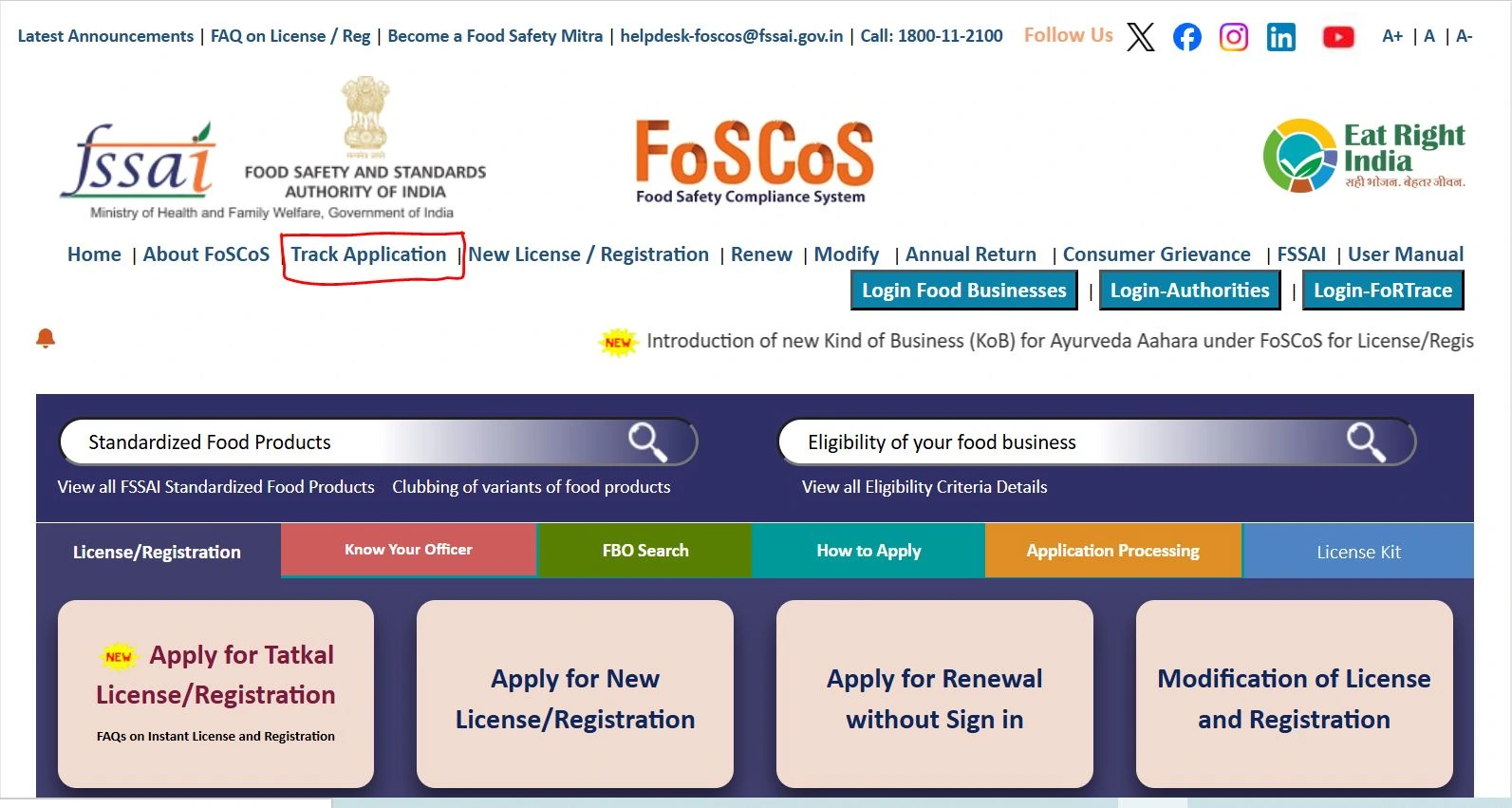
Step 2: Click on ‘Track Application’
This is the first tab on the website’s main menu.
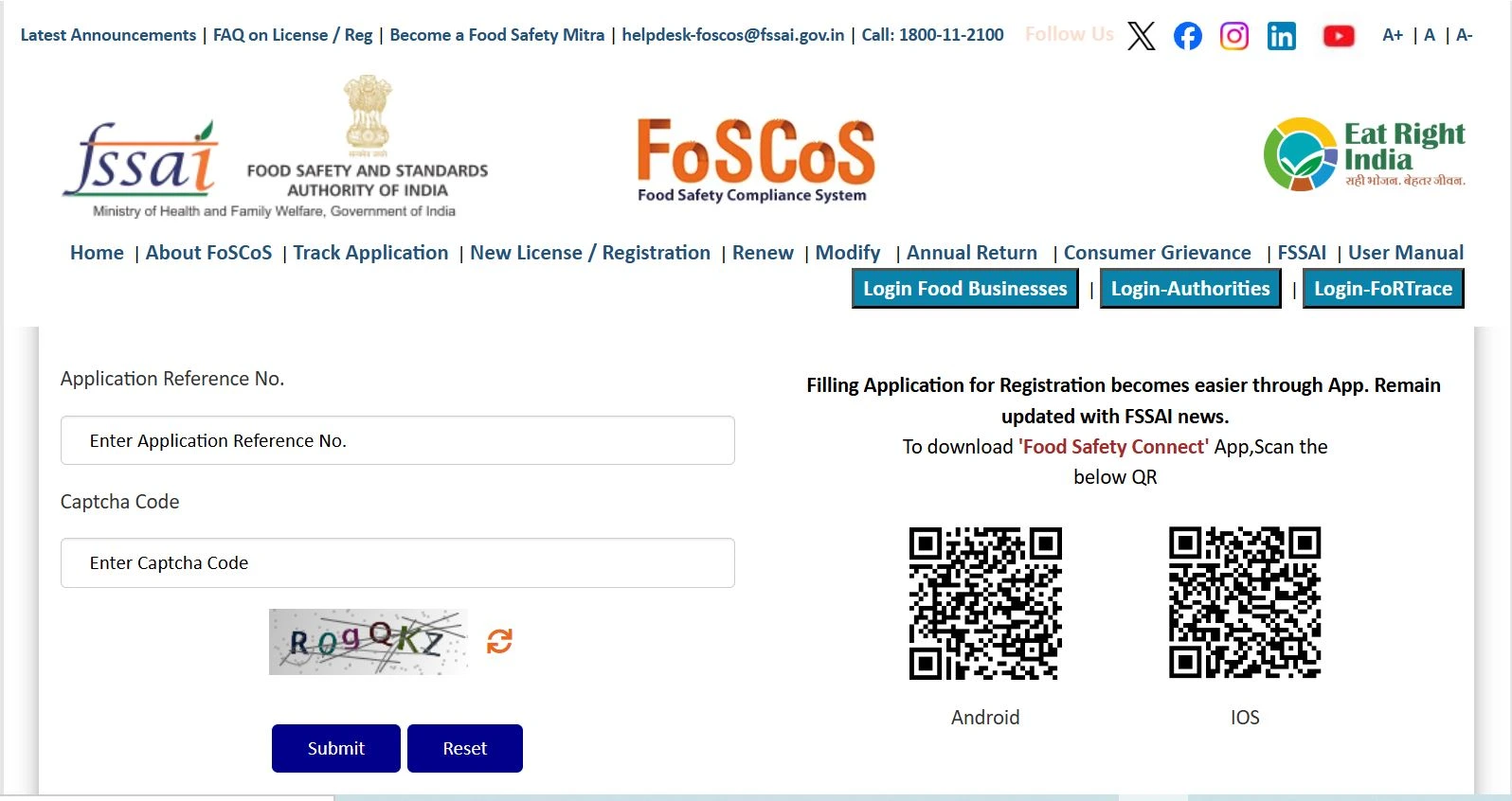
Step 3: Enter the Application Reference Number
Enter the 17-digit ARN, type the captcha code, and click Submit.
The portal displays:
- ARN details
- Applicant name
- Business address
- Type of application
- Current status
- Remarks, if any
Different FSSAI Application Status Types
The FSSAI application progresses through various stages. Each status reflects a specific point in the approval process.
Below are the detailed meanings:
1. Process Yet to Be Started
This means that the application has been successfully submitted, and authorities have not yet initiated processing. Applicants should revisit the portal regularly to monitor updates.
2. Application Reverted
The authority has reviewed the application and returned it for modification or clarification.
Common reasons for reversion include:
- Missing documents
- Unclear business details
- Incorrect categorization
- Non-compliance in uploaded forms
Important: Applicants must respond within 30 days. Failure to respond may lead to rejection. A notification is also sent via email. Applicants can log in using ARN or email to provide the requested clarification.
3. Application Rejected
The authorities reject the application when:
- The applicant fails to respond to the reversion
- Documents are incorrect or forged
- Business details are non-compliant
- The inspection reveals major violations
A rejected application cannot be revived; a fresh application must be filed.
4. Inspection
If the status reads ‘Inspection,’ an FSSAI officer will visit the premises soon.
The inspection ensures:
- Hygiene standards
- Food safety measures
- Infrastructure compliance
- Equipment quality
- Record maintenance
Successful inspection is mandatory for licence approval.
5. Registration Certificate Issued
This status appears when:
- All documents are verified
- The inspection (if applicable) is completed
- The application meets FSSAI requirements
The applicant can now:
- Log in to FoSCoS
- Download the FSSAI Registration/License Certificate
- Display the license number on products and premises
This marks the completion of the approval process.
Validity and Renewal of FSSAI Registration/Licence
FSSAI certificates are issued for a validity period of 1 to 5 years, depending on the applicant’s selection.
Important rules include:
- Renewal must be done at least 180 days before expiry
- Applications submitted after expiry attract a late fee of ₹100 per day
- Operating with an expired licence may lead to penalties or closure
Tracking renewal dates ensures continuous compliance.
Why Tracking FSSAI Status Is Important
FBOs must monitor their application status to:
- Avoid missing clarification notices
- Prevent delays in approval
- Ensure timely response to authority queries
- Avoid penalties for late responses
- Stay updated on inspection schedules
- Download the certificate as soon as it is issued
Timely tracking ensures smooth business operations.
Conclusion
Tracking the FSSAI application status is an essential part of the food licence approval process. It ensures transparency and helps food business operators stay updated regarding approvals, clarifications, inspections, or rejections. Applicants must use their 17-digit ARN to check the progress online and take timely action whenever the application is reverted or pending clarification.
Get Professional Assistance for FSSAI Registration
Starting a food business requires precise documentation and timely compliance. At IndiaFilings, we simplify the entire process—from preparing documents to filing the application, tracking status, handling inspections, and obtaining the final licence.
Get your FSSAI Registration or Licence done quickly and accurately with IndiaFilings. Contact us today for expert assistance.