

RENU SURESH
Expert
Published on: Jul 30, 2026
How to Download Fssai Certificate: A Step-by-Step Guide
When it comes to running a food business in India, ensuring compliance with the Food Safety and Standards Authority of India (FSSAI) is crucial. This regulatory body governs food safety, and every food business must be registered or licensed under the Food Safety and Standards Act, 2006. FSSAI issues a Registration or License certificate to Food Business Operators (FBOs) to validate the safety and quality of food products being sold. If you are looking to download your FSSAI Registration or License certificate, this guide will walk you through the process.
Types of FSSAI Registration
Before we dive into the download process, it is essential to understand the different types of FSSAI registrations that businesses can apply for based on their size, turnover, and operations:
1. FSSAI Basic Registration
This type of registration is for small-scale food businesses whose annual turnover is below Rs. 12 lakh, and their production capacity does not exceed 100 liters or kilograms per day. These businesses can apply for a Basic Registration certificate.
2. FSSAI State License
Medium-sized businesses with an annual turnover between Rs. 12 lakh and Rs. 20 crore are required to apply for an FSSAI State License. This license is issued by the state government after inspection of the business premises.
3. FSSAI Central License
Large food businesses with an annual turnover exceeding Rs. 20 crore must apply for the FSSAI Central License. This is a more comprehensive license and is issued by the Central Government after thorough evaluation.
The Process of Issuing the FSSAI Certificate
Once you apply for the FSSAI Registration or License, the authorities follow a well-defined process before issuing the certificate:
Step 1: Confirmation of Jurisdiction
The FSSAI authorities first verify if the jurisdiction of your business falls within the relevant office's region.
Step 2: Scrutinization of Documents
All submitted documents are examined for completeness and accuracy. This is a critical step to ensure that your application adheres to all legal requirements.
Step 3: Inspection of Food Premises (If Required)
In some cases, an inspection of the food premises may be necessary. This helps ensure that the business is compliant with the safety and hygiene standards set by the FSSAI.
Step 4: Issuance of Certificate
If the FSSAI authorities are satisfied with your application and documentation, they will issue your FSSAI Registration or License certificate. The certificate is typically sent to the applicant’s email and is embedded with a QR code for verification.
Understanding the FSSAI License Number
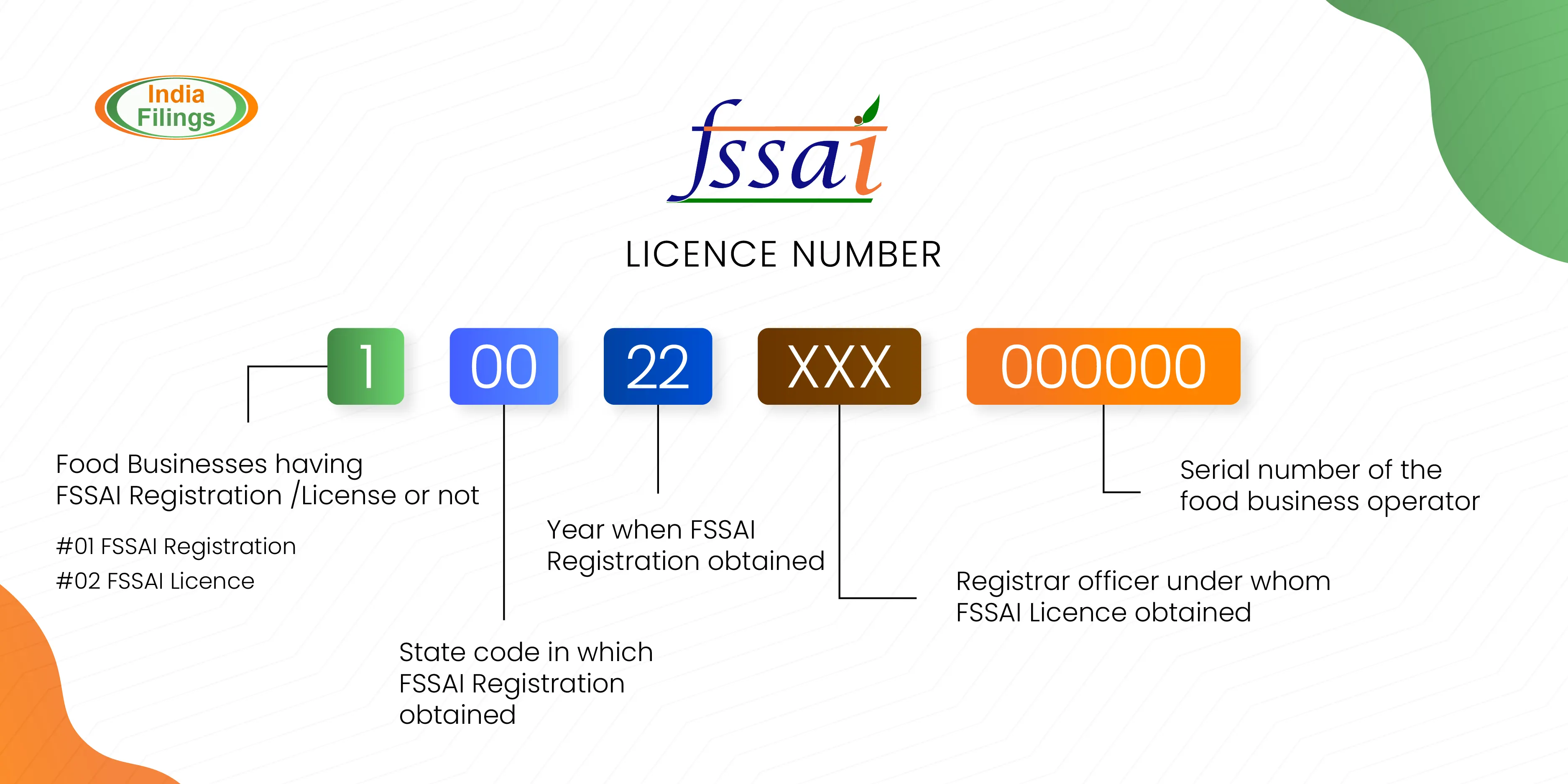
Your FSSAI certificate will contain a unique 14-digit license number, which must be displayed by all FBOs at their food premises and on the packaging of their food products. Here’s what the different sections of the FSSAI license number indicate:
- Section 1: The first digit indicates whether the food business has a valid FSSAI registration/license.
- Section 2: The second and third digits represent the state code where the business is registered.
- Section 3: The fourth and fifth digits indicate the year when the license was issued.
- Section 4: The sixth, seventh, and eighth digits represent the quantity of enrolling master.
- Section 5: The last six digits are the unique license number for the business.
Step-by-Step Guide to Download Your FSSAI Certificate
Once your FSSAI Registration or License is approved, you can download the certificate by following these steps:
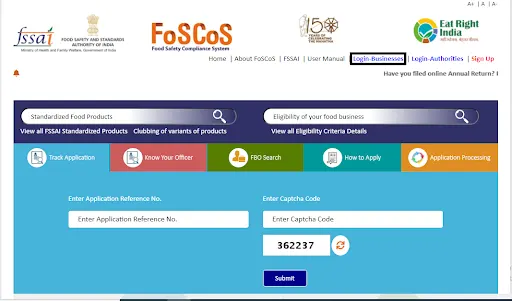
Step 1: Visit the FoSCoS Website
Go to the FoSCoS (Food Safety Compliance System) website. Once on the homepage, click on the 'Login-Businesses' option to access your account.
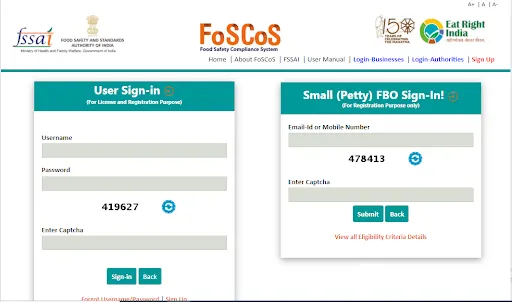
Step 2: Enter Your Login Details
Enter your Username, Password, and the Captcha displayed on the page, then click on the Sign-in button.
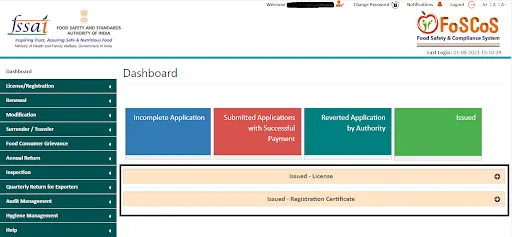
Step 3: Access Your Dashboard
After logging in, you will be redirected to your Dashboard. Here, you will see various options related to your FSSAI account.
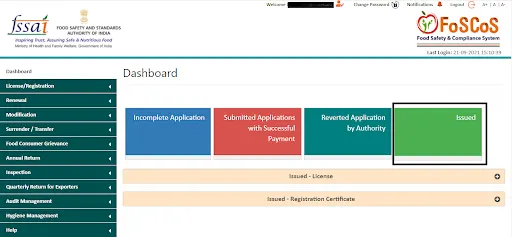
Step 4: Click on the ‘Issued’ Option
In your dashboard, find and click on the ‘Issued’ option, which will show all the certificates issued to you.
Step 5: Select the Relevant Certificate Type
You’ll have two options to choose from:
- Issued License if you applied for an FSSAI License
- Issued Registration Certificate if you applied for an FSSAI Registration.
Click on the relevant option based on your application.
Step 6: View Your Certificate Details
Your FSSAI certificate will now appear on the screen. Find your Reference Number or Registration Number in the certificate details section.
Step 7: Download Your FSSAI Certificate
Click on the FSSAI certificate registration number to open the full certificate. You will see a Download button/image on the page. Click on it, and the certificate will be saved to your device.
Importance of Having an FSSAI Certificate
The FSSAI certificate plays a pivotal role in ensuring that your food business is recognized as compliant with food safety standards. Here’s why it is so important:
1. Building Trust with Customers
Having an FSSAI certification increases the credibility of your food business. It assures customers that the food you provide meets national safety standards, making it safe for consumption.
2. Legal Requirement
The FSSAI certificate is a legal requirement for food businesses in India. If you fail to obtain this certificate, you could face legal action, penalties, and even business closure.
3. Improved Business Prospects
An FSSAI certificate adds a layer of professionalism and trustworthiness to your brand. It can attract investors, customers, and business partners who are looking for certified, reliable food businesses.
4. Risk Management
The FSSAI regulations are designed to ensure that food products are safe, thus reducing the risk of contamination, adulteration, and other food safety concerns. Failure to comply with FSSAI standards could result in fines or closure of the business.
5. Mandatory Display of FSSAI Number
Once you receive your FSSAI certificate, you must display the 14-digit license number at a prominent place on your business premises. Additionally, the FSSAI logo and registration number should be displayed on all packaged food products. This ensures transparency and fosters consumer confidence.
Common Issues While Downloading FSSAI Certificates
While the process of downloading your FSSAI certificate is generally straightforward, there are a few common issues that business owners might face:
1. Incorrect Login Credentials
If you forget your username or password, you can easily reset them by clicking the 'Forgot Password' link on the login page.
2. Certificate Not Issued Yet
If your FSSAI certificate is not showing up in the ‘Issued’ section, it might be due to the application being in process or pending approval. Make sure to check your email for any updates from the FSSAI authorities.
3. Technical Glitches
Sometimes, users might face issues with the FoSCoS website itself, such as slow loading times or the inability to download the certificate. In such cases, it is advisable to try again later or contact the FSSAI support team for assistance.
4. Expired or Incorrect Certificate Details
If the details on your FSSAI certificate are incorrect, you may need to contact the FSSAI authorities for clarification and rectification.
Conclusion
Obtaining an FSSAI Registration or License certificate is a necessary step for anyone running a food business in India. The certificate ensures that your food products meet the required safety standards and are safe for consumption. By following the simple steps mentioned in this guide, you can easily download your FSSAI certificate and comply with the regulatory requirements.
Remember, having the FSSAI certificate is not only a legal requirement but also a vital factor in building customer trust and enhancing your business’s reputation. It’s essential to display your FSSAI number on all your food products and at your business premises to showcase your commitment to food safety.
If you’re facing any challenges with the FSSAI certificate download process, don't hesitate to reach out to the FSSAI support team for guidance.
Ready to Get Your FSSAI Certificate?
At IndiaFilings, we make the process of applying for and downloading your FSSAI Registration or License certificate hassle-free. Whether you're starting a food business or ensuring compliance with food safety standards, we’re here to help you every step of the way.
Contact our expert team for assistance with your food business compliance. We’ll guide you through the process and ensure you’re fully compliant with all regulations.