
Bennisha
Published on: Aug 12, 2026
Pahani or Adangal - Andhra Pradesh
Adangal is also known as Pahani. It is an important revenue record which has particulars relating to lands such as the owners' details, area assessment, water rate, soil type, nature of possession of the land, liabilities, tenancy, crops grown, etc. In this article, we look at the procedure for obtaining Pahani in the state of Andhra Pradesh in detail.
Know more about Adangal. Know more about Patta Chitta in Tamil Nadu.Pahani Online
Andhra Pradesh landowners can easily get their land details through the official Mee Bhoomi website. Mee Bhoomi website also facilitates landowners to check the status and to download their Village 1B and Village Adangal anytime. Landowners can personally access the land record status and can also make corrections when needed and then report it directly to the Mandal Revenue Officer (MRO) or to the
Mee Sevacentres.
Download AP Adangal
The following steps have to be followed to download AP Adangal from the website:
Step 1: Logging on the websiteThe landowner has to visit the official website of Mee Bhoomi or click on
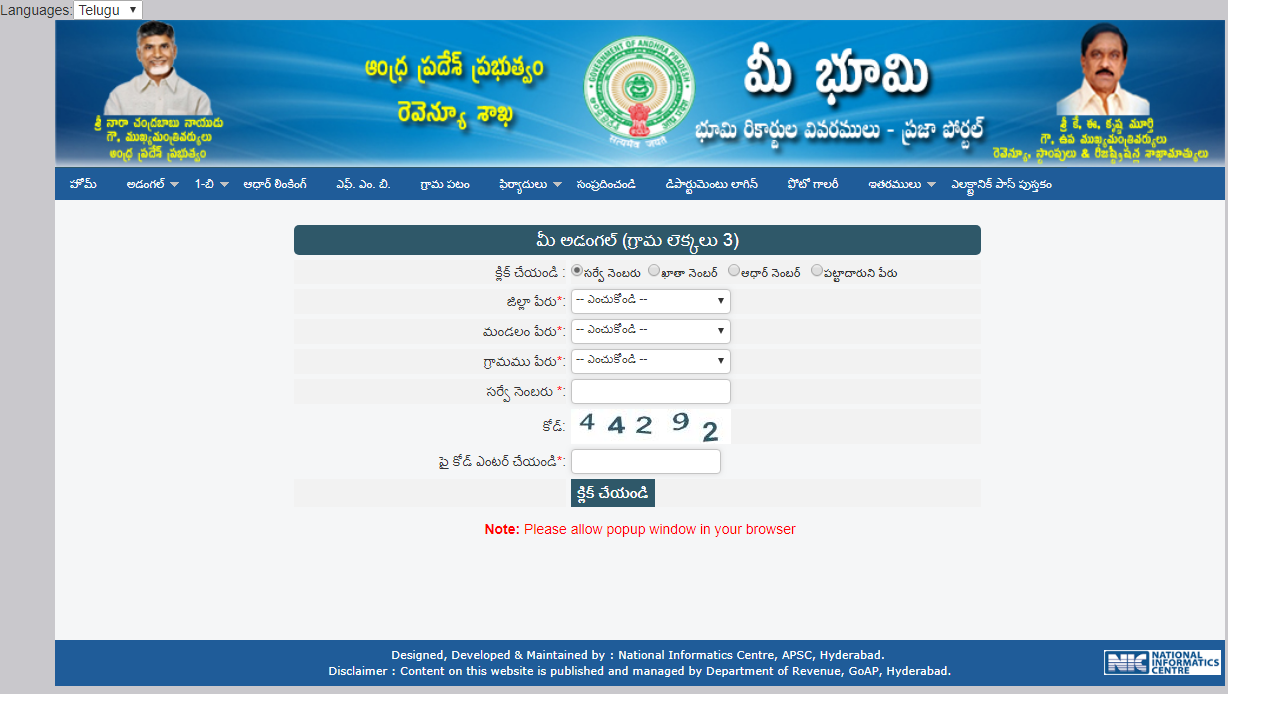
Step 2: Select AdangalOn the home page, click on Adangal. The landowner can select the desired option from 'Your Adangal' or 'Village Adangal'. By clicking on any one of these options, it gets downloaded.
Step 3: Enter DetailsThe landowner has to enter the Survey number, Account number or Aadhar number in the application.
Step 4: Select Document NumberFrom the list, the applicant has to select the District name, Mandal and the Village name and then enter the document number.
Step 5:
Captcha CodeThe last step is entering the Captcha code at the end of the application and click submit.
Step 6:
Pop-Up MessageAfter completing all these steps, a pop-up message appears that has the details of the
Mee BhoomiAP Adangal.
Download AP Adangal
Download AP 1B Land Records
The following steps have to be followed to download the AP land records.
Step 1:
Logging on the websiteThe user has to log in to the official website of Mee Bhoomi or click on
Step 2:
Select DownloadFrom the homepage, the user has to click on 1B and select the option to download personal 1B or Village 1B.
Step 3: Entering detailsThe user has to enter the Survey Number, Account Number or Aadhar Number in the application.
Step 4: Enter Document NumberThe user has to select the Village Name and then has o enter the Document Number.
Step 5: Captcha CodeThe last step is entering the Captcha code at the end of the application and click Submit.
Step 6: Pop-Up messageAfter completing all these steps, a pop-up message appears that has the details of the 1B.