
Sanya Warriar
Expert
Published on: Aug 19, 2026
How can I check if a trademark is registered?
A trademark search is simply checking if another person or organization does not already own the trademark that one wishes to register. By doing so, the applicant makes necessary amends to their trademark to avoid conflicts. The present article briefs about the procedure to check whether a
trademark is registered.Trademark
A trademark is a distinctive mark, logo, symbol, or band used by an organization or an individual to identify and distinguish their goods and services. The trademarks of India are registered and regulated under the Trademarks Act (1999).
Importance of Trademark Search
As all Indian trademarks are controlled by the Comptroller General of Patent Designs and Trademarks in India and recorded by the Indian Trademark Registrar, the applicant can conduct a trademark search through the online database to ensure that their trademark is.
- A trademark search would prevent an infringement of the applicable laws (s)
- Prevention of duplication by checking the availability
- Ensuring uniqueness while also having proper trademark classification.
- Prevention of intellectual property conflicts
Trademark Class
A trademark only grants exclusivity for the use of the mark in connection with the category of goods having services for which it is registered. There are 45 classes under trademark, 34 of which fall under 'Goods' and 11 under 'Service.' To learn more about the Trademark class -
Click here.Procedure to Check for a Trademark
Follow the below-mentioned steps to efficiently conduct a 'Trademark Search' through the government page.
- Log in to IP India government website.
- Click on the ‘Trademarks’ tab

- Select ‘Public search’ on the right-hand side of your screen.

- By doing so, you will be redirected to another page.
- Under ‘Search Type’, there are 3 options available; ‘Wordmark, ‘Vienna Code’, and ‘Phonetic’. You may choose which type of search you wish to do for your trademark.
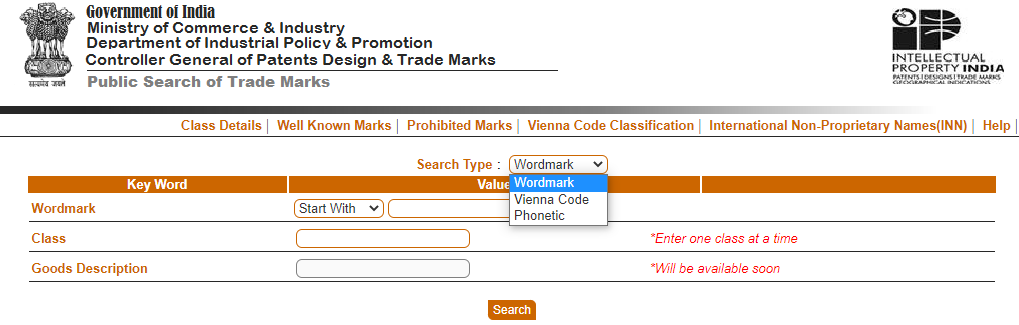
- re-directed criteria, the keywords change as listed below
| Search Criteria | Keyword Fields |
| Wordmark | Wordmark, class, goods description Vienna |
| Vienna Code | Vienna code, class |
| Phonetic | Phonetic, class, goods description |
- The required details are to be filled in. (If there are many goods or services related to the trademark, the app description Vienna code-based search)
- The resulting panel will display the list of registered/objected/abandoned trademarks which will serve as the basis for services on the trademark.
Conduct a Trademark Search through IndiaFilings
To conduct a Trademark Search through IndiaFilings, follow these steps:
Step 1: Go to the IndiaFilings Trademark Search page.

Step 2: Type your desired brand name in the search field and click "Search Trademark."

Step 3: The results will show the status of the trademark, whether registered, abandoned, or related status. For each trademark, all the relevant information will be displayed, such as application number, date, proprietor name, trademark type, etc.
