
IndiaFilings
Expert
Published on: Aug 12, 2026
How to Make TDS Payment Online?
TDS (Tax Deduction at Source) is a system where tax is deducted at the time of making specified payments such as rent, interest, or commission. The person responsible for such payments must deduct TDS and make timely TDS payments, which are primarily made online, to the government. This process ensures tax collection at the source itself and helps streamline compliance. To pay TDS online, the deductor must log in using the TAN, verify the transaction via OTP, select the assessment year and payment type, enter the tax details, and complete the TDS payment online. In this article, we provide a complete overview of how to pay TDS online, including step-by-step guidance on TDS payment methods, both online and offline.
The complete list of specified TDS payments and applicable rates is clearly depicted in the TDS rate chart.
Pay the TDS to the Income tax filing portal and file it with an appropriate TDS form before the due date through IndiaFilings!What is TDS Payment?
TDS is deducted by the person paying the income. Thus, the tax is deducted at the source of income itself. The tax deducted is then deposited by the payer into the income tax department account on behalf of the payment recipient as a TDS payment. The TDS payment is thus deemed to be a payment of income tax by the recipient at the time of his assessment. This payment process can be easily done through online TDS payment.
How to Make TDS Payment Online on the IT Portal?
TDS payment online is a simple process on the Income Tax Department's e-filing portal. Below are the step-by-step instructions on how to pay TDS online:
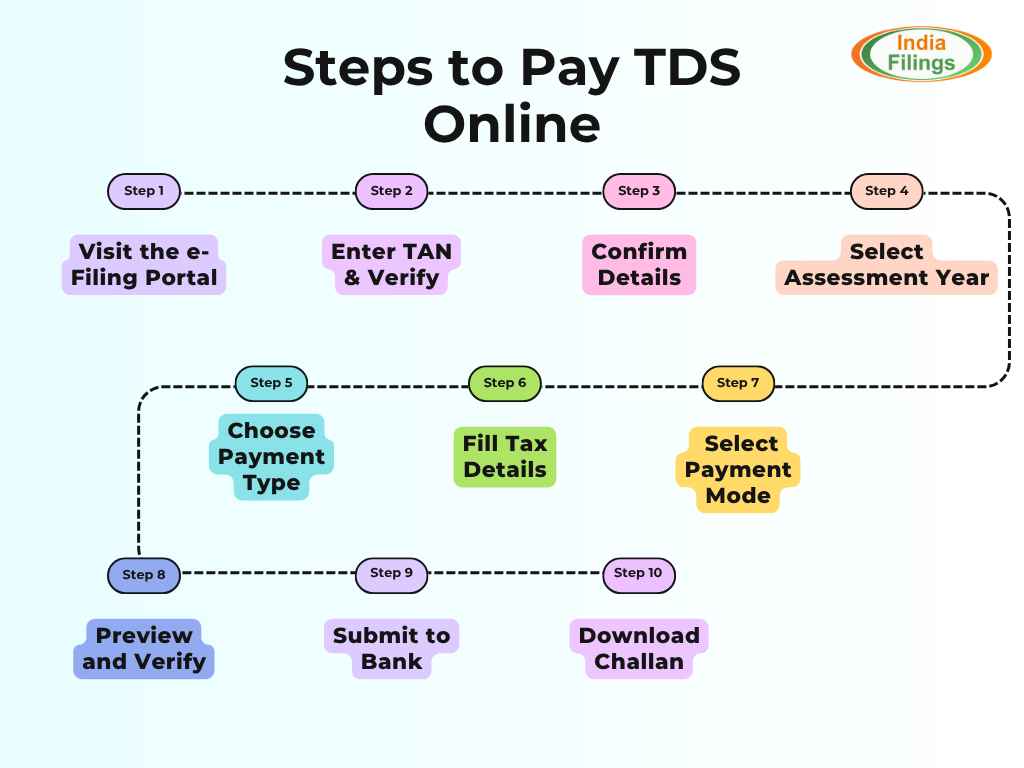
Step 1 - Visit the e-Filing Portal: Go to the Income Tax Filing Portal and select ‘e-Pay Tax’ under the ‘Quick Links’ section on the left.
Step 2 - Enter TAN and Verify: Provide the Tax Deduction Account Number (TAN) and your mobile number. The TAN is a 10-digit alphanumeric number issued to those deducting TDS. Verify via OTP and proceed.
Step 3 - Confirm Details: After verification, a success message displaying your TAN and name will appear. Click ‘Continue’ to proceed.
Step 4 - Select Assessment Year: Choose the relevant assessment year and click ‘Proceed.’
Step 5 - Choose Payment Type: An extensive list of payment types will be displayed. Select the appropriate type for the TDS payment.
Step 6 - Fill Tax Details: Specify whether the deductee is a Company or Non-Company and provide accurate details under the respective categories. Click ‘Continue.’
Step 7 - Select Payment Mode: Choose one of the following payment modes:
- Net Banking: No transaction fees apply.
- Debit Card: No transaction fees apply.
- Pay at Bank Counter: Available only for non-companies and non-audit cases. No charges apply.
- RTGS/NEFT: Tax payments can be made through any RTGS/NEFT-enabled bank. Charges vary by bank.
- Payment Gateway: Offers options like net banking, debit card, credit card, and UPI. Transaction charges may apply.
Step 8 - Preview and Verify: Review all entered details. Edit if necessary, then confirm by clicking ‘Pay Now.’
Step 9 - Submit to Bank: Agree to the terms and conditions, then click ‘Submit to Bank.’ You’ll be redirected to the payment gateway or bank webpage to complete the transaction.
Step 10 - Download Challan: Once the payment is completed, download the Challan Form for future reference. This is the procedure that TDS taxpayers can use to resolve the problem of how to pay TDS online through the Income tax e-filing portal.
How to Pay TDS Offline?
To pay TDS offline, deductors must physically submit the TDS amount along with Challan 281 at an authorised bank branch. First, download Challan 281 online and accurately fill in all the necessary details. Then, visit the nearest bank branch to deposit the TDS amount and complete the challan. Once the submission is processed, the bank provides a stamped counterfoil as proof of payment. This counterfoil serves as an official record and can be used for future reference.
Procedure for making online TDS Payment on NSDL
Ensure that you know how to pay TDS online to simplify the process. To make an online TDS Payment, logon to the e-Tax Payment System and follow the steps below:
-
Select the relevant challan online, as applicable
- Income Tax Challan No ITNS 280
- Income Tax Challan No ITNS 281
- Income Tax Challan No ITNS 282
- Income Tax Challan No ITNS 283
- Enter its PAN / TAN as applicable: There will be an online check on the validity of the PAN / TAN entered.
- If PAN/ TAN is valid the taxpayer will be allowed to fill up other challan details like accounting head under which payment is made, name and address of TAN and also select the bank through which payment is to be made, etc.
- On submission of data entered a confirmation screen will be displayed. If the taxpayer confirms the data entered in the challan, it will be directed to the net-banking site of the bank.
- The taxpayer will login to the net-banking site with the user id/ password provided by the bank for net-banking purpose and enter payment details at the bank site. On successful payment a challan counterfoil will be displayed containing CIN, payment details and bank name through which e-payment has been made. This counterfoil is proof of payment being made.
This is the process of how to make TDS payment online through NSDL Portal. But now, the direct tax payment facility has been migrated to the income tax e-filing portal. Hereafter, taxpayers can use the IT portal to deposit TDS online. Follow the procedure as discussed above.
Due Dates for TDS Payments
In the table below, we have provided the offline and online TDS payment due date month-wise,
| Month | TDS Payment Due Date |
| April | On or before the 7th of May |
| May | On or before the 7th of June |
| June | On or before the 7th of July |
| July | On or before the 7th of August |
| August | On or before the 7th of September |
| September | On or before the 7th of October |
| October | On or before the 7th of November |
| November | On or before the 7th of December |
| December | On or before the 7th of January |
| January | On or before the 7th of February |
| February | On or before the 7th of March |
| March | On or before the 30th of April |
How to Check the TDS Payment Status?
Along with knowing how to make TDS payment online, understanding the TDS payment status-checking process helps. To check the status of your online TDS payment, follow these simple steps:
- Visit the TIN-NSDL Oltas Challan Status Inquiry website.
- You can check the payment status using either of these two options:
- CIN-Based View: Enter the challan details, such as the BSR code of the bank branch, challan date, and challan serial number. This will provide details like the challan serial number, deposit date, TAN/PAN, taxpayer name, and amount confirmation.
- TAN-Based View: Enter your TAN and the challan date range for a specific financial year. This will display information like the CIN, major and minor head codes, payment nature, and confirmation of the amount matching the bank's records.
Both methods help verify the accuracy of your online TDS payment details and ensure they are properly recorded.
Consequences of Delayed TDS Payment
Under Section 201(1A) of the Income Tax Act, there are penalties for both late deduction and late payment of TDS.
- Interest for Late Deduction: If TDS is not deducted on time, interest will be charged at 1% per month (or part of a month) on the unpaid TDS amount, starting from the date the tax should have been deducted until the date it is actually deducted.
- Interest for Late Payment: If the deducted TDS is not paid on time, interest will be levied at 1.5% per month (or part of a month) on the amount of TDS, from the date the tax was deducted until the date of actual payment.
Take advantage of the online TDS payment method to pay the TDS easily and avoid the penalties.
TAN Registration and Its Importance
TAN registration or Tax Deduction and Collection Account Number (TAN) is a 10-digit alphanumeric number required to be obtained by all persons who are responsible for deducting or collecting tax. All those persons who are required to deduct tax at source or collect tax at source on behalf of the Income Tax Department are required to obtain a TAN.
When TDS Deduction and TDS Payment is Required?
The income from the following sources is subjected to tax deduction at source:
- Salary and all other positive incomes under any head on income( Section 192 )
- Interest on securities ( Section 193 )
- Interest other than interest on securities( Section 194A )
- Payments to contractors and sub-contractors( 1 )
- Winnings from Lottery or crossword puzzles( Section 194B )
- Winnings from horse races( Section 194BB )
- Insurance Commission covering all payments for procuring Insurance business( Section 194D )
- Any interest other than interest on securities payable to non-residents not being a company or to a foreign company(Section 195 )
- Payment to non-resident sportsman including athlete or sports association/institution.In case of non-resident sportsman,payments in respect of advertisements as well as articles on any game/sports in India in newspapers,magazines,etc. is included( Section 194E )
- Payment in respect of deposits under NSS[National Savings Scheme]( Section 194EE )
- Payment on account of repurchase of Units by Mutual Fund or UTI( Section 194F )
- Payment for Commission or brokerage( Section 194H )
- Payment of rent( Section 194I )
- Payment of fees for professional or technical services( Section 194J )
- Commission to Stockist,distributors,buyers and sellers of Lottery tickets including remuneration or prize on such tickets(Section 194G )
- Income from Units purchased in foreign currency or long-term capital gain arising from the transfer of such Units purchased in foreign currency ( Section196B )
- Payment of any income to non-residents in respect of interest or dividend on bonds and shares( Section 196C )etc.
After the TDS deduction, it is important to deposit the deducted TDS amount to the Income Tax Department. Let's delve into the different methods of how to make TDS payment online.
Continue reading: Guide to TDS return filing in India
Conclusion
In conclusion, timely payment and deduction of
TDS are crucial to maintaining compliance with income tax laws and avoiding unnecessary penalties. By understanding the process and deadlines for TDS payment, as well as utilizing convenient online methods, taxpayers can ensure smooth transactions and avoid interest charges for delays. Whether you followed the procedure of how to make TDS payment online or offline, adhering to the prescribed timelines will help maintain proper tax records and safeguard against costly penalties. Stay proactive in managing TDS responsibilities to ensure smooth business operations and legal compliance. IndiaFilings helps you to pay TDS online and on the IT Portal & file it with expert assistance! File Now!