
IndiaFilings
Expert
Published on: Aug 11, 2026
How to do a Trademark Search
A trademark is a sign, design or expression which identifies products or services from a particular source. A registered trademarks provide its owner the exclusive use of a mark to identify or represent its products or services. Intellectual property awareness has steadily increased among Indian businesses over the last decade and the number of trademark applications has increased steadily. It is therefore important for existing businesses and new businesses to register their marks and/or be aware of trademark filings that are similar to the interests of the business. In this article, we look at the process for doing an online trademark search in India.
Trademark Database
Trademark registrations and registered trademarks are controlled in India by the Comptroller General of Patent Designs and Trademarks. An online trademark search database is available through the website of the Comptroller General of Patent Designs and Trademarks, and can be used by both professionals and non-professionals to do a trademark search. The trademark database contains all the trademarks applications submitted to the Trademark registrar in India including registered, applied, objected and expired trademarks. A trademark search of the trademark database will provide the user with valuable information relating the trademark search query.
How to do a Trademark Search
To do a trademark search in India, visit the trademark search database using a web browser.
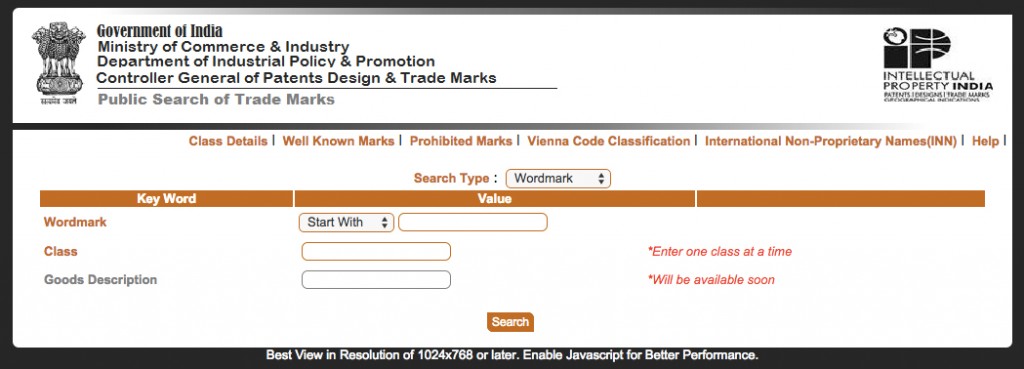 Trademark Search Website
- Select Wordmark as the Search Type at the top of the page.
- Enter the wordmark you would like to search the trademark database with. The trademark database can be compared against the search query on three conditions - "start with", "contains" and "match with".
- Start with will display all entries in the trademark search database that start with the value provided for search.
- Contains will display all entries in the trademark search database that contains the value provided for search.
- Match with will display all entries in the trademark search database that matches with the value provided for search.
- Enter the class of trademark that is applicable. Trademarks are divided into 45 classes with each class representing a distinct group of goods or services. A registered trademark or trademark application will only be pertinent to the class under which it was applied for.
- Click search to begin the trademark search.
Understanding Trademark Search Results
In the following illustrated example, the results for trademark search of the word "Ford" under Class 12 (Class 12 pertains to vehicles) is displayed.
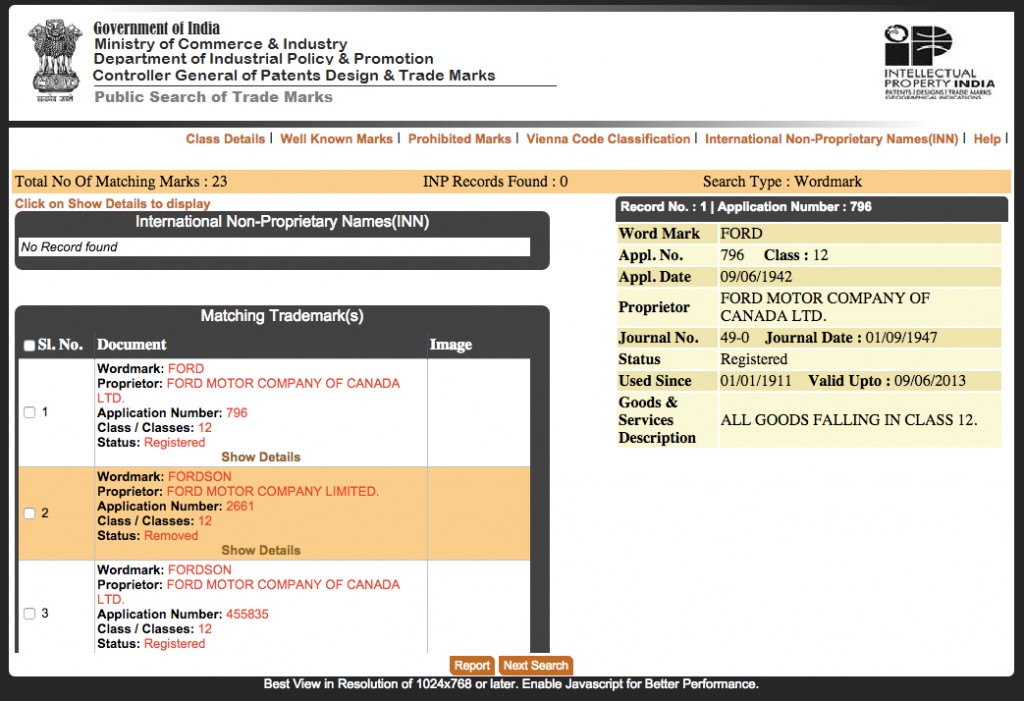 Trademark Search Results
The trademark search results page above displays a list of all the trademarks that start with the word "Ford" registered under class 12. It is no surprise that Ford Motor Company of Canada Limited is the owner of the wordmark "Ford" under class 12. Selecting the option "show details" would display information pertaining to the trademark application number, application date, owner information, trademark validity date, trademark used since date and a description.
A search could bring up a number of matches and understanding the trademark search status is essential for interpreting the implications. If, a trademark search returns "no matches found" then there are no registered or applied trademarks that match the query. Further, search of the trademark database for the same query with a different match type or a modified query is then recommended.
It is important to note that for a trademark to be registered, it must not similar to any existing trademarks.
For trademark registration or trademark search in India, visit IndiaFilings.com