IndiaFilings

Expert

Published on: Jul 30, 2026

Sales Automation - LEDGERS

Sales followup can be easily automated using

LEDGERS. When you create an estimate using LEDGERS, automatically two email followups will be scheduled by the system. The details of the followup date will be shown on the right side of the estimate as shown below: Automated Followup Automated Followup
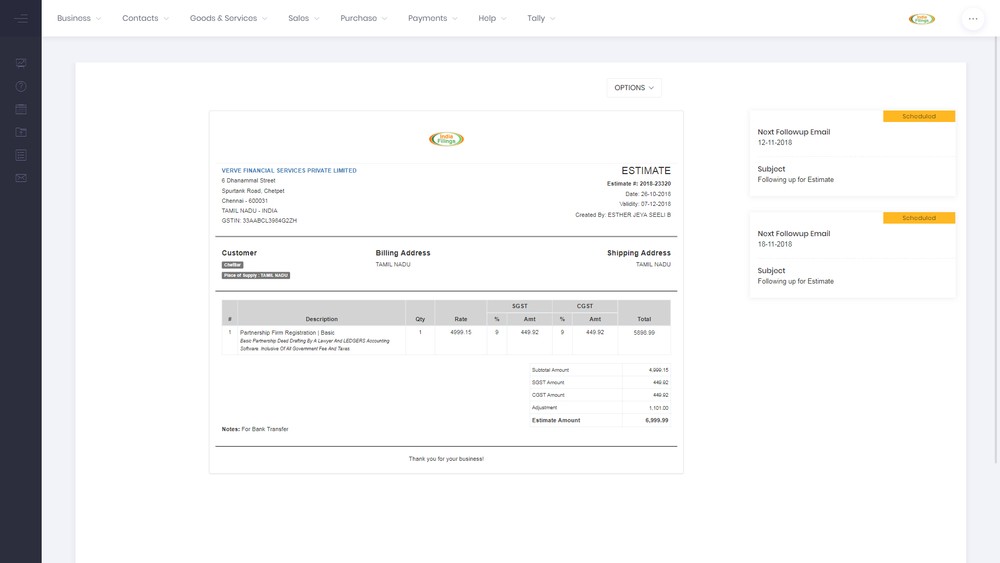
Automated Followup Status

All automated followups have three types of status as follows: Scheduled - An automated followup email has been scheduled to be sent on the date shown. Cancelled - An automated followup email which was scheduled has been cancelled. Completed - An automated email was sent on the scheduled date by the system.

Auto Cancellation

In case a customer make payment on an estimate, all scheduled automated followups will be automatically cancelled by the system.

Editing Automated Followups

The system allows for automated follows-ups to be edited. The subject of the email, date of follow-up and content of the email can be edited. To edit a follow-up, click on the follow-up card.
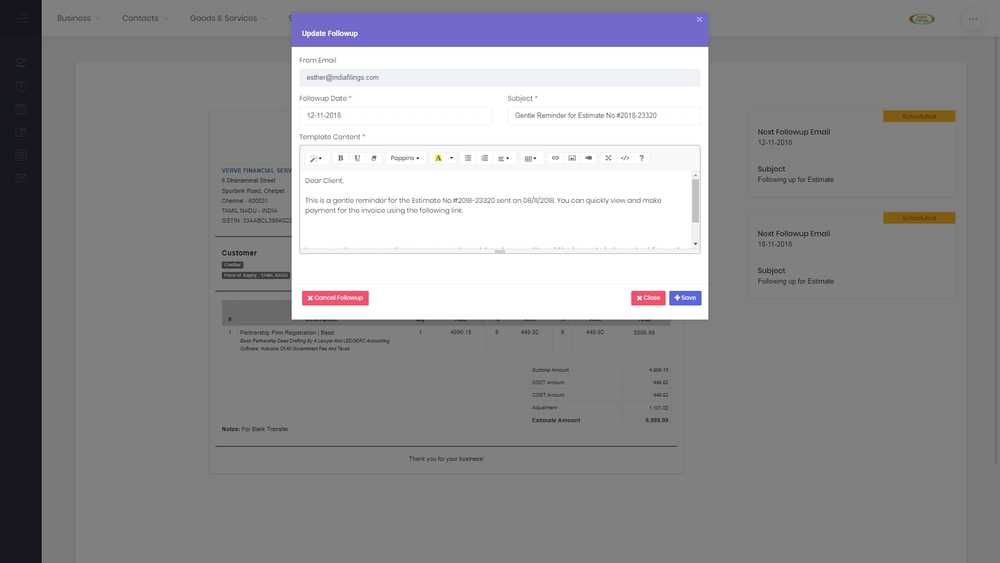
Edit Automated Followup Edit Automated Followup You can now edit any of the fields from the email and save. You can also cancel a scheduled followup by clicking on Cancel Followup button.
Back to Learn

Frequently Asked Questions

Common questions about Automate Sales Followups with LEDGERS for Financial Efficiency.

The automated followup feature in LEDGERS ensures that potential customers or leads are consistently followed up with after an estimate is created. It helps streamline the sales process by automatically scheduling two email follow-ups, reducing the risk of missing important follow-up opportunities.
When you create an estimate using LEDGERS, two automated follow-up dates will be displayed on the right side of the estimate. This visual indication makes it easy to track when the follow-up emails are scheduled to be sent.
LEDGERS provides three status types for automated follow-ups: Scheduled (indicating an email is scheduled to be sent on the displayed date), Cancelled (an email that was scheduled has been cancelled), and Completed (an email was successfully sent on the scheduled date).
If a customer makes a payment on an estimate, any scheduled automated follow-ups will be automatically cancelled by the LEDGERS system. This helps prevent unnecessary follow-ups and improves the overall customer experience.
Yes, LEDGERS allows you to edit the details of an automated follow-up. By clicking on the follow-up card, you can modify the subject of the email, the date of the follow-up, and the content of the email.
To cancel a scheduled automated follow-up, you can click on the follow-up card and then select the "Cancel Followup" button. This will change the status of the follow-up to "Cancelled," and the email will not be sent on the scheduled date.
While the specific content of an automated follow-up email can be edited, it typically includes a reminder about the estimate, any relevant updates, and a call-to-action encouraging the recipient to take the next step in the sales process.
The automated follow-up feature in LEDGERS can benefit your sales process by ensuring consistent and timely follow-ups with potential customers, reducing the risk of leads falling through the cracks, and streamlining your overall sales workflow.
Yes, LEDGERS allows you to customize the subject, date, and content of the automated follow-up emails. This flexibility enables you to tailor the follow-ups to better suit your specific sales process or messaging.
The article does not provide information about setting up additional automated follow-ups beyond the two initially scheduled by LEDGERS. However, it's possible that the platform offers this functionality or the ability to set up custom follow-up sequences.