

Renu Suresh
Expert
Published on: Jul 30, 2026
Register DSC on GST Portal
To avail of the GST e-filing services, taxpayers must register their DSC on the GST portal. Digital Signature Certificate (DSC) is one of the options for authenticating users on the GST Portal. After the procurement of DSC, the user is obligated to register it with the GST portal. A digital signature certificate is an encrypted document used to verify identity while accessing information and services online or for the digital signing of documents. Authorized certifying authorities issue a digital signature certificate or DSC. This article examines the process of writing DSC into the portal. Is Digital Signature Required for GST?DSC on GST Portal
Any individual registered as an authorized signatory of a company on the GST webpage is permitted to file the GST returns using DSC. DSC registration is PAN-based, and only Class 3 DSC are accepted on the GST Portal. Further, DSC is mandatory for signing in case the GST registration was obtained for:- Public Limited Company
- Private Limited Company
- Unlimited Company
- Foreign Company
- Limited Liability Partnership (LLP)
- Foreign Limited Liability Partnership
- Public Sector Undertaking
Various Methods for user authentication on the GST Portal
In addition to signing documents through DSC, the GST Portal also accepts Electronic Signature (E-Sign and Electronic Verification Code (EVC). However, LLPs and Companies are mandatorily required to use digital signatures only.Digital Signature Certificate (DSC)
A DSC can be submitted electronically to prove one's identity, access information or services on the Internet, or sign certain documents digitally. Electronically signing the Application using DSC is mandatory for enrolment by Companies, Limited Liability partnerships (LLPs), Foreign Companies, and Foreign Limited Liability partnerships (FLLPs).Electronic Signature (E-Sign)
Electronic Signature (E-Sign) is an online electronic signature service in India based on Aadhar. To use E-Sign, the authorized Signatory must have Aadhar. A Time Password (OTP) will send to the mobile phone number that is registered with Aadhar at the time of digitally signing documents at the GST Portal. Once authenticated, the documents would be signed with an e-sign.Electronic Verification Code (EVC)
The Electronic Verification Code (EVC) authenticates the user's identity at the GST Portal by generating an OTP. The OTP will send to the registered mobile phone of the Authorized Signatory filled in part A of the Registration Application. By authenticating the OTP, the document will be signed.Authorized Signatories
The signatories will change according to the type of entity. The various signatories authorized to carry out the role for different entities are tabulated below:| Type of Entity |
Authorized Signatory |
| Proprietorship Firm | Proprietor |
| Hindu Undivided Family | Karta |
| Partnership Firm | Managing Partner |
| Trust Registration | Managing Trustee |
| LLP / Company | Director / Partner, with due authorization from the LLP / Board of Directors |
| Society/Club | Authorized Signatory, with due authorization from the management committee |
| Statutory Body | Authorized Signatory |
| Local Authority | Authorized Signatory |
| Government Department | Authorized Signatory |
Pre-requisites to register DSC on GST Portal
- Valid Class 3 DSC along with USB Token
- Installed DSC software
- User ID and password to log in
emSigner Utility
Before registering DSC on GST Portal, you must install the emSigner utility. The emSigner utility can download from the Register DSC page. DSC registration is PAN-based, and only Class 3 DSC are accepted on the GST Portal.Procedure to Register DSC on GST Portal
After procuring a DSC, The applicant can follow the below-mentioned steps to register the DSC with the GST Portal.New registrations of DSC on the GST portal
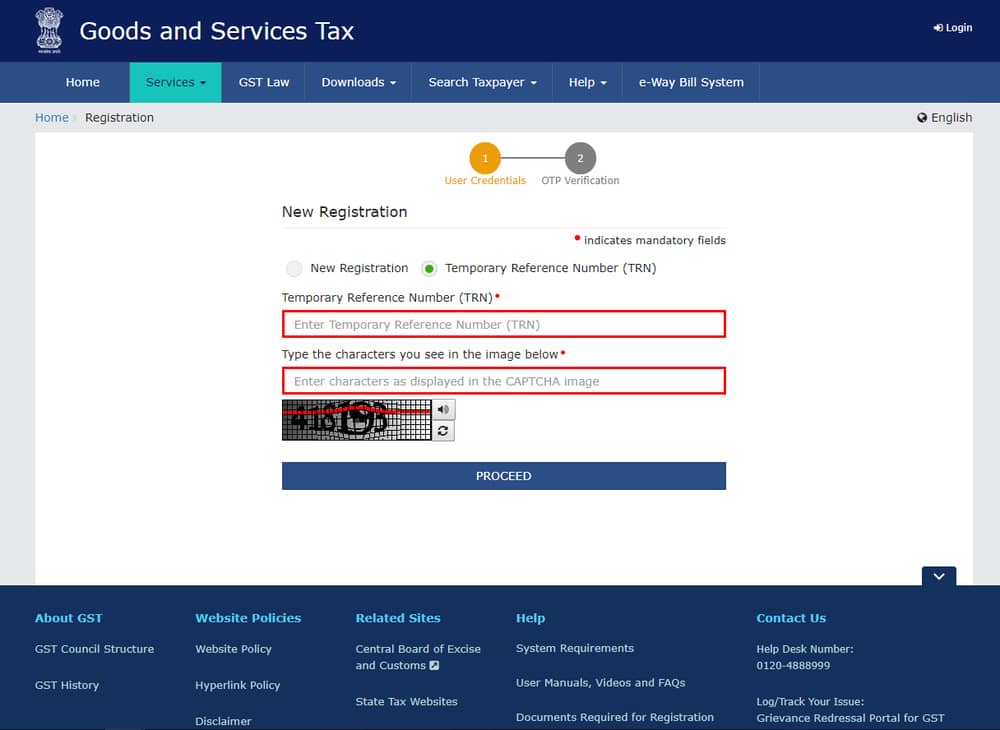
For New registrations of DSC on the GST portal, follow the procedure mentioned below:- Access the official webpage of GST; for new registration, click on 'The REGISTER NOW option.
- The Temporary Reference Number (TRN) option must be selected, and in the same field, enter the TRN you receive.
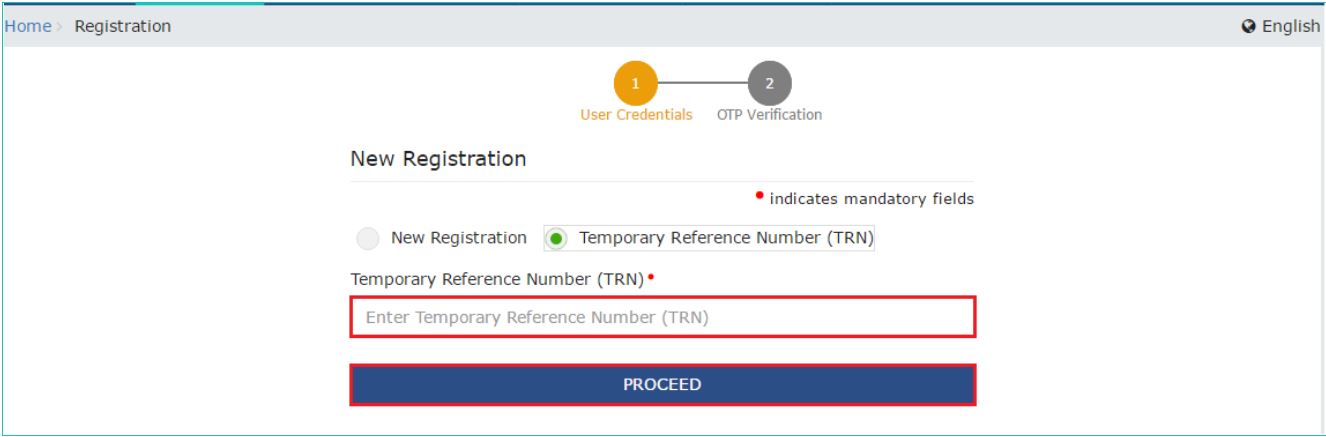 Register DSC on GST Portal - New registrations
- Click on the 'PROCEED' option and furnish the one-time password received on the email ID and mobile number in the email / mobile OTP field.
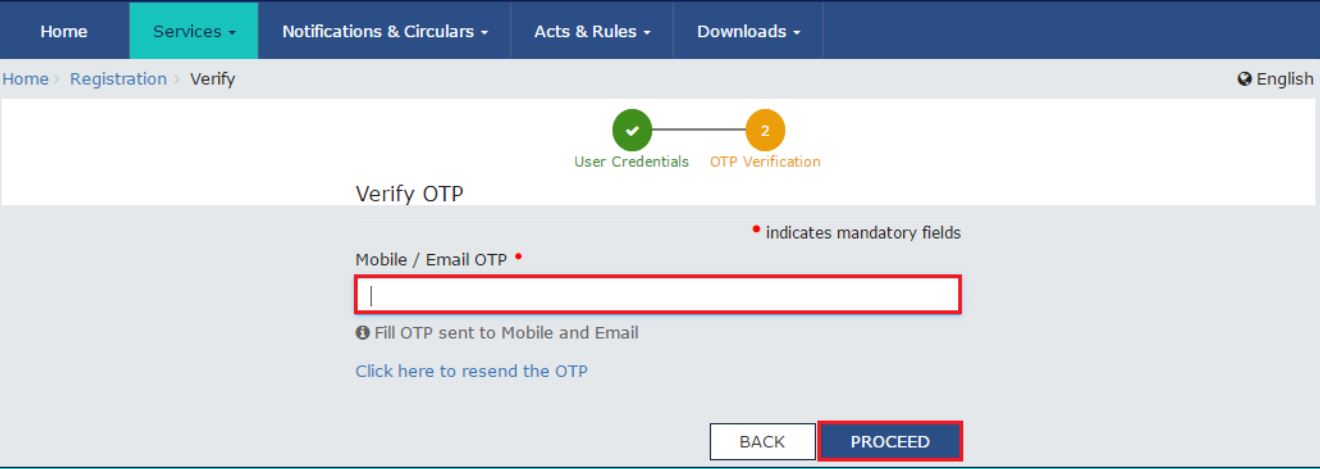 Register DSC on GST Portal - New registrations2
Note: The validity of the one-time password expires in 10 minutes.
Click on the 'Services' option, select 'User Services' from the dropdown menu, and then select 'Register / Update DSC Command.'
Register DSC on GST Portal - New registrations2
Note: The validity of the one-time password expires in 10 minutes.
Click on the 'Services' option, select 'User Services' from the dropdown menu, and then select 'Register / Update DSC Command.'
Existing registrations of DSC on the GST portal
For existing registrations of DSC on the GST portal, follow the below-mentioned procedure: Access the official web portal of GST and log in to the GST Portal. Click on the username on the top right of the post-login landing page.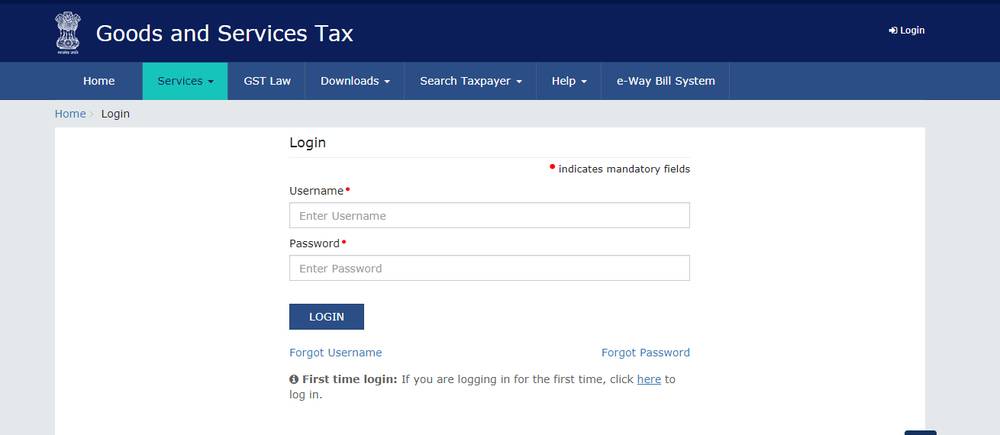 Register DSC on GST Portal step 1
Select My Profile from the dropdown list and click on the Register/Update DSC link under the Quick Links section.
Register DSC on GST Portal step 1
Select My Profile from the dropdown list and click on the Register/Update DSC link under the Quick Links section.
 Register DSC on GST Portal - Step 2
- Attach your DSC dongle and open the emSigner utility.
- The Register/Update DSC page will have a dropdown with the PANs of all the authorized signatories. Select the PAN number from the dropdown list.
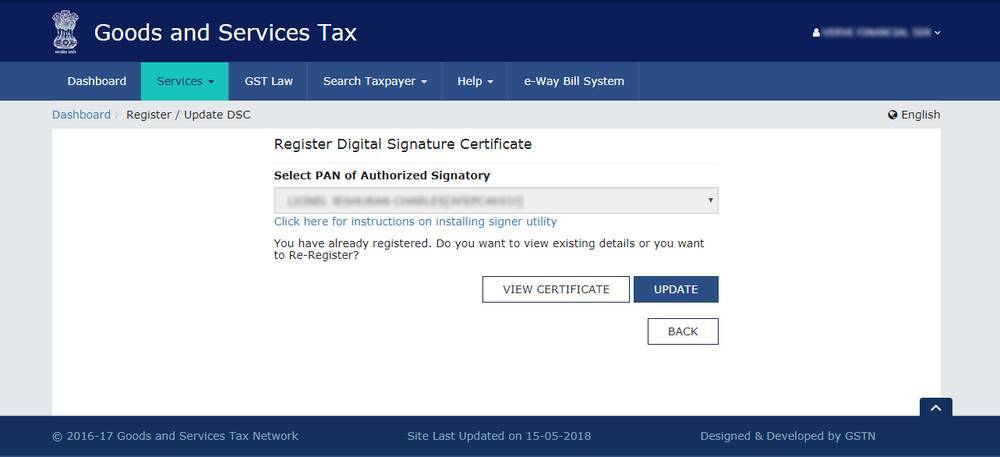 Register DSC on GST Portal - Step 4
Select the appropriate option from the emSigner utility. Before registering, the system will ask you to enter the password to authorize the DSC registration on the GST Portal.
Register DSC on GST Portal - Step 4
Select the appropriate option from the emSigner utility. Before registering, the system will ask you to enter the password to authorize the DSC registration on the GST Portal.
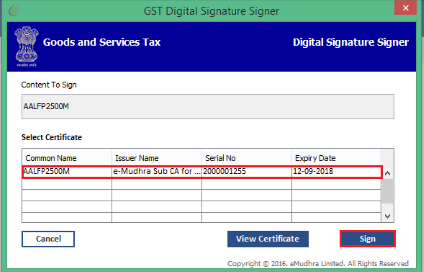 emSigner - Register DSC on GST Portal
- On submission of the correct password, the DSC registration on the GST portal will complete.
- With the completion of the steps mentioned above, you have managed to complete the task of registering your Digital Signature Certificate on the GST portal.