

Renu Suresh
Expert
Published on: Aug 28, 2026
Possession Certificate in Kerala
Possession certificate is a document which a property seller gives to a buyer stating the possession date of the property. Possession certificate is issued by concerned Tahsildar in Rural areas and RDO in urban areas. Possession is mandatory to include the property in the revenue records. Further, possession certificate is required to secure a loan. In this article, we look at Kerala Possession certificate application procedure in detail.Uses of Possession Certificate
The certificate can be used for any of the following purposes:- To obtain subsidy provided by the Government.
- To apply for a housing loan.
Possession Certificate Processing Time
Possession certificate will be issued within 7 days from the date of applying.Fee for Possession Certificate
Akshaya Centre Fee
The applicable fee for obtaining the certificate through Akshaya Centre is given here:| S.No | Fee Structure | |
| 1 | Fee for SC/ST family | Rs.12 |
| 2 | Fee for BPL family | Rs.20 |
| 3 | Fee for all other families | Rs.28 |
Online e-District Fee
Fee for applying possession certificate online through the e-District portal is Rs.15.Documents Required
The following documents are necessary to obtain possession certificate in Kerala:- Proof of ownership of property
- Encumbrance certificate
- Identity proof - Aadhaar Card
- Details of Land Tax
- Voters ID
Apply through Akshaya Centre
The procedure to obtain possession certificate through Akshaya centre is discussed in detail here: Step 1: To apply for possession certificate, go to Akshaya Service Centre nearby. Step 2: The applicant has to put in an application request for possession certificate online with the help of Akshaya Centre service person. Step 3: Submit all required documents to the service person to upload online. Once the application, along with all required documents, has been submitted, it will be forwarded to the backend department application. Step 4: The applicant will get an SMS to the registered mobile number. They can find the application number in this SMS. Keep it safe for future purpose. Step 5: Concerned department (Tahsildar) will process the possession certificate request, and after successful verification, the authorized officer will issue the possession certificate by digitally signing it. Step 6: If the applicant gets an SMS regarding application approved message, the certificate is ready for download. Step 7: Again visit Akshaya centre, with the help of the service centre person, download the certificate by providing the application number. Step 8: Get a printed copy of the digitally signed possession certificate. It can be used for applying for home loans.Apply through e-District Portal
The applicant can follow below mentioned step by step guidelines to apply for the certificate online through the e-District portal. Step 1: Visit the main page of the e-District portal of Government of Kerala. Step 2: To avail e-District certificate services, the applicant has to register in this web portal.Register in e-District Portal
Step 3: To register in the e-District portal, click on the ‘Portal user registration’ option from the main page. The page will redirect to next page.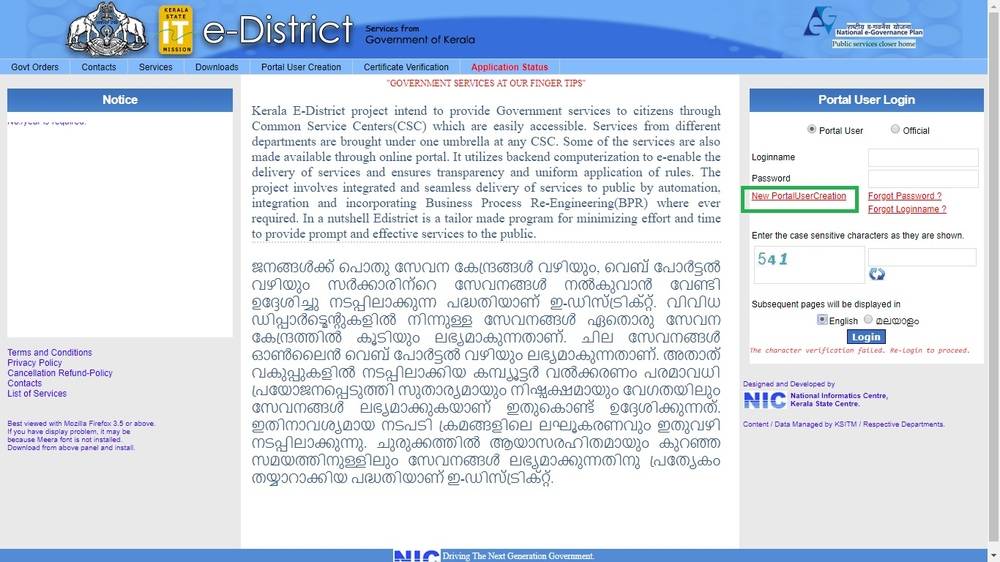 Image 1 Possession Certificate Kerala
Step 4: The applicant needs to fill personal details and select the login name and password.
Step 5: Select the password recovery question and provide an answer for the selected question.
Image 1 Possession Certificate Kerala
Step 4: The applicant needs to fill personal details and select the login name and password.
Step 5: Select the password recovery question and provide an answer for the selected question.
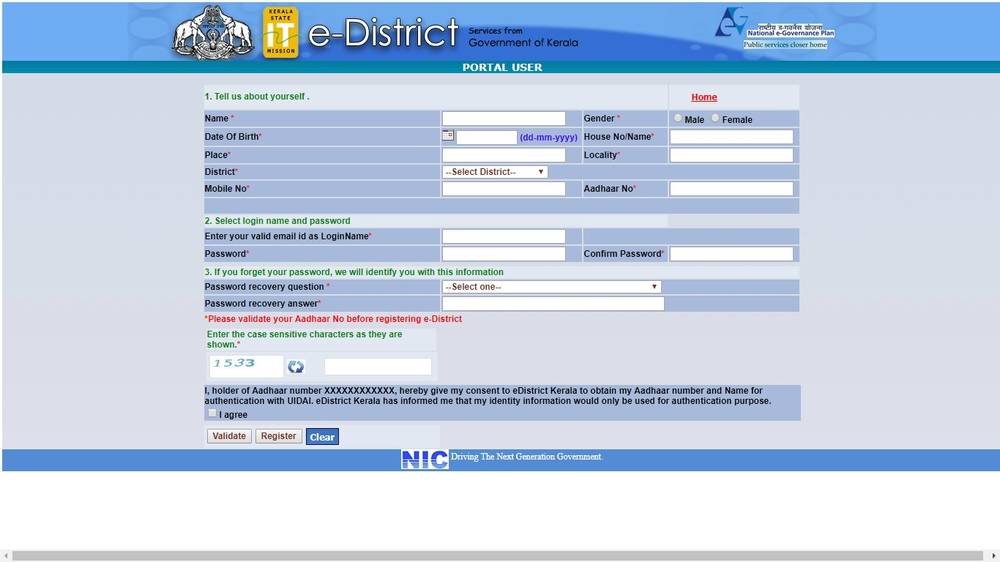 Image 2 Possession Certificate Kerala
Step 6: Click on validate button and further to register button.
Now the applicant can avail online certificate services by login to the e-district portal using the username and password.
Image 2 Possession Certificate Kerala
Step 6: Click on validate button and further to register button.
Now the applicant can avail online certificate services by login to the e-district portal using the username and password.
One Time Registration
Step 7: After login to the portal, do a onetime registration to apply for possession certificate. Step 8: Click on the one-time registration button. Fill all mandatory details and click on the duplicate button. Note: One-time registration process is to find out whether the applicant has already registered through any Akshaya Centers, i.e. duplicate check. Step 9: After the successful duplicate check, the submit button will be enabled. The applicant can click on the submit button to register. Step 10: Click on the applicant registration link, in the new page select the duplicate link, the system will automatically check the duplicate application if any. Step 11: After verification, click on Submit to proceed to apply.Enter Detail
Step 12: Enter all details for the certificate such as e-District registration number, name, certificate type and purposes. Step 13: To save details, click on the save button. The applicant will be redirected to the new page for uploading documents.Upload Documents
Step 14: Upload all required documents (mentioned above) in PDF format with 100KB. Step 15: After uploading all required documents make payment. Note: Before making payment, check all entered data.Make Payment and Generate Receipt
The applicant can see the fee for the certificate; it will appear on the screen: Step 16: The applicant can pay the fee by any of the following methods.- Debit card payment
- Credit Card Payment
- IMPS
- Wallets
- Net banking
- Cash-card prepaid