
Peter
Expert
Published on: Jul 30, 2026
Manufacturing or Importing API Drugs
To manufacture or import Active Pharmaceutical Ingredient (API)/drugs to India, the company or the organization should seek prior approval from the Drugs Controller General Of India (DCGI) for licensing to produce and distribute. The company should also follow the norms stipulated by the Central Drugs Standard Control Organisation (CDSCO) to produce the drugs. The Ministry of Health and Family Welfare will monitor the DCGI and CDSCO. To support DCGI and CDSCO in widening scope and research, the Government of India (GoI) has formed the Drug Technical Advisory Board (DTAB) and Drug Consultative Committee (DCC). Any new
drug that is yet to be introduced into the country should conduct trials, collect sample data, approval process and adhere to Appendix 1, IA and VI of Schedule Y and the following rules as mandated by the Drugs and Cosmetics Act 1940 and Rules 1945:|
S. No. |
Rule Number |
Represents |
|
1 |
Rule 122 A | Permission to Import New Drugs |
|
2 |
Rule 122B | Permission to Manufacture New Drugs |
|
3 |
Rule 122 DA | Definition of Required Clinical Trials |
|
4 |
Rule 122 E | Definition of Drugs |
The following are also the rules and guidelines that should be followed by the company that introduced new drugs into the market:
|
S. No. |
Name of the Rules and Guidelines |
|
1 |
Drugs and Cosmetics Act 1940 and its rules 1945 |
|
2 |
Narcotic Drugs and Psychotropic Substances of 1985 |
|
3 |
Drugs Price Control Order of 1995 |
|
4 |
Consumer Protection Act of 1986 |
|
5 |
Factories Act of 1948 |
|
6 |
Law of Contracts (Indian contract Act of 1872) |
|
7 |
Monopolistic & Restrictive Trade Practices Act of 1969 |
|
8 |
ICH GCP Guidelines |
|
9 |
Schedule Y Guidelines |
|
10 |
ICMR Guidelines |
|
11 |
Registry of Trial |
Guidelines and Requirements for Approval of Import or Manufacturing New Drugs or Undertaking Clinical Trails
Application and Data Required
To seek permission to manufacture or import new
drugs for production, marketing, or for clinal trials, the company should attach the following data in Form 44 as stipulated by Schedule Y (Rules 122A, 122B, 122D, 122DAA, AND 122E):- Chemical and Pharmaceutical details, as mentioned in item 2 of Appendix I
- Data on Animal Pharmacology, as mentioned in item 3 of Appendix I and Appendix IV
- Actions are taken for general pharmacology as prescribed in item 3.3 of Appendix I and item 1.2 of Appendix IV
- Pharmacokinetic data concerning the absorption, distribution, metabolism, and excretion of the test substance as prescribed in item 3.5 of Appendix I
- Data on Animal Toxicology, as mentioned in item 4 of Appendix I and Appendix III
- Regulatory Status, as mentioned in item 9.2 of Appendix I
- Details related to marketing new drugs as mentioned in item 10 of Appendix I
- Protocols and methods involved for testing quality, as mentioned in item 11 of Appendix I
- If the drug involved in the study has to be imported, details should be furnished in Form 12
Clinical Trails Required for Application Process
As per rule 21(b), all new
drugs should be conducted only after prior approval from the ethics committee. The trial facility should have appropriate treatment facilities and investigators with the required qualifications, training, and experience. The organization should ensure that the clinical trial sponsor implements the test and maintains adequate quality, as required by Good Clinical Practice (GCP) and Appendix VII. During the clinical trial, the sponsor must ensure proper medical care is provided to the participants. The company should provide a detailed report that should contain the interest in pursuing the new drug application, details of the patients, drugs involved, drugs prescribed to the patients, and duration of the clinical trial. In case of any serious adverse events, the company should report to the ethics and licensing authority as per clause (b) of rule 21.Phases of Clinical Trails
- Pre Clinical Study
- Phase I - Human Pharmacological Trail
- Phase II - Exploratory Trail
- Phase III - Confirmatory Trail
- Phase IV - Post-Marketing Trail
Drafting Results for Approval
The following should be attached while drafting Form 44, applying for approval:
- Module 1: Administrative or Legal Information
- Module 2: Summaries of the methodologies and procedures used
- Module 3: Information regarding quality (Pharmaceutical, biological and Chemical)
- Module 4: Non-clinical information
- Module 5: Clinical Information
Studies in Special Populations
The clinical data should include the use of drugs on the following members as per item 8.3 of Appendix I:
- Geriatrics
- Children
- Pregnant Women
- Nursing Women
- Elderly Patients
- Patients with organ failure
- Paediatrics and
- Post Marketing Surveillance
Importing New Drugs
To
import new drugs in India, the foreign company should seek approval from CDSCO and DCGI. To request for approval, the company shall furnish all the required details in Form 45, as mentioned in the Drugs and Cosmetics Act 1940 and its Rules 1945.Registring with CDSCO
Companies importing drugs should register with CDSCO in Form 41. The Form shall contain details of the manufacturing site and drugs used and required. After furnishing in Form-41, the company can approach CDSCO for Import Registration Certificate and Import Licence. Though registration is not required for clinical tests, New Drug and Clinical Trail Rules, 2019 states that the company imports drugs should furnish details in Form 16 for NOC and Test Licence.
Fees for Registration with CDSCO
For manufacturers in India, the registration fee is Rs.3,00,000 For companies importing drugs, the registration fee is USD 1500 For registering a new drug, the fee is USD 1000 per drug
List of Forms Required
- Form 45
- Form 44
- Form 41
- Form 40
- Form 17
- CT- Form 16
- Form 11
- Form 10
- Form 8
Validity of the Registration Certificate
The registration certificate issued by CDSCO is valid for three years from the date issued.
Renewal of Registration Certificate
To renew the registration certificate, the company should apply with all required documents nine months before the expiry date.
Document Required for Registration
- Name and Documents of the company, investigators and
- Name of the Drugs used
- Parameters of Dosage
- Composition used
- Classification of Pharmalogical components
Registering with CDSCO
To apply for manufacturing, conduct a clinical test, or import new drugs, the applicant should register with CDSCO through an online portal.
Step 1: Open the CDSCO web portal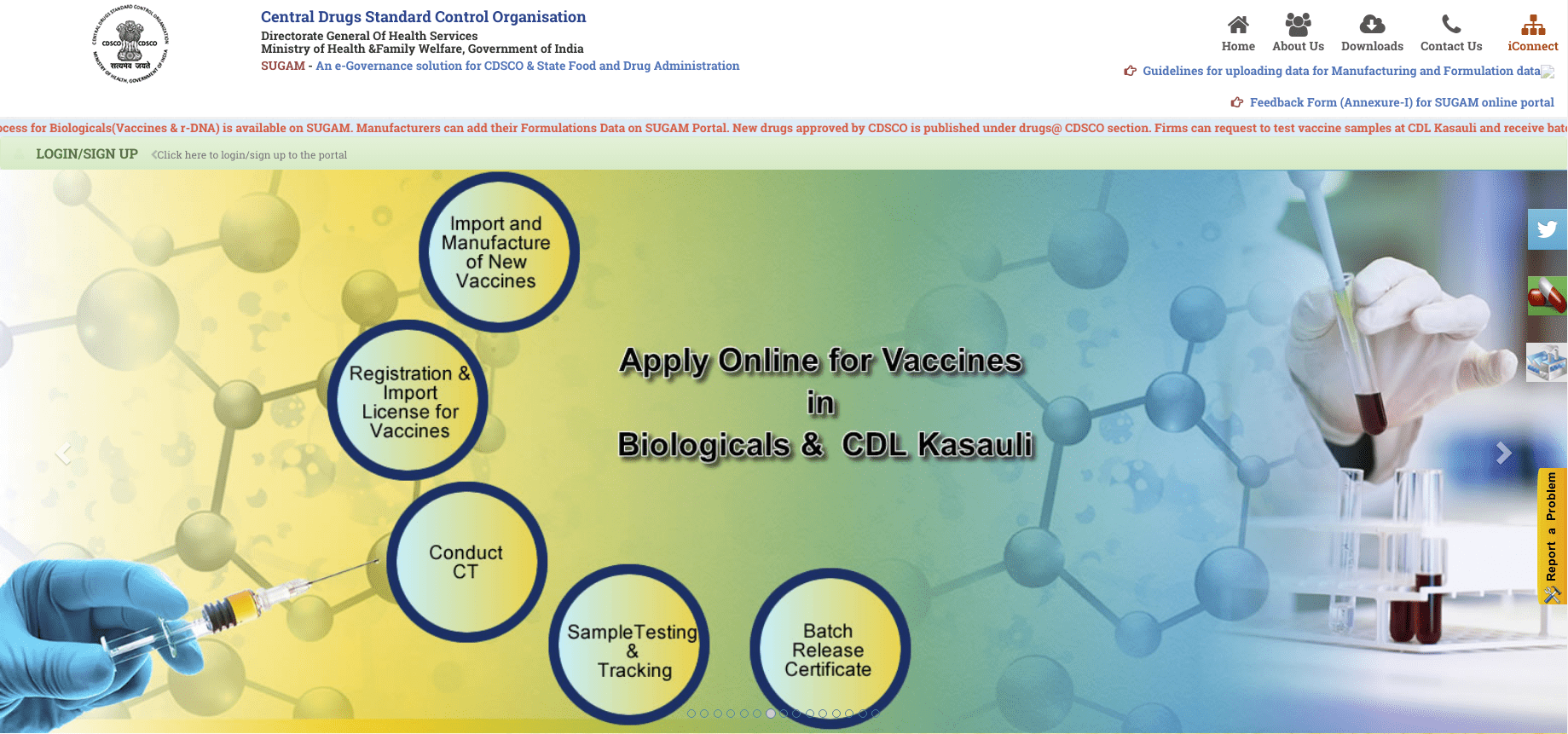 Step 2: Click on Login or Sign Up and Click on "Sign Up Here"
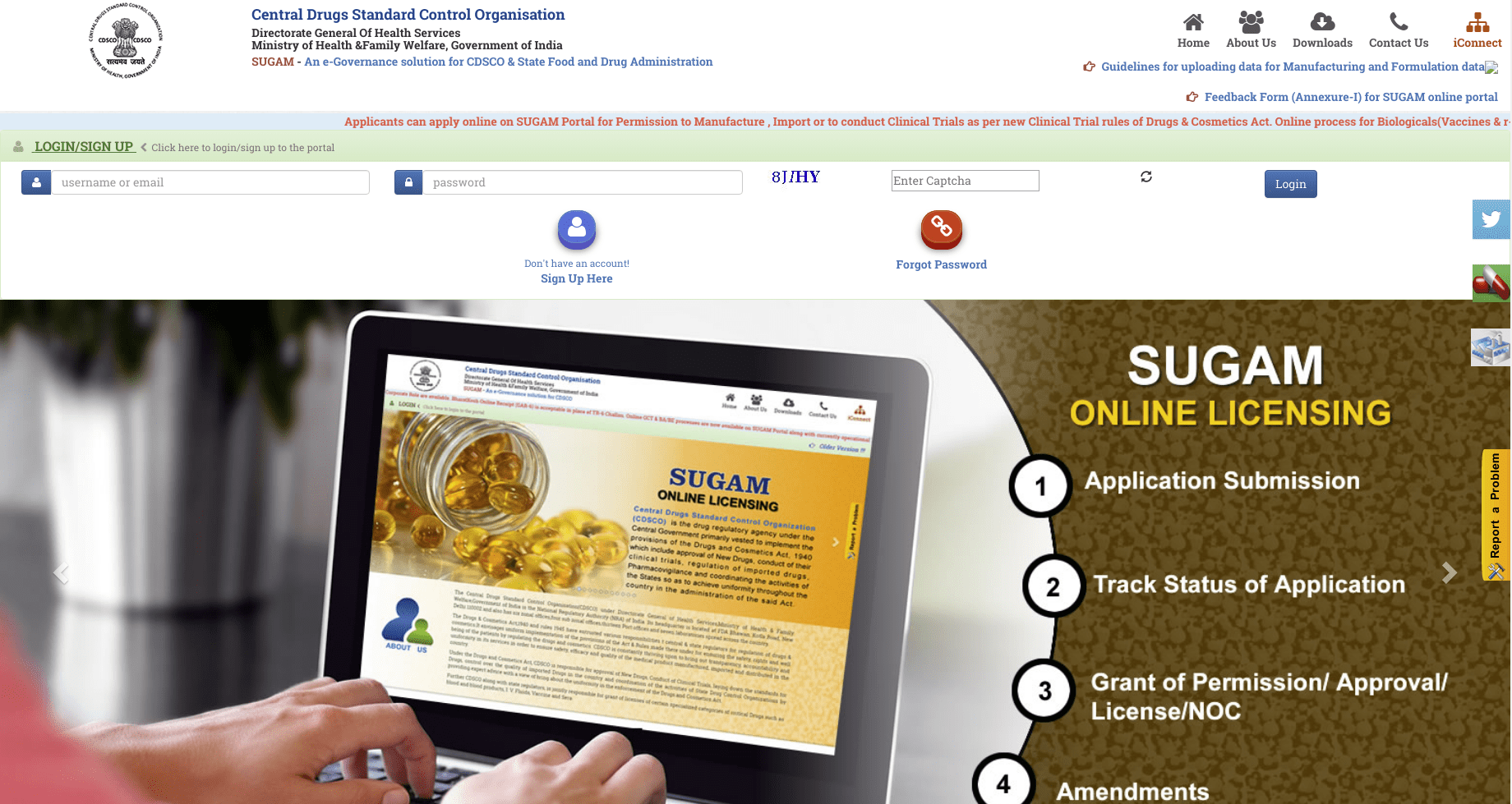 Step 3: Choose the option from "Registration Purpose" and click, Submit
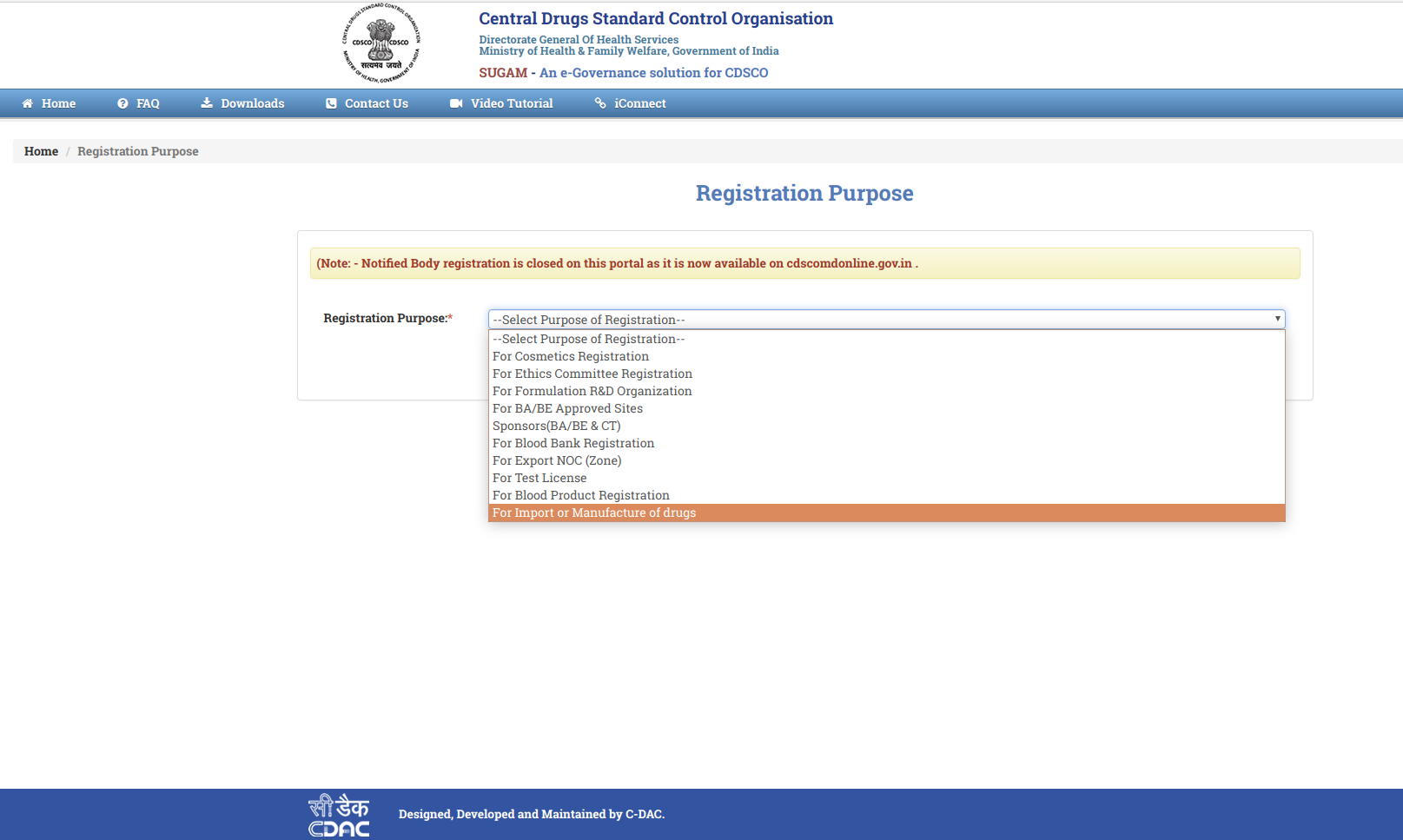 Step 4: Provide all the details with valid information
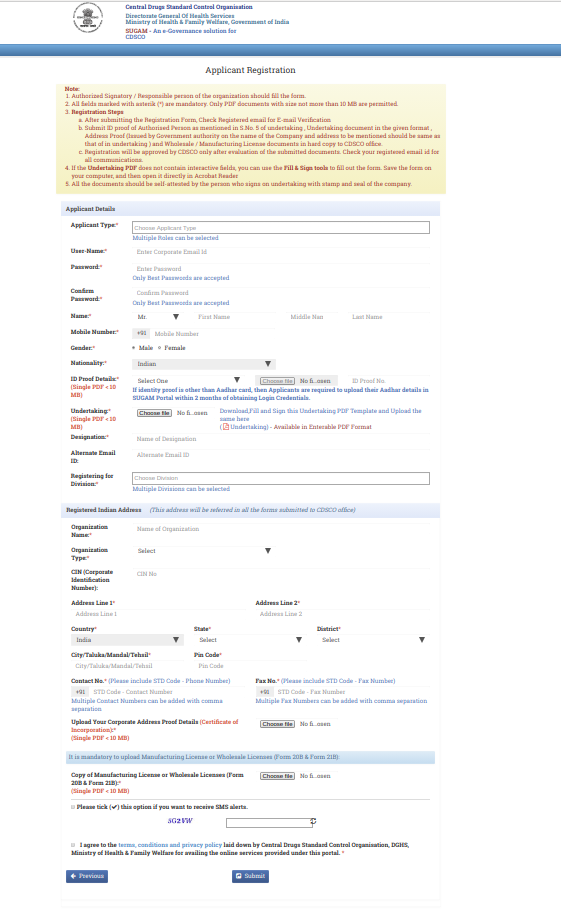 Step 5: After verification, an e-mail would be sent to the registered e-mail address
Step 6: Create USER ID and Password with the link and login into the CDSCO webpage
Step 7: Click on the Dashboard and click on 'Submit Application' to upload the documents and details for the registration certificate
Step 5: After verification, an e-mail would be sent to the registered e-mail address
Step 6: Create USER ID and Password with the link and login into the CDSCO webpage
Step 7: Click on the Dashboard and click on 'Submit Application' to upload the documents and details for the registration certificate
Applying for Import Licence
Step 1: Login into CDSCO and click on 'Dashboard'Step 2: Click on 'Application Submission' and click on 'Form Submission' on the popped up window
Step 3: Choose the Department and Select the Form to be submitted
Step 4: (Applicant and Manufacturer Detail): On the 'Type of Application', click 'Fresh'. Fill the details with valid credentials and click on 'Save and Continue'.
Step 5: (Drug Details): Choose the application applying for 'Bulk' or 'Finished Formulation'. Furnish all the details and click on 'Save' and click 'Next'
Step 6: (Manufacturing Unit Details): Enter the details of the manufacturing unit and click on 'Next'. To add more units, click on 'Add'
Step 7: (Directs back to Applicant and Manufacturer Detail): Select the application type as 'Endorsement', furnish all the details, enter the registration number and click on 'Continue'.
Step 8: Verify the form and click on 'Save' and 'Next'
Step 9: Verify the form and click on 'Continue' After clicking 'Continue', the application will be sent for verification and the applicant shall receive File No. for future reference.
Making Payment Online
Step 1: Open CDSCO web portal and log in to CDSCO
Step 2: Click on 'Online Payment Option' and furnish all the required details
Step 3: Choose the Bank
Step 4: Click on Pay, Enter Bank Details and click on 'Proceed'
Step 5: After successful payment, the transaction will generate GAR 6 for e-challan, which can be accessed through NTRP.
Eligibility Criteria
- Indian Agents with prior experience in the field of extending support for pharmaceutical companies
- Corporates
- Foreign Enterprises having Indian Subsidiary
- Manufacturing Units
For more details on MSME, Import and Registration documentation,
bis certification standards