

RENU SURESH
Expert
Published on: Jul 30, 2026
GST Returns Offline Tool Installation Procedure
Goods and Service Tax Network (GSTN) provides Returns Offline Tool to facilitate the upload of invoices in bulk. The taxpayer can add items in offline mode and upload invoices to the GST Portal using GST Returns Offline Tool. The appearance of the Returns Offline tool will be similar to that in the GSTN web portal, and the functionalities are identical. In this article, we will look at GST Returns Offline Tool installation procedure in detail. Know more about Types of GST Returns and Due DatesDownload GST Returns Offline Tool
You can download the GST return offline tool from the . Once the GST return offline tool is downloaded, you have to install the downloaded fillies on your computer to upload invoices.GST Login Page Know more about GST Portal
Downloading the Returns Offline tool is a one-time activity; however, it may require an update in future if GSTN Network updates the Tool. Check the version of the GST offline tool used by you with the available offline tool file on the GST Portal at regular intervals.
Files in a Downloaded ZIP folder
The downloaded ZIP folder (gst_offline_tool.zip) contains all files for installation. You have to unzip the downloaded files and extract the files. The folder contains the following files:- Offline tool .exe file
- txt file
- Excel File Template
- CSV file folders
- User Manual
GST Offline tool.exe file
It is a file for the GST Returns Offline tool to be installed in the computerReadme.txt file
This file explains in detail the prerequisites for the GST Returns Offline toolExcel File Template
As mentioned above, the downloaded ZIP file contains an excel file template in the format of GSTR1_Excel_Workbook_Template.xlsx file. The multi-section excel can be used to add invoice details. You can upload invoice data entered in the respective worksheets for all sections at one go.CSV file folders
GST Offline Tool support upload on invoice details in the .csv format. The .csv format refers to comma-separated values format. : Section wise CSV files folder which contains .csv file with the sample data which have to be deleted before filling the actual invoices data to the template.User Manual
Invoice Upload Offline tool User Manual - User Manual is detailing out the guidance for taxpayers to use Returns Offline tool.GST Returns Offline Tool Installation Procedure
The step-step by guidelines for installing GST Returns Offline Tool is explained in detail below. Step1: You need to Save Excel file, and CSV files on your computer as these files contain the templates in which the data can be entered to be used by the GST Returns Offline tool.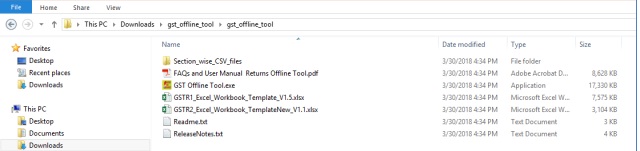
Image 1 GST Returns Offline Tool Installation
Step 2: By clicking on the Readme.txt file, you will get the information of the GST Returns Offline tool installation process.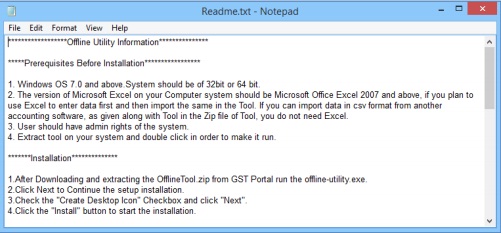
Image 2 GST Returns Offline Tool Installation
Step 3: Now you have to double click on the GST Offline tool set up file for installation.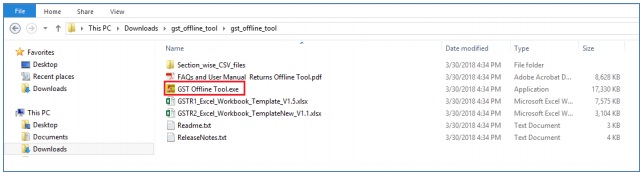
Image 3 GST Returns Offline Tool Installation
Step 4: A small window will display, click on the Yes button to install the Offline tool.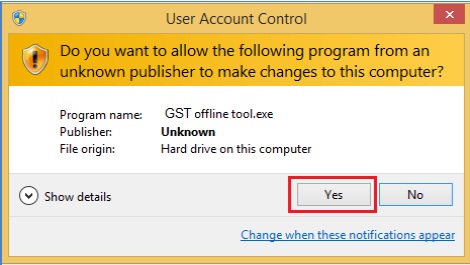
Image 4 GST Returns Offline Tool Installation
Step 5: After that click on the Next button. The new window will be displayed.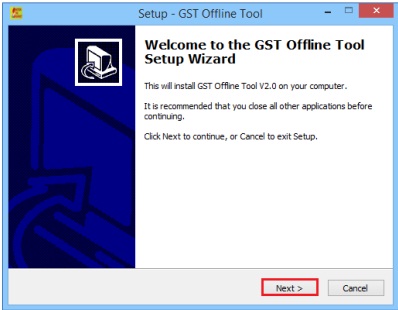
Image 5 GST Returns Offline Tool Installation
Step 6: In the new window, you need to click on the Browse button to select the destination location to install the GST Returns Offline tool. After that, click on the next button.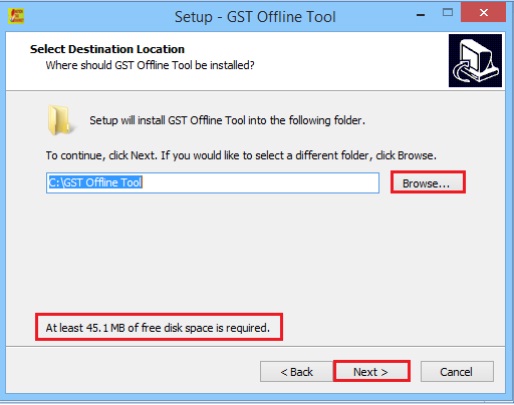
Image 6 GST Returns Offline Tool Installation
Step 7: The needed disk space for installing the GST Returns Offline tool will be displayed. Note: Ensure that the required space is available on your machine for the installation. GST return offline tool downloading will not be completed if there is not sufficient space in the computer. Step 8: You have to select the checkbox for creating a desktop icon of the Returns Offline tool on the desktop as a shortcut and then click the Next button.Image 6 GST Returns Offline Tool Installation
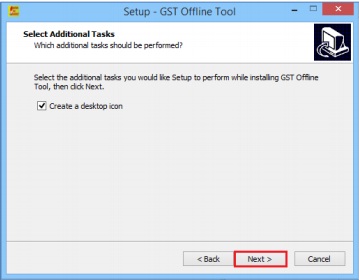
Image 7 GST Returns Offline Tool Installation
Step 9: In the small window, you have to click on the Install button for further processing. Setup will be installed along with the required software on the computer.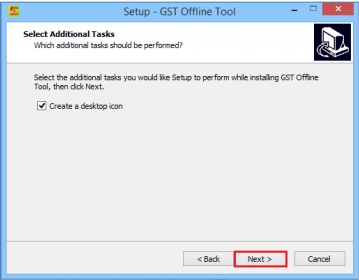
Image 7 GST Returns Offline Tool Installation
Note: The installation of the GST Returns Offline tool usually takes 2-3 minutes depending on the Internet and System speed. Step 10: Now the Offline returns tool set up are completed. Ensure that both the checkboxes are selected to start the GST return the offline tool. After verifying the details click on the Finish button.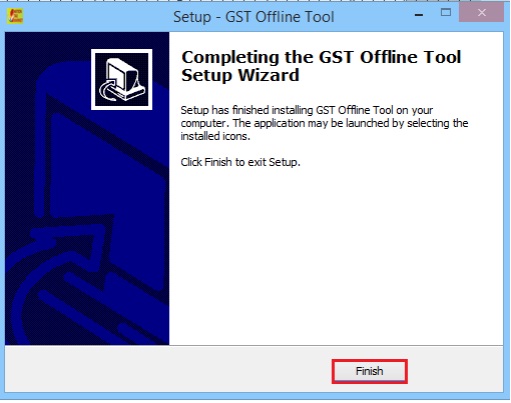
Image 9 GST Returns Offline Tool Installation
Note: - In case, you uninstall the GST return tool and then re-installs the tool, you should re-install the tool at the same location. In case, you re-install the return offline tool on the different location you need to restart the system then only the tool refers to a new location. If you are not restarting the system, the Returns Offline tool will refer to the old path, and you can’t open the tool. Step 11: Check whether the desktop icon for the GST return offline tool is created on the desktop. By double-clicking on the icon, the offline tool will get open.
Image 10 GST Returns Offline Tool Installation
You can start add invoice details in offline mode and upload invoices to theGST Portal.