
Karthiga
Expert
Published on: Jul 30, 2026
GST Refund-Specialized Agency
As per the provisions under CGST law, any specialised agency of United Nations Organization, Multilateral Financial Institutions,
Embassies of foreign countries, Foreign Diplomatic Missions are eligible to claim the refund for tax paid on the purchase or sale of goods and services for their official use. GST RFD-10 form has to be filed by the registered taxpayer on the GST common portal. In this article, we look at the process of Claiming GST refund by international organisations.Applying for GST Refund
Embassy of foreign countries and any other persons notified by the Commissioner is required to obtain
GST Unique Identity Number. GST Unique Identity Number helps to claim GST refund on notified supplies of goods or services and other purposes as declared by the GST authorities. The taxes on supplies for a value of Rs. 5,000 or above (without including the tax component) are eligible for the refund.Time Limit for Claiming Refund
GST RFD-10 refund application for inward supplies can be registered within 6 months from the last day of the quarter in which such supply was obtained.
GST RFD-10 can be furnished only after filing the statement of inward supplies in Form GSTR-11 of the corresponding tax period.Online Procedure to Claim Refund in Form GST RFD-10
To claim for the refund by applying online, follow the steps mentioned below:
Visit GST Portal Homepage
Step 1: Please visit the official portal of GST department. Step 2: After filing the Form GSTR-11, then the applicant can generate GST RFD-10 application form.Select Return Dashboard
Step 3: Click the Services and select “Returns Dashboard” command from Returns menu. Step 4: On the next screen File Returns will have appeared. Select the Financial Year and Return Filing Period (Month) to file the return from the drop-down list.Generate GST RFD-10
Step 5: Press on the “Search” button and Click View GSTR11 option. Press the Generate RFD-10 button, RFD-10 form will appear on the resulting screen showing auto-populated tax period same as Form GSTR -11.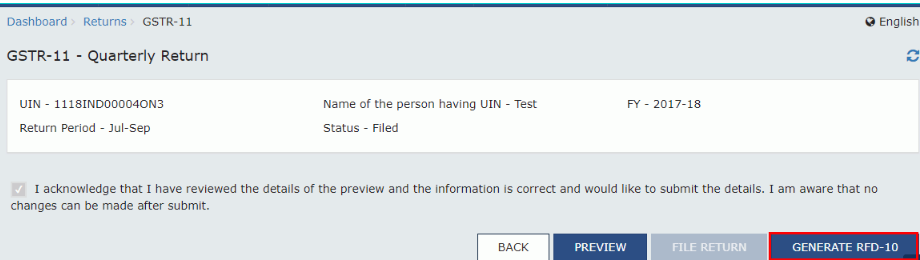 GST-Refund-Specialized-Agency- Form-GSTR11
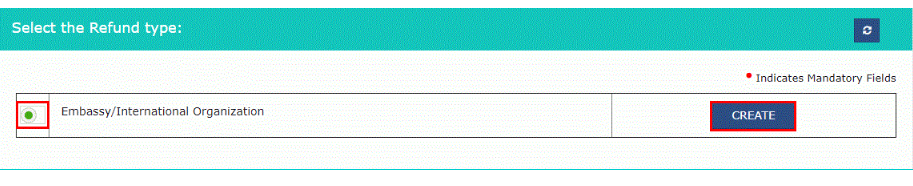
Step 6: Select the Embassy/ International Organization button and click the Create button.
GST-Refund-Specialized-Agency- Form-GSTR11
Step 6: Select the Embassy/ International Organization button and click the Create button.
 GST-Refund-Specialized-Agency-Refund-Type
Details of the tax paid on Purchase
Step 7: Amounts in table “Details of the tax paid on purchases as reported under GSTR-11” from the return of the respective period.- If the UIN holder requires to claim the refund amount which is less than the amount displayed, he/she can edit the amount downward in the above table.
- The taxpayer can make downward editing of the tax amount but cannot make upward editing of the tax amount refundable. After modifying in table “Refund Amount Details (in INR), the total will get auto-calculated in the table “Refund Amount Claimed (in INR)”. In the case of "No", the amount of refund can be above than the respective values of tax or Cess.
Choose the bank account
Step 8: Choose the bank account to receive the refund. Press the Save button to upload refund details to the GST Portal.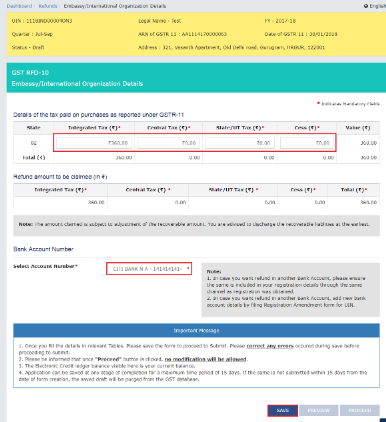 GST-Refund-Specialized-Agency-Upload-Details
 GST-Refund-Specialized-Agency-Refund-Application
Preview Details of the refund
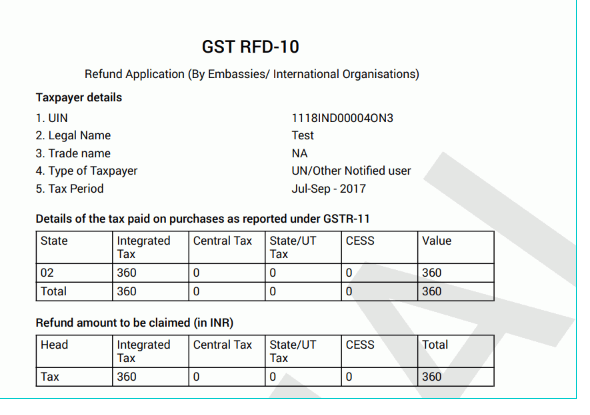
Step 9: Click the Preview button to preview the details of refund before submitting on the GST Portal. Step 10: Click the Proceed button and check the declaration box. Choose an Authorized Signatory from the list of registered names in the drop-down. Step 11: Click the option either Submit with DSC or Submit with EVC option:- Submit with DSC option: Sign the application using the registered Digital Signature Certificate of the selected authorised signatory.
- Submit with EVC option: If the EVC option is chosen, the system triggers an OTP to the registered mobile phone number and e-mail address of the authorised signatory.
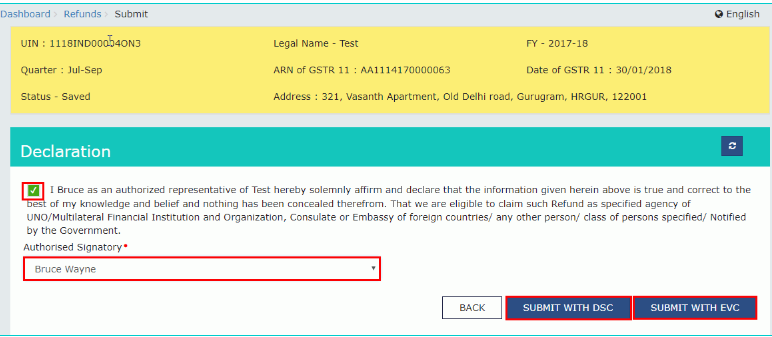 GST-Refund-Specialized-Agency-Declaration
Generation of Application Reference Number
- The system generates an ARN and shows it in a confirmation message, representing that the refund application has been successfully filed. GST Portal grants the ARN at registered email and mobile of the registered taxpayer. Check the GST RFD -10 applications using the option Track Application Status under Refunds tab. On submission of form GST RFD-10, the taxpayer has to take prints of the filed application and the Refund ARN Receipt made at the portal and submit the same along with supporting documents to the jurisdictional authority. The distribution is done once the concerned Tax Official prepares the refund application.
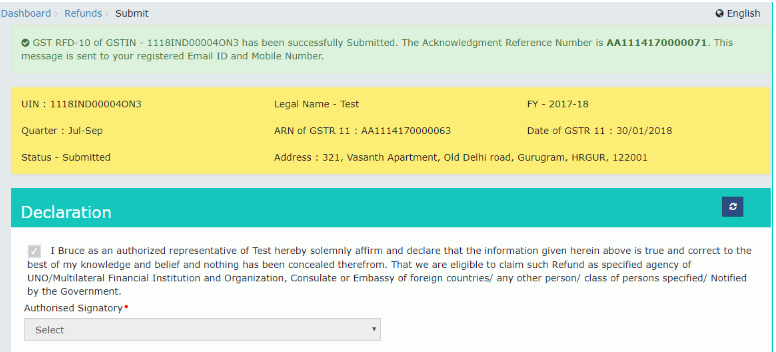 GST-Refund-Specialized-Agency-refund-application
Generate GST RFD-10 Application Form
To apply for a refund online, follow the steps mentioned below:
Step 1: Please revisit the official portal of GST department.Select Return Dashboard
Step 2: Click the Services and select “Returns Dashboard” command from Returns menu. Step 3: Select the refund type page displayed as the Embassy/ International Organization option.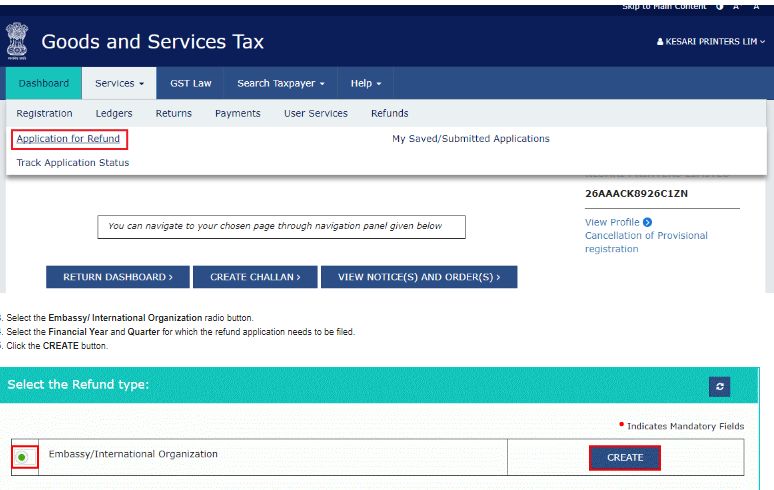 GST-Refund-Specialized-Agency-Refund-Type
Select Financial Year
Step 4: Choose the Financial Year and Quarter for which the refund application needs to be filed and click on the “Create” button. Step 5: In the table “Details of the tax for the purchases under GSTR-11” of the respective period will populate automatically.- If the person holds UIN wants to claim the refund amount which is less than the amount shown, the taxpayer can edit the amount downward in the above table.
- The taxpayer can make downward editing of the tax amount but cannot make upward modifying of the tax amount refundable. After making changes in table “Refund Amount Details (in INR), the total will be auto-generated in table “Refund Amount Claimed (in INR)”. In the case of"No", the amount of refund can be more than the respective values of tax/Cess.
Select Bank Account
Step 6: Select the bank account to receive the refund and click the "save" button to upload refund details to the GST Portal.- The Taxpayer can choose a bank account from the drop-down list to receive a refund amount.
- The bank accounts shown in the drop-down are those accounts that were produced at the time of GST registration.
- Till registration amendment form is not active, in case of taxpayer want a refund in another Bank Account, please make sure the same is added in the registration details through the same way as registration was granted.
- After registration amendment form is active, in case taxpayer want a refund in another bank account, add new bank account details by filing the Registration Amendment form for UIN.
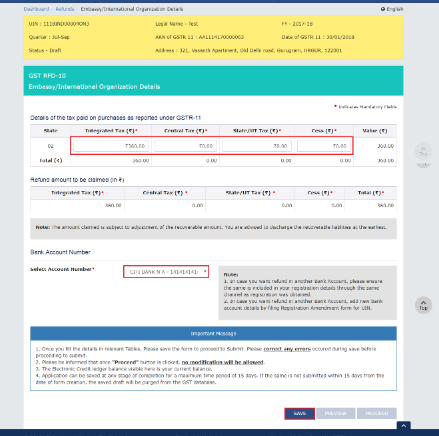 GST-Refund-Specialized-Agency-Refund-Details
Preview Details of Refund
Step 7: Click the Preview button to preview the details of refund before submitting on the GST Portal.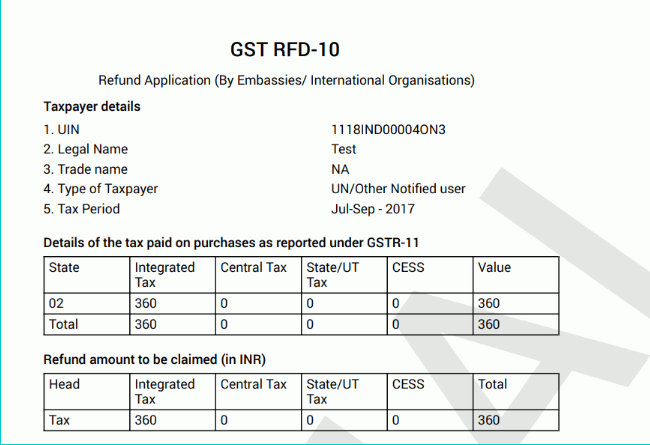 GST-Refund-Specialized-Agency-Refund-Application
Step 8: Click the Proceed button and check the declaration box. Choose an Authorized Signatory from the list of registered names in the drop-down.
GST-Refund-Specialized-Agency-Refund-Application
Step 8: Click the Proceed button and check the declaration box. Choose an Authorized Signatory from the list of registered names in the drop-down.
Submit with DSC or EVC Option
Step 9: Click the option either Submit with DSC or Submit with EVC option:- Submit with DSC option: Sign the application using the registered Digital Signature Certificate of the selected authorised signatory.
- Submit with EVC option: If the case of choosing the EVC option, the system triggers an OTP to the registered mobile phone number and e-mail address of the authorised signatory.
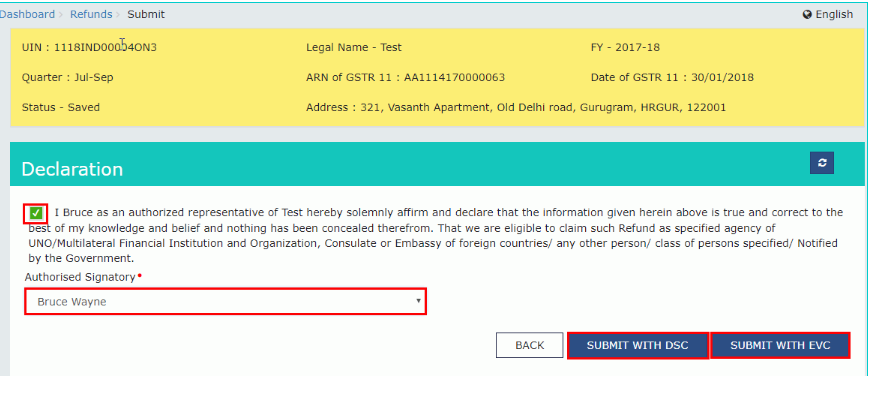 GST-Refund-Specialized-Agency-Declaration
Application Reference Number
- The system generates an ARN and shows it in a confirmation message, representing that the refund application has been successfully filed.
- GST Portal grants the ARN at registered email and mobile of the registered taxpayer.
- The system generates an ARN and shows it in a confirmation message, representing that the refund application has been successfully filed.
- GST Portal grants the ARN at registered email and mobile of the registered taxpayer.
- Check the GST RFD -10 applications using the option Track Application Status under Refunds tab.
- On submission of form GST RFD-10, the taxpayer has to take prints of the filed application and the Refund ARN Receipt made at the portal and submit the same along with supporting documents to the jurisdictional authority.
- After distribution, the concerned Tax Official prepares the refund application.
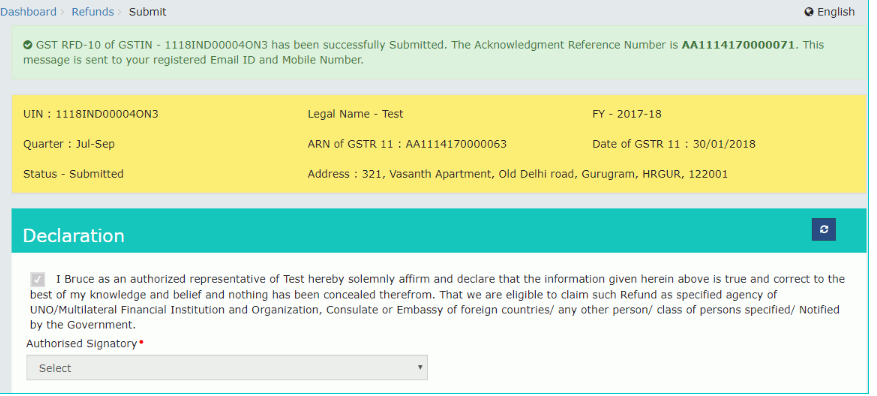 GST-Refund-Specialized-Agency-Track-Application