
IndiaFilings
Expert
Published on: Aug 12, 2026
Enabling GST API Access for Invoice Upload
To upload invoices and file GST returns from LEDGERS GST Software, GST API access must be enabled. In this article, we look at the procedure for enabling GST API access and uploading GST return from LEDGERS.
Know more about uploading invoices to GSTN.Enabling GST API Access
LEDGERS will be able to directly
file GST returns only for those GST accounts for which API access is enabled. The following video shows the procedure for enabling GST API access. https://www.youtube.com/watch?v=CqSNHl0_Ik4&feature=youtu.beStep 1: Login to your GST Account
Visit the
GST Portal and login to your GST account. Click on My Profile from GST Option drop-down menu.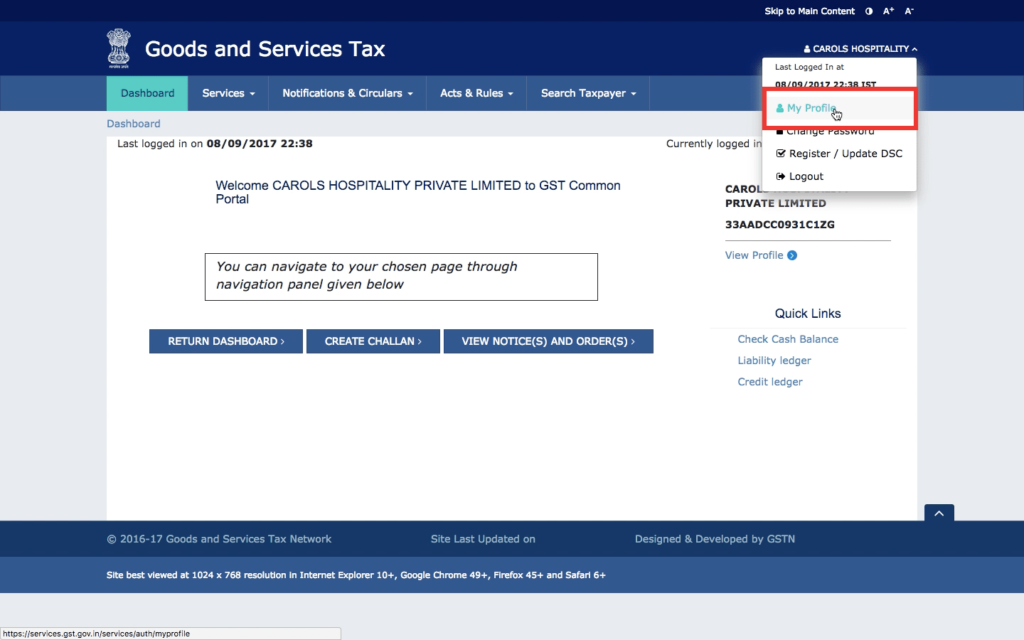 Step 1 - Go to GSTN Profile
Step 2: Select Manage API Access
Select manage API access from the left-side menu to access the API settings page on the GSTN portal.
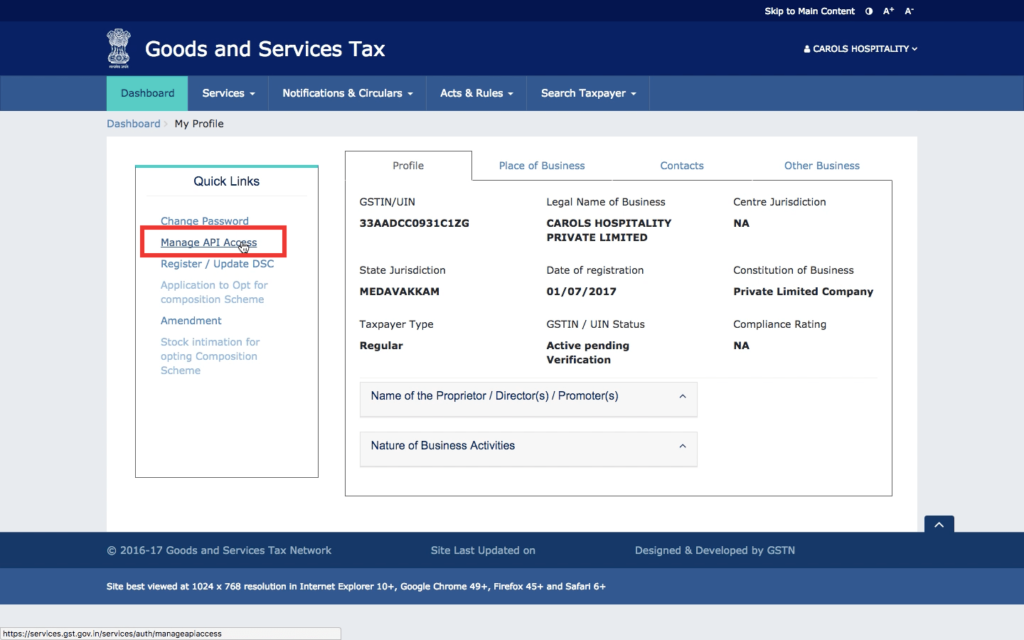 Step 2 - Select Manage API Access
Step 3: Enable GST API Access
Change the setting to "Yes" for Enable API Request. In the duration drop-down menu, select the session time. The session time will determine how long each authentication through OTP will be valid. For example, if 6 hours is selected, a OTP verification to connect to GSTN will be valid for 6 hours. At the expiry of 6 hours, another OTP will have to be generated and validated to keep the connection open. We suggest you keep the duration at 7 days or 30 days, so that sufficient time is available to complete the GST return filing from the time of OTP authentication. Once the duration is selected, click on confirm.
 Step 3 - Enable GSTN API Access
Connecting to GST from LEDGERS
To connect your LEDGERS GST Software to GSTN for filing GST returns, follow the steps below:
Step 1: Access the GSTN Connect Page
Go to the GSTN Connect page. You can access the page from the top menu under GST Filing.
Step 2: Click on Generate OTP
Click on generate OTP. An OTP will be sent to the mobile number of the authorised signatory mentioned in the
GST registration certificate.Step 3: Enter OTP
Enter OTP. If the connection is successful, the GSTN Connection Status will change to "Connected".
Error in Connecting to GST through API Access
If API access is not enabled in the GST account, the user will receive a message AUTH4037 - API Access Denied. To solve the problem, login to your GST account on the GST Portal and enable GST API access as shown above.