
IndiaFilings
Expert
Published on: Jul 30, 2026
Convert Estimate to Invoice - LEDGERS Guide
Creating an estimate and obtaining client/customer consent before issuing an
GST invoice is a good sales and business practice. Under GST regulations, a business becomes liable for remitting the GST amount mentioned on the invoice on the issuance of invoice, irrespective of payment status. Hence, if goods/services are not supplied, then it is prudent to issue an estimate, receive payment and then issue a tax invoice.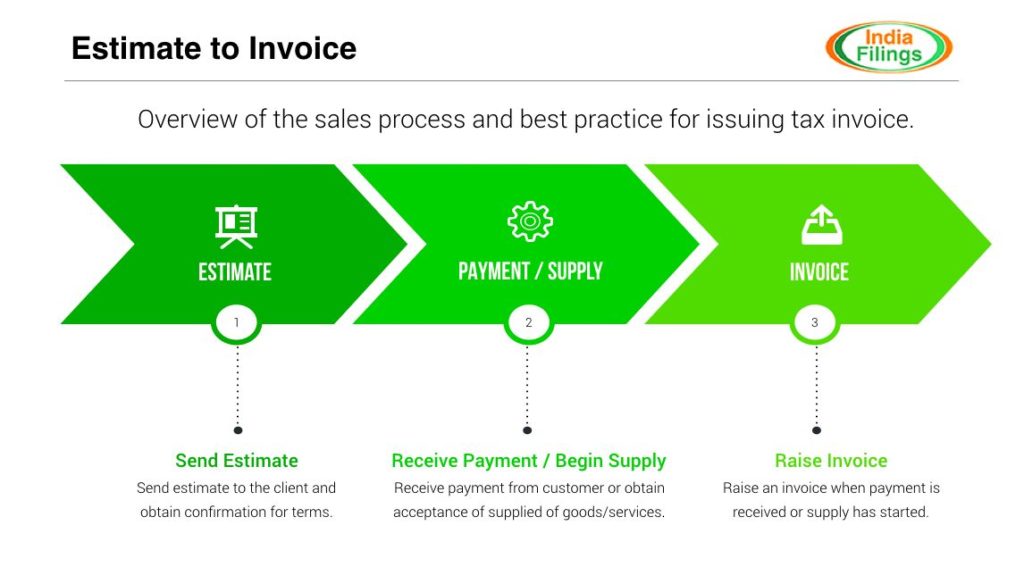 Convert Estimate to Invoice
LEDGERS Software makes it easy for businesses to quickly issue estimates and convert estimates into invoices. Follow the steps below to convert an estimate to an invoice.
LEDGERS is free. Click here to signup and begin using LEDGERS Software.
Convert Estimate to Invoice
LEDGERS Software makes it easy for businesses to quickly issue estimates and convert estimates into invoices. Follow the steps below to convert an estimate to an invoice.
LEDGERS is free. Click here to signup and begin using LEDGERS Software.
Creating an Estimate
To create an estimate, go to Sales -> Estimate -> Create Estimate. Complete the information required to issue an estimate like customer name, date, estimate number, items, rate, quantity and additional charges (if any). On completing the necessary information, click on Create Estimate.
Guide to creating an estimate using LEDGERS.Convert Estimate to Invoice
Once an estimate is created, open the estimate you would like to convert by accessing Sales -> Estimate -> Manage Estimates. Select the estimate you would like to convert to an invoice. Once the estimate is open, click on the "Options" button on the top right hand side corner and select "Convert Estimate". Now, the details mentioned in the estimate will be auto-filled into an invoice. You can edit the details or save the invoice by clicking on "Create Invoice" at the bottom.