
Sinduja Shankar
Published on: Aug 11, 2026
BIN View: Easy BIN Verification for Seamless TDS Compliance
The Book Identification Number (BIN) is a crucial element in the TDS filing process. It serves as a unique verification key, required for government deductors who report Tax Deducted at Source (TDS) without making payments through bank challans. This article explores the BIN view and verification process, explains why quoting the BIN correctly is essential, and provides a step-by-step guide on how to view and verify your BIN details using the NSDL TIN portal.
What is a Book Identification Number (BIN)?
The Book Identification Number (BIN) is issued to deductors by the Assessing Officer (AO) upon the successful filing of Form 24G (monthly e-TDS return). This number helps in identifying the TDS transactions that are processed by the Principal Accounts Officer (PAO) and ensures that these transactions are accurately reflected in the quarterly TDS returns.
The BIN acts as a reference number for the TDS filed, and it must be quoted in the quarterly TDS/TCS statements. The BIN is vital for validating the TDS amounts reported by the deductor, ensuring that the information is accurate and consistent with the Form 24G filed by the PAO.
When is BIN generated?
Based upon the details submitted by the DDOs, the respective DTO/PAO will file Form No.24G (which is a monthly e-TDS return).
On the successful filing of Form No.24G, a unique Book Identification Number will be stated on the Tax Information Network (NSDL) after the respective Principal Accounts Officer files monthly statements with Form 24G.
This BIN needs to be quoted in the quarterly returns. The user may contact the respective Assessing Officer and collect the necessary BIN details.
What is BIN View and Why is It Crucial for TDS Reporting?
The BIN view process allows businesses and tax professionals to easily verify whether the TDS amounts match the official records, ensuring accurate reporting and preventing discrepancies that could affect tax credits. Moreover, it simplifies the TDS filing process by helping deductors ensure that all required details are in place before submitting the quarterly TDS statements.
How to Perform BIN View Verification: A Complete Step-by-Step Guide
The NSDL portal provides an efficient platform for viewing and verifying BIN details for various TDS-related forms, such as Form 24G, Form 24Q, and Form 26Q. Here is the detailed procedure for performing BIN View Verification:
Step 1: Access the NSDL BIN View Portal
To start the BIN verification process, visit the official NSDL TIN portal. The portal allows users to view and verify their BIN details, ensuring that all TDS amounts and transaction records are correctly reported.
- Visit the NSDL BIN View Portal: NSDL BIN View Portal
- Once you are on the portal, you can proceed with the next steps.
Step 2: Enter the Required Information
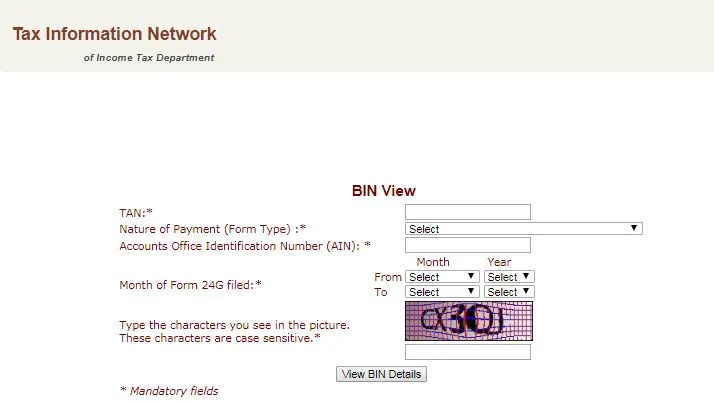
To access your BIN details, the portal requires some mandatory information. Please fill in the following fields accurately:
Tax Deduction and Collection Account Number (TAN): The TAN is a unique identifier that links the TDS reports to your deductor account. It is crucial for verifying your TDS filings.
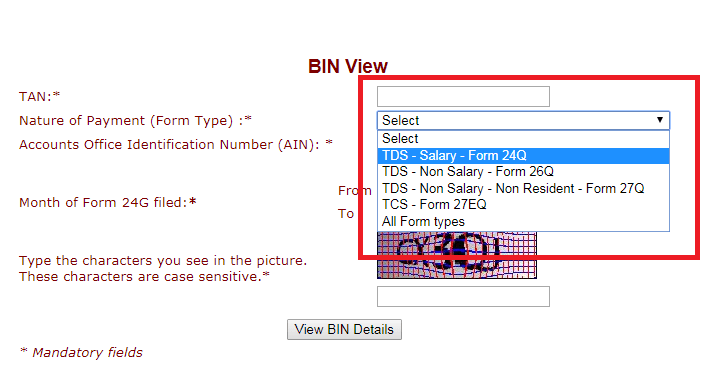
Nature of Payment (Form Type): From the dropdown menu, select the form type that corresponds to the TDS transaction you are verifying. The available options include:
- TDS - Salary (Form 24Q)
- TDS - Non-Salary (Form 26Q)
- TDS - Non-Salary - Non-Resident (Form 27Q)
- TCS (Form 27EQ)
- All Form Types (if you wish to verify BIN details for all forms at once).
Accounts Office Identification Number (AIN): The AIN is required to verify the BIN details for a specific area office. Enter the AIN to filter the results for the correct office.
Month of Form 24G Filed: Select the month and year during which you filed Form 24G. This ensures that the system retrieves the correct BIN details for that specific period.
Step 3: Verify the TDS Amount
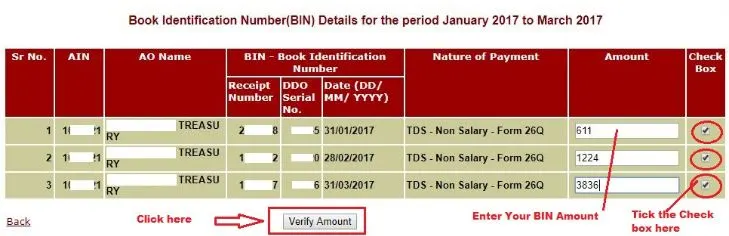
After entering the necessary information, the system will ask you to verify the TDS amount remitted to the government. You need to:
- Enter the TDS Amount: Provide the TDS amount that corresponds to the Receipt Number and DDO Serial Number as per your Form 24G filing.
- Confirm the Amount: Once you've entered the TDS amount, you will be prompted to check the box confirming that the amount is correct.
After confirming the amount, click on the “Verify Amount” button to proceed.
Step 4: Review the BIN Verification Status
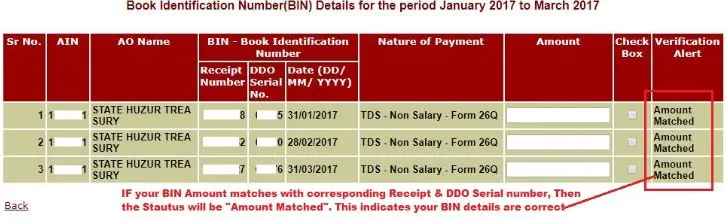
Once the system verifies the TDS amount, it will display the BIN verification status. The status will indicate one of the following outcomes:
Amount Matched:
This means that the BIN details and the TDS amounts you entered match correctly, and the verification is valid. In this case, your TDS credit will be successfully processed and reflected in Form 26AS.
Amount Not Matched
This indicates that there is a discrepancy between the TDS amounts and the BIN details. If this happens, the TDS credit will not be available in Form 26AS, and you will need to take corrective action. You should review the details for any errors or contact the Assessing Officer (AO) to resolve the discrepancy.
Step 5: Take Corrective Action if Needed
If the verification status indicates “Amount Not Matched”, follow these steps:
- Check for Errors: Double-check the TDS amount you entered. Ensure that all figures are correct and align with the Form 24G details.
- Contact the Assessing Officer (AO): If the issue persists, reach out to the Assessing Officer (AO) for further assistance. The AO can help resolve any discrepancies in the TDS amount or BIN details.
Required Information for BIN View
To view your BIN details, you must provide the following mandatory details:
- Tax Deduction and Collection Account Number (TAN): This unique identification number is essential for linking your TDS filings to your account.
- Accounts Office Identification Number (AIN): This is necessary for verifying BIN details related to a specific Area Office.
- Nature of Payment (Form Type): Select the appropriate form type from the dropdown menu, such as TDS - Salary, TDS - Non-Salary, or TCS, depending on the type of transaction.
- Form 24G Month/Year Range: The month and year during which Form 24G was filed. This allows the system to filter the results based on the filing period.
Once you have filled in all the required fields, you can proceed to view your BIN details.
Key Points to Note About BIN Reporting
- BIN Quotation in TDS/TCS Statements: The BIN must be quoted in the transfer voucher details when preparing the quarterly TDS/TCS statements. This ensures that all transactions are properly linked to the corresponding TDS filings and deductees.
- Period Selection: When selecting the period for the BIN view, it must be within the last 15 months from the current date. This ensures that only the most relevant data is being retrieved for verification.
- Availability of BIN View: BIN view is available for Form 24G filed starting from F.Y. 2010-11 onwards. If you're trying to view BIN details for earlier periods, they may not be accessible, and you'll need to contact the Pay and Accounts Office (PAO) or District Treasury Office (DTO).
- Missing BIN Details: If the BIN details for the requested AIN and period are unavailable, please contact your respective PAO or DTO to obtain the necessary information and resolve any discrepancies.
What Does a BIN Consist Of?
When you view your BIN details, you’ll encounter the following key components:
- Receipt Number: This is a seven-digit unique number generated for each Form 24G statement that has been successfully accepted by the TIN central system. This Receipt Number serves as a reference for the TDS filing.
- DDO Serial Number: A five-digit unique number generated for each DDO (Drawing and Disbursement Officer) record with a valid TAN present in the Form 24G statement. This number ensures that the correct DDO record is linked to the TDS filing.
- Date: The last date of the month and year for which TDS/TCS is reported in Form 24G. This helps track the timing of your TDS reports and ensures that the data is current.
By verifying these BIN details, you can ensure that your TDS filings are correct, compliant, and accurately matched to your deductee’s Form 26AS.
Important Clarifications on BIN
To ensure a smooth process, it is important to keep in mind the following points:
- Valid TAN Requirement: A valid TAN is essential to access DDO records and generate the BIN.
- BIN Availability Period: The BIN view/download option is available for a maximum period of 12 months.
- Accessing the Zip File: The downloaded BIN details will be compressed into a zip folder, which is password-protected. You can extract it using WinZip, WinRAR, or 7-Zip. The password for accessing this file is the 7-digit Accounts Office Identification Number (AIN).
- Availability for Form 24G: The BIN view is available for Form 24G filed from FY 2010-11 onwards.
- Reporting Issues: If you are unable to find BIN details for a specific AIN or period, contact the relevant Pay and Accounts Office (PAO) or District Treasury Office (DTO) for assistance.
By following the steps outlined above and ensuring accurate reporting of BIN details, businesses and deductors can avoid discrepancies, penalties, and ensure that the TDS credits are correctly reflected in Form 26AS.
Common Issues in BIN View and How to Resolve Them
Even though BIN verification is a straightforward process, issues can arise during the verification. Here are some common problems and how to resolve them:
1. Mismatch Between BIN Details and TDS Amounts
If the BIN details do not match the TDS amount reported in Form 24G, the verification will fail. This may occur due to data entry errors, incorrect TDS amounts, or issues with the Form 24G submission.
Solution: Double-check the TDS amount and the BIN details. If the problem persists, contact the Assessing Officer (AO) or the Principal Accounts Officer (PAO) to resolve the issue.
2. Missing BIN Details for a Specific Period or AIN
Sometimes, BIN details may not be available for certain periods or Accounts Office Identification Numbers (AIN).
Solution: If BIN details for the specified AIN or period are not available, contact the relevant Pay and Accounts Office (PAO) or District Treasury Office (DTO) to request the missing information.
3. CAPTCHA Errors During Verification
The CAPTCHA is an essential part of the security process, and it can sometimes cause issues if the characters are entered incorrectly.
Solution: Carefully enter the CAPTCHA characters as displayed, ensuring that the text is case-sensitive.
BIN Verification Best Practices
To ensure a smooth and efficient BIN verification process, follow these best practices:
- Verify BIN Details Regularly: Make sure that the BIN details are regularly checked for accuracy, especially before submitting quarterly TDS statements.
- Maintain Accurate Records: Keep detailed records of Form 24G filings and TDS amounts for easy verification.
- Stay Updated on Tax Regulations: Keep abreast of any changes to TDS reporting or BIN verification regulations to ensure compliance.
- Contact the Relevant Authorities: If you encounter issues with BIN verification, don’t hesitate to reach out to the Assessing Officer (AO) or Principal Accounts Officer (PAO) for assistance.
Consequences of Not Quoting the BIN Correctly
Correctly quoting the BIN in the quarterly TDS statement is mandatory. Failure to quote the BIN correctly can result in several consequences, including:
- Non-availability of TDS Credit: If the amounts and BIN details do not match, the corresponding TDS credit will not be available in the Form 26AS for the deductee.
- Penalties and Rejections: A mismatch between the BIN details and TDS amounts can cause the TDS return to be rejected. This could lead to penalties and further delays in processing.
- Audit Triggers: Incorrect or missing BIN information can trigger an audit or additional scrutiny from the Income Tax Department, potentially leading to unnecessary complications.
The Importance of Accurate BIN Reporting
Accurate BIN reporting is vital for several reasons:
1. Ensuring Correct TDS Credit
When BIN details are correctly reported, the TDS credit is accurately reflected in the deductee’s Form 26AS. This ensures that the deductee can claim the correct amount of TDS credit during the income tax filing process. Incorrect BIN reporting can lead to delays in tax credit processing and can cause issues during the tax return filing.
2. Compliance with Tax Regulations
Accurate BIN quoting is a legal requirement for TDS deductors under the Income Tax Act. Non-compliance with these regulations can result in penalties, audits, or scrutiny by tax authorities. Correct BIN verification ensures that TDS returns are compliant with all relevant laws.
3. Prevention of Penalties and Legal Issues
Inaccurate BIN reporting or failure to quote the BIN can result in penalties from the Income Tax Department. It may also trigger audits or legal issues if discrepancies are found in TDS returns. To avoid this, it's crucial to verify BIN details before submitting quarterly TDS statements.
4. Streamlining the TDS Filing Process
The BIN view process streamlines the TDS filing process by allowing deductors to ensure that all TDS amounts are accurately reported before filing their returns. This reduces the likelihood of errors, ensures faster processing, and helps avoid the need for corrections after filing.
Conclusion: Simplifying TDS Filing with Accurate BIN Reporting
Accurate BIN verification is an essential step in ensuring the smooth processing of TDS returns and avoiding potential penalties. By following the BIN view process, you can ensure that TDS amounts are correctly reported, deductees receive their tax credits, and your TDS filings remain compliant with tax regulations.
For expert guidance on TDS filings, BIN verification, or other tax-related services, IndiaFilings is here to help. Our team of professionals can assist you in ensuring compliance and optimizing your TDS filing process, so you can focus on growing your business.
Contact IndiaFilings today to streamline your TDS filing and ensure seamless tax compliance.
Ensure Accurate TDS Filing with Expert Help!
Don't let BIN verification and TDS filing become a hassle. IndiaFilings offers professional assistance to ensure that your TDS returns are accurate, compliant, and processed without delays. Our experts will guide you through the BIN verification process, helping you avoid discrepancies, penalties, and ensuring your TDS credits are correctly reflected.
Contact IndiaFilings today to streamline your TDS filings and maintain seamless tax compliance with expert support!