
Karthiga
Expert
Published on: Aug 18, 2026
Aadhaar Seva Kendras (ASK)
The Unique Identification Authority of India has started the online appointment booking to avail Aadhaar services at Aadhaar Seva Kendras (ASK). This centres will provide
Aadhaar related services like new enrolment, name update, address update, etc. Currently, these services are provided by Unquie Identification Authority of India (UIDAI) in selected government offices, post offices and banks.Facilities in ASK
Aadhaar Seva Kendra is similar to the
Passport Seva Kendra where the applicants will be given with token to avail Aadhaar related services, and then the documents will be verified by the verifier. Once the verification is completed, the applicant has to make payment of Rs.50 at the cash counter for updating Aadhaar card. Also, the entire token movement is visible to the applicant via digital display screens for effective queue management.Online Appointment Booking
The existing Aadhaar cardholders, as well as new Aadhaar card applicants, can book for an appointment at an ASK for availing the following services:
- New Aadhaar enrolment
- Name update
- Address update
- Mobile number update
- Email id update
- Date of Birth update
- Gender update
- Biometric (fingerprints + iris + photo) update
Requirements for online booking of appointment
A mobile number and the details of the relevant valid documents is required for booking an appointment. In case of enrolling for a new Aadhaar card, there will not be any charges to be paid at the Aadhaar Seva Kendra. For updating, any detail in your existing Aadhaar card, a fee of Rs.50 will be charged at the Aadhaar Seva Kendra.
Procedure for Online Appointment Booking
To book an online appointment for availing Aadhaar related services, follow the steps given below:
Visit UIDAI Portal Step 1: Visit the UIDAI (Unique Identification Authority of India) portal to book an appointment. My aadhaar Step 2: Now, click on " My Aadhaar" option from the menu bar, which is displayed on the homepage of the portal.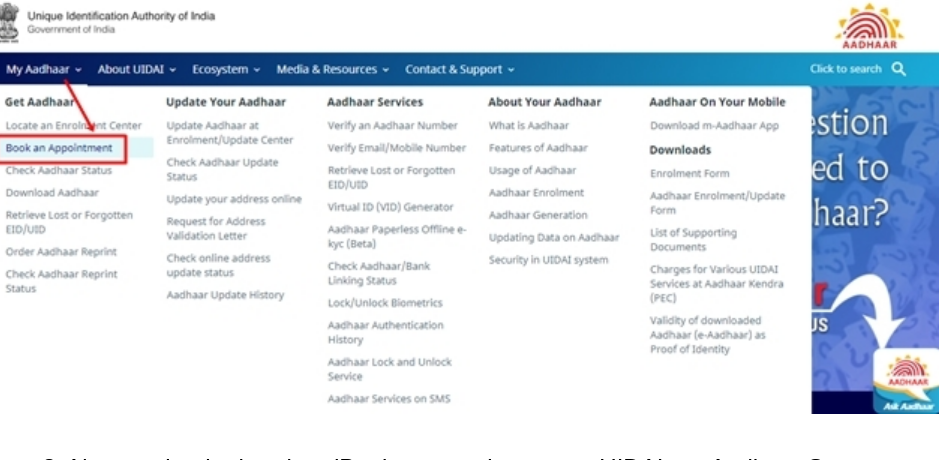 Aadhaar Sewa Kendras (ASK) - Image 1
Book an Appointment at UIDAI run Aadhaar Seva Kendra
Step 3: Select "Book an appointment" option and a new web page appears.
Step 4: Click on "Book an appointment" at UIDAI run Aadhaar Seva Kendra option if the applicant belongs to the cities like Patna, Delhi, Banglore, Lucknow, Agra, Bhopal, Chennai, Vijaywada, Hisar and Chandigarh.
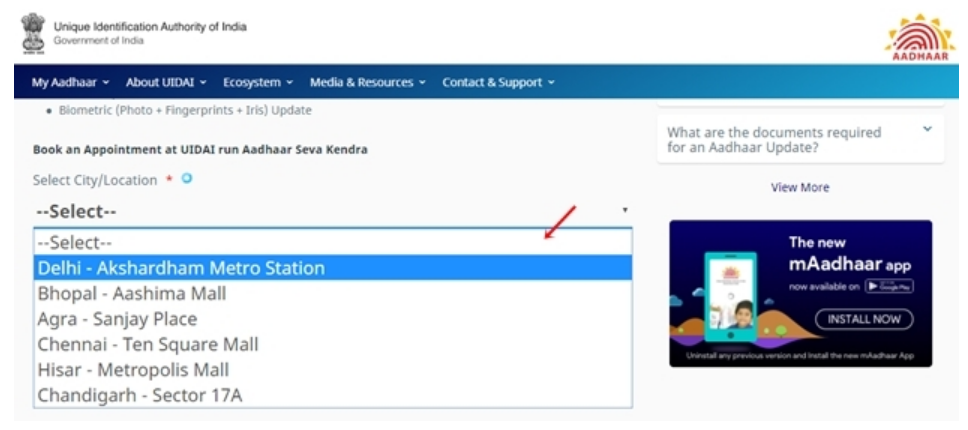
Select the City/Location
Step 5: On the next page, select the respective "City or Location" and then click on "Proceed to book an appointment" button.
Step 6: Once you have selected the 'City or Location', and then you will be redirected to a next page.
Aadhaar Sewa Kendras (ASK) - Image 1
Book an Appointment at UIDAI run Aadhaar Seva Kendra
Step 3: Select "Book an appointment" option and a new web page appears.
Step 4: Click on "Book an appointment" at UIDAI run Aadhaar Seva Kendra option if the applicant belongs to the cities like Patna, Delhi, Banglore, Lucknow, Agra, Bhopal, Chennai, Vijaywada, Hisar and Chandigarh.
Select the City/Location
Step 5: On the next page, select the respective "City or Location" and then click on "Proceed to book an appointment" button.
Step 6: Once you have selected the 'City or Location', and then you will be redirected to a next page.
 Aadhaar Sewa Kendras (ASK) - Image 2
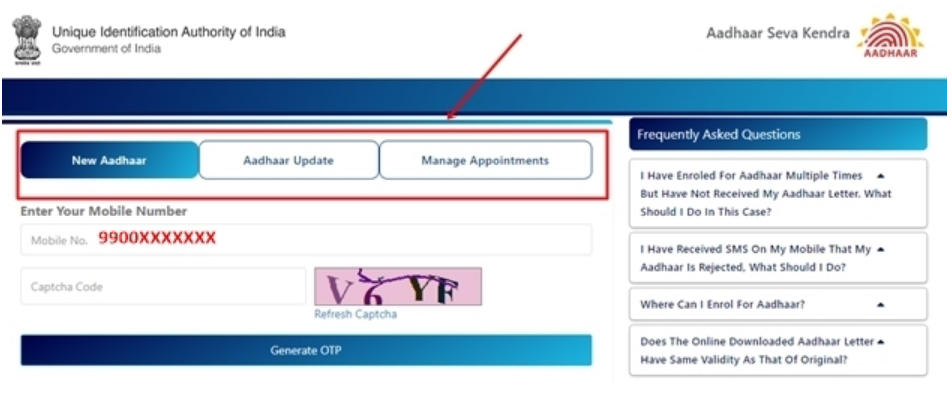
Select Aadhaar services options
Step 7: Then, the applicant will have to select from the Aadhaar services options displayed on the current page. The options are "Aadhaar Update" or "New Aadhaar" or "Manage Appointment".
Aadhaar Sewa Kendras (ASK) - Image 2
Select Aadhaar services options
Step 7: Then, the applicant will have to select from the Aadhaar services options displayed on the current page. The options are "Aadhaar Update" or "New Aadhaar" or "Manage Appointment".
 Aadhaar Sewa Kendras (ASK) - Image 3
New Aadhaar
Step 8: For new application, the applicant has to click on "New Aadhaar" option.
Update Aadhaar
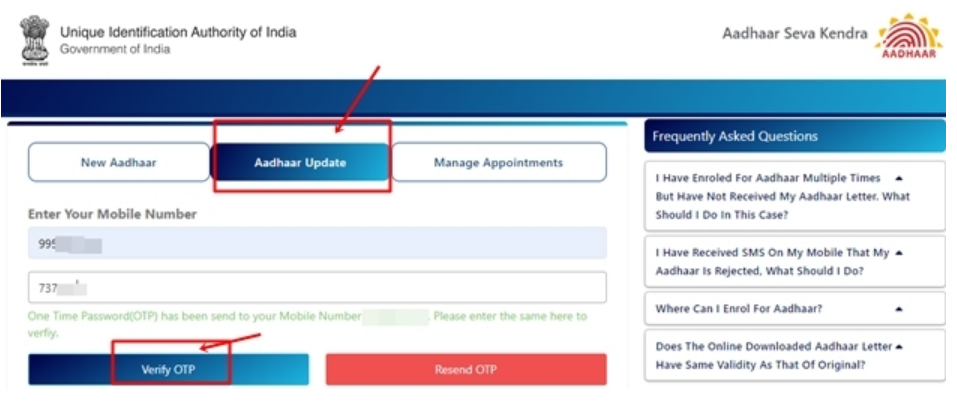
Step 9: If the applicant wants to update details select the 'Aadhaar Update' option and enter the updated mobile number, captcha code and generated a valid one-time password (OTP) so that the applicant will have to verify the application by entering the OTP received in the registered mobile number.
Aadhaar Sewa Kendras (ASK) - Image 3
New Aadhaar
Step 8: For new application, the applicant has to click on "New Aadhaar" option.
Update Aadhaar
Step 9: If the applicant wants to update details select the 'Aadhaar Update' option and enter the updated mobile number, captcha code and generated a valid one-time password (OTP) so that the applicant will have to verify the application by entering the OTP received in the registered mobile number.
 Aadhaar Sewa Kendras (ASK) - Image 4
Receive OTP
Step 10: Upon successful OTP verification, the applicant needs to fill the online form, which consists of appointment details, personal details, Aadhaar number, regional language, state, city and Aadhaar Seva Kendra.
Aadhaar Sewa Kendras (ASK) - Image 4
Receive OTP
Step 10: Upon successful OTP verification, the applicant needs to fill the online form, which consists of appointment details, personal details, Aadhaar number, regional language, state, city and Aadhaar Seva Kendra.
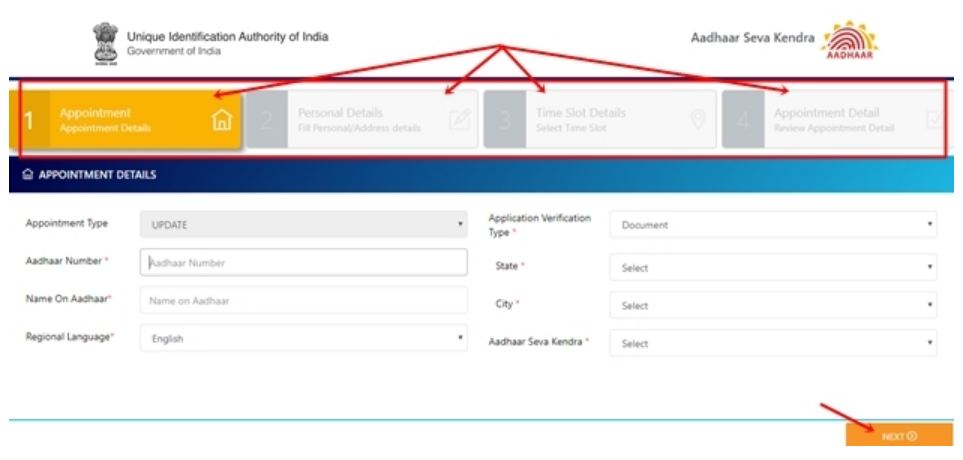 Aadhaar Sewa Kendras (ASK) - Image 5
Select the Time slot
Step 11: After filling appointment details, personal details, the applicant needs to select the time slot for booking the appointment.
Aadhaar Sewa Kendras (ASK) - Image 5
Select the Time slot
Step 11: After filling appointment details, personal details, the applicant needs to select the time slot for booking the appointment.
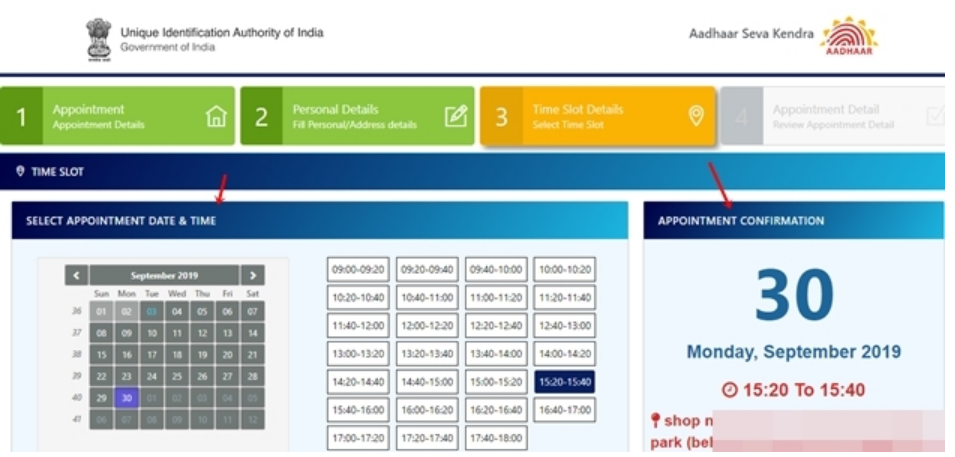 Aadhaar Sewa Kendras (ASK) - Image 6
Verify the Appointment Details
Step 12: Check your appointment details and in case of any discrepancy, click on "Previous" button and correct the mistakes if the details are valid then click on "Submit" button to complete the online booking of your appointment.
Aadhaar Sewa Kendras (ASK) - Image 6
Verify the Appointment Details
Step 12: Check your appointment details and in case of any discrepancy, click on "Previous" button and correct the mistakes if the details are valid then click on "Submit" button to complete the online booking of your appointment.
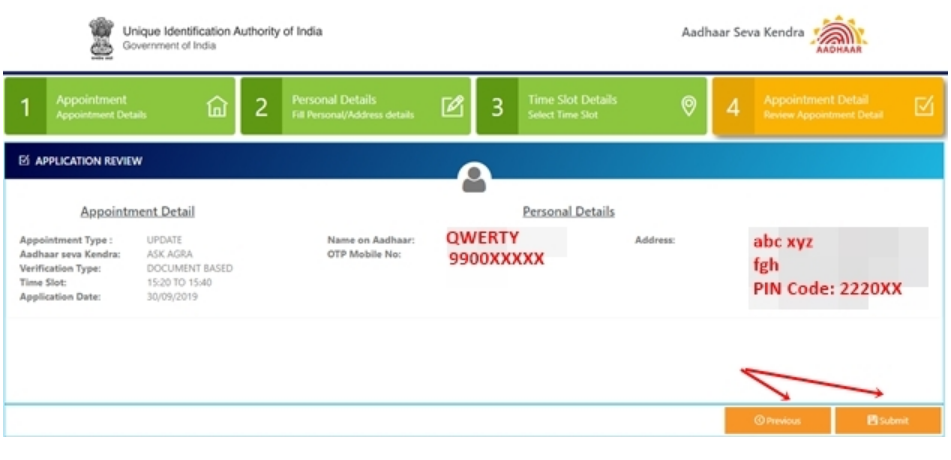 Aadhaar Sewa Kendras (ASK) - Image 7
Receive Appointment Booking Number
Step 13: After the submission of details, the confirmation message, along with an appointment booking number, will be sent to the applicant registered mobile number.
Aadhaar Sewa Kendras (ASK) - Image 7
Receive Appointment Booking Number
Step 13: After the submission of details, the confirmation message, along with an appointment booking number, will be sent to the applicant registered mobile number.