

RENU SURESH
Expert
Published on: Oct 21, 2026
Invoice Management System (IMS) under GST: Key Features, Benefits & How It Works
The Goods and Services Tax Network (GSTN) continues to enhance the GST portal by introducing new tools that make compliance and auditing easier for taxpayers. The most recent addition is the Invoice Management System (IMS), launched on 14th October 2024. This system is designed to streamline the management of invoices, making ITC (Input Tax Credit) claims faster, more accurate, and more reliable.
In this article, we’ll walk you through the key features, benefits, and working mechanism of the Invoice Management System. Let’s dive in.
Latest Updates
19th June 2025
GSTN, through an advisory, clarified the impact and resolution of wrongly rejected documents on the Invoice Management System (IMS) for both suppliers and recipients.
7th June 2025
GSTN announced that from the July 2025 tax period (filed in August 2025), the auto-populated sales liability values in GSTR-3B will be hard-locked. This means taxpayers will no longer be able to manually edit Table 3 values in GSTR-3B, which are auto-filled from GSTR-1/GSTR-1A/IFF.
Suppliers must act promptly and regularly through GSTR-1A to address any documents rejected by their B2B buyers on the IMS.
21st December 2024 — 55th GST Council Meeting
The Council recommended key amendments to strengthen the GST return framework and align it with IMS actions:
- Section 38 of the CGST Act, 2017 & Rule 60 of the CGST Rules, 2017, provide a legal framework for generating FORM GSTR-2B based on taxpayers’ actions on IMS.
- Section 34(2) of CGST Act, 2017, mandates the reversal of ITC attributable to a credit note by the recipient, enabling suppliers to reduce their output tax liability.
- Insertion of Rule 67B in CGST Rules, 2017, to prescribe how suppliers’ output tax liability shall be adjusted against a credit note issued.
- Section 39(1) of the CGST Act, 2017 & Rule 61 of the CGST Rules, 2017 mandate that FORM GSTR-3B can be filed only after FORM GSTR-2B of the period is available on the GST portal.
These recommendations will be implemented through the relevant circulars/notifications.
14th October 2024
As per GSTN’s advisory, the Invoice Management System (IMS) was officially made available on the GST portal.
The first GSTR-2B reflecting IMS actions was generated for October 2024 (on or after 14th November 2024).
9th September 2024 — 54th GST Council Meeting
The Finance Minister acknowledged enhancements to the GST return system. According to the 3rd September advisory, recipient taxpayers were given options to:
- Accept
- Reject
- Keep an invoice pending
This facility (initially optional) is expected to reduce errors, improve reconciliation, and lower the number of notices issued due to ITC mismatches.
What is the Invoice Management System (IMS) under GST?
The Invoice Management System (IMS) is a new feature introduced on the GST portal in late 2024. It enables recipient taxpayers to take specific actions on invoices uploaded by their suppliers in GSTR-1. With IMS, recipients can:
- Accept the invoice
- Reject the invoice
- Keep the invoice pending
This system directly addresses one of the biggest challenges in GST compliance — mismatches between supplier-filed invoices and recipient returns, which often lead to disputes and delays in claiming Input Tax Credit (ITC).
By allowing recipients to review and respond to supplier invoices in real-time, IMS helps ensure that records are accurate and aligned. This not only streamlines the ITC claiming process but also reduces errors, improves reconciliation, and minimises the risk of notices or disputes arising from ITC mismatches.
Date of Implementation of Invoice Management System under GST
The Invoice Management System (IMS) was officially implemented on the GST portal as of October 14, 2024. From this date onwards, taxpayers could begin using IMS features to manage and act upon invoices uploaded by their suppliers.
How Does the Invoice Management System (IMS) Work?
One of the biggest challenges for taxpayers under GST is availing Input Tax Credit (ITC) due to mismatches between supplier invoices and recipient records. The Invoice Management System (IMS) addresses these bottlenecks by enabling recipients to review and act on invoices submitted by suppliers. Step-by-Step Process:
Supplier Submission
Suppliers submit and save their GSTR-1 by the 11th of every month, or use the Invoice Furnishing Facility (IFF).
Any amendments can be made using GSTR-1A until the recipient files their GSTR-3B for the relevant tax period.
Invoice Appears on Recipient Dashboard
Once submitted, the invoice appears on the recipient taxpayer’s IMS dashboard and eventually in GSTR-2B.
The dashboard displays key details such as supplier GSTIN, trade name, invoice number, and invoice type.
Recipient Actions
Recipients have three options for each invoice:
- ACCEPT: The invoice becomes part of the recipient's auto-generated ITC statement or GSTR-2B (generated on the 14th of every month).
- REJECT: The invoice is excluded from the recipient's ITC report and GSTR-2B.
- PENDING: The invoice is not counted in the current month’s GSTR-2B but is carried forward to the next month.
- No Action Taken: If the recipient does not act on an invoice, it is deemed accepted and automatically added to GSTR-2B.
Amended Invoices
- If a supplier amends an accepted or pending invoice via GSTR-1A, the updated invoice replaces the old one.
- Recipients must take action on the amended invoice, which will reflect in GSTR-2B in the subsequent month.
Future Utilisation of Pending Invoices
Recipients can claim ITC on pending invoices in future months, subject to the maximum time limit under Section 16(4) of the CGST Act, 2017.
Key Timelines:
- Suppliers upload invoices in GSTR-1/IFF by the 11th of each month.
- Recipients must act before filing GSTR-3B by the 20th of the corresponding month.
- Draft GSTR-2B is recomputed after the 14th for any actions taken after that date.
Key Features of the Invoice Management System (IMS)
The Invoice Management System (IMS) simplifies GST compliance by providing a unified platform for managing, reviewing, and amending invoices, ensuring seamless communication between suppliers and recipients.
- Communication Functionality: IMS serves as a communication tool within the GST portal, linking suppliers and recipients through invoice documentation and a unified dashboard interface.
- Single-Window GSTR-2B Processing: Recipient taxpayers with multiple suppliers can efficiently manage all inward invoices and auto-generate GSTR-2B with minimal intervention. Taxpayers only need to select ACCEPT, REJECT, or PENDING to finalise auto-generated ITR reporting.
- Zero Compliance Burden: IMS does not add any additional compliance requirements. If a recipient does not respond to an invoice, it is automatically marked as deemed accepted. The system streamlines inward invoice management, simplifying ITC reporting.
- Dashboard Summary of Inward Invoices: The IMS dashboard provides a consolidated view of all invoices and actions taken, aiding management decisions and supporting the auditing process.
- Easy Invoice Amendments for Suppliers: Suppliers can conveniently amend submitted invoices using the GSTR-1A functionality, improving accuracy and flexibility.
Documents That Cannot Be Marked as Pending
The following documents or transactions in IMS cannot be marked as Pending. Users must either accept or reject them:
- Original Credit Note: Cannot be marked pending until July 2025 (as per GSTN API updates).
- Upward Amendments of Credit Notes: Regardless of the recipient’s action on the original credit note, these cannot be pending until July 2025.
- Downward Amendments of Credit Notes: If the original credit note was rejected by the recipient, downward amendments cannot be pending.
- Downward Amendments of Invoice/Debit Note/ECO: If the original invoice, debit note, or ECO was accepted by the recipient and the respective GSTR-3B has been filed, these amendments cannot be pending until July 2025 (as per GSTN API updates).
How to Use IMS on the GST Portal
As a buyer or vendor, IMS can be accessed on the GST portal after logging in with your credentials.
Step 1: Log in to the GST Portal
- Log in to the GST portal.
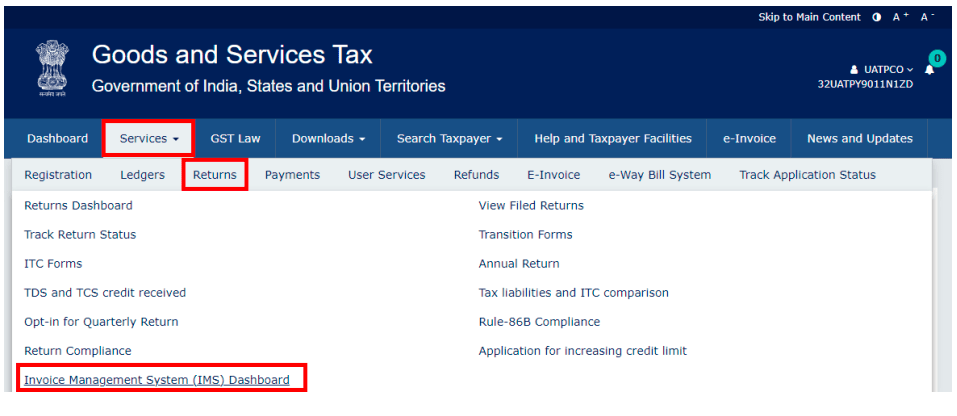
- Navigate to Services > Returns > Invoice Management System (IMS).
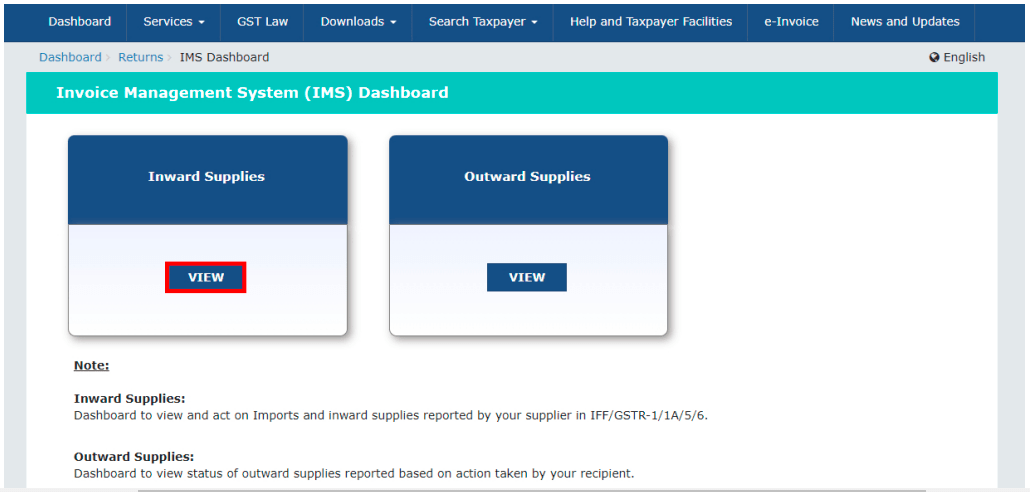
- Click View on the respective tiles to access either the Supplier Dashboard (outward supplies) or the recipient Dashboard (inward supplies).
Step 2: View Summary of Invoices on the IMS Dashboard
- As a buyer, you can view all purchase/inward supply invoices reported by your GST-registered suppliers through GSTR-1, GSTR-1A, or IFF.
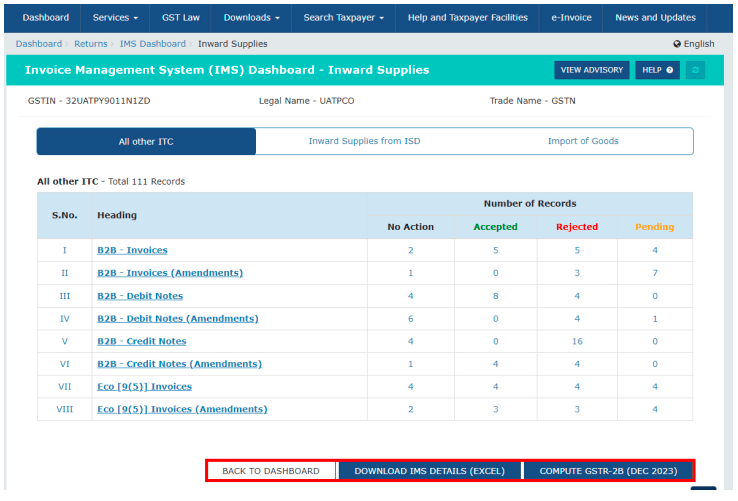
- Invoices are categorised into headings such as B2B invoices, CGST Section 9(5) invoices (e-commerce), credit notes, and debit notes (both original and amended).
- Each heading displays the number of records under No Action, Accepted, Rejected, and Pending.
.webp)
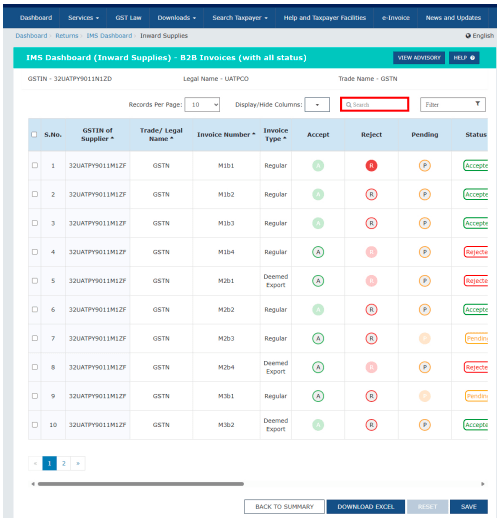
- Click on any heading to view the list of invoices and take the required action.
Step 3: Take Action on Invoices
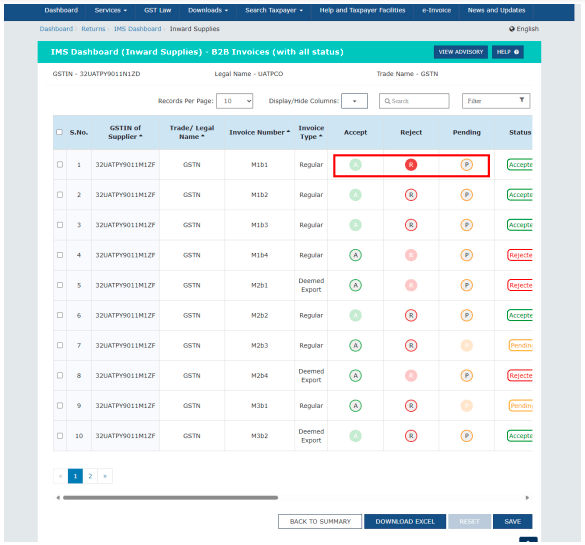
Select an action for each invoice:
- A – Accept
- R – Reject
- P – Keep Pending
Click Save to record your actions.
Use filters or the search option to find specific invoices, and download records with their status as an Excel sheet if needed.
Multiple invoices can be selected using checkboxes for bulk actions.
Note: Any invoice with no action taken before filing GSTR-3B is considered deemed accepted.
Step 4: Keep Invoices Pending (If Needed)
- Select P to mark any invoice or credit/debit note (CDN) as Pending for later review.
- You may postpone action for a few months, but ensure to accept or reject the invoice/CDN before the deadline to claim Input Tax Credit (ITC) under CGST Section 16(4).
- Caution: Delaying action blocks your working capital until the invoice is processed.
Step 5: Generate or Recompute GSTR-2B
- GSTR-2B is generally available after the 14th of each month for the previous month.
- If no action is taken in IMS after the 14th, the GSTR-2B is considered final for claiming ITC in GSTR-3B.
- If you take or update any action after the 14th, the Compute GSTR-2B button becomes available to recompute GSTR-2B.
Step 6: File GSTR-3B
- After completing actions in IMS, the GSTR-2B will reflect the updated invoice details.
- Accepted invoices and debit notes appear under the ITC Available section in GSTR-2B.
- These details flow into the corresponding sections of Table 4 in GSTR-3B.
- Review the entries, make any necessary edits for discrepancies, and then file GSTR-3B.
How Taxpayers Manage Invoices and Claim Input Tax Credit (ITC
Currently, taxpayers follow several steps to manage inward invoices, reconcile them, and claim ITC:
- Collect Purchase Register Records: Recipients gather all records from their purchase register.
- Download GSTR-2A: After suppliers file their GSTR-1 with supporting documents, the inward invoice details appear in the recipient’s GSTR-2A.
- Download GSTR-2B: GSTR-2B is auto-generated on the 14th of every month and is used as part of the ITC claim.
- Reconcile GSTR-2A with Purchase Register: Compare GSTR-2A entries with purchase register records to ensure accuracy.
- Reconcile GSTR-1 with Sales Register: Verify the accuracy of outward supplies by comparing the sales register with GSTR-1.
- Reconcile GSTR-3B with GSTR-1: Calculate GST liability accurately by ensuring consistency between GSTR-3B and GSTR-1.
- Match GSTR-2B with GSTR-3B: Ensure proper utilisation of ITC when discharging GST liability.
- Additional Reconciliation for Large Businesses: Large taxpayers may also reconcile e-way bills and invoices to avoid discrepancies and ensure compliance.
Impact & Resolutions for Wrong Actions on IMS
Incorrect actions on IMS can affect ITC claims and reporting, but there are clear ways for recipients and suppliers to correct them.
Recipient Rejection Errors:
If a recipient mistakenly rejects a document on IMS and has already reported it in GSTR-3B, they can request the supplier to report the document in GSTR-1A for the same period or as an amendment in GSTR-1 of a subsequent period. This allows the recipient to accept the document in the correct period.
Impact on Supplier for Rejected Invoices:
- The above correction does not increase the supplier’s liability.
Amended Credit Notes & ITC Adjustment:
Recipients can reverse the ITC claimed based on an amended credit note by accepting the updated credit note from the supplier on IMS. When GSTR-2B is recomputed, the ITC is adjusted to reflect the amended value.
Supplier Liability for Rejected Credit Notes:
Initially, the supplier’s liability is added back in the unsubmitted GSTR-3B. Once the supplier reports the credit note in GSTR-1A (same period) or GSTR-1 (next period), the liability is reduced accordingly.
Benefits of the Invoice Management System (IMS)
Once rolled out, IMS is expected to provide several benefits for businesses of all sizes:
- Precision Audit: Auditors can review each invoice thoroughly through a single interface, reducing the risk of errors and simplifying the audit process.
- Minimised Errors in GSTR-3B: With a summary view of all inward invoices, taxpayers can ensure that no invoice is missed before filing GSTR-3B.
- Simplified Handling of Pending Invoices: Pending invoices are carried forward to future tax periods without impacting GSTR-2B or GSTR-3B.
- Support for QRMP Taxpayers: IMS is accessible to small businesses, including QRMP taxpayers. However, for them, GSTR-2B will be generated quarterly, not monthly, for the first two months of the quarter.
Key Points of the Invoice Management System (IMS)
- IMS has been live since 1st October 2024.
- The system simplifies the review of inward invoices, allowing taxpayers to take individual actions easily.
- There is no additional compliance burden—invoices are automatically considered “deemed accepted” if no action is taken.
- IMS enhances audit efficiency for large companies and streamlines ITC claiming for smaller businesses.
The user-friendly interface requires no accounting or auditing expertise.
LEDGERS: Smart Invoice Management Starts Here
Automate approvals, monitor ITC, and reduce errors. Take charge of your workflow with Ledgers:
- Stay on top of every inward and outward invoice with real-time tracking.
- Ensure seamless GST compliance without the hassle of manual reconciliation.
- Collaborate with your team efficiently and reduce processing delays.
- Generate accurate reports instantly for audits and management reviews.
- Experience a smarter, faster, and more reliable way to manage your invoices.