
Arun Kumar
Expert
Published on: Jul 30, 2026
Tracking GST Payment Status
GST payment can be made
online or offline through authorised banks. Prior to making a GST payment, the taxpayer must log in to his/her GST account and generate a GST payment challan. The procedure for generating GST challan and making GST payment is covered in other articles. In this article, we look at the procedure for tracking GST payment status on the GST portal. Keeping track of the payment is essential at different levels as it gives the users a record of the complete transaction. To keep track of the complete payment, follow the steps below. In case you have not received credit for GST payment made after 24-48 hours, you can raise a ticket for GST payment problems.Who can track the GST Payment?
The following persons can track their GST payment:
- E-Commerce who collects taxes,
- Individuals supplying goods and services inter-state supplies,
- Individuals supplying goods and services intra-state supplies,
- Person liable to deduct TDS,
- Late Filing the Returns,
- Any other payment as required by the GST Act.
How to Track the GST Payment in GST Portal?
Any registered taxpayer who paid the GST amount can track in the GST Portal through the Challan history. The taxpayer can follow the following steps:
STEP 1: Access the GST Portal. The GST Home page is displayed STEP 2: Click the Services> Payments > Track Payment Status option. GST Track Payment Status OptionSTEP 3: In the Enter GSTIN field, enter your GSTIN.
STEP 4: In the Enter CPIN field, enter your CPIN.
STEP 5: Type in the characters as displayed below field, enter the captcha text.
STEP 6: Click the TRACK STATUS button. The payment status is displayed. To view the challan, click the VIEW CHALLAN button.
GST Track Payment Status OptionSTEP 3: In the Enter GSTIN field, enter your GSTIN.
STEP 4: In the Enter CPIN field, enter your CPIN.
STEP 5: Type in the characters as displayed below field, enter the captcha text.
STEP 6: Click the TRACK STATUS button. The payment status is displayed. To view the challan, click the VIEW CHALLAN button.
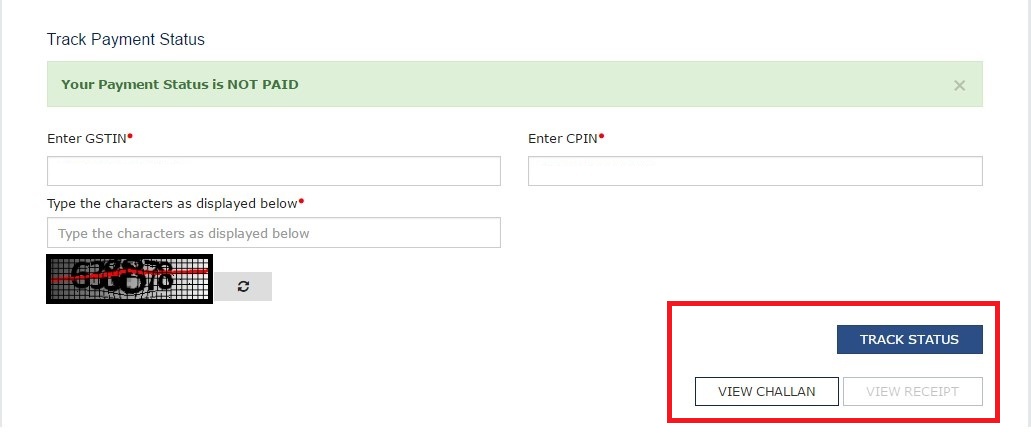 GST Payment Status
GST Payment Challan Status
Once the details are entered in the field, and the ‘
Track Payment Status’ is clicked, the status of the challan is displayed. There are two statuses:- FAILED/ NOT PAID
- PAID
Failed Payment
If the status of Challan shows FAILED/ NOT PAID, and the user selected the mode as E-Payment, then the taxpayer can click on the VIEW CHALLAN button. To make the payment again for the Failed challan, select the Bank, agree with the Terms and Conditions and click on the MAKE PAYMENT button
Paid Challan
If the Payment status is PAID, then the VIEW RECEIPT button is enabled, and the Taxpayer can view the receipt and also download the receipt after clicking on the VIEW RECEIPT button. In case of any other Status of challan (other than PAID), Taxpayer will be able to View the Challan.
Click here to know more about the procedure for making GST Payment.