

Renu Suresh
Expert
Published on: Aug 19, 2026
Register DSC on the new Income Tax Portal
Digital Signature Certificate or DSC is proof of the identity of an individual taxpayer or organization. Irrespective of the authentication, each digital taxpayer must register DSC on the new Income Tax Portal. A valid Class 3 Digital Signature Certificate (DSC) is essential for taxpayers to file Income tax returns online because it has to be affixed to all documents filed in the ITR. Registering the DSC on the new Income Tax Portal ensures that the returns submitted are authentic and secure. The present article briefs the procedure Register DSC on the new Income Tax Portal.Digital Signature Certificate (DSC)
DSC is the electronic version of a physical certificate. It's used to examine someone's or an organization's identity online. Likewise, a handwritten signature confirms a physical document, Digital Signature Certificate (DSC) confirms an electronic document. Digital Signature Certificate can also use to e-verify a taxpayer's ITR, among other things.Importance of Registering DSC on the Income Tax Portal
Any person willing to sign the Income Tax Return 'digitally' has to complete the registration process for the DSC on the e-filing website before signing.- As mentioned above, Digital Signature Certificate (DSC) is essential for taxpayers to file Income tax returns online. It ensures that the ITR submitted is secure.
- DSC must be affixed on all documents filed in the Income Tax Returns.
Who should register the DSC on the Income tax portal?
- Companies and taxpayers must use a Digital Signature Certificate (DSC) to e-verify their ITR (Income Tax Return).
- DSC is mainly for those taxpayers whose accounts are to be audited under section 44AB of the income tax act, and it is optional for the rest of the taxpayers.
- As per the revised provisions under section 44AB of the Income Tax Act, e-Filing is mandatory for all individuals/professionals having an annual gross receipt of Rs.25 Lakhs and above and for businesses with an annual turnover of Rs.1 Crore and above.
e-Filing of Income Tax with Digital Signature Certificate
A Digital Signature Certificate is mandatory for income tax e-filing by a specific section of businesses, families, and individuals. As per Section 140 of the Income Tax Act 1961, the following person is responsible for signing the IT return.-
- Managing Director
- Any other Director (in case the MD is unavailable)
- Any authorized person possessing a legal power of attorney in case of the presence of a Non-resident Company
- Managing Partner of an organization or any other Partner (in the specific case of Managing Partner being unavailable)
- Chief Executive Officer/ Principal Officer or Competent person in case of other entities such as Body of Individuals, Association of Persons, Artificial Juridical person, Trust, Local Authority
- Karta, in case of a HUF
- Self in case of an Individual
- Any authorized person possessing a legal power of attorney if the individual cannot sign the IT Return
- Any authorized person possessing a legal power of attorney if the individual is outside India.
Register Digital Signature Certificate (DSC) service of Income tax Portal
The Register Digital Signature Certificate (DSC) service of the Income-tax Portal is available to all registered users of the Income tax e-Filing portal. This service enables the registered taxpayer to perform the following:- Register DSC
- Re-Register when registered DSC has expired
- Re-Register when registered DSC has not expired
- Register DSC of Principal Contact
Register DSC on New Income Tax Portal
CBDT launched the new Income Tax portal on 07th June 2021; taxpayers were required to register Digital Signature Certificate (DSC) in the new Portal even though it was registered earlier.- All taxpayers who wish to use DSC are required to re-register their DSC on the new Income tax portal using the 'Register DSC' service.
- CBDT informed that the DSC registered on the previous Income tax e-filing portal will not be migrated to the new e-filing Portal due to security and technical reasons.
Prerequisites for Register DSC on the new Income Tax Portal
- The taxpayer must be the registered user of the e-filing portal with a valid username and password.
- Downloaded and installed the emsigner utility
- USB token should plug into the computer
- DSC USB token should be Class 3 DSC
- The registered DSC should be active and not expired.
- DSC should not be revoked
Procedure to download the emsigner utility
The emsigner utility must download before registration of DSC in the Income-tax Portal. Follow the below-mentioned steps to download the emsigner utility:- Access the official website of the income tax e-filing portal and Click on the 'Downloads' tab from the top.
- Click on 'DSC Management Utility' and select the 'Utility (emBridge) link.
- After the completion of downloading, install the emBridge on the computer.
Procedure to Register DSC on the new Income Tax Portal
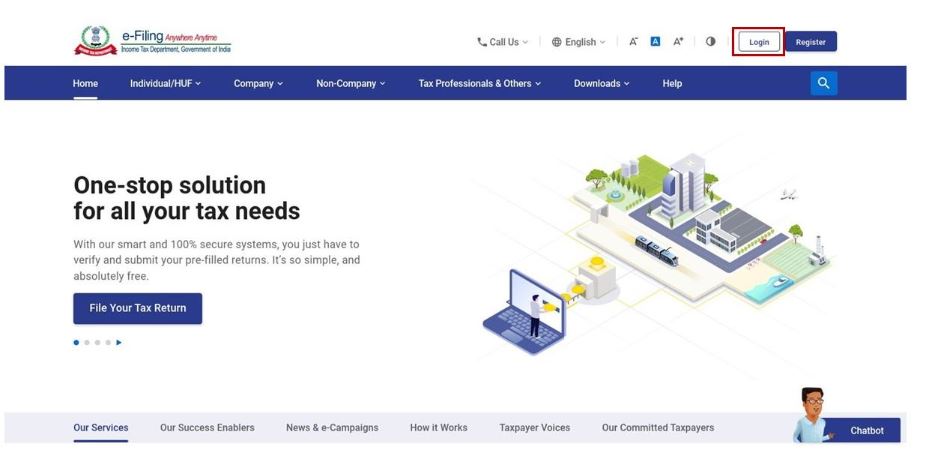
- Access the official website of the new and log in to the Portal using valid user credentials.
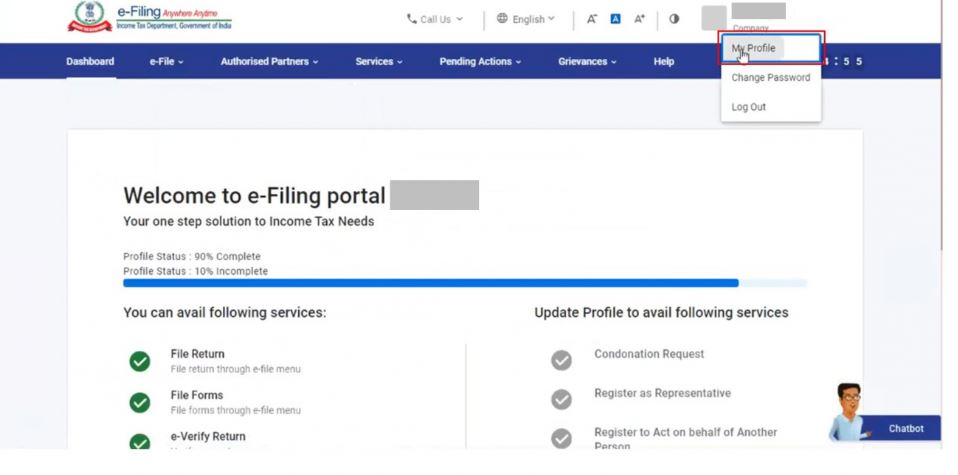
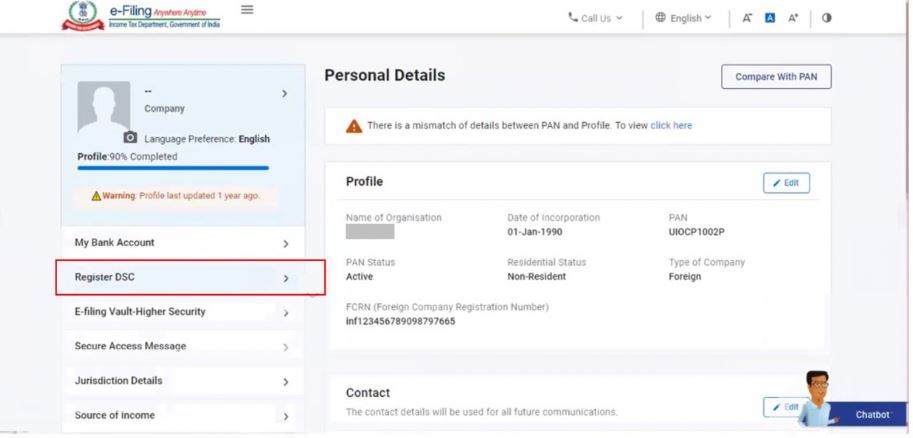
- Select the My Profile page from the Dashboard and Click Register DSC on the left side of the screen.
- Furnish the email ID linked with the DSC token.
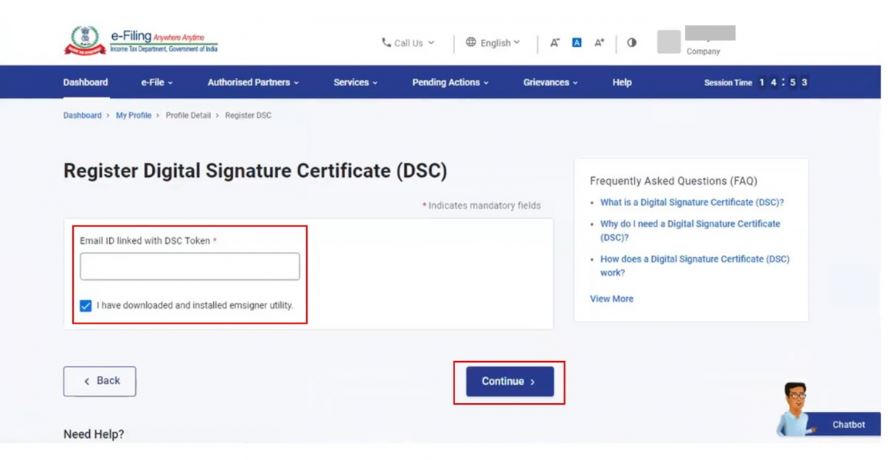
- The PAN number will display, and select "I have downloaded and installed emsigner utility" and Click on Continue.
- Insert the USB token into the USB port of the machine and run the "eMBridge."
- Select the Provider in the Dropdown (Provider will display after the successful running of the eMBridge application, Select the Certificate from the dropdown (DSC holder name will show in the dropdown)
- Furnish the Provider Password, the DSC token password, and click on "Sign."
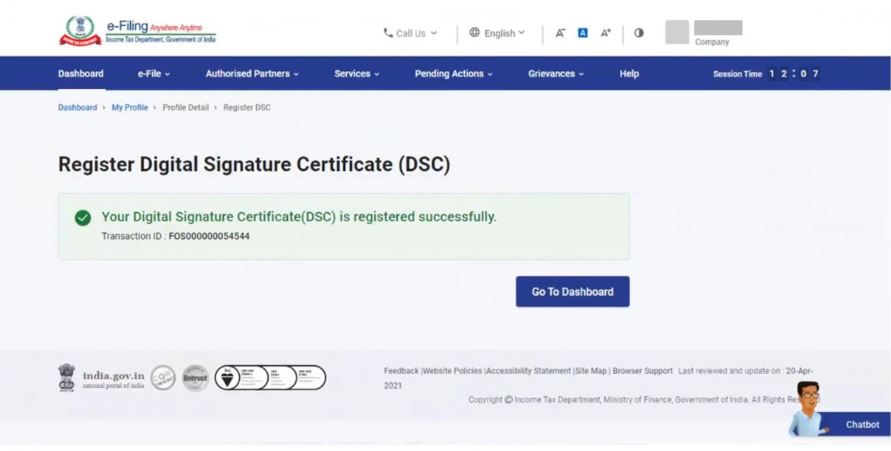
- A success message will display on successful validation.
 Note:
Note:
- In case the DSC is expired, the system will display a message that 'Your registered DSC has already expired. Please re-register a valid DSC'.
- If a taxpayer wants to re-register an unexpired DSC, click on 'View' to view the details or click on 'Update' to update the same.
- If the taxpayer wants to register the DSC with the principal contact, enter the email ID of the principal contact registered at the e-filing portal and proceed to register DSC.