
Isha Purohit
Expert
Published on: Aug 21, 2026
Form 10-IEA: Due Date, Required Documents & Filing Process
Planning to file your ITR under the old tax regime? With the Budget 2023 making the new tax regime the default from FY 2023-24 onwards, taxpayers who prefer the old regime must actively opt for it by filing Form 10-IEA. This form must be submitted before the due date for filing your income tax return to ensure your preference is recorded. In this article, we’ll walk you through what Form 10-IEA is, its due date, and the step-by-step filing procedure. Need help? Talk to the tax experts at IndiaFilings today and make your Form 10-IEA submission—and your ITR filing—hassle-free.
Also read: Old Regime vs New Regime: Which is Better for You?
What is Form 10-IEA?
Form 10-IEA is a revised tax filing form that enables taxpayers to choose between the new tax regime—set as the default from the financial year 2023–24—and the old tax regime. It allows individuals to opt for the old regime to take advantage of its available deductions and exemptions, even though they are automatically enrolled in the new regime.
Why Form 10-IEA is Needed?
Form 10-IEA is essential for taxpayers, particularly those with income from business or profession, who wish to exercise their choice between the new and old tax regimes. It ensures proper compliance and helps both the taxpayer and the government maintain clarity in tax reporting.
- Switching Tax Regimes: The form allows taxpayers to opt out of the default new tax regime and switch to the old regime to claim available deductions and exemptions.
- Re-entry Option: It also enables eligible taxpayers to re-enter the new tax regime in future assessment years, subject to specific conditions.
- Determines Applicable Rules: The selected tax regime directly influences the deductions, exemptions, and tax rates that apply to the individual.
- Ensures Transparency: A clear declaration of the taxpayer's regime choice and relevant dates helps the government monitor tax preferences accurately.
- Maintains Updated Records: Filing Form 10-IEA contributes to building a precise and up-to-date tax profile for each taxpayer.
Form 10-IE: Purpose and Changes from FY 2023–24
Form 10-IE was used by taxpayers to opt for the new tax regime when it was not the default. This applied until the financial year 2022–23, where individuals had to file this form to declare their intent to be taxed under the new regime.
Shift in Default Tax Regime
From FY 2023–24 onward, the new tax regime has become the default. As a result, taxpayers who do not explicitly choose the old regime will be automatically taxed under the new one.
Impact on Form 10-IE Usage
With the new regime now being the default, Form 10-IE is no longer required for salaried individuals and those without business or professional income to opt into the new regime.Instead, these individuals can indicate their preference for the old regime directly in their income tax return (ITR), simplifying the process.
Taxpayers with business or professional income must still file Form 10-IE if they wish to opt into the new regime in the earlier years (up to FY 2022–23) or if required under transitional rules.
Who Should File Form 10-IEA?
With the new tax regime set as the default from FY 2023–24, taxpayers who prefer the old regime must take specific actions based on their source of income:
- For Taxpayers with Business or Professional Income: Individuals filing returns through ITR-3 or ITR-4 must submit Form 10-IEA to opt for the old tax regime. This form must be filed within the prescribed due date under Section 139(1) of the Income Tax Act.
- For Taxpayers Without Business or Professional Income: Individuals using forms like ITR-1 or ITR-2 can simply select the option "Opting out of new regime" directly in the ITR form. No separate filing of Form 10-IEA is required in this case.
Form 10-IEA Due Date
Form 10-IEA must be submitted online within the deadline prescribed for filing the income tax return, typically by July 31st. Timely submission ensures compliance with tax regulations and enables tax authorities to process your tax details without delays.
After filing, you will receive an acknowledgement number, which is crucial for tracking the status of your Form 10-IEA and referencing it in any future communications. This number should also be mentioned when filing your Income Tax Return (ITR).
Verification of Form 10-IEA
Before submitting Form 10-IEA online, it is essential to verify and validate the form thoroughly. The verification can be done using an electronic verification code (EVC) or a digital signature. Completing this verification ensures that the details provided in the form are accurate and legitimate, helping to prevent fraudulent activities and ensuring compliance with tax rules.
Details Required to File Form 10-IEA
Before filling out Form 10-IEA online, it's important to understand the information you’ll need to provide. Below are the details required in the form:
- Full Name: Enter your full name exactly as mentioned on your PAN card and other official documents.
- Assessment Year: Specify the assessment year (AY) applicable to the tax regime choice. For instance, if you opt for the old tax regime in FY 2023-24, the applicable assessment year will be AY 2024-25.
- Choice of Tax Regime: Indicate whether you are discontinuing the new tax regime or re-entering it. This choice will determine the tax deductions, rates, and exemptions applicable to your income.
- Dates for Change in Tax Regime: You must provide the dates for discontinuing the current tax regime and entering the new one, if applicable.
- Income from Business or Profession: Confirm whether you have income under the head of “Profits and Gains of Business or Profession”.
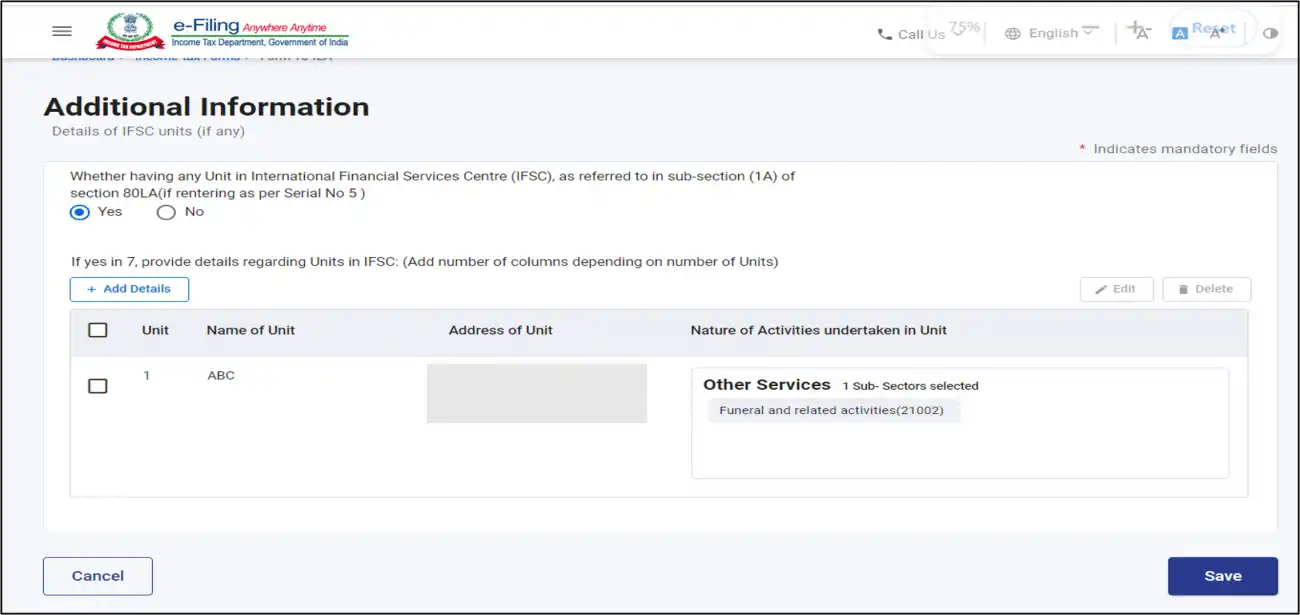
- IFSC Unit Details: Confirm whether you have a unit in an International Financial Service Centre (IFSC) as specified in Section 80LA(1A). If yes, provide the necessary details of the unit.
- Additional Information: Include your address, date of birth, and type of business/profession (if applicable to your business income). Also, provide information about any previously filed Form 10-IE and make the required declaration.
How to File Form 10-IEA Online
Follow these steps to successfully file Form 10-IEA online:
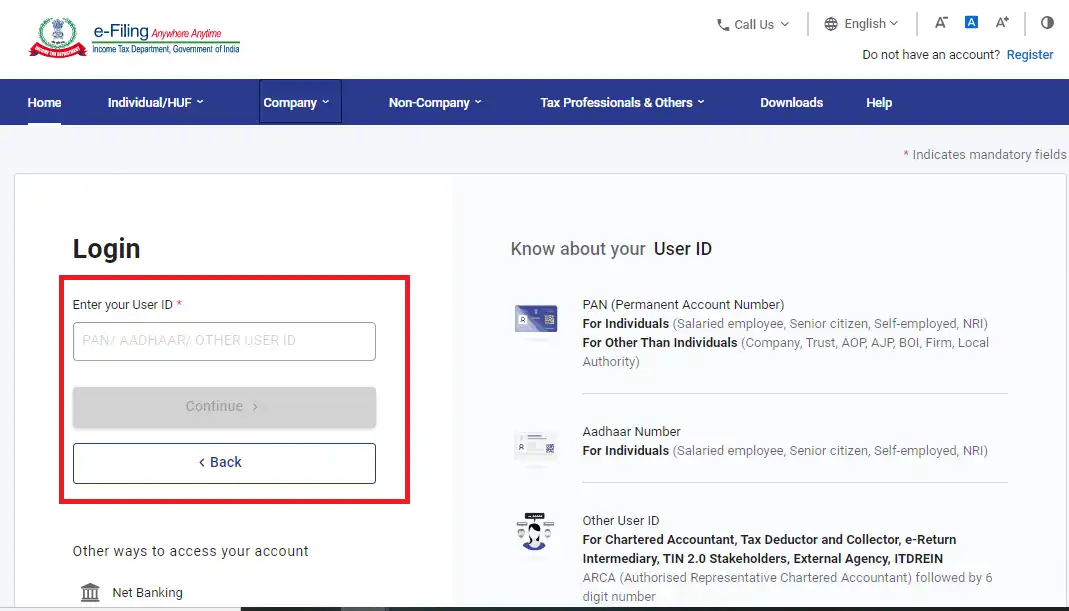
Step 1: Log in to the e-Filing Portal
Go to the Income Tax e-Filing Portal and log in using your credentials.
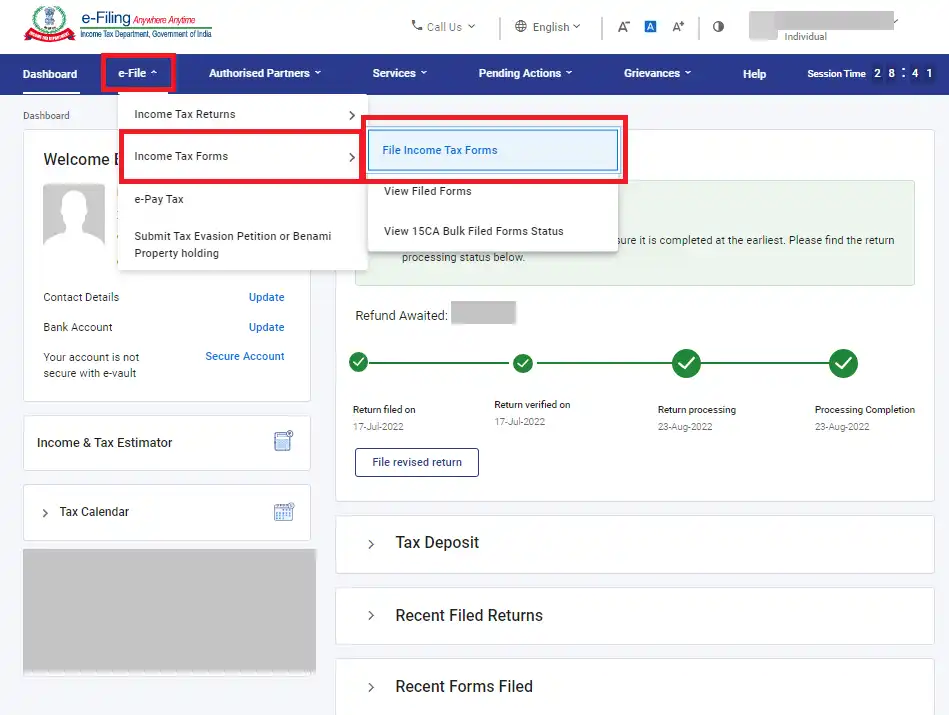
Step 2: Navigate to the Income Tax Forms Section
On the dashboard, click on ‘e-File’ > ‘Income Tax Forms’ > ‘File Income Tax Forms’.
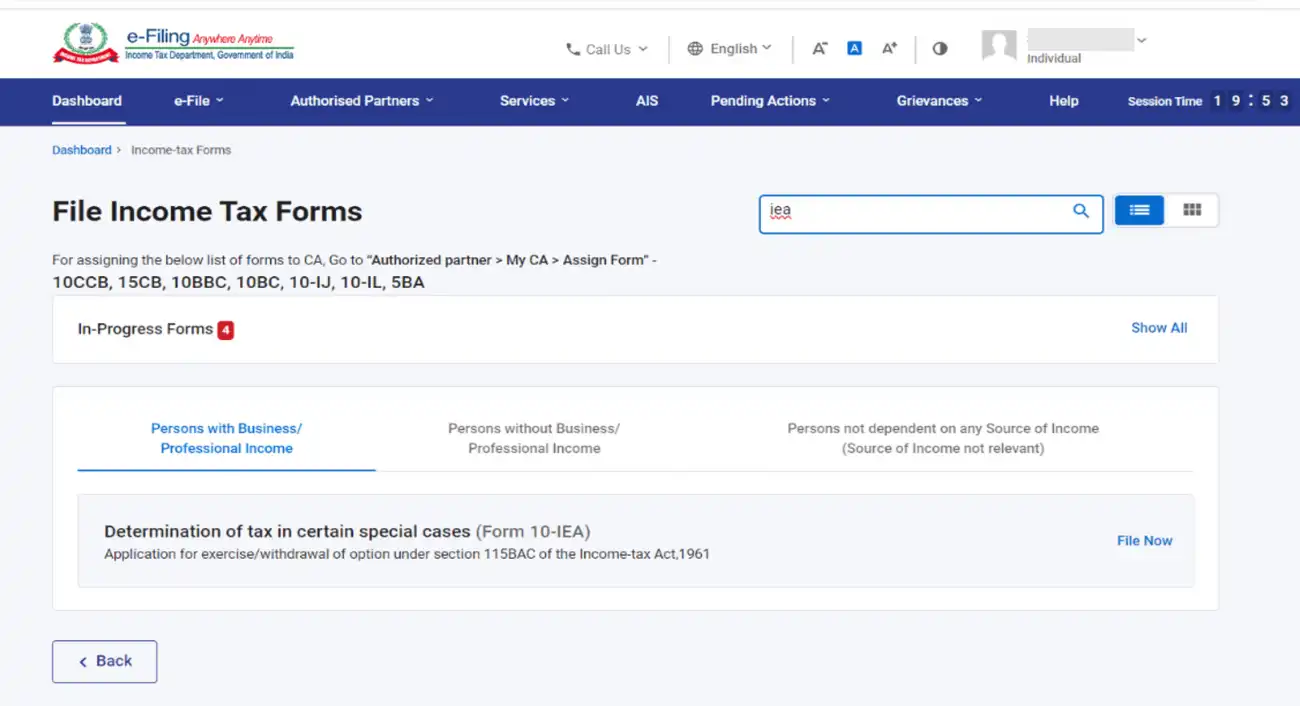
Step 3: Select Form 10-IEA
Scroll down to find Form 10-IEA, or type it in the search box. Once located, click on the ‘File Now’ button to proceed.
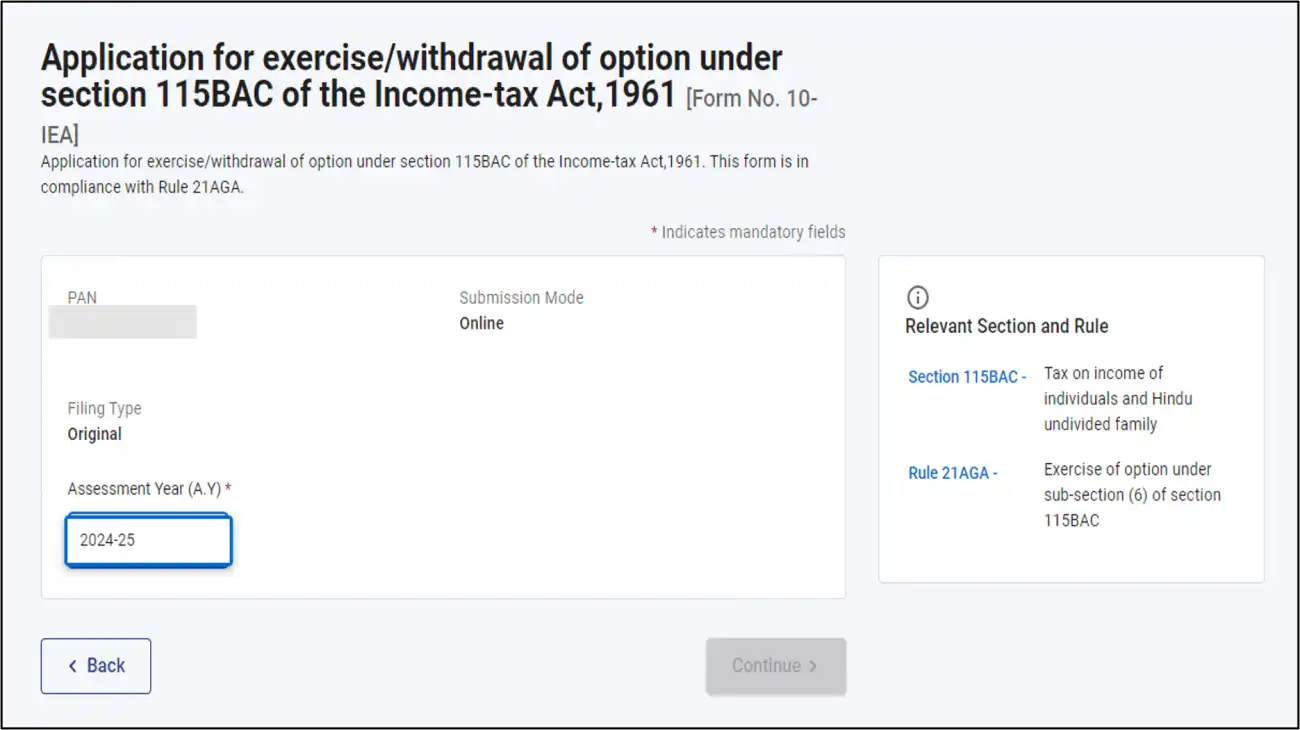
Step 4: Choose the Relevant Assessment Year
Select the Assessment Year (AY) for which you're filing the return. For example, if you are filing taxes for FY 2023-24, select AY 2024-25.
Step 5: Verify Document Requirements
Review the required documents for filing. Once confirmed, click on ‘Let’s Get Started’.

Step 6: Confirm Income Details
Select ‘Yes’ if you have income under the head “Profits and Gains of Business or Profession” for the assessment year. Also, choose the applicable due date for filing the return and click ‘Continue’.
Note: Use the ‘Help Document’ hyperlink for guidance on selecting the due date.
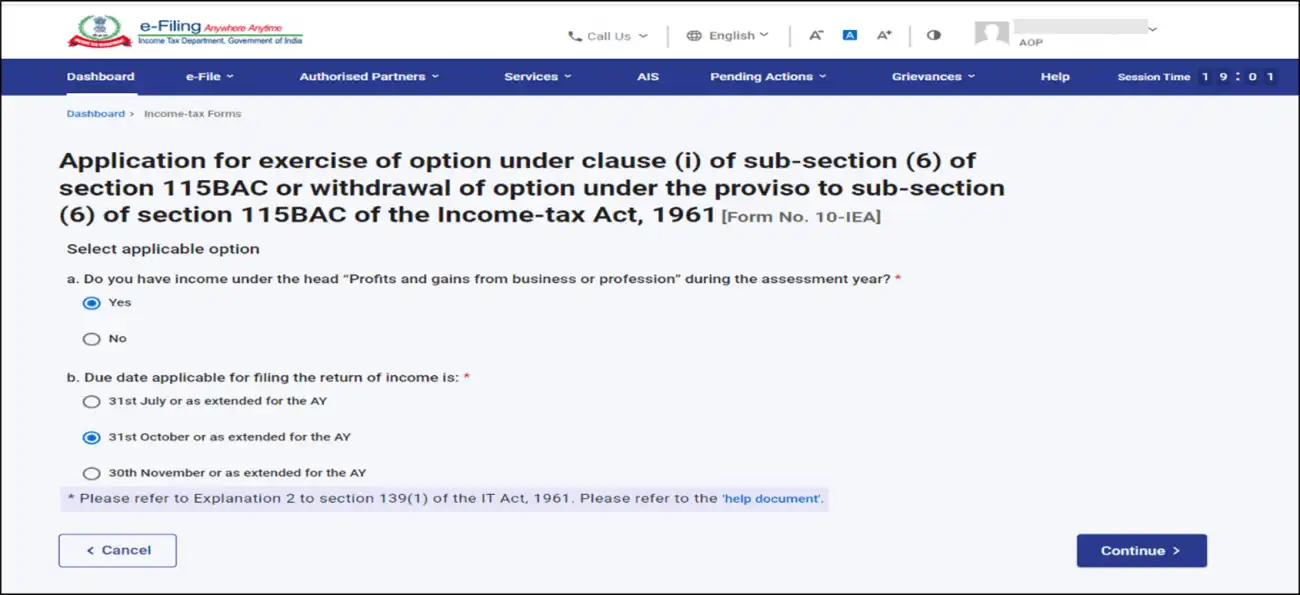
Step 7: Confirm Tax Regime Choice
Click ‘Yes’ to confirm your selection of the tax regime.
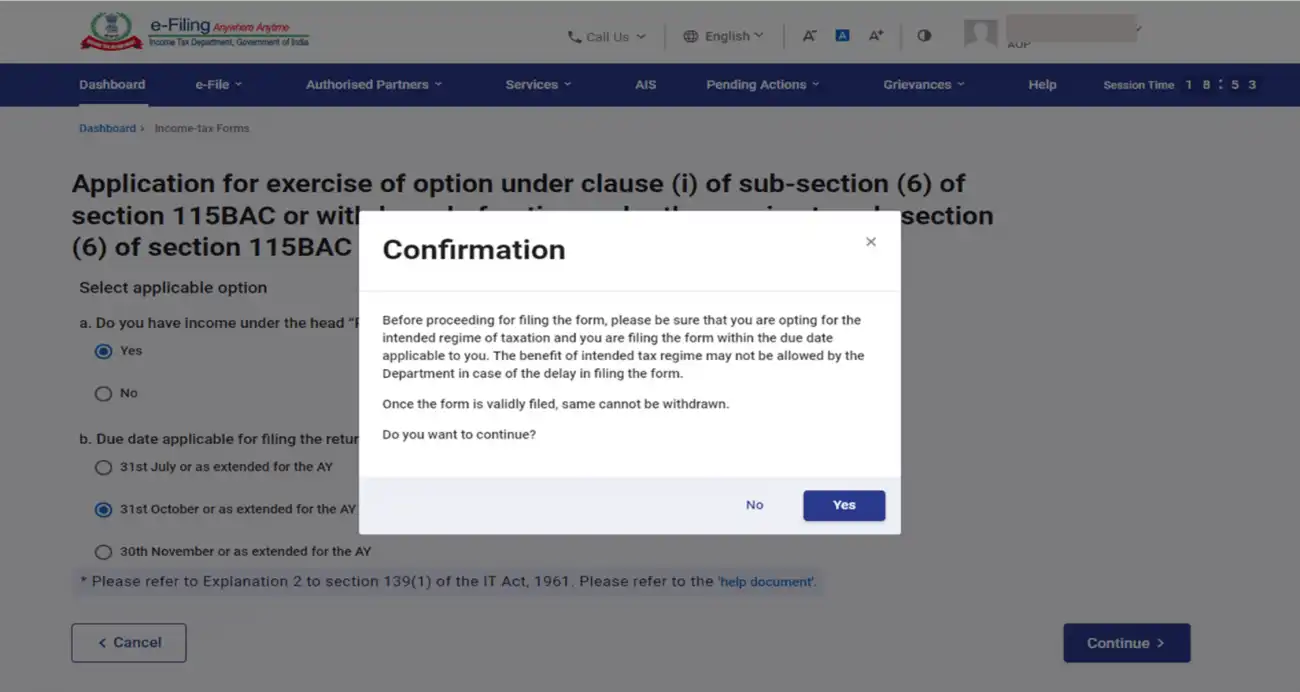
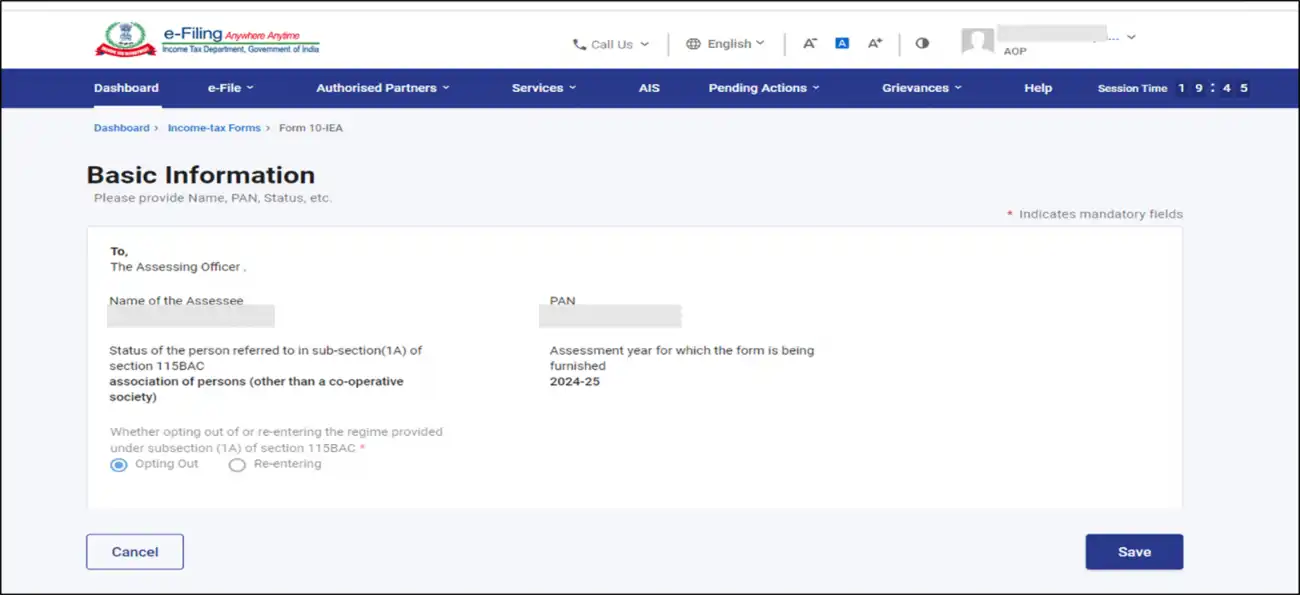
Step 8: Fill Out and Confirm Form 10-IEA SectionsForm 10-IEA consists of three sections. Verify and confirm each section:
- Basic Information : This section will auto-fill your basic details. If it's your first time filing, the ‘Opting Out’ option will be pre-selected, and if the system detects a valid form with the opting-out option, ‘Re-entering’ will be auto-selected. Click ‘Save’ once completed.
- Additional Information: Provide details about your IFSC unit (if applicable) and click ‘Save’. If you are opting out of the new tax regime, this section will be greyed out.
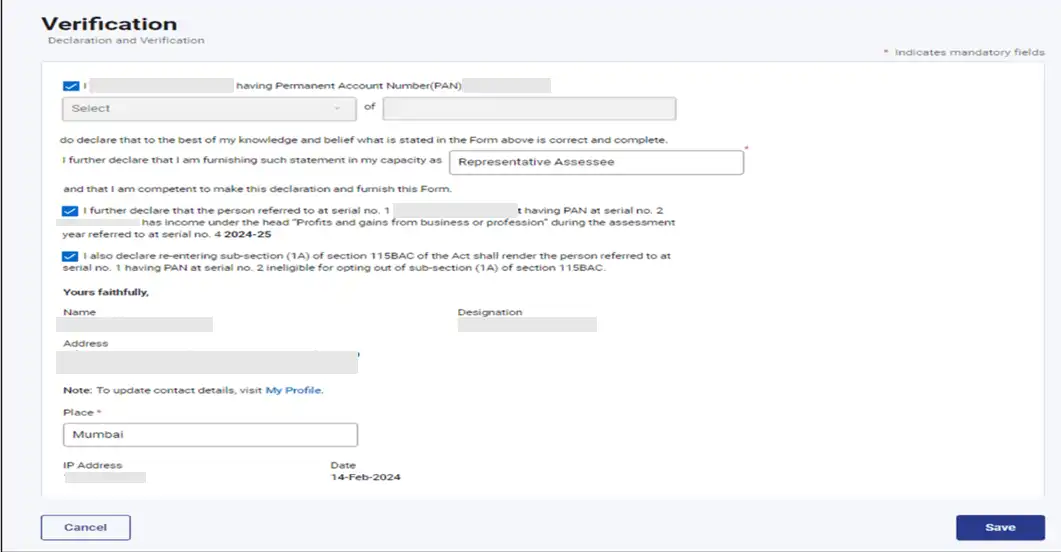
- Declaration and Verification: Review the self-declaration and check the boxes to agree with the terms and conditions. Confirm that all the details are correct, then click ‘Save’. Once done, click ‘Preview’ to review Form 10-IEA.
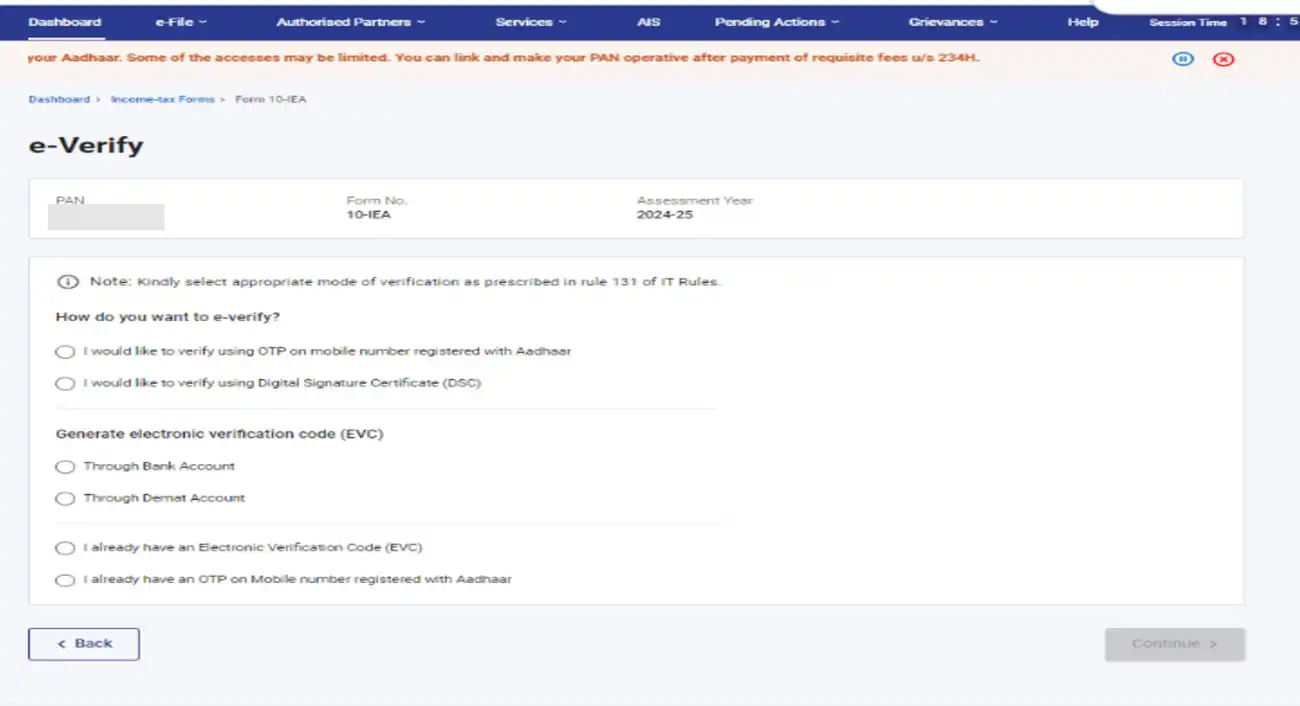
Step 9: e-Verify Form 10-IEA
After reviewing, click on ‘Proceed to e-Verify’. Choose one of the following options for e-verification:
- Aadhaar OTP
- Digital Signature Certificate (DSC)
- Electronic Verification Code (EVC)
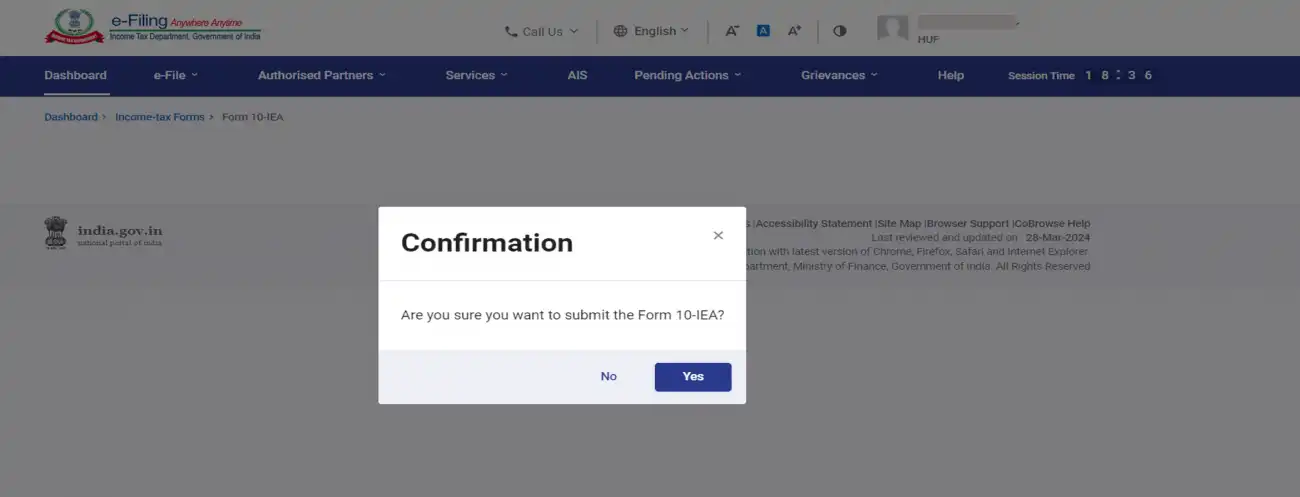
Step 10: Submit the Form
After completing the e-verification, click ‘Yes’ to submit the form.
Step 11: Acknowledgement and Receipt
After successful e-verification, you will receive a Transaction ID and Acknowledgement Receipt Number. Save this information for future reference.

You can also download the form by going to ‘e-File’ > ‘Income Tax Forms’ > ‘View Filed Forms’.
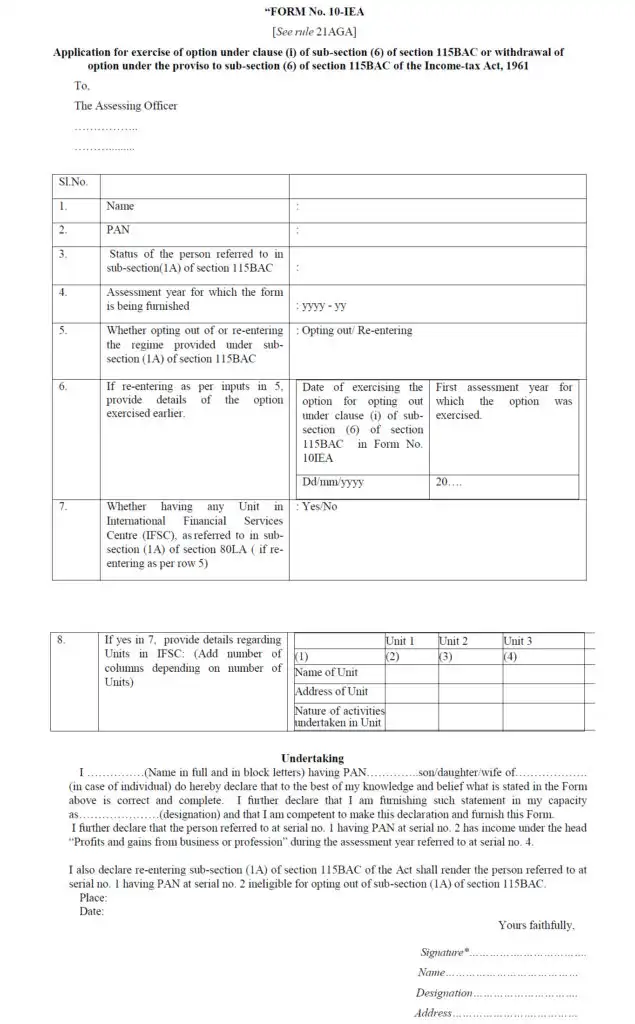
You can download Form 10-IEA in PDF format for your records.
Conclusion
Form 10-IEA plays a vital role for taxpayers who wish to continue with the old tax regime despite the new regime being set as the default from FY 2023-24. Filing this form correctly and within the stipulated deadline ensures you retain control over your tax planning strategy. Whether you're a salaried individual or part of a Hindu Undivided Family (HUF), understanding and submitting Form 10-IEA on time can help you avoid unnecessary tax liabilities.
Need Help Filing Form 10-IEA?
Let the experts at IndiaFilings guide you through the process. From choosing the right tax regime to submitting your ITR accurately and on time, we make tax filing simple and stress-free.
Frequently Asked Questions
1. Why Form 10-IE Was Discontinued?
Prior to the introduction of Form 10-IEA, taxpayers had to file Form 10-IE to opt for the new tax regime. However, with the new tax regime now being established as the default tax regime from FY 2023-24, Form 10-IE has been discontinued.
The discontinuation of Form 10-IE simplifies the process, allowing taxpayers to choose the old tax regime by filing Form 10-IEA instead.
Click here to learn more about Form 10IE Or Form 10IEA: Which Form should you File?
2. What happens if an individual fails to submit Form 10-IEA on time?
If an individual does not submit Form 10-IEA by the due date, they will not be able to opt for the old tax regime. In such cases, the Income Tax Department will process the taxpayer's return under the new tax regime by default.
3. Why is it important to specify the dates for opting out of or choosing the new tax regime?
Correctly specifying the dates for opting out of or re-entering the tax regime is essential for clarity and compliance with tax regulations. It ensures that the changes are applied within the correct financial year, adhering to prescribed timelines.
4. Can a taxpayer file under the new tax regime after opting for the old tax regime?
No, once a taxpayer opts for the old tax regime, they are not allowed to switch to the new tax regime during the same financial year. Only taxpayers without income from a profession or business can switch between tax regimes each year.
5. What is required in the filing process for Form 10-IEA?
The filing process for Form 10-IEA requires taxpayers to provide essential details such as their name, current status, PAN number, and assessment year. This information allows the Income Tax Department to accurately classify and process the taxpayer’s information.
6. When to Submit Form 10-IEA?
Form 10-IEA must be submitted before filing your income tax return. After submission, an acknowledgement number will be generated, which is important for tracking the status of your form. Taxpayers with business income who wish to opt for the old tax regime must file Form 10-IEA by the due date to ensure their choice is considered when processing their tax return.
7. How to Verify and Submit Form 10-IEA?
To ensure that the information provided in Form 10-IEA is accurate and authentic, proper verification is required. This can be done through either a digital signature or an electronic verification code (EVC). The verification process ensures the legitimacy of the form, preventing fraudulent activities and ensuring compliance with tax regulations.
8. Do I need to file Form 10-IEA every year?
For salaried individuals or HUFs without business income, Form 10-IEA must be filed annually if they wish to switch from the default new tax regime to the old tax regime. However, for taxpayers with business or professional income, the form needs to be filed only once when opting for the old regime.
9. Can I switch to the old regime after filing my ITR?
No, you cannot switch to the old tax regime after filing your Income Tax Return (ITR) under the new regime. The selection of the tax regime must be done before filing the ITR for that financial year.
Click here to learn more about Can I Change Tax Regime while Filing ITR?
10. Is Form 10-IEA mandatory for all taxpayers?
No, Form 10-IEA is only mandatory for taxpayers who wish to opt out of the default new tax regime and switch to the old regime. It is not required for taxpayers who want to continue with the new tax regime.
11. What happens if I do not submit Form 10-IEA?
If you fail to submit Form 10-IEA, you will be automatically taxed under the new tax regime. This means you will not be able to claim the deductions and exemptions that are available under the old regime.
12. Is there a penalty for not filing Form 10-IEA on time?
While there is no direct penalty for not filing Form 10-IEA on time, if the form is not filed, you will not be able to switch to the old tax regime for that financial year, and your ITR will be processed under the default new tax regime.
13. Can I file Form 10-IEA if I have business income?
Yes, taxpayers with business or professional income can file Form 10-IEA. However, they are required to file the form only once when opting for the old regime. After that, they cannot switch between the two regimes annually.
14. Is Form 10-IEA mandatory if I want to remain in the new tax regime?
No, if you wish to remain under the new tax regime, you do not need to file Form 10-IEA. Since the new tax regime is now the default, no action is required if you choose to continue with it.
15. Can I switch tax regimes multiple times during the financial year?
No, you can only switch tax regimes once during the financial year. Salaried individuals and HUFs can change their regime every year, but taxpayers with business income can only switch once.
16. Can I file Form 10-IEA offline?
No, Form 10-IEA can only be filed online through the Income Tax Department's e-filing portal.
17. Do I need any supporting documents while filing Form 10-IEA?
You do not need to upload any supporting documents when filing Form 10-IEA. However, it’s a good practice to have relevant documents like income proofs and deduction receipts handy in case they are required for verification by the Income Tax Department.
18. What happens if I submit Form 10-IEA with incorrect details?
If Form 10-IEA is submitted with incorrect information, you may not be able to switch to the desired tax regime. The Income Tax Department may process your return based on the incorrect regime. Always double-check the details before submission.
19. Can I revise my ITR after filing Form 10-IEA if I made a mistake?
Yes, you can revise your ITR if you made a mistake, provided it is done before the revision deadline. However, Form 10-IEA cannot be changed once it has been submitted, so ensure that you select the correct tax regime before filing.