
Sinduja Shankar
Published on: Sep 15, 2026
Linking Aadhaar with UAN
The Employee Provident Fund Organisation has made it mandatory to link Aadhaar with Employee Provident Fund (PF) account. The employer generally provides the Unique Account Number. All the employees who contribute for provident fund (PF) account are eligible for getting a UAN. Every employee needs to ensure that the Unique Account Number (UAN) should be linked with
Aadhaar cardto link PF to it. The UAN card issued by the EPFO contains the details of the employee. The linking of Aadhaar with UAN can be done online as well as offline. Click here to know more about -
UAN RegistrationBenefits of Seeding Aadhaar with UAN
Linking Aadhaar with UAN for online claim submission is mandatory. The below listed following are the benefits of seeding Aadhaar Card to UAN (Universal Account Number):
- Claim settlement will be quicker if your Aadhaar is linked with UAN.
- Linking Aadhaar Card to UAN (Universal Account Number) will eliminate the duplicate and bogus accounts.
- The customers can transfer their funds between PF accounts without the digital signature of the employer.
- When the customer successfully linked their Aadhaar details, they can also make PF withdrawals without the attestation of their employer.
- Once the applicants successfully linked their Aadhaar details, they can make PF withdrawals without the attestation of their employer.
- The most significant benefit of linking is that it will make the transparency in your whole account system.
Click here to know more about -
Linking Aadhar to Ration Card.Linking of Aadhaar with PF account – Online
The employee needs to follow the specified steps to link his Provident Fund (PF) to his Aadhaar:
Step 1:The applicant must visit the Unified Portal of Employees' Provident Fund.
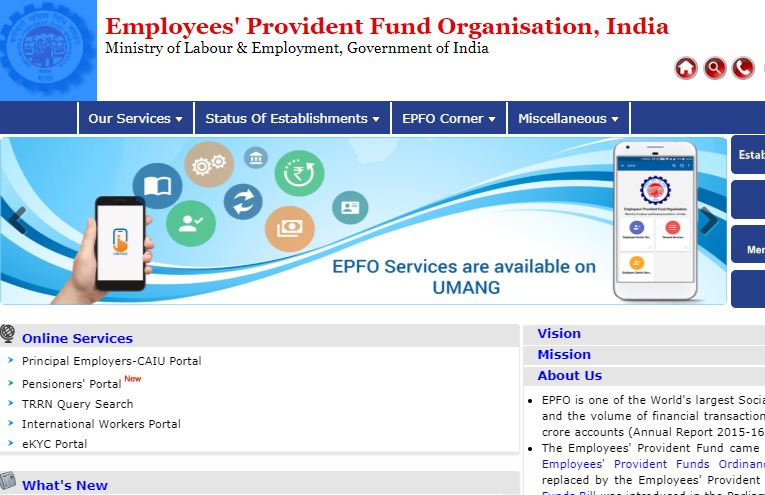
Step 1 - Linking Aadhaar with UAN - EPFO
Step 2:Click on the eKYC link under the online service option.
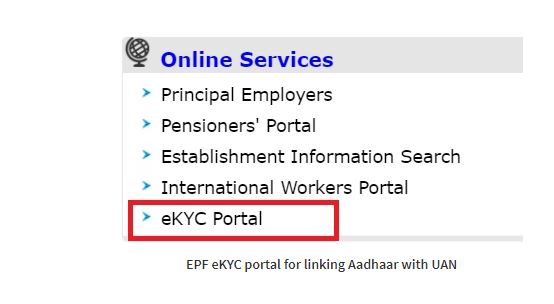
Step 2 - Linking Aadhaar with UAN - EPFO
Note:This portal contains two online service sections. The above online service section is for EPFO field officer and the second is for EPFO Member.
Step 3:In the EPFO member section click on
“Link UAN Aadhaar”tab.
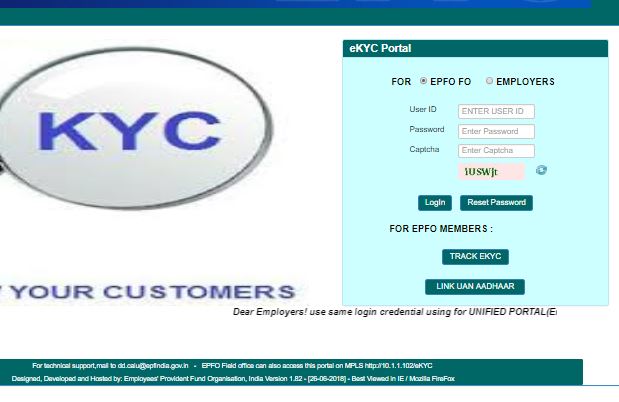
Step 3 - Linking Aadhaar with UAN - EPFO
Step 4:You will be taken to the next page where you will have to provide your UAN after the mobile number which is linked to UAN gets displayed.
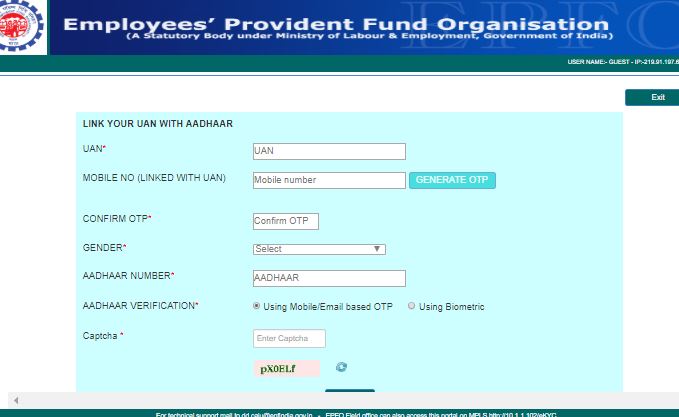
Step 4 - Linking Aadhaar with UAN - EPFO
Step 5:Click on
“Generate OTP”button and enter the OTP, which you have received and provide your Aadhaar number.
Step 6:After the successful OTP verification and if your details between UAN and Aadhaar matches, then your Aadhaar will be linked to your UAN.
Step 7:You can also track whether UAN is linked with Aadhar using eKYC portal through TRACK eKYC.
Linking of Aadhaar with PF Account – Offline
The EPFO introduced the offline facility named "Aadhaar Seeding Application" with the support of the Common Service Centers (CSC) and CDAC. With the launch of Aadhaar Seeding Application facility, the applicants can approach for the nearby field offices of EPFO or CSC outlets. While going to nearby field offices of EPFO or CSC outlets, it is necessary to submit self-attested copies of the following documents:
- Universal Account Number (UAN)
- Copy of a PAN Card
- Copy of your Aadhaar Card
- IFSC Code of given bank
- Account Number
- One Cancel Check
After the verification is done, the Aadhaar number will be linked to EPF account. After that, then you will receive a message on your registered mobile number.
Track Application Status
To keep track of your UAN linked with Aadhar using eKYC Portal, follow the below steps:
Step 1:Go to the official EPF website
Step 2:
Click on the eKYC link under the online service option.
Step 3:In the EPFO member section click on Track eKYC link.
Step 4:It takes you to the new window, where you need to enter UAN and click on the Track eKYC button. Finally, the status will be displayed on the screen.
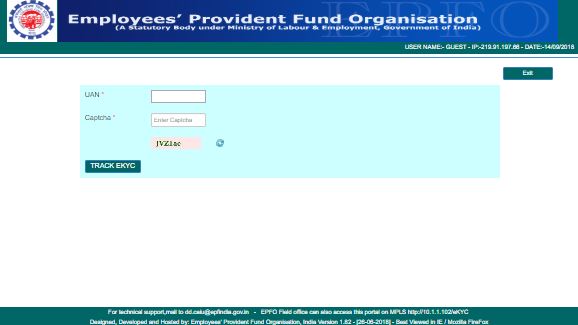
Track Status - Linking Aadhaar with UAN - EPFO
UMANG Mobile App
UAN can now link Aadhaar card number with the 12-digit unique identity number via UMANG app, which allows the applicant to access a host of government services online through the web and mobile app.