
Arun Kumar
Expert
Published on: Jul 30, 2026
Generate E-Way Bill
An E-Way Bill (EWB) is an ‘
electronic way’ bill for movement of goods which can be generated on the E-Way Bill Portal. Any supplier or a transporter transporting goods with a value of more than Rs.50,000 (Single Invoice/bill/delivery challan) in a single vehicle should carry a GST e-way bill as per the GST Council regulations. The supplier or the transporter of the goods must register with GST to obtain GST E-Way bill. This bill shall come into effect from 1st April 2018. After generating the E-Way bill on the portal using required credentials, the portal generates a unique E-Way Bill Number (EBN) and allocates to the registered supplier, recipient, and the transporter. In this article, we look at the steps for e-way bill generation on the Government website. The supplier or the transporter can engage in the E-way bill generation through the following ways:- LEDGERS Software,
- E-Way bill portal
- SMS,
- Android App and through,
- Site-to-Site Integration (through API).
Who can Generate E-Way bill?
The following members can create E-Way bill through online, SMS, App or API:
- Suppliers,
- Recipients,
- Tax officers and
- Transporters.
It is important for these members to know about how to generate e way bill.
When should you Generate the Bill?
Before understanding how to generate eway bill, you must know instances where you need to generate bill. A GST registered member can generate the e-way bill during the following circumstances:
- When the supplier provides supply,
- During Return,
- Inward supply from an unregistered person.
How to Generate E Way Bill through Website
E-way bill can be generated on the GST E-Way Portal. To use the portal, you will need a
GST registration and transporter registration. Here are the steps on how to generate e way Bill,Login to E-Way Bill Portal
Step 1: Access the E-Way bill generation portal and enter the login detail to enter the platform.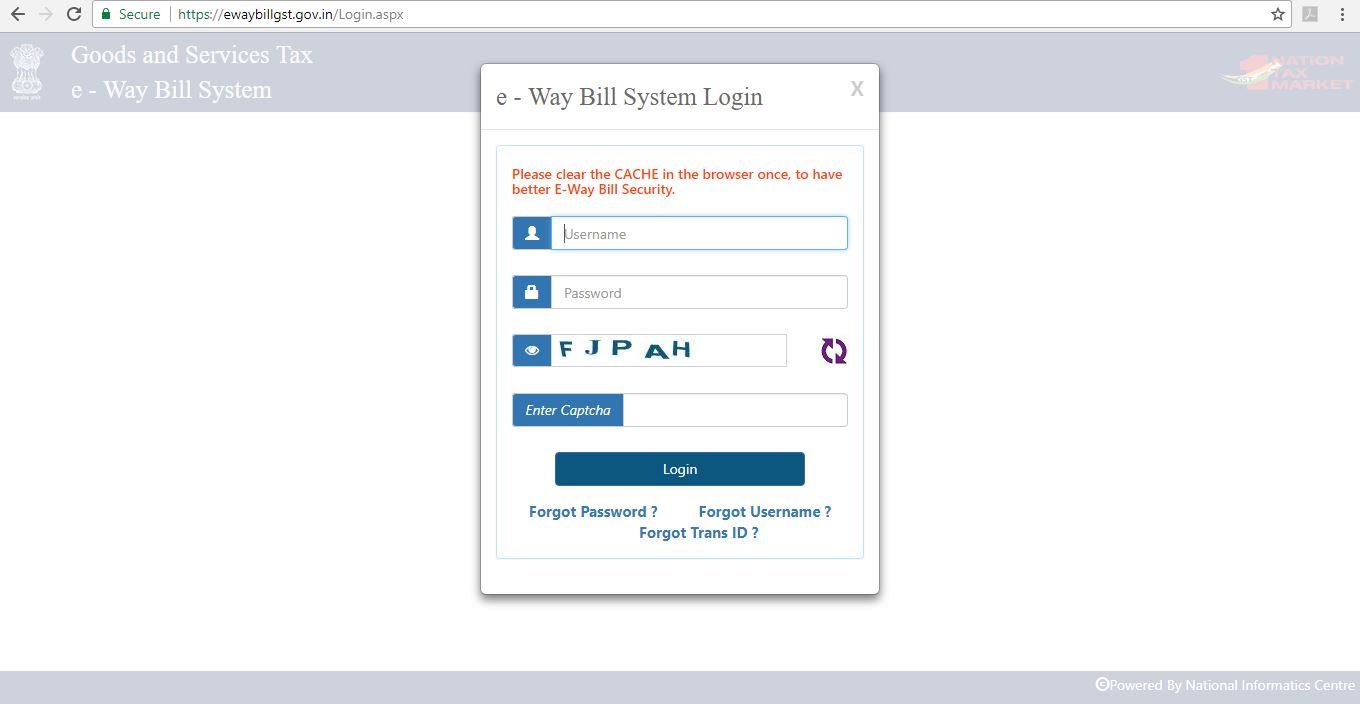 Step-1 - E-Way Bill Portal
Step 2: Click on the “Generate New” option from the E-Way bill- Main menu page to create a new E-Way bill.
Step-1 - E-Way Bill Portal
Step 2: Click on the “Generate New” option from the E-Way bill- Main menu page to create a new E-Way bill.
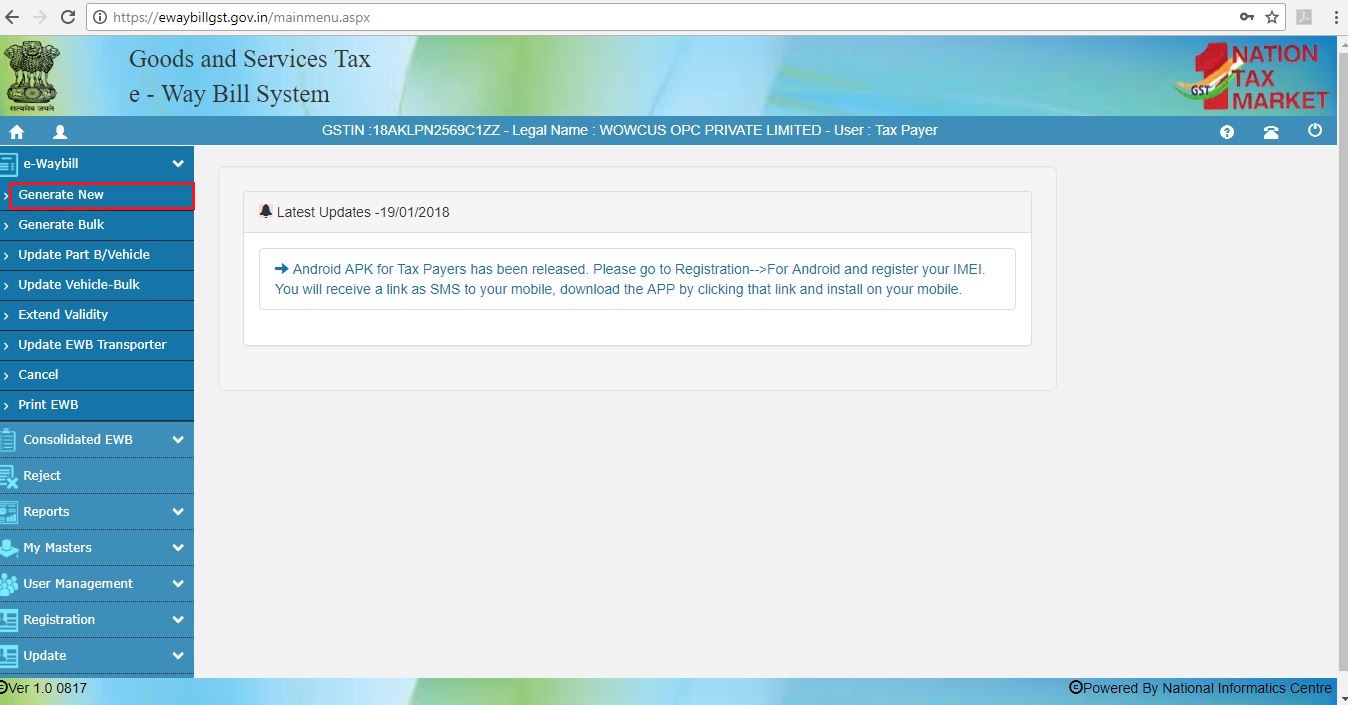 Step-2 - E-Way Bill Portal
Generate E-Way Bill
Step 3: A new EWB bill generation form appears. Fill in the details required similar to creating a GST invoice. Select outward, if you are the supplier and inward, if you are the recipient. Enter details of the supplier and recipient along with GSTIN, wherever applicable. When a registered GSTIN is entered in the field provided in the form, other details gets pulled into the empty fields. Before proceeding to the next step kindly check the details.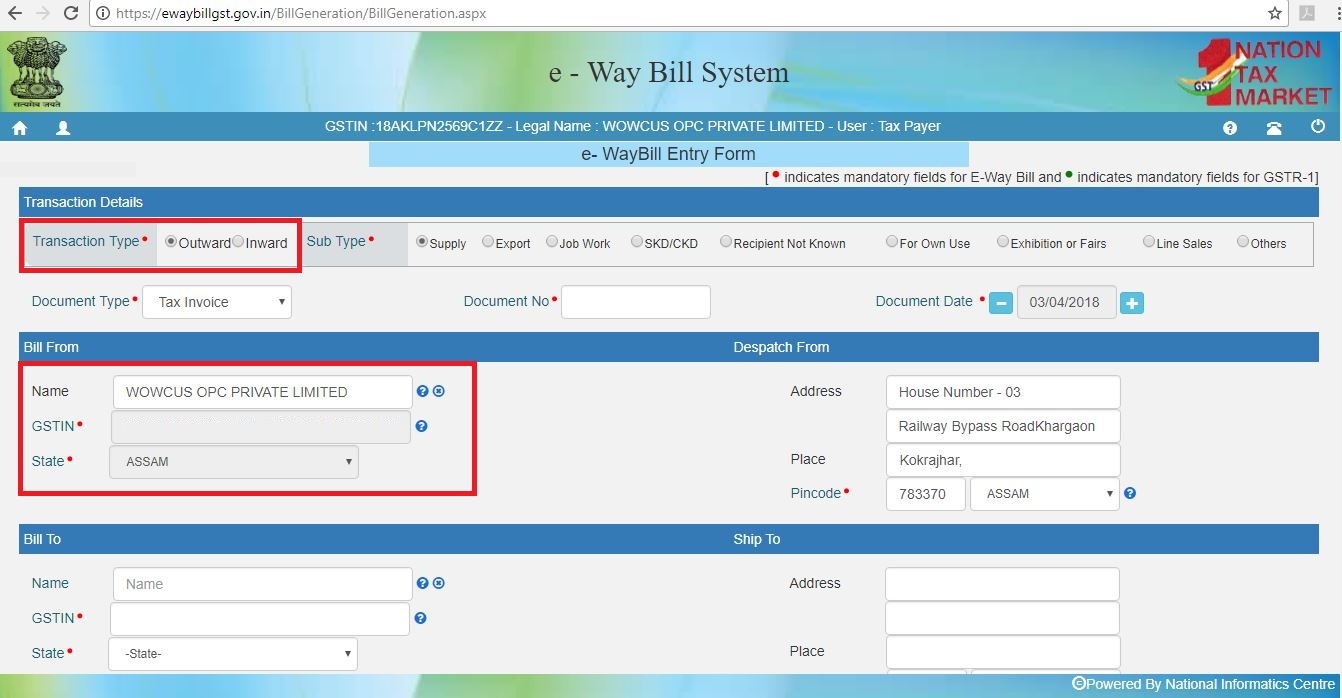 Step-3 - E-Way Bill Portal
Enter Goods Description
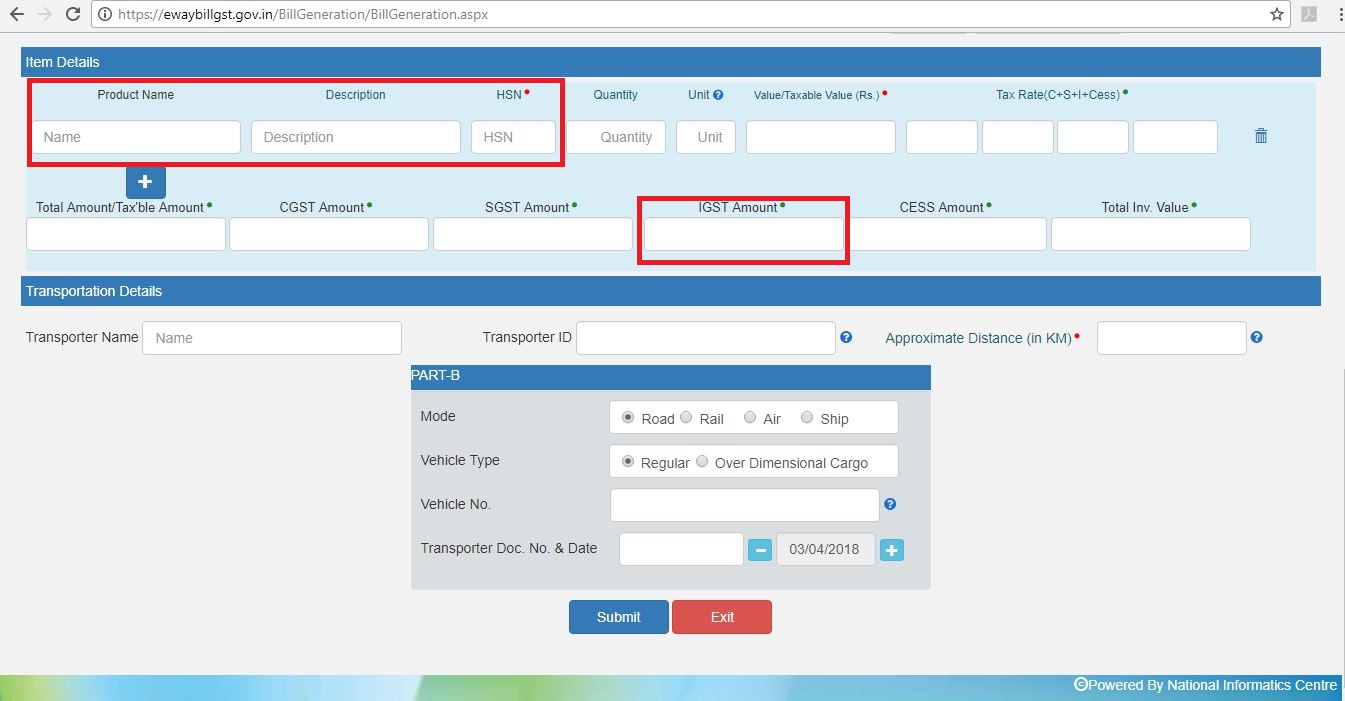
STEP 4: The second half of the page will contain information to be filled as follows:- Product Name and Description must be completed similar to a tax invoice.
- HSN Code for the Product must be entered. 1
- Quantity and Unit of the goods.
- Value of the products along with Tax rate.
- IGST or CGST Rates applicable. IGST would be applicable for inter-state transport and SGST / CGST for intra-state transport.
- Approximate distance of transport along with Transporter Name and Transporter ID. This shall determine the validity of the E-Way bill.
 Step-4 - E-Way Bill Portal
Step 5: Generate E-way bill
After filling all the necessary details, click on the “SUBMIT” button to create the EWB. The Portal shall display the E-Way bill containing the E-Way Bill number and the QR Code that contains all the details in the digital format. The printed copy of the bill should be provided to the transporter who will carry it throughout the trip till it is being handed over to the consignee.
Step-4 - E-Way Bill Portal
Step 5: Generate E-way bill
After filling all the necessary details, click on the “SUBMIT” button to create the EWB. The Portal shall display the E-Way bill containing the E-Way Bill number and the QR Code that contains all the details in the digital format. The printed copy of the bill should be provided to the transporter who will carry it throughout the trip till it is being handed over to the consignee.
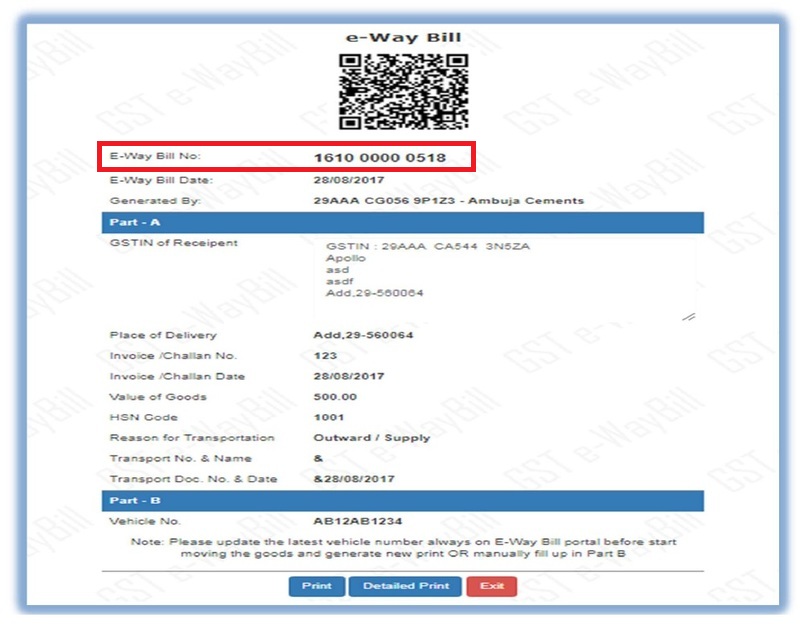 Step-5 - E-Way Bill Portal
Step 6: Consolidate E-way Bill Generation
A consolidated EWB can also be created which contains all the details on the transaction and is also easy to create it by providing just the ‘E-Way bill number’ in the required field. Click on “SUBMIT” to generate the consolidated EWB.
Step-5 - E-Way Bill Portal
Step 6: Consolidate E-way Bill Generation
A consolidated EWB can also be created which contains all the details on the transaction and is also easy to create it by providing just the ‘E-Way bill number’ in the required field. Click on “SUBMIT” to generate the consolidated EWB.
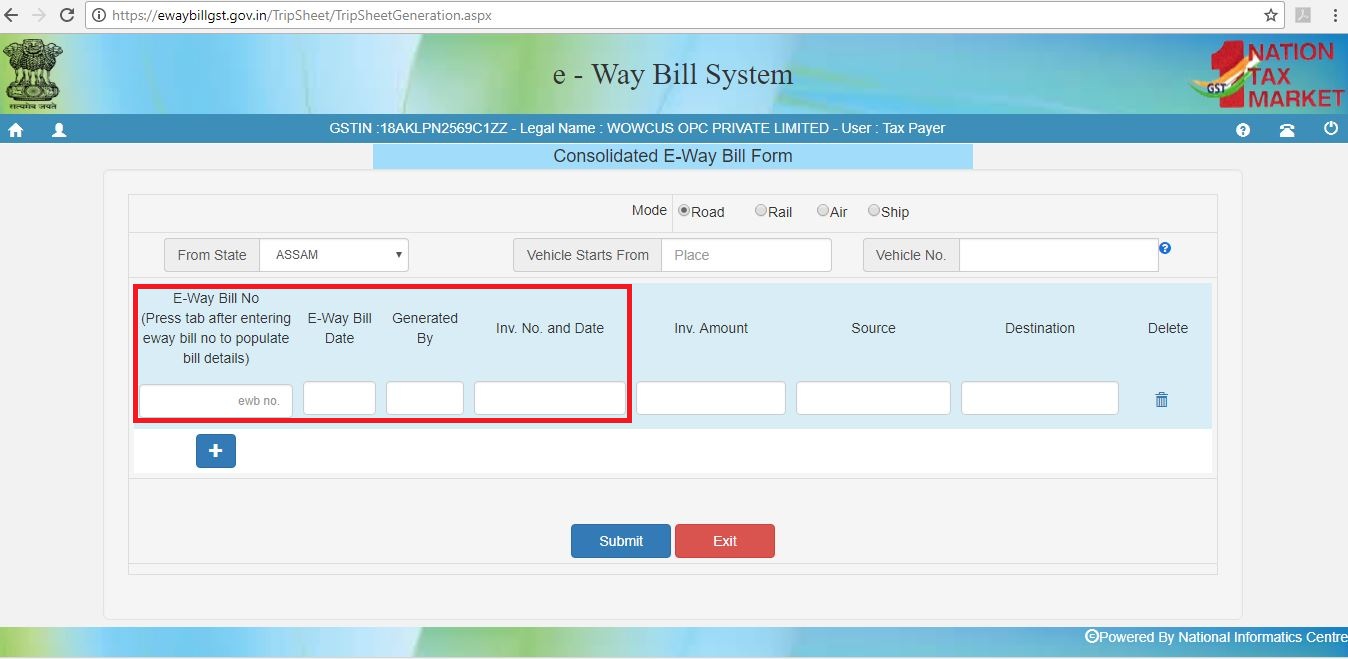 Step-6 - E-Way Bill Portal
An E-Way bill can be updated once it is created. Details on the transporter, consignment, consignor and also the GSTIN of both the parties can be updated in the existing E-Way bill provided the bill is not due on its validity.
Learn more: How to Generate EWay Bill through SMS?
Step-6 - E-Way Bill Portal
An E-Way bill can be updated once it is created. Details on the transporter, consignment, consignor and also the GSTIN of both the parties can be updated in the existing E-Way bill provided the bill is not due on its validity.
Learn more: How to Generate EWay Bill through SMS?
Notification regarding the launch of the E-Way 2 Bill Portal dated May 28, 2024
The GSTN launched the E-Way Bill 2 Portal on June 1, 2024. It provides high availability and redundancy for the E-Way Bill system. This new portal offers critical E-Way Bill functionalities like generation, updation, and web/API access, all while syncing seamlessly with the main portal and allowing users to switch between them during outages. Notably, it facilitates cross-portal updation of Part-B for E-Way Bills, ensuring business continuity during technical issues. Here are the key features of the E-Way Bill 2 portal,
- Independent Functionality: Generate and update E-Way Bills directly on the E-Way Bill 2 Portal, independent of the main portal. This ensures business continuity even during temporary outages on the main portal.
- Web and API Access: The portal is suitable for both web users and those preferring programmatic access through Application Programming Interfaces (APIs). This flexibility allows businesses to integrate E-Way Bill functionalities into their existing workflows.
- Shared Login Credentials: Use your existing login credentials from the main E-Way Bill portal to access the E-Way Bill 2 Portal. This eliminates the need for separate registration and simplifies the login process.
- Contingency Plan for Outages: During technical issues with the main portal, taxpayers and logistic operators can seamlessly switch to the E-Way Bill 2 Portal to ensure uninterrupted E-Way Bill generation and updating.
- Cross-Portal Part-B Updates: A unique feature allowing updates to Part-B (recipient details) of an E-Way Bill generated on one portal (e.g., Portal 1) to be completed on the other portal (Portal 2). This eliminates the need to physically carry two E-Way Bill slips in such scenarios.
- Real-time Synchronization: Data entered on the E-Way Bill 2 Portal synchronizes with the main portal within seconds, ensuring all information remains consistent and readily available.
Signup for LEDGERS GST Software to easily generate E-way Bill.