
Bennisha
Expert
Published on: Aug 13, 2026
GSTR-7A
Form GSTR-7A is a system-generated
TDS certificate. Once the deductor furnishes a return in Form GSTR-7 on the GST Portal and the deductee accepts the details that are uploaded on GST Portal, form GSTR-7A is generated. GST TDS certificate is available for both the Deductor and the Deductee.TDS Certificate
A TDS certificate is generated in Form GSTR-7A using the information furnished in return by the Deductor in Form GSTR-7. Only one TDS certificate is issued per GSTIN for all supplies for which the tax has been deducted for every GSTR-7 return that is filed.
Filing Form GSTR-7
Form GSTR-7 for a month can be filed upon the completion of the month. The last date to file this form is before the 10th of the following month.
Importance of Form GSTR-7
Form GSTR-7 facilitates the reporting and payment of the TDS amount that is deducted, for which the credit of the tax can be provided to the concerned supplier. Once the form is filed by the taxpayer, all the TDS details are reflected in Part C of the Form 2A of the supplier, who claims the Input Tax Credit of the TDS deducted in his/ her name. The same can also be used to pay the output tax liability.
Pre-Conditions for Generation of TDS
The precondition for the generation of the TDS certificate is that the deductor must furnish a return in Form GSTR-7A on the
GST Portal. Also, the deductee must accept the uploaded details by the deductor and file the return.Viewing Form GSTR-7A
Given below are the steps for a deductor to view form GSTR-7A.
Step 1: Log in to the Portal The taxpayer has to log in to the official GST Portal. Step 2: Enter the Details The taxpayer has to enter the username and password. Step 3: Click View/ Download Certificates From the 'Services' tab, the taxpayer has to select the 'User Services' and then click the 'View/Download Certificates' command. The 'View/Download Certificates' page appears on the screen.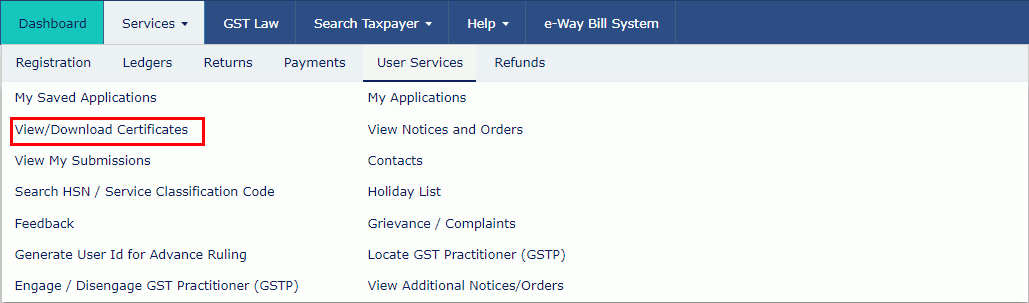 Step 3-GSTR-7A
Step 4: Click on TDS Certificate Link
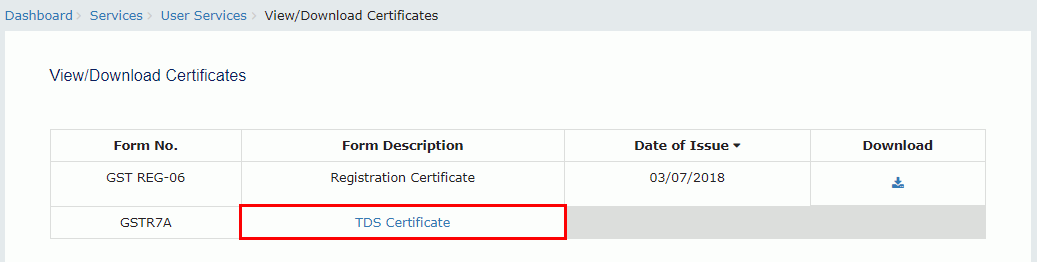
The taxpayer has to click the 'TDS Certificate' link.
Step 3-GSTR-7A
Step 4: Click on TDS Certificate Link
The taxpayer has to click the 'TDS Certificate' link.
 Step 4-GSTR-7A
Step 5: Select Financial Year and Return Filing Period
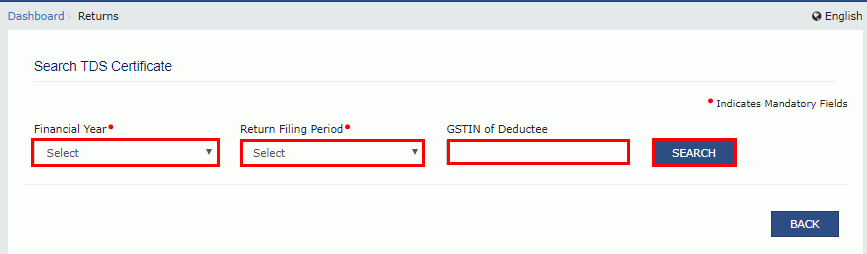
The taxpayer has to select the 'Financial Year' and 'Return Filing Period' from the drop-down list.
Step 6: Enter GSTIN
In the GSTIN of the Deductee field, the taxpayer has to enter the 'GSTIN' of the Deductee. If the GSTIN of the deductee is not entered, the downloaded certificate contains the details of the deductee for the selected relevant period.
Step 7: Click Search
Once all the details are entered, click the 'Search' button.
Step 4-GSTR-7A
Step 5: Select Financial Year and Return Filing Period
The taxpayer has to select the 'Financial Year' and 'Return Filing Period' from the drop-down list.
Step 6: Enter GSTIN
In the GSTIN of the Deductee field, the taxpayer has to enter the 'GSTIN' of the Deductee. If the GSTIN of the deductee is not entered, the downloaded certificate contains the details of the deductee for the selected relevant period.
Step 7: Click Search
Once all the details are entered, click the 'Search' button.
 Step 7-GSTR-7A
Step 8: Click Download
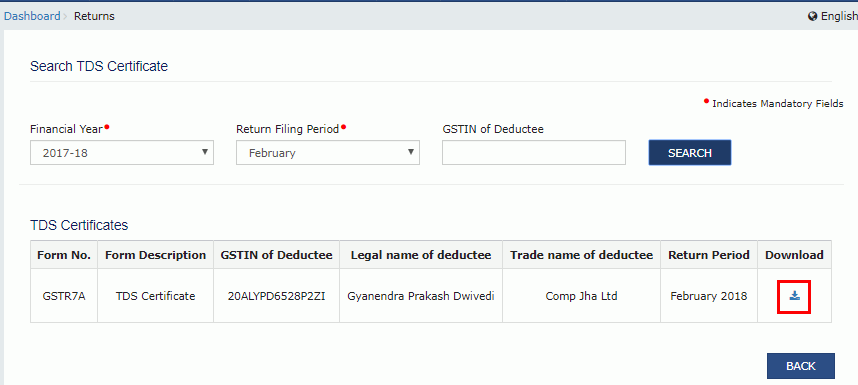
Search results appear on the screen. Taxpayers can click the 'Download' link to download the TDS certificate.
Step 7-GSTR-7A
Step 8: Click Download
Search results appear on the screen. Taxpayers can click the 'Download' link to download the TDS certificate.
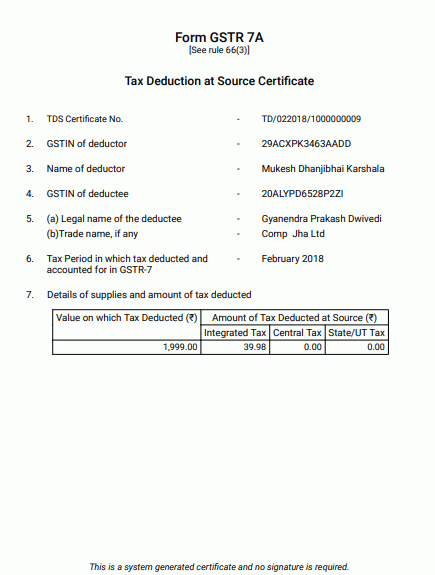
 Step 8-GSTR-7A
The TDS certificate appears in PDF format.
Step 8-GSTR-7A
The TDS certificate appears in PDF format.
 Step 8-GSTR-7A
Given below are the steps for a deductee to view form GSTR-7A.
Step 1: Log in to the GST Portal
The taxpayer has to log in to the official GST Portal.
Step 2: Enter the Details
The taxpayer has to enter their username and password.
Step 3: Click View/ Download Certificates
From the 'Services' tab, the taxpayer has to select 'User Services' and then click the 'View/ Download Certificates' command. The 'View/Download Certificates' page appears on the screen.
Step 8-GSTR-7A
Given below are the steps for a deductee to view form GSTR-7A.
Step 1: Log in to the GST Portal
The taxpayer has to log in to the official GST Portal.
Step 2: Enter the Details
The taxpayer has to enter their username and password.
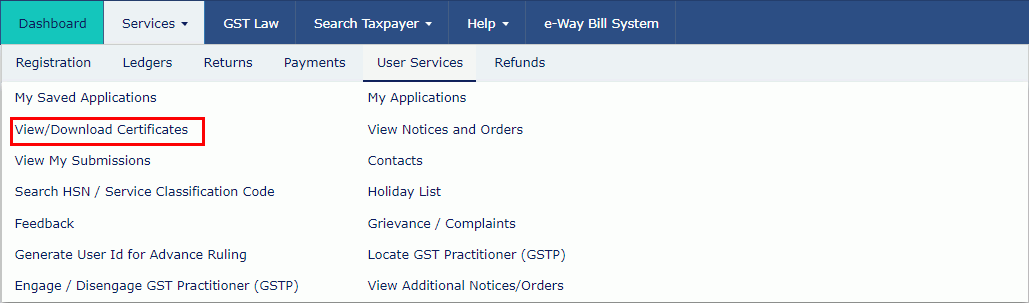
Step 3: Click View/ Download Certificates
From the 'Services' tab, the taxpayer has to select 'User Services' and then click the 'View/ Download Certificates' command. The 'View/Download Certificates' page appears on the screen.
 Step 3-GSTR-7A
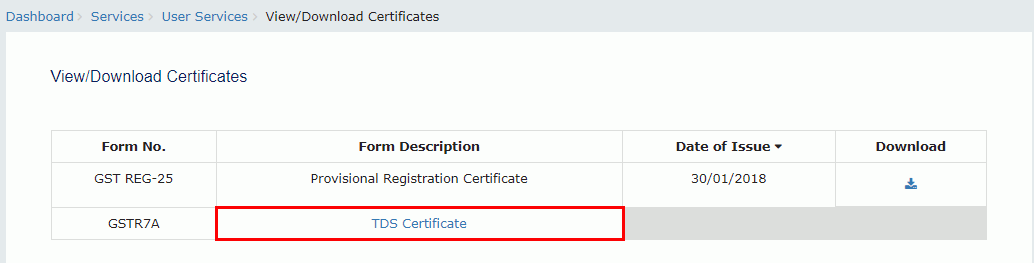
Step 4: Click on the TDS Certificate link
The taxpayer has to click the 'TDS Certificate' link.
Step 3-GSTR-7A
Step 4: Click on the TDS Certificate link
The taxpayer has to click the 'TDS Certificate' link.
 Step 4-GSTR-7A
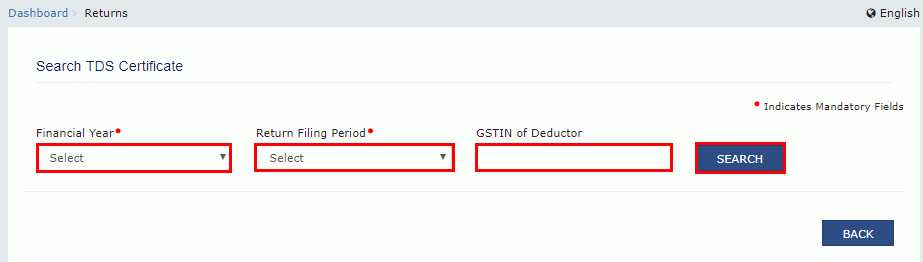
Step 5: Select Financial Year and Return Filing Period
The taxpayer has to select the 'Financial Year' and 'Return Filing Period' from the drop-down list.
Step 6: Enter GSTIN
In the GSTIN of the Deductee field, the taxpayer has to enter the 'GSTIN' of the Deductor. If the GSTIN of the deductor is not entered, the downloaded certificate contains the details of the deductor for the selected relevant period.
Step 7: Click Search
After entering the details, click the 'Search' button.
Step 4-GSTR-7A
Step 5: Select Financial Year and Return Filing Period
The taxpayer has to select the 'Financial Year' and 'Return Filing Period' from the drop-down list.
Step 6: Enter GSTIN
In the GSTIN of the Deductee field, the taxpayer has to enter the 'GSTIN' of the Deductor. If the GSTIN of the deductor is not entered, the downloaded certificate contains the details of the deductor for the selected relevant period.
Step 7: Click Search
After entering the details, click the 'Search' button.
 Step 7-GSTR-7A
Step 8: Click Download
Search results appear on the screen. Taxpayers can click the 'Download' link to download the TDS certificate.
Step 7-GSTR-7A
Step 8: Click Download
Search results appear on the screen. Taxpayers can click the 'Download' link to download the TDS certificate.
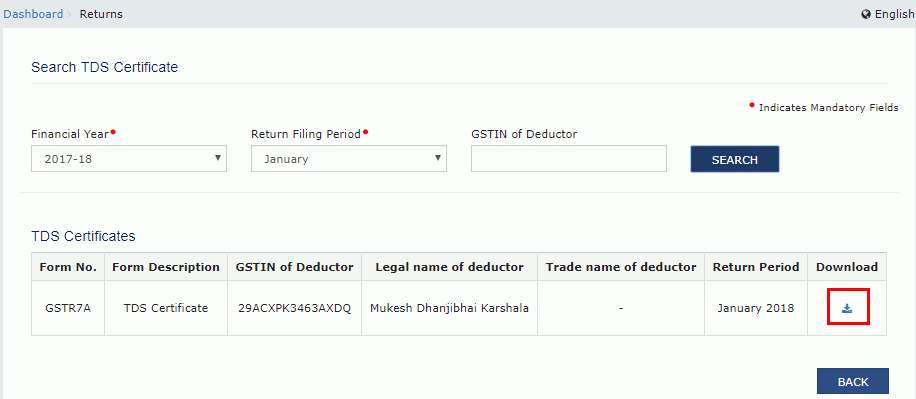 Step 8-GSTR-7A
The TDS certificate appears in PDF format.
Step 8-GSTR-7A
The TDS certificate appears in PDF format.
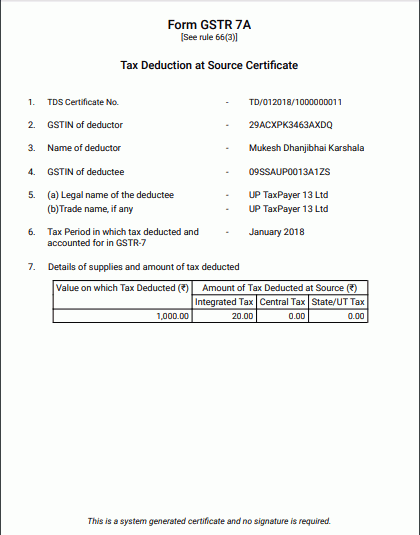 Step 8-GSTR-7A