
IndiaFilings
Published on: Oct 21, 2026
GST Software - Getting Started with LEDGERS
LEDGERS is a free cloud-based GST software from IndiaFilings for helping Indian businesses easily manage GST compliance. Ledgers GST software is easy to use and intuitive. Hence, even small businesses and first-time Entrepreneurs can easily use the software to manage sales, track expenses and file GST returns. In this article, we look at some of the features and functionalities of LEDGERS GST software in detail.
Creating a LEDGER
You can easily create a LEDGER by signing up from the
IndiaFilings GST Softwarepage. After providing the valid information, the portal sends an email to the registered email address. On verifying the email ID, the portal transfers the page to the LEDGERS platform for setting up the password. After setting up the password, you can log in to LEDGERS Dashboard. In case you already have an iCFO account username and password, you can sign-on to the LEDGERS platform using the iCFO account. From the LEDGERS dashboard page, you can set up a business by clicking on the Add Business button. To set up a business, you will have to provide the business name, GSTIN, GST information and complete an OTP mobile verification. On completing the OTP verification, you will be at the LEDGERS dashboard.
Customer Management
One of the first things you should do after creating a LEDGER is to set up your customer list. You can click on Contacts -> Add Customer to add a Customer. Customer can be easily added by providing a name and email. While adding a customer, you also have the ability to add more information about the customer like GSTIN, PAN, TAN, address and more. In case you need the customer to verify or provide information about his/her business, you can enable the customer portal. The customer would receive an email for verifying GSTIN information if the user enabled the Customer Portal feature. Similar to customer management, extensive features have been provided on LEDGERS for Supplier Management and Onboarding.
Adding Goods and Services
Before creating invoices or track expenses, you can add goods and services to your business. To add a Goods, click on Goods & Services -> Add Goods. In the page, you can add the Goods Name, HSN Code, GST Rate to be Applied and Selling Price. You can use the HSN Code Finder to find HSN or SAC code and suggested 1 for all goods and services. Further, you can also toggle between prices inclusive or GST and prices exclusive of GST to verify the GST tax component.
Creating GST Tax Invoices
A major feature used extensively in any GST software is the creation of invoices and estimates. Using LEDGERS, you can create beautiful invoices. Once the customer and goods information is updated, you can easily create an invoice in less than a minute. Just click on Create Invoice, select the customer and the goods or services to be sold. The system will automatically calculate CGST, SGST and IGST based on the taxable value of the goods, discount (if any) and quantity. On clicking create invoice, a beautiful invoice, as shown below, will be created. You can then send the invoice to your customer through email easily.
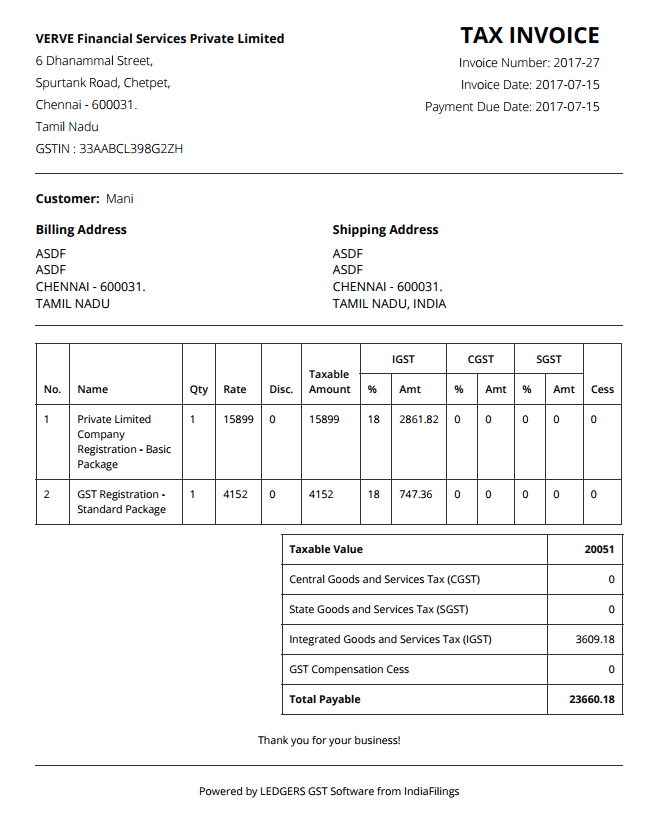
GST Invoice - Created on LEDGERS GST Software
There is more to LEDGERS. Signup today and experience the best.