
Karthiga
Expert
Published on: Jul 30, 2026
GST Refund - Supply to SEZ
As per the provisions included under IGST law, any supply of goods or services made to Special Economic Zone(SEZ) is considered as zero-rated supplies is exempted from tax and are eligible for claiming the refund. In this article, we look at the process for making GST refund claim on supply to SEZ.
Special Economic Zone(SEZ)
Special Economic Zone is an area considered to be situated outside India, and any supply of goods or services to SEZ attracts zero rates as zero-rated supply. Under GST, there are two possibilities available on account of supply made to SEZ unit or developer:
- Supply goods or services to SEZ units without paying tax
- Supply goods or services to SEZ units with payment of tax.
Know more about
SEZ in IndiaEligibility Criteria
The following conditions are eligible to file the refund application in form GST RFD-01A to claim the refund on account of supplies made to SEZ unit / SEZ developer (without payment of tax):
- The Taxpayer is enrolled with GST Portal and holds an active GSTIN (Identification Number) for the period of refund is applied.
- Form GSTR-1 and Form GSTR-3B need to be filed for all the tax periods for which refund is intended to be claimed.
- The taxpayer has done supplies to SEZ unit or SEZ Developer.
Documents Required
The applicant has to upload the required documents along with Form RFD-01A, as notified under CGST Rules or Circulars stated. Additionally, Statement 5 having details of invoices or any other supporting documentation can be uploaded by the taxpayer, if needed by the sanctioning authority. Know more about
GST Refund- Documents RequiredPrescribed Authority
After filing the refund application form will be assigned to the Refund Processing Officer for processing the refund. The application will be processed, and the Jurisdictional Authority will issue the refund after verification.
Online Procedure To Claim Refund - Supply to SEZ
To claim for refund on the supply made to SEZ, follow the steps mentioned below:
Step 1: Kindly visit the official portal of GST department.Provide Login Details
Step 2: Log in to the GST Portal with accurate details like username and password and click on the “Login” button. Step 3: Click the Services and select “Application for refund” option from Refund menu. GST-Refund-Supply-to-SEZ-Login-Details
Step 4: Select the On account of Supplies to SEZ unit/ SEZ developer (without payment of tax) option from the refund type.
GST-Refund-Supply-to-SEZ-Login-Details
Step 4: Select the On account of Supplies to SEZ unit/ SEZ developer (without payment of tax) option from the refund type.
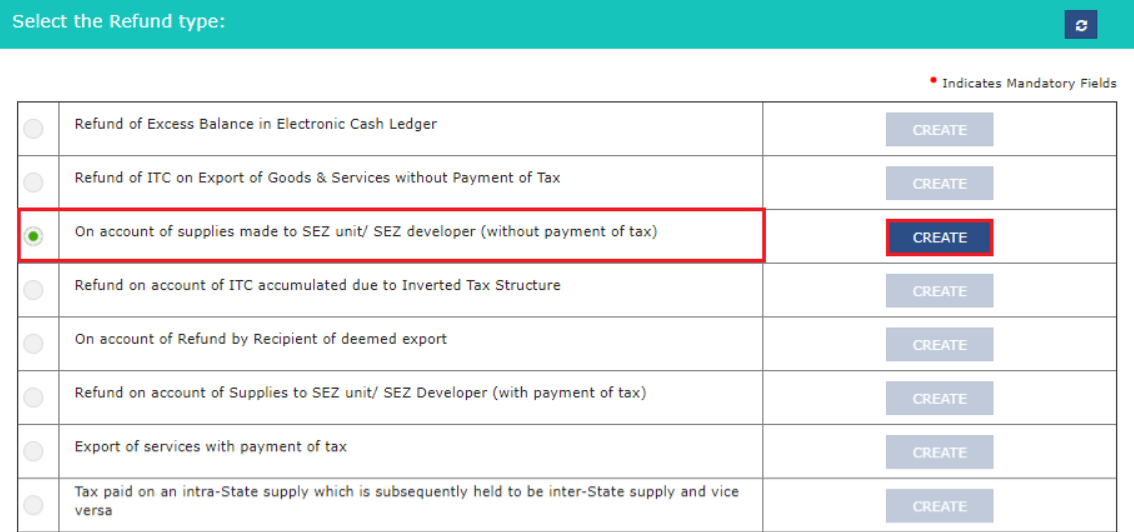 GST-Refund-Supply-to-SEZ-refund-type
Step 5: Choose the Financial Year and Tax Period for which application has to be filed from the drop-down list and click the Create button.
Step 6: Select "Yes or No" option for a refund made for all previous tax periods starting from registration date.
GST-Refund-Supply-to-SEZ-refund-type
Step 5: Choose the Financial Year and Tax Period for which application has to be filed from the drop-down list and click the Create button.
Step 6: Select "Yes or No" option for a refund made for all previous tax periods starting from registration date.
Application Form GSTR-1 And Form GSTR-3B
Step 7: Fill the Form GSTR-1 and Form GSTR-3B for the selected tax periods for which refund is expected to be claimed on account of supplies made to SEZ unit/ SEZ developer (without payment of tax) page is displayed. Step 8: Download the offline utility, upload details of supplies of goods and services made to SEZ unit/SEZ developer and then file refund of ITC on account of supplies made to SEZ unit/ SEZ developer (without payment of tax).Download Offline Utility
Step 9: Click the "Download Offline Utility" link and press the "Proceed" button to continue.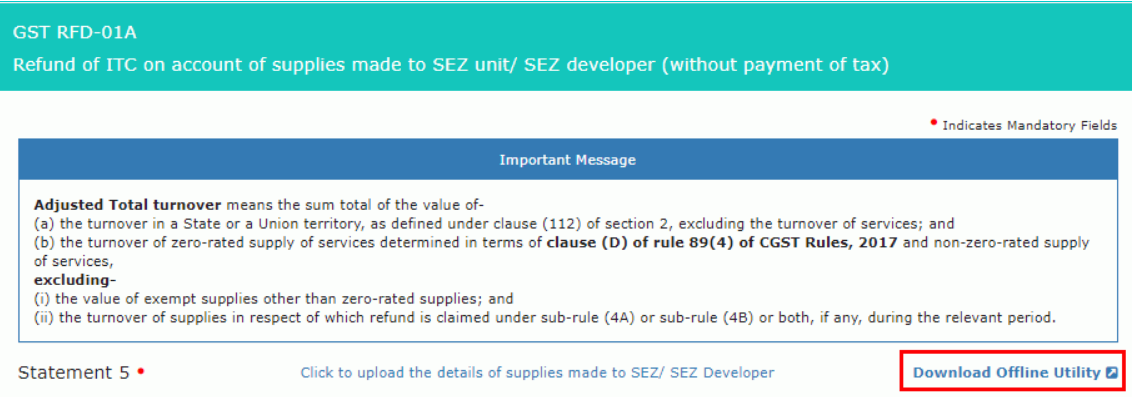 GST-Refund-Supply-to-SEZ-Download-Offline-Utility
Step 10: Now open the excel sheet and enter the GSTIN and From and To Return Period in the prescribed format.
Step 11: Enter the details of Sr. No., Invoice, Goods/ Services, Shipping Bill/ Bill of export/ Endorsed Invoice no and click the "Validate & Calculate" button.
GST-Refund-Supply-to-SEZ-Download-Offline-Utility
Step 10: Now open the excel sheet and enter the GSTIN and From and To Return Period in the prescribed format.
Step 11: Enter the details of Sr. No., Invoice, Goods/ Services, Shipping Bill/ Bill of export/ Endorsed Invoice no and click the "Validate & Calculate" button.
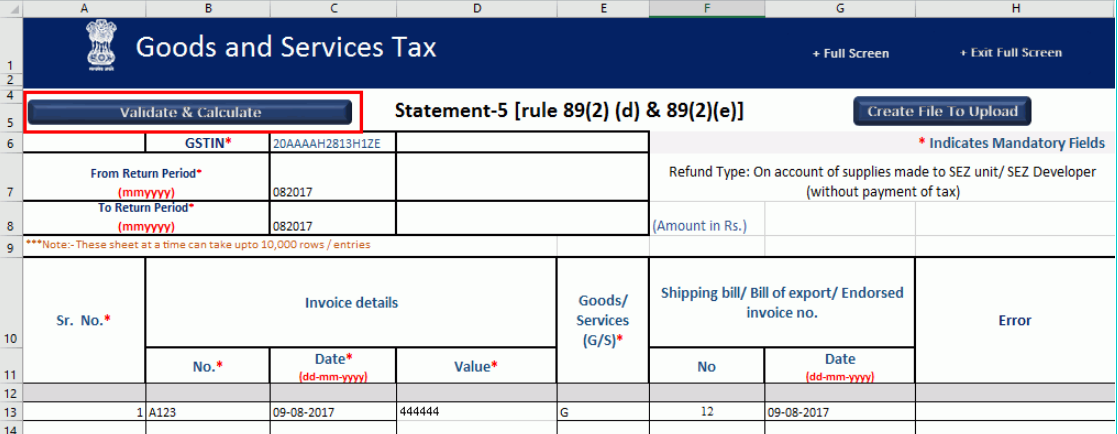 GST-Refund-Supply-to-SEZ-Invoice-Details
Step 12: The total number of records in the sheet is displayed. Click the OK button.
Step 13: Click the "Create File To Upload" button and save your file.
GST-Refund-Supply-to-SEZ-Invoice-Details
Step 12: The total number of records in the sheet is displayed. Click the OK button.
Step 13: Click the "Create File To Upload" button and save your file.
Upload complete details of supplies made to SEZ Unit or SEZ Developer
Step 14: Click the tab Click to upload the details of supplies made to SEZ/ SEZ Developer and click the tab click here to upload.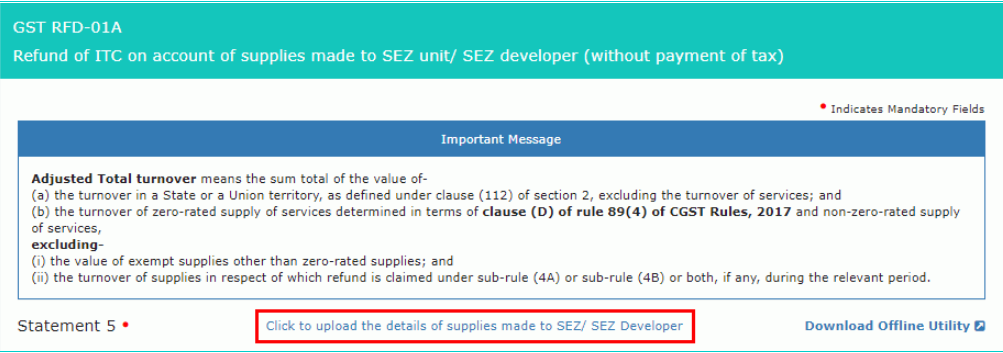 GST-Refund-Supply-to-SEZ-Upload-Details
Step 15: Now save the refund statement file and click the "Open" button.
Step 16: Click the “Download Unique Invoices” tab to view the invoices that have been uploaded successfully and click Validate statement button.
Step 17: Upon statement validation, a confirmation message on the screen that the statement has been submitted successfully for validation. Click the "Back" button.
GST-Refund-Supply-to-SEZ-Upload-Details
Step 15: Now save the refund statement file and click the "Open" button.
Step 16: Click the “Download Unique Invoices” tab to view the invoices that have been uploaded successfully and click Validate statement button.
Step 17: Upon statement validation, a confirmation message on the screen that the statement has been submitted successfully for validation. Click the "Back" button.
Refund on account of supplies made to SEZ unit/ SEZ developer (without payment of tax)
Step 18: Enter the value in the statement 5A below for the tax period for which the refund to be claimed. Step 19: Select the Bank Account Number from the drop-down list. In case you have filed the (Form GST RFD-11), select Yes enter the Reference Number of RFD-11 filing or else No and click the Save button. Step 20: Select the name of authorised signatory in the name of the authorized signatory drop-down list. Step 21: Click the File with DSC or File with EVC button.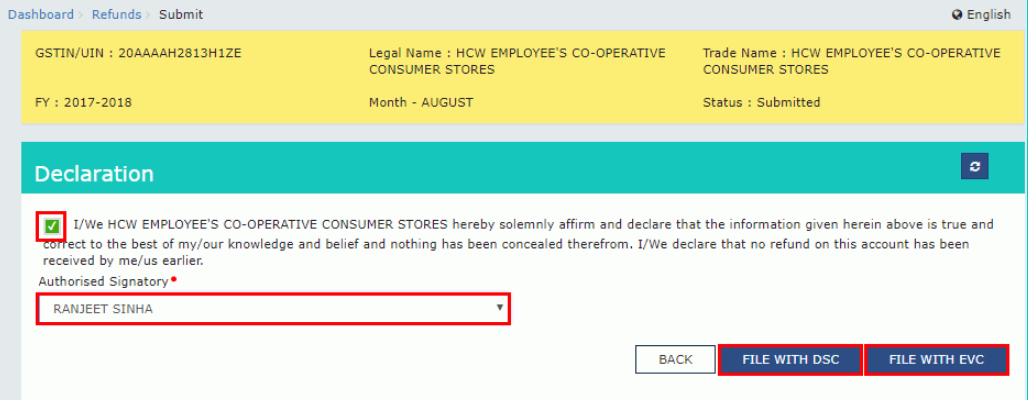 GST-Refund-Supply-to-SEZ-Declaration
File With DSC- Method
GST-Refund-Supply-to-SEZ-Declaration
File With DSC- Method
- Click the "Proceed" button and select the certificate and click the "Sign"
- Enter the OTP sent on email and mobile number of the Authorized Signatory registered at the GST Portal and click the Verify button.
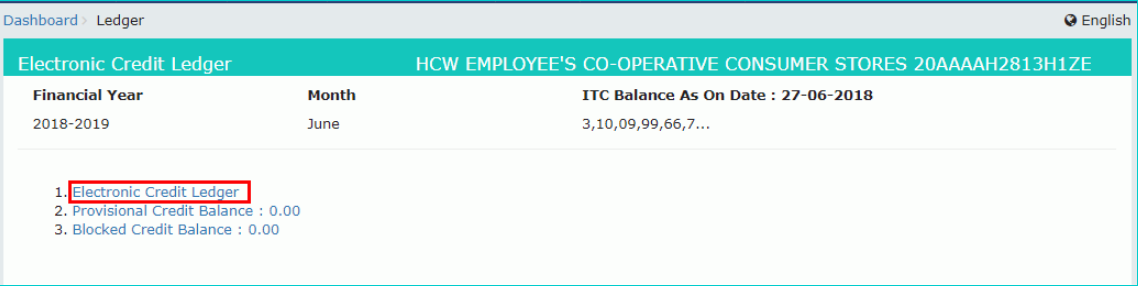 GST-Refund-Supply-to-SEZ-Electronic-Credit-Ledger
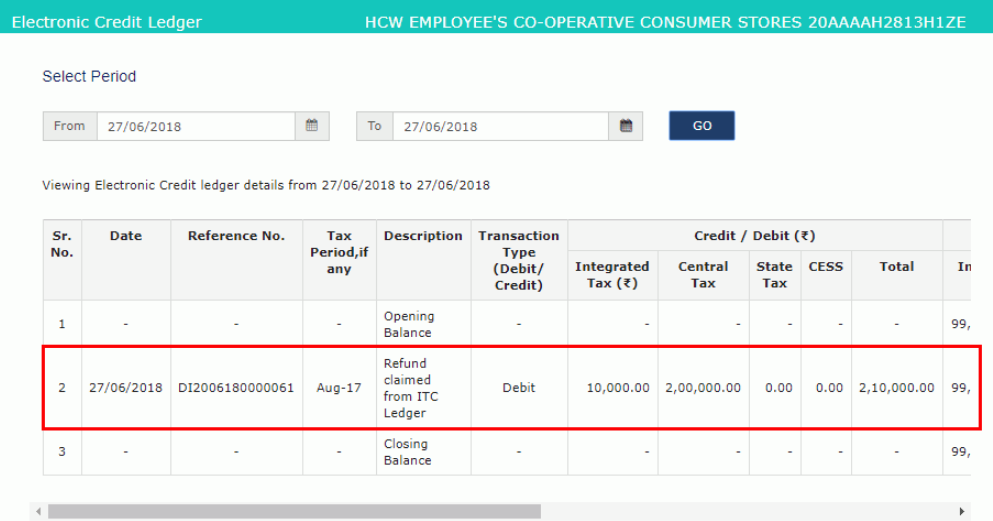
Step 25: Select the date from and to with the help of the calendar to choose the period for which you want to look at the transactions of Electronic Credit Ledge and click the “Go” button.
Step 26: Details of Electronic Credit Ledger are shown. Notify the debit entry in the Electronic Credit Ledger for the amount claimed as refund.
GST-Refund-Supply-to-SEZ-Electronic-Credit-Ledger
Step 25: Select the date from and to with the help of the calendar to choose the period for which you want to look at the transactions of Electronic Credit Ledge and click the “Go” button.
Step 26: Details of Electronic Credit Ledger are shown. Notify the debit entry in the Electronic Credit Ledger for the amount claimed as refund.
 GST-Refund-Supply-to-SEZ-Refund-Amount