

RENU SURESH
Expert
Published on: Aug 19, 2026
ITR U Updated Return: How to File & Key Changes for 2025
ITR-U, or Updated Income Tax Return, is a form that lets you correct errors or omissions in your previously filed income tax return. It can be submitted within four years from the end of the relevant assessment year. For FY 2024-25, the filing window for ITR-U is 1st April 2026 to 31st March 2030. In this article, we provide a detailed guide on ITR-U, covering when it can be filed, the conditions for eligibility, how additional tax liabilities are calculated and more!
File your Updated Income Tax Return easily with IndiaFilings.
Latest Update
Updated Returns (ITR-U) Now Available for ITR-3 and ITR-4
The facility for filing Updated Returns (ITR-U) for Assessment Years 2021-22 and 2022-23 for ITR-3 and ITR-4 is now available. Eligible taxpayers can correct or revise errors or omissions in their previously filed returns through the Income Tax e-Filing portal.
-Now-Available-for-ITR-3-and-ITR-4.webp)
Updated Returns (ITR-U) Now Available for ITR-1 and ITR-2
The Income Tax Department has enabled the facility to file Updated Returns (ITR-U) for Assessment Years 2021-22 and 2022-23 for ITR-1 and ITR-2. Eligible taxpayers can now correct or revise their earlier filed returns under Section 139(8A) of the Income Tax Act through the e-Filing portal.
Budget 2025 Update
The 2025 budget brings a key change to income tax return filings: the deadline for Updated Returns (ITR-U) is now extended from two years to four years from the end of the relevant assessment year. This extension takes effect in April 2025. An additional tax must be paid when filing an ITR-U, calculated as a percentage of the additional tax (tax + interest) owed, based on the filing timeline:
- Within 12 months of the end of the relevant AY: 25%
- Within 24 months of the end of the relevant AY: 50%
- Within 36 months of the end of the relevant AY: 60%
- Within 48 months of the end of the relevant AY: 70%
While belated or revised ITRs cannot be filed after December 31st of the assessment year, the ITR-U form can be used from January 1st of the AY onwards to rectify minor errors or omissions in the original ITR. It's important to note that ITR-U filings cannot be used to reduce tax liability, claim refunds, or increase reported losses.
For instance, if you filed your ITR for the financial year 2023-24 (assessment year 2024-25), the old rules gave you until March 2027 to file an updated return. Now, you have until March 31, 2029.
What is ITR-U?
ITR-U (Updated Income Tax Return) is a form introduced under Section 139(8A) of the Income Tax Act that allows taxpayers to:
- Correct errors or omissions in their previously filed ITR.
- File a missed ITR if they failed to file it within the due date and the belated/revised return deadline.
Taxpayers can file an Updated Return within two years from the end of the relevant Assessment Year (AY).
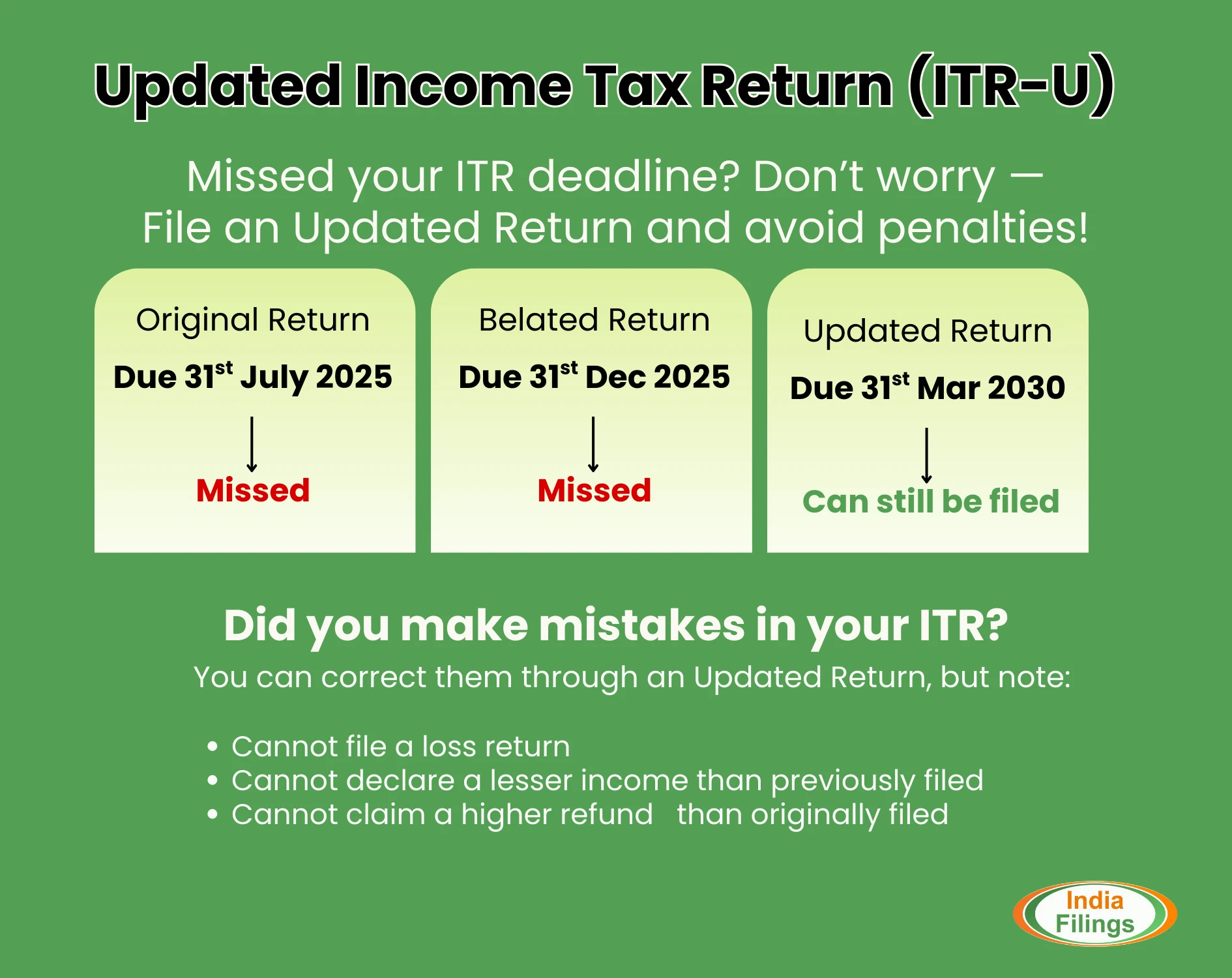
Example: For A.Y. 2023-24, if you missed filing your ITR or the belated/revised return, you can still file ITR-U from 1st January 2024 to 31st March 2026.
The CBDT has now notified Rule 12AC and new Form ITR-U for filing such updated income returns vide the Income-tax (Eleventh Amendment) Rules, 2022.
Who Can File ITR-U Under Section 139(8A)?
Any taxpayer who has made an error or omitted income details in any of the following returns can file an Updated Return (ITR-U):
- Original Return
- Belated Return
- Revised Return
An Updated Return can be filed in the following cases:
- Did not file the return. Missed return filing deadline and the belated return deadline
- Income is not declared correctly
- Choose the wrong head of income
- Paid tax at the wrong rate
- To reduce the carried forward loss
- To reduce the unabsorbed depreciation
- To reduce the tax credit u/s 115JB/115JC
A taxpayer can file only one updated return for each assessment year(AY).
Who is Not Eligible to File ITR-U Under Section 139(8A)?
You cannot file ITR-U in the following cases:
- Already filed an Updated Return for the same assessment year.
- Filing a NIL return or a loss return.
- Claiming or enhancing a refund.
- Reducing tax liability through the updated return.
- Search proceedings initiated under Section 132.
- Survey conducted under Section 133A.
- Books, documents, or assets seized under Section 132A.
- Ongoing or completed assessment/reassessment/revision/re-computation.
- No additional tax outgo (e.g., tax liability adjusted with TDS credit/losses).
- If carried forward losses, unabsorbed depreciation, or tax credits are to be reduced due to the updated return, ITR-U must be filed for all affected years.
ITR-U Filing Deadlines
The due dates for filing ITR-U for the previous four years are shown in the table below.
| Financial Year (FY) | Assessment Year (AY) | Last Date to File ITR-U |
|---|---|---|
| FY 2020–21 | AY 2021–22 | 31st March 2025 |
| FY 2021–22 | AY 2022–23 | 31st March 2026 |
| FY 2022–23 | AY 2023–24 | 31st March 2027 |
| FY 2023–24 | AY 2024–25 | 31st March 2028 |
| FY 2024–25 | AY 2025–26 | 31st March 2029 |
| FY 2025–26 | AY 2026–27 | 31st March 2030 |
| FY 2026–27 | AY 2027–28 | 31st March 2031 |
If you require assistance with filing your ITR-U or making changes to your filed ITR, IndiaFilings is here to help. Contact us today for expert support and ensure your taxes are filed accurately and efficiently.
Additional Tax Payment on ITR U Form
When filing an updated income tax return (ITR-U) and declaring previously unreported income or making corrections, taxpayers must pay not only the additional tax due but also a surcharge on that tax. You will have to pay an additional tax of 25% or 50% on the tax amount, depending on the timing of your ITR-U filing.
Timing of Filing ITR-U | Additional Tax |
Within 12 months from the end of the AY | 25% of Additional Tax (Tax + Interest) |
Between 12 and 24 months from the end of the AY | 50% of Additional Tax (Tax + Interest) |
ITR-U Form Download
For taxpayers looking to update their returns, Form ITR-U is available for download. We have attached here for ready reference:
Components of ITR U Form
ITR-U, designed for updating previously filed income tax returns, comprises several essential elements. Here’s a breakdown of what to expect in the form:
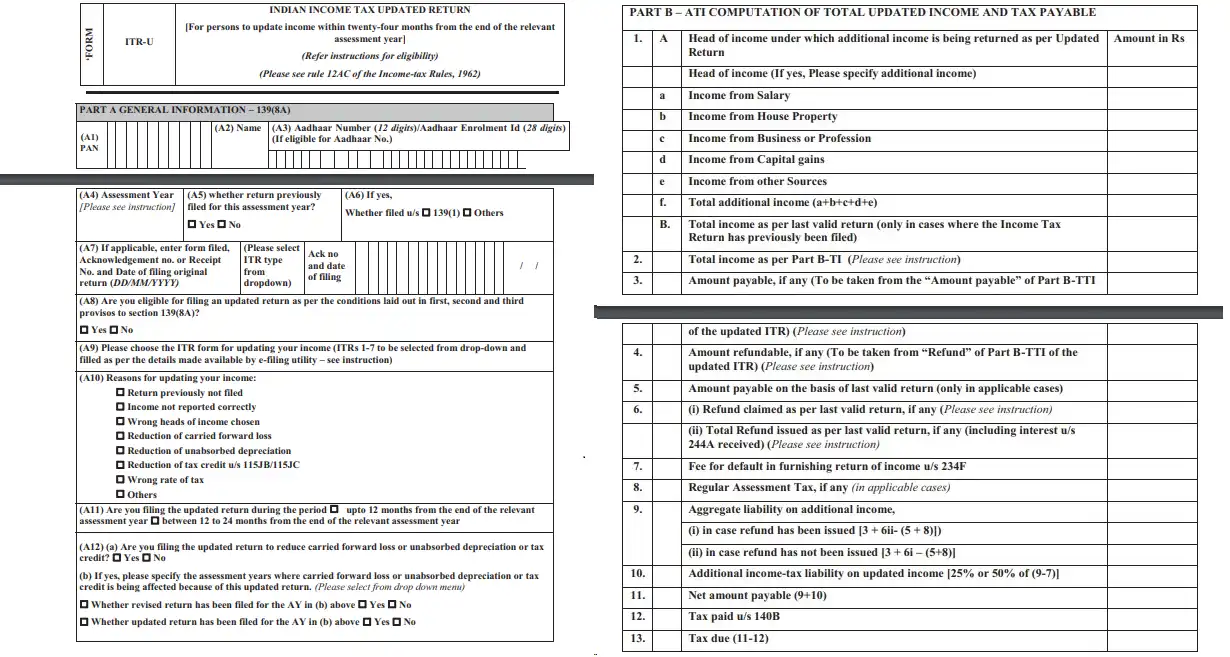
Basic Information:
- Includes the taxpayer's PAN (Permanent Account Number), name, address, and other personal details.
- Specifies the Assessment Year for which the return is being updated.
- Provides the original acknowledgement number and the date of the original filing.
Details of Income:
- Detailed report of all income sources, including salary, house property, business or profession, capital gains, etc.
- Includes adjustments for previously undeclared income or corrections to previously declared income.
- Deductions and Taxable Income:
- Updates to deductions previously claimed under Sections 80C, 80D, etc., of the Income Tax Act.
- Recalculation of net taxable income considering the revised deductions.
Tax Computation:
- Breakdown of the tax payable based on the revised taxable income.
- Details any additional tax payable, including applicable interest.
Tax Payments:
- This section provides information on taxes already paid, such as advance tax, self-assessment tax, and TDS (Tax Deducted at Source).
- If additional tax has been paid, details of such payments should be included along with the revised return.
Details of Tax Credits
- Any adjustments to previously claimed tax credits or amendments to tax credit claims.
Other Information:
- Details related to foreign assets, foreign income, and required disclosures under the Black Money Act.
- List of all bank accounts held by the taxpayer.
Declaration and Verification:
- A declaration by the taxpayer confirming the accuracy of the information provided.
- A section for the taxpayer’s signature to verify the contents of the return.
Guidelines for Filing ITR-U
Here are the key points to know about ITR-U:
- One-Time Submission: ITR-U can be filed only once for an assessment year. After submission, no further changes can be made for that year under this provision.
- Disclosure of Additional Income: The form enables taxpayers to fully disclose any additional income that wasn't originally reported, helping to avoid potential liabilities such as penalties and interest.
- Types of Corrections: Corrections can include changes in income details, tax credits, deductions, or declarations.
- Payment of Tax: If the updated return results in additional tax due, it must be paid along with any applicable interest to ensure no further discrepancies.
- No Refunds: ITR-U cannot be used to claim refunds. It is primarily for reporting additional income or correcting filing errors.
How to file ITR U Online?
As per the Income tax rules, the updated return (ITR-U) has to be furnished along with an updated version of the applicable ITR form (ITR 1 – 7). Here's a more comprehensive step-by-step guide to help you through the process of filing ITR U form effectively:
Access the e-Filing Portal:
Visit the official website for income tax e-filing in India. Use your PAN (Permanent Account Number) as your user ID to log in. If you do not have an account, you must register first by providing your PAN, full name, and date of birth and completing the registration process.
Enter the e-Filing Dashboard:
Once logged in, you will be directed to the dashboard. Here, click on the 'e-File' menu and select 'File Income Tax Return' from the dropdown options.
Select the Assessment Year:
You will be prompted to choose the relevant Assessment Year (A.Y.) for which the updated return is to be filed. Make sure you select the correct A.Y. to avoid any discrepancies.
Initiate the Filing Process:
Choose 'Updated Return under Section 139(8A)' when asked for the type of filing. This option is specific to those updating their previously filed returns.
Determine Your Taxpayer Status:
Select your status from the dropdown menu, such as Individual, Hindu Undivided Family (HUF), Company, etc. This classification helps in applying the specific rules and limitations relevant to different categories of taxpayers.
The form is divided into two parts – Part A & Part B.
Part A: General Information
- Fill in the following details:
- PAN
- Name
- Aadhaar Card Number
- Assessment Year
- Confirm if you have filed a return previously for this Assessment Year.
- If yes, refer to the ITR acknowledgement to check whether it was filed under Section 139(1) or any other section.
- Enter the Form No., Acknowledgement/Receipt No., and Date of filing of the original return (as per the ITR acknowledgement).
- Review the eligibility conditions for filing ITR-U and select the correct option.
- Select the applicable ITR form number.
- Choose at least one reason for updating the return (multiple choices allowed).
- Mention if the return is being filed within 12 months or 12–48 months.
- If the updated return impacts carried-forward loss, unabsorbed depreciation, or tax credits, specify the Assessment Year affected and whether a revised/updated return was filed earlier.
Part B: Computation of Updated Income and Tax Payable (ATI)
Here you must declare your updated income and compute the tax payable:
- Report the additional income under the relevant heads. (No detailed break-up required.)
- Enter the income as per the last return filed.
- Provide the Total Income figure (available in Part B-TI of your ITR form 1–7).
- Mention the amount payable (from Part B-TT – Amount Payable).
- Mention the refund claimed, if any (from Part B-TT – Refund).
- Enter the tax payable amount as per your last return.
- If a refund was claimed earlier, enter the refund amount (including interest) received.
- If the last return was filed late, enter the late filing fee paid.
- Enter any regular assessment tax paid previously.
- Compute your aggregate liability on additional income.
- Add the additional tax liability (25% or 50% of differential tax, depending on filing timeline).
- Calculate the net tax payable (aggregate liability + additional tax).
- If the updated return results in additional tax payable, make the payment as Self-Assessment Tax u/s 140B and enter the challan details.
Input Correct Income Details:
Accurately provide details of all income sources, including salary, house property income, profits from business or profession, capital gains, and other sources. If you're revising previously unreported or under-reported income, ensure to align these figures with supporting documents like Form-16, bank statements, investment proofs, etc.
Review and Adjust Deductions:
Update any relevant deductions claimed under various sections of the Income Tax Act (such as 80C, 80D, etc.) that were previously missed or incorrectly reported. Calculate the net taxable income after incorporating these changes.
Calculate Your Tax Liability:
Utilise the built-in tax calculation tool on the portal to compute your tax liability based on the revised income. This will include calculation of any additional tax payable, including interest or penalties due to the amendments.
Settle Any Tax Dues:
If there is additional tax due as per your updated return, make sure to pay this before submitting the ITR-U. The portal provides facilities for online payment of taxes, which can be done using net banking, debit card, or other payment methods.
Preview, Confirm, and Submit:
Before submitting, preview the filled ITR-U form to verify all the information for accuracy and completeness. Once satisfied, submit the form.
Verify Your Submission:
After submission, verify your return through options such as Aadhaar OTP, EVC generated through a bank account, or by sending a physically signed ITR-V to the CPC in Bengaluru.
Receive Acknowledgement:
Upon successful verification, you will receive an acknowledgement from the IT Department. This acknowledgement should be stored safely for future reference.
How to Verify ITR-U?
Once you file the Updated Return (ITR-U), it must be verified. Verification can be done in the following ways:
- Aadhaar OTP
- Electronic Verification Code (EVC)
- Digital Signature Certificate (DSC)
Note: For cases where a tax audit is applicable, verification is allowed only through DSC.
How to calculate the Tax Payable for an Updated Return (ITR-U)?
Here is the procedure to calculate the tax payable when filing an updated income tax return (ITR-U):
Calculate Total Income Tax Liability:
This is the sum of all taxes, interest, late fees, and the additional tax for filing an updated return.
- Tax Payable: The tax due on the additional income reported in the modified ITR (Part B-TTI).
- Interest: Any interest levied under Sections 234A, 234B, or 234C on the additional income (Part B-TTI).
- Late Fee: If applicable, the late fee is under Section 234F (Part B-TTI).
- Additional Tax: The penalty for filing an updated return (25%, 50%, 60%, or 70%, depending on when the ITR-U is filed).
Calculate Net Tax Liability
Subtract any tax credits or payments already made from the Total Income Tax Liability.
- Total Income Tax Liability: Calculated in step 1.
- TDS/TCS/Advance Tax/Tax Relief: Taxes already deducted or paid.
Step-by-Step Calculation with Table:
Below, we have given a table to represent how this calculation works:
Sr. No. | Particulars | Match figure from | Amount (in Rs) |
A | Tax payable on additional income (modified ITR, Part B-TTI) | Modified ITR | XXXX |
B | Interest (Section 234A/234B/234C) (modified ITR, Part B-TTI) | Modified ITR | XXXX |
C | Late fee (Section 234F) (modified ITR, Part B-TTI) | Modified ITR | XXXX |
D | Taxes paid/relief (TDS/TCS/Advance Tax/Regular Assessment Tax/Relief) |
| XXXX |
E | Total refund issued/claimed (original return) | Original return | XXXX |
F | Aggregate tax liability on additional income | A + B + C + E - D | XXXX |
G | Additional tax (25%, 50%, 60% or 70% of (F - C)) |
| XXXX |
H | Net Amount Payable | F + G | XXXX |
Key Points:
- The "modified ITR" refers to the ITR submitted along with the ITR-U.
- Part B-TTI of the ITR form contains details of the tax payable and interest calculations.
- The additional tax is calculated on the aggregate tax liability minus the late fee (if any). This is because the late fee is already a penalty.
- The final "Net Amount Payable" (H) is what you owe to the government.
Note: This is just a sample calculation provided for illustrative purposes. For accurate computation based on your specific case, our IndiaFilings experts are here to help you every step of the way.
Cases when an updated return of income cannot be furnished
The form ITR-U cannot be filed for the following reasons:
- Where a search has been initiated under section 132 or requisition is made under section 132A of the Income-tax Act
- Where a survey has been conducted u/s 133A other than survey u/s 133(2A) of Income-tax Act
- Where any proceeding for assessment or reassessment or recomputation or revision of income is pending under the Income-tax Act
- Where the Assessing Officer has information for the relevant assessment year: Blank Money law, Benami law, etc.
- Where any information is received under an agreement referred to in sections 90 or 90A of the Income-tax Act
- Where any prosecution proceedings are initiated under the Income-tax Act:
Conclusion
In conclusion, the ITR-U provides a valuable opportunity for taxpayers to rectify past filing errors or omissions, ensuring accurate and compliant tax records. Whether you've missed filing altogether or simply need to correct details on a previous return, the ITR-U offers a path to resolution. While the previous two-year window provided some flexibility, the recent extension to four years (effective April 2025) offers even greater leeway for taxpayers to address any discrepancies. Remember, however, that the ITR-U is designed for reporting additional income and increasing tax liability, not for claiming refunds or reducing your tax burden.
Missed filing your ITR? Don't worry! Update your return now and stay tax compliant without hassle!