

Renu Suresh
Expert
Published on: Aug 18, 2026
Revised Form GST DRC-03 - Procedure for Intimation of Voluntary Payment
The Central Board of Indirect Taxes and Customs vide a notification dated 1st December 2021 has issued the Central Goods and Services Tax (Ninth Amendment) Rules, 2021. The Central Goods and Services Tax (Ninth Amendment) Rules, 2021 has revised the FORM GST DRC-03. Revised FORM GST DRC-03 shall now be used for the Intimation of payment made voluntarily or made against the show cause notice (SCN) or statement. The present article briefly explains the said amendment rules.Form GST DRC-03
Form GST DRC-03 is a tax settlement form where a taxpayer can pay off their tax by inflating their liability voluntarily or in response to Show Cause Notice (SCN) raised by the GST Department. The Revised FORM GST DRC-03 is attached here for reference:- Tax settlement can be made voluntarily by the taxpayer for an already established liability or the Show Cause Notice (SCN)issued by the tax officials under Sections (73) and (74) of the CGST Act 2017.
- Section-73 handles the cases of non-payment or underpayment of tax without any purpose or solicitation of deception
- Section-74 handles the instances of no-payment or underpayment of tax with the purpose and solicitation of deception
Applicability of Form GST DRC-03
According to the Central Goods and Services Tax (Ninth Amendment) Rules, 2021, CBIC has now introduced facilitation called Payment on Voluntary Basis through Form GST DRC-03 for the taxpayers to make payments for any causes like that Audit, inspection or investigation, voluntary, SCN, annual return, reconciliation statement, scrutiny, intimation of tax ascertained through FORM GST DRC-01A, Mismatch (Form GSTR-1 and Form GSTR-3B), Mismatch (Form GSTR-2B and Form GSTR-3B) The facility is made available on the GST tax portal for the taxpayers in filing the GST Return.Prescribed Time for filing DRC-03
Form DRC-03 is used for making a voluntary payment of tax. Voluntary payment can be made either before the issuance of show cause notice or within 30 days of issue of SCN, in case the show cause notice is already issued. In the Revised Form GST DRC-03, CBIC noted that taxpayers need to provide details of show cause notice if payment is made within 30days of its issue, scrutiny, intimation of tax ascertained through Form GST DRC01A, audit, inspection, or investigation.Procedure to file Form DRC-03
Procedure to make payment against the liability (tax, interest, and penalty) based on self-ascertainment of tax is given below:- Access the official webpage of GST and log in to the GST Portal with valid credentials. Click on the Services option and then select User Services.
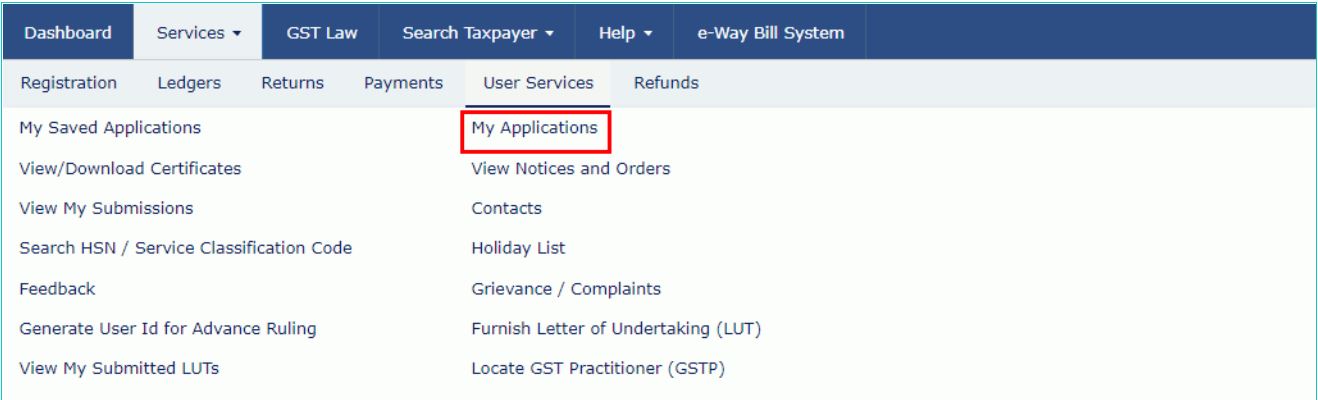 1. Revised Form GST DRC-03 - GST Home Page
- Click on the My Applications option and then Select the Intimation of Voluntary Payment - DRC - 03 from the Application Type drop-down list. Click the NEW APPLICATION button.
 2. Revised Form GST DRC-03 - Application Type
- The intimation of payment made voluntary or made against the show cause notice (SCN) or statement or intimation of tax ascertained, through FORM GST DRC-01A, the page will be displayed.
Cause of Payment
- Select the Cause of Payment from the drop-down list.
- In Case of Voluntary Payment - The payment date is auto-populated and cannot be edited.
- In Case of SCN -. Select Manual Entry from the SCN Reference Number drop-down list and enter the SCN Reference Number and Select the SCN Issue Date using the calendar. ( SCN Issue date should be within last 30 days)
- In Case of Annual Return - Select the Section Number from the drop-down list.
- In Case of Reconciliation Statement - Select the Section Number from the drop-down list.
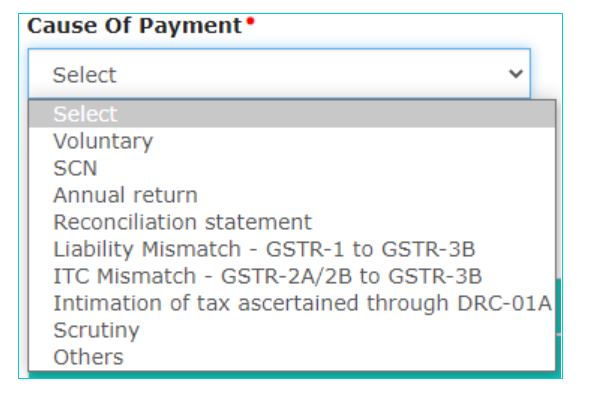 1.Revised Form GST DRC-03 - Cause of Payment
- Select the Financial Year, from date and To Date for Overall tax Period from the drop-down list. Enter the details of payment made including interest, penalty, and others
- After providing all the details, click on the PROCEED TO PAY button. The Voluntary Payment page will be displayed.
Liability Details and Cash Ledger Balance
Liability details and the cash available as on date will be displayed in a table. Use the scroll bar to move to the right to enter the amount to be paid through cash against the liability and enter the amount to be paid through cash by creating a challan against the liability. Note: Interest and penalty amount shall be paid out of cash ledger only.Credit Ledger Balance
- The ITC available as on date will be displayed, Use the scroll bar to move to the right to enter the amount to be paid through ITC against the liability.
- Select the Verification checkbox and enter the Name of Authorized Signatory and Place. Click the CREATE CHALLAN button. The Create Challan page will be displayed.
Make Payment
- Select the Payment Modes as E-Payment/ Over the Counter/ NEFT/RTGS and Click the GENERATE CHALLAN button.
- On successful completion of payment, a message will be displayed. The Bank Transaction ID will also be displayed on the screen. Click on CONTINUE to proceed further.
- By clicking on the PREVIEW button, a draft statement in PDF format can be downloaded on your computer.
Upload Document
Before filing Form GST DRC-03, Click on the Choose File button to upload any document. Select the Verification checkbox and Select the Name of Authorized Signatory from the drop-down list.File GST DRC-03
After providing all the details, click on the File button, a confirmation message will be displayed. Click OK to continue. Click the FILE WITH DSC or FILE WITH EVC button- FILE WITH DSC - Select the certificate and click the SIGN button.
- FILE WITH EVC - Enter the OTP sent on the e-mail and mobile phone number of the Authorized Signatory registered at the GST Portal, and click the VALIDATE OTP button.