
Bennisha
Expert
Published on: Jul 30, 2026
Filing Reply for Form GST DRC-22
GSTR-22 is a form used by the concerned authorities for provisionally attaching the properties, bank account etc of the taxpayer. This article guides such taxpayers on filing reply to form GST DRC-22 against the proceedings initiated against them.
Conditions for Initiating the Recovery Process
The recovery process in GST portal is initiated under the following conditions.
- Demand ID is created under assessment, enforcement, appeal, refund or any other module and this is indicated in the Electronic Liability Register.
- Prescribed time under the GST law to make payment of adjusted dues has been expired.
- Demand is in a recoverable stage, and not within an appeal period, finally adjudged or appeal that is not filed against the order/ appellate order.
Modes of Recovery Process
The following are some of the modes of recovery that are available to tax officials.
- Detain and sale of goods of the taxpayer in possession of the tax department/ other officers.
- Issuance of letter/ any other government departments/ correspondence to third parties including banks/ successor or transferee or legal heir/ debtors/ any other person provided in law.
- Distrain, detain and sell immovable and movable properties.
- Issuance of certificate to the concerned revenue authorities to recover the arrears of Land Revenue.
- Application to the magistrate to recover as fine.
- Recovery from Electronic Cash Ledger/ Electronic Credit Ledger of a taxpayer.
- Other modes as mentioned by the law.
Types of Notices
Depending on the mode of Recovery, relevant
notice can be issued. This table provides the list of notice types that can be issued based on the mode of recovery.|
Mode of Recovery |
Type Notice |
|
Sale of taxable goods under the control of the concerned Recovery officer |
Form GST DRC-10 (Notice for Auction of Goods under section 79 (1) (b) of the Act) |
|
Notice to Third Parties |
Form GST DRC-13 (Notice to a third person as per Section 79(1) (c)) Form GST DRC - 15 (An application before the Civil Court to request for execution of a Decree) |
|
Seizure of Immovable/ Movable properties/ Attachment by Tax Authorities |
Form GST DRC-16 (Notice for attachment and sale of immovable/movable goods/as per Section 79) Form GST DRC-22 (Provisional attachment of property as per Section 83) |
|
An application to the Magistrate used for recovery as Fine |
Form GST DRC -19 (An application to the Magistrate used for Recovery as Fine) |
|
Notice to the concerned Officer |
Form GST DRC -09 (Order for recovery through specified officer under section 79) |
Application Process
Here are the steps that are involved in filing a reply to the Form GST DRC - 22, that are filed against the proceedings initiated for Recovery of Taxes.
Viewing Recovery Details
Step 1: Login to the GST Portal The taxpayer has to login to the official GST Portal. Step 2: Click on View Additional Notices/ Orders option The taxpayer has to click on the 'Services' tab, then 'User Services' and then 'View Additional Notices/ Orders' option.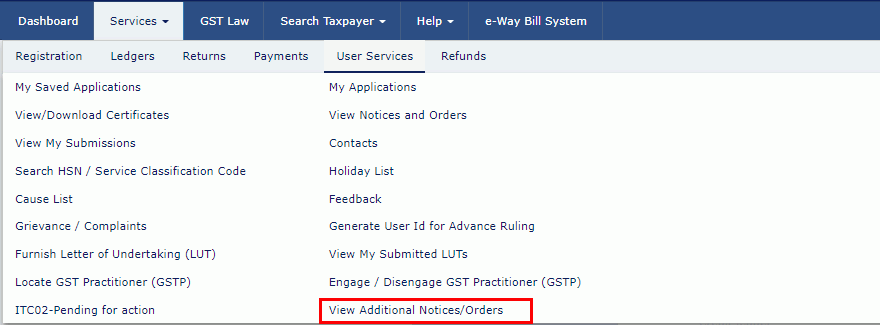 Step 2-Filing reply in Form GST DRC-22
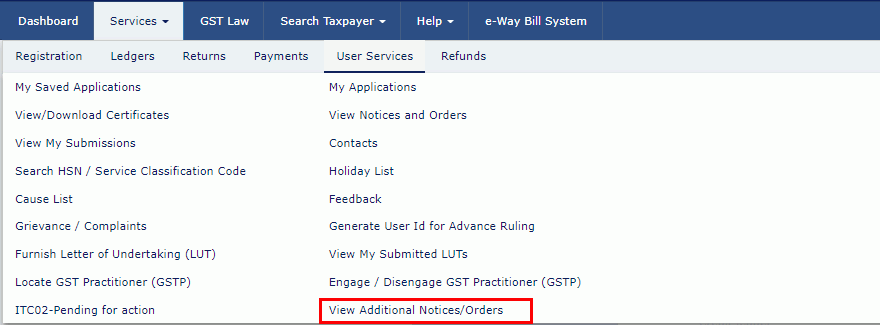
Step 3: Click View
The taxpayer has to click on 'View' option.
Step 2-Filing reply in Form GST DRC-22
Step 3: Click View
The taxpayer has to click on 'View' option.
 Step 3-Filing reply in Form GST DRC-22
Step 4: Select the Recovery Details
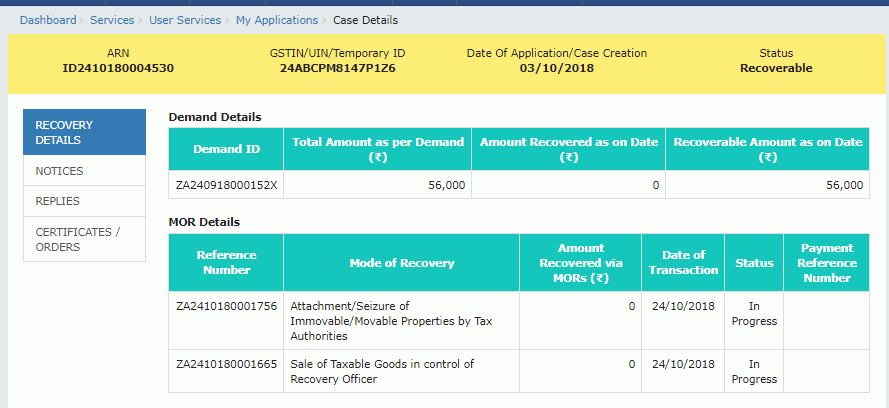
On the Case Details page, the taxpayer has to select the 'Recovery Details' tab. This tab lists the details of demand issued and mode of recovery.
Step 3-Filing reply in Form GST DRC-22
Step 4: Select the Recovery Details
On the Case Details page, the taxpayer has to select the 'Recovery Details' tab. This tab lists the details of demand issued and mode of recovery.
 Step 4-Filing reply in Form GST DRC-22
Viewing Issued Notices
Step 1: Select the Recovery Details On the Case Details page, the taxpayer has to select the 'Recovery Details' tab. This tab lists the notices issued by the Tax Official. Step 2: Click the View link The taxpayer has to click the 'View' link in the action column to view and download the notices that are issued into the machine.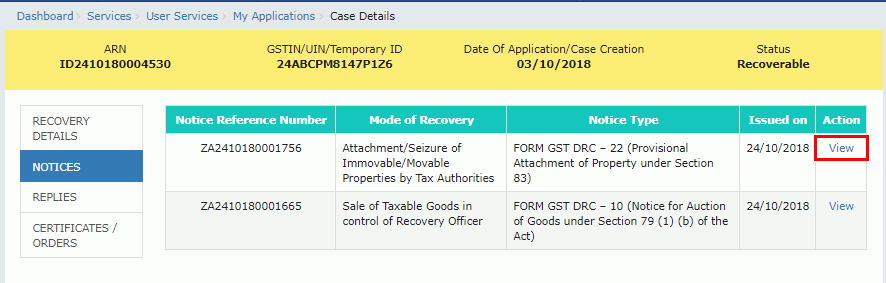 Step 2-Filing reply in Form GST DRC-22
View/ Add Reply to the Issued Notice
Step 1: Select the Replies Tab The taxpayer has to select the 'Replies' tab from the Case Details page. This tab displays the replies that are filed against the notices issued by the tax official. Step 2: Click Add Reply In order to add a reply, click on 'Add Reply'. The Reply page is displayed. Select the 'Mode of Recovery', 'Notice Type' and 'Notice Reference Number' from the drop-down list.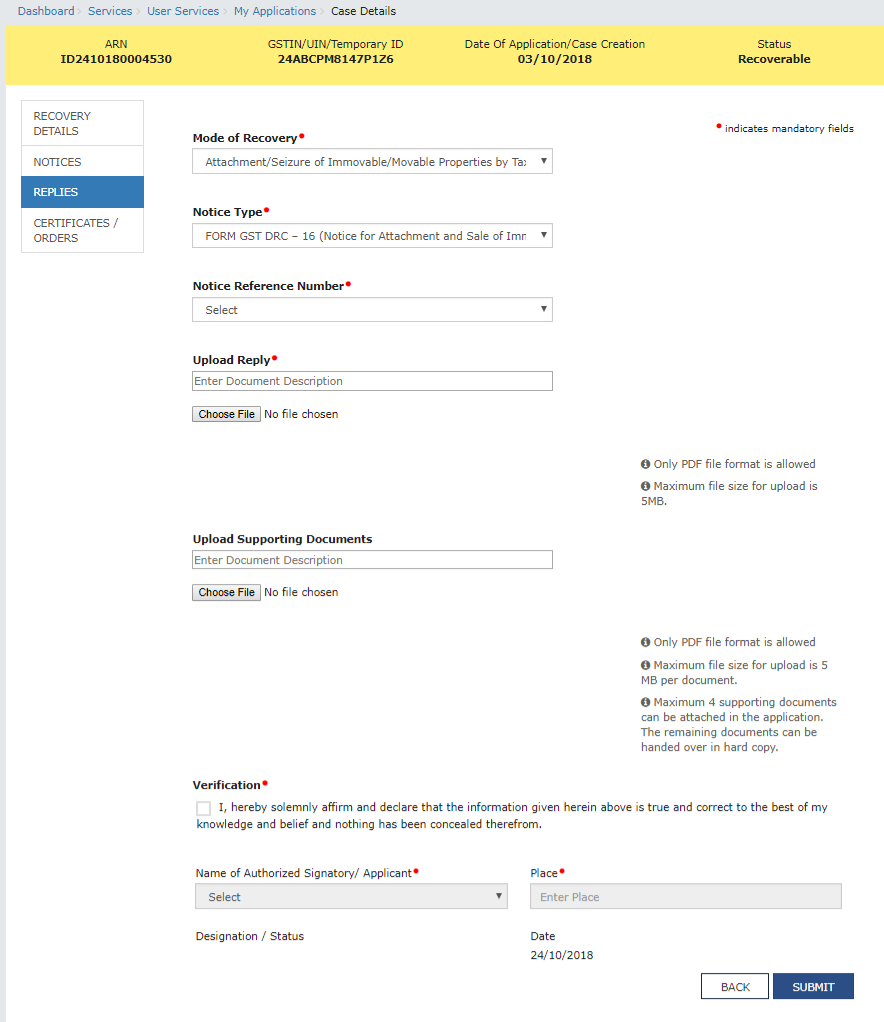 Step 2-Filing reply in Form GST DRC-22
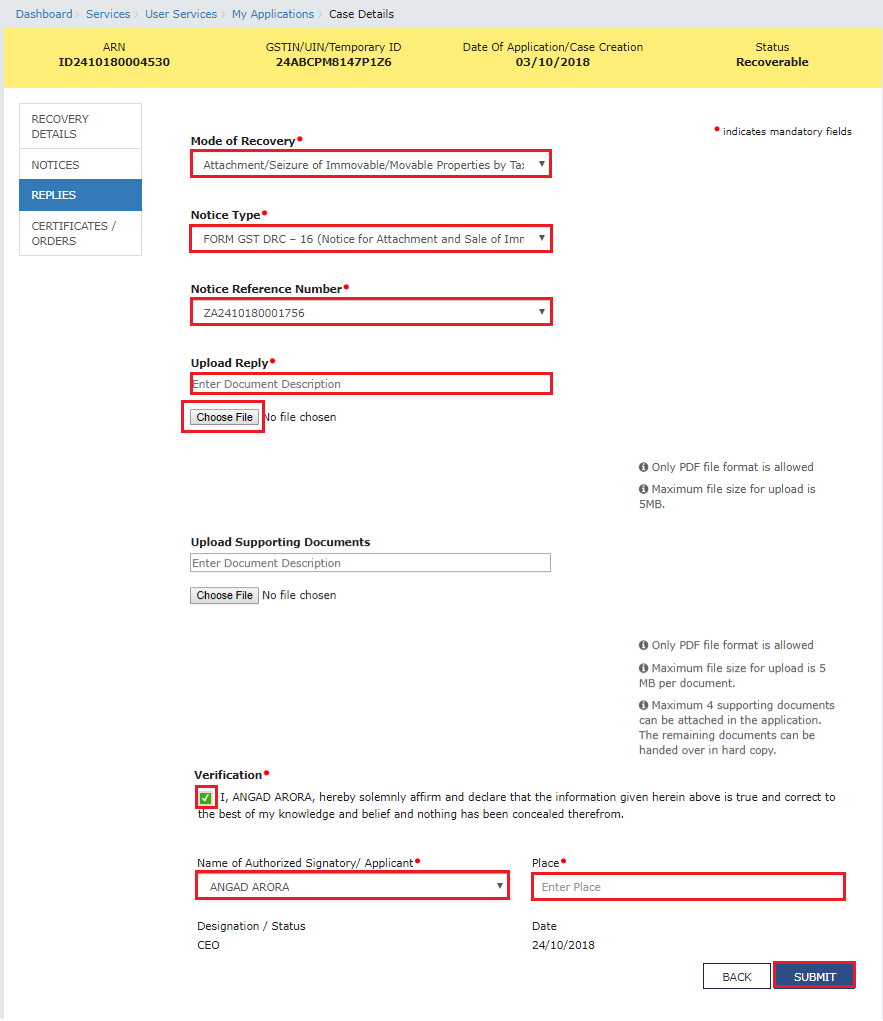
Step 3: Click Choose File
The taxpayer has to click on 'Choose File' to upload reply and any other supporting documents that are related to the reply. Then, the verification check-box has to be selected and select the name of the authorized signatory.
Step 4: Enter the Place
The taxpayer has to enter the place from where the form is filed.
Step 5: Click Submit
The taxpayer has to click on 'Submit' option and then click 'Proceed'.
Step 2-Filing reply in Form GST DRC-22
Step 3: Click Choose File
The taxpayer has to click on 'Choose File' to upload reply and any other supporting documents that are related to the reply. Then, the verification check-box has to be selected and select the name of the authorized signatory.
Step 4: Enter the Place
The taxpayer has to enter the place from where the form is filed.
Step 5: Click Submit
The taxpayer has to click on 'Submit' option and then click 'Proceed'.
 Step 5-Filing reply in Form GST DRC-22
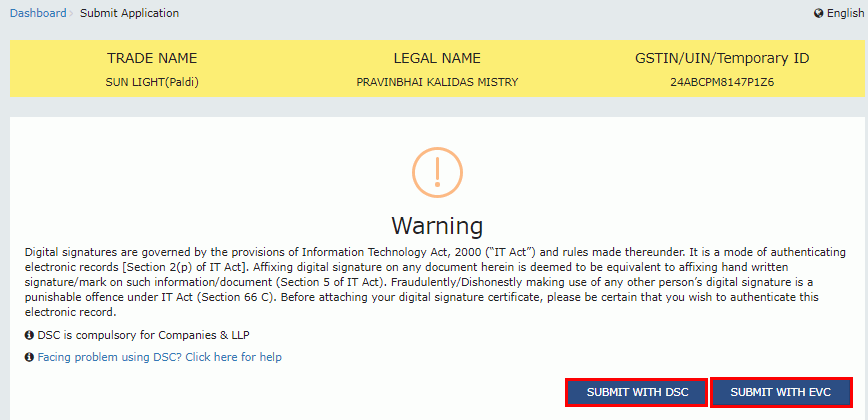
Step 6: Click Issue with DSC or Issue with EVC
By clicking the 'Proceed' option, 'Submit Application' page is displayed. The taxpayer has to either click on the 'Issue with DSC' or 'Issue with EVC'.
Step 5-Filing reply in Form GST DRC-22
Step 6: Click Issue with DSC or Issue with EVC
By clicking the 'Proceed' option, 'Submit Application' page is displayed. The taxpayer has to either click on the 'Issue with DSC' or 'Issue with EVC'.
 Step 6-Filing reply in Form GST DRC-22
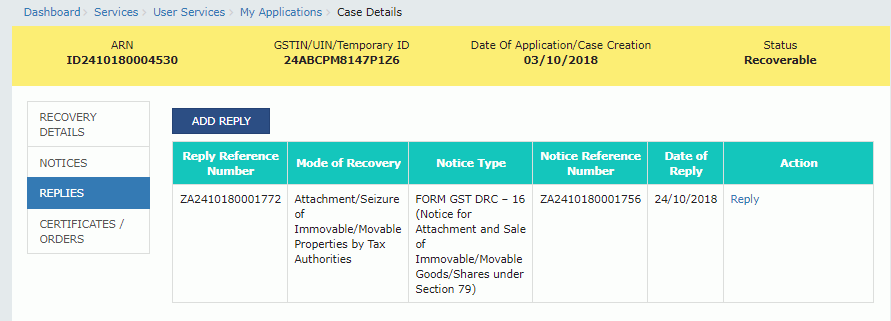
Step 7: Click OK
A success message is displayed with the generated Reference number and then click on 'Ok' option. Following this, the updated 'Replies' tab is displayed with the record of the filed reply in a table. This can be downloaded by clicking the documents in the 'Action' section of the table.
Step 6-Filing reply in Form GST DRC-22
Step 7: Click OK
A success message is displayed with the generated Reference number and then click on 'Ok' option. Following this, the updated 'Replies' tab is displayed with the record of the filed reply in a table. This can be downloaded by clicking the documents in the 'Action' section of the table.
 Step 7-Filing reply in Form GST DRC-22
After successful reply of the file, the taxpayer receives
Step 7-Filing reply in Form GST DRC-22
After successful reply of the file, the taxpayer receives
- An acknowledgement intimation via the registered email and SMS along with the generated RFN.
- The reply is made available on the Tax Official's dashboard.
Viewing the Order Issued against the Case
Here are the steps that are followed to download the order that has been issued against the case.
Step 1: Click on Certificate/ Orders From the Case Details page, the 'Certificates/ Orders' tab has to be clicked. The tab provides an option to view the issued order or certificate with all the documents in the PDF format. Step 2: Click the View link The taxpayer has to click on the 'View' link in the Action column of the table to download and view.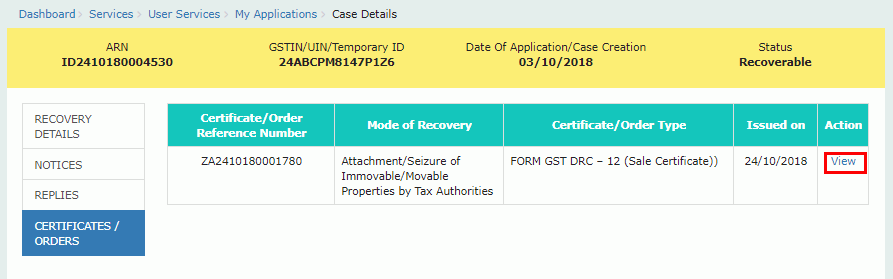 Step 2-Filing reply in Form GST DRC-22