
Sinduja Shankar
Expert
Published on: Aug 14, 2026
Export Market Promotion Scheme (EMP)
Export Market Promotion Scheme (EMP) is a Central Government Scheme implemented by the Government of India through the Coir Board. This scheme aims to improve the export performance of the Indian Coir Industry. In this article, we look at the Export Market Promotion Scheme in detail.
To know about Coir Udyami Yojana (CUY)Eligibility Criteria
The EMP scheme is applicable to the following entities:
- Manufacturers
- Entrepreneurs
- Exporters of Coir
Documents Required
The below-listed documents to be submitted along with the application form for the Exporter & RCMC Registration:
- Scanned Copy of IE Code
- Scanned copy of Signed Purchase Order
- A Bank Certificate showing the Financial status of your Account
- Copy of Pan Card
- Copy of Small Scale Industry (SSI) Certificate/ Coir Board Industrial Establishment Certificate
- Copy of Partnership deed - Self Attested
- Limited Company (Memorandum Article of Association)
- An Affidavit/ Declaration in your Company letterhead for submitting the export details to Coir Board every month without fail
- Demand Draft
Registration Procedure
To register for the Export Market Promotion (EMP) Scheme, the entities has to follow the below-mentioned procedure:
Access the Portal
Step 1: Firstly, the entities have to visit the official portal of MyCoir to apply for this scheme.
New Login Registration
Step 2: Registered users can only log in to apply for this scheme. For a new registration, the applicants will have to follow the ‘New Login Registration’ procedure.
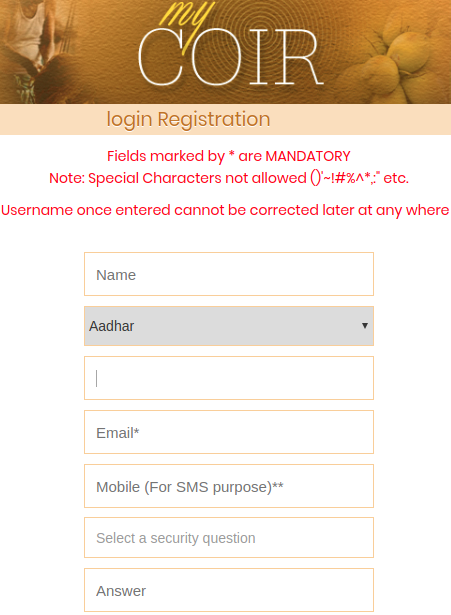
Step 3: Now, the applicant has to log in with the following details:
-
- User Name
- Aadhar Card details
- e-Mail Address
- Security question
Note: The applicant has to enter the captcha before confirming the login.
Step 4: Upon completion, the username and password will be intimated via SMS of the applicant's registered mobile number.
Login into Portal
Step 5: In the login page, type the user name and password received through email/SMS and click "Sign In".
Note: The applicant will be asked to change the password and has to re-login with new login credentials.
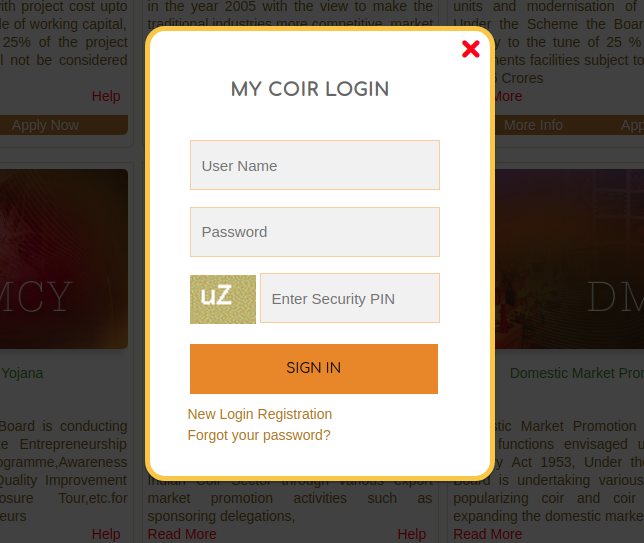
Step 6: After successful login, the applicant will be redirected to the Home Page.
Registration TypesStep 7: The EMO scheme has the following two phases of registrations:
-
- Exporter & RCMC Registration
- Export Market Development Assistance (EMDA)
Exporter & RCMC Registration
Step 8: Now, the applicant has to click on the “+Registration” option from the menu list.
Step 9: Then, the applicant has to select the “+Exporter” option from the menubar and select the “-Registration” Button.
Fill In the Right Credentials
Step 10: Now enter all the mandatory details in the application form.
Note: The application forms can be had either from the HO of the Coir Board or downloaded from the official website.
Print the Acknowledgement Slip
Step 11: Take a Print of Exporter Registration and RCMC Registration submitted the application form from the Portal and can send to Coir Board along with the Demand draft.
Track Application status
The applicant can check/ verify the status of the application in the official portal by login to the account with the username and Password. The beneficiary/ Applicant must visit the respective home pages of the official site in for the latest developments against the application.
My Coir - MSME Schemes Mobile App
My Coir -
MSME Schemes app allows the user to validate the status of an application/service receipt issued against any scheme under Coir Board across the State. My Coir - MSME Schemes Mobile App is available for Android, Windows & iOS platforms and can be downloaded from the official portal and respective app stores.