
Daphne
Expert
Published on: Jul 30, 2026
DSC Registration on the New Income Tax Portal
DSC utility is a software used to create a digital signature file for
income tax efiling. In this article, we discuss the procedure for creating a digital signature file using DSC utility. When the taxpayer is using a digital signature to authenticate the returns filed, it allows the Income Tax Department to verify that the returns are filed only with the approval of the taxpayer and not by a random person.What is a digital signature file?
A
digital signature file is an encrypted document containing the identity details of the verifier. A digital signature file is needed to confirm the authenticity of the source of a file. For instance, a digital signature file is used in income tax efiling to verify the return filed by an assessee and the identity of the income tax return uploader.What is DSC Utility?
DSC stands for Digital Signature Certificate. DSC utility is a Tool to digitally sign government forms such as income tax returns, TDS returns and for verifying PAN online.
Types of Digital Signature
There are two types of Digital Signature Certificate.
- PFX File
- USB Token
PFX File
PFX File is a Digital Signature Certificate that is in a file format (.pfx format). This type of signature can be easily circulated through e-mail, which makes it easier for users. However, there is a risk of misuse if not handled properly.
USB Token
Digital Signature certificate in a USB Token, looks similar to a pen drive, which is attached to the PC for using a digital signature. The main advantage of it is that it safeguards DSC from misuse which is more likely in a pfx file.
Generating Signature File for Income Tax EFiling using DSC Utility
Step 1: Download DSC Utility
Download the utility from the link provided above. You can also download the utility through the Income Tax E-Filing portal.
Step 2: Extracting the JAR File
Extract the zip folder and open the utility (
DSC_MGMT_UTILITY.jar)Step 3: Read the Instructions
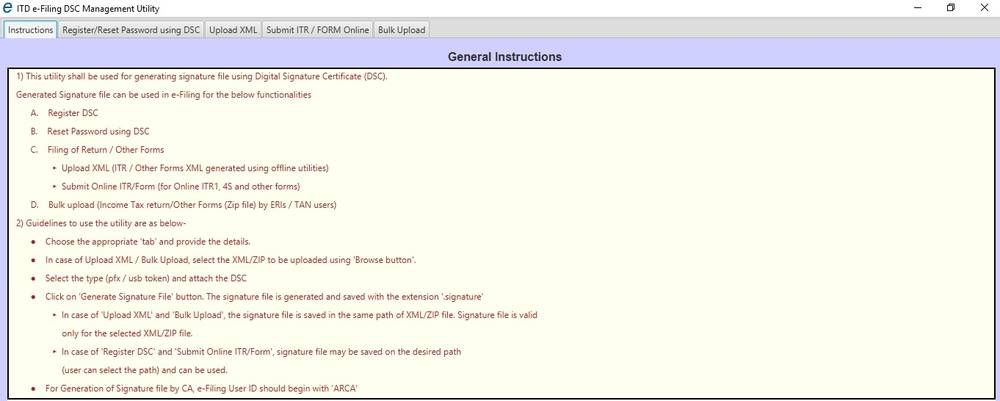
The utility looks as below. Read the instructions that are provided in the Instructions tab.
 DSC-Utility-for-Filing-Income-Tax-Returns
Step 4: Uploading File
Click on the 'Bulk Upload Tab'.
 DSC-Utility-for-Filing-Income-Tax-Returns
Zip your file, click on 'Browse Zip file', select your file and enter the efiling User Id (TAN number) and PAN as registered with DSC and efiling login.
DSC-Utility-for-Filing-Income-Tax-Returns
Zip your file, click on 'Browse Zip file', select your file and enter the efiling User Id (TAN number) and PAN as registered with DSC and efiling login.
Step 5: Select the Digital Signature Certificate
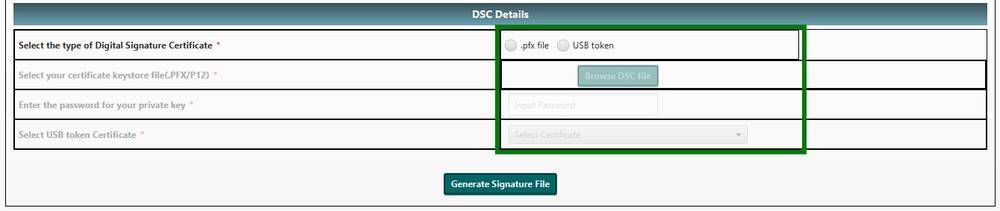
Select the type of Digital Signature Certificate that you possess. As mentioned earlier in the article, Digital Signature Certificate could either be PFX file or USB Token. USB token digital signatures are now more prevalent.
 DSC-Utility-for-Filing-Income-Tax-Returns
If you have your Digital Signature in PFX File :
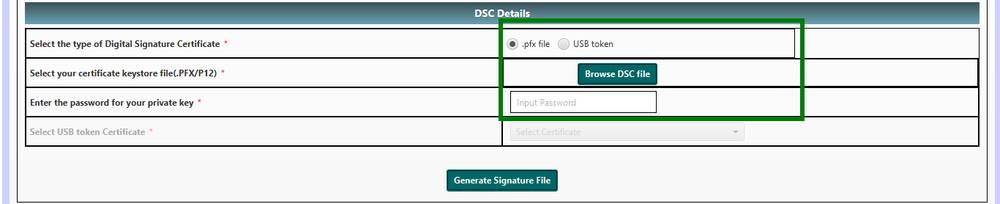
Select '.pfx file' option, click on ‘Browse DSC File’ button to select a valid ‘.pfx’ file and then enter the password for the file.
 DSC-Utility-for-Filing-Income-Tax-Returns
Click on ‘Generate Signature file’ button. A success message will be displayed. The generated signature file will be saved at the same location where the return file is stored.
Upload the generated signature file with the return file in the Income Tax eFiling portal to complete filing with DSC.
DSC-Utility-for-Filing-Income-Tax-Returns
Click on ‘Generate Signature file’ button. A success message will be displayed. The generated signature file will be saved at the same location where the return file is stored.
Upload the generated signature file with the return file in the Income Tax eFiling portal to complete filing with DSC.
If you have your Digital Signature in USB Token :
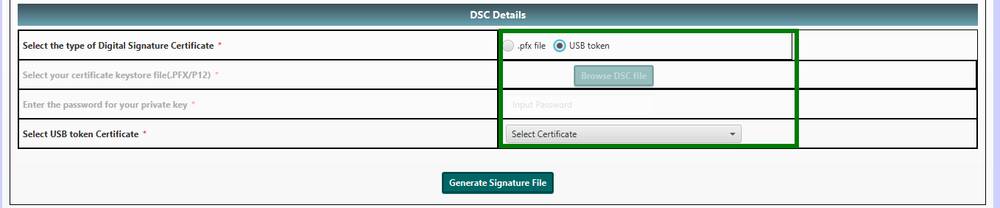
Insert the DSC Token in the system, select a valid certificate from the drop-down and enter the PIN of the USB token.
 DSC-Utility-for-Filing-Income-Tax-Returns
Click on ‘Generate Signature file’ button. A success message will be displayed. The generated signature file will be saved at the same location where the return file is stored.
Upload the generated signature file with the income tax return file in the eFiling portal to complete filing with DSC.
DSC-Utility-for-Filing-Income-Tax-Returns
Click on ‘Generate Signature file’ button. A success message will be displayed. The generated signature file will be saved at the same location where the return file is stored.
Upload the generated signature file with the income tax return file in the eFiling portal to complete filing with DSC.