Sinduja Shankar

Expert

Published on: Aug 12, 2026

Ain Registration

AIN or Account Information Number is a seven-digit identification number which is allotted by the Directorate of Income Tax (Systems). The number is allotted to each Accounts Office (AO). Every Accounts Office must have an account identification number with jurisdictional TDS office for filing Form 24G.

AIN for Form 24G

The Pay and Accounts Office (PAO)/Cheque Drawing and Disbursing Office (CDDO)/District Treasury Office (DTO) are required to file TDS statement in Form 24G on a monthly basis as per the Income-tax Department Notification no. 41/2010, dated May 31, 2010.

Steps for registration of AIN - Online Method

The following procedures are to be followed for the registration of AIN or Account Information Number online. The Accounts Office (AO) can register their AINs online

Access TIN website

Step 1: The applicant can register for AIN allotment using the TIN NSDL website using this link.

Ain Registration Form

Step 2: Now click on the Online Ain Registration link on the homepage.

Provide Details

Step 3: The Online Account Office Identification Number (AIN) Registration Form will be displayed, as shown below: Step 3 - AIN Registration Step 3 - Ain Registration Step 4: The following details that are needed to be provided for AO Number registration are listed below:
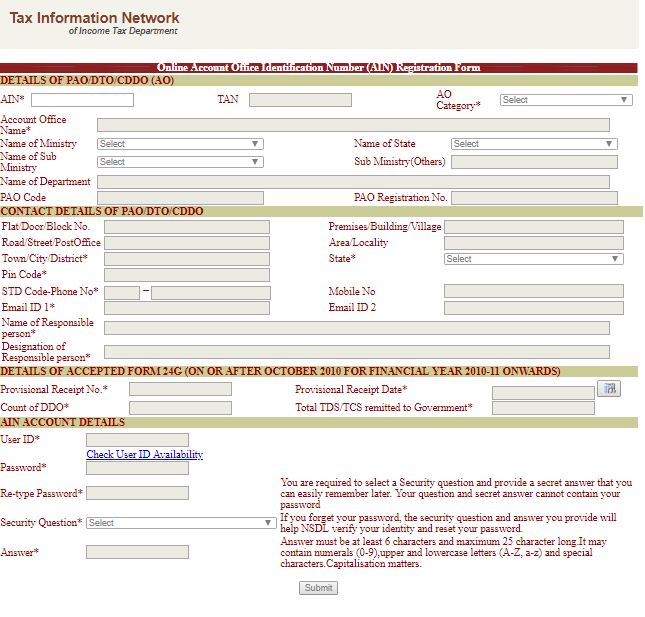
  • Details of the Assessing Officer (AIN Number, TAN, Category of the Assessing Officer, Name of the Account Office, Name of the Ministry, etc.)
  • Contact details of the Assessing Officer (Flat Number, Name of the building, Post Office/Street Name, Locality Name, Town/District, State, etc.)
  • Name of the Responsible Individual (Designation of the Responsible Individual, Details of the Form 24G, Provisional Receipt Number, Provisional Receipt Date, TDS/TCS remitted to the government)
  • AIN account details (User ID, Password to IAN account, Security question and answer)

Submit the Application Form

Step 5: By filling all the mandatory fields in the application form, click on the Submit button.

Note Registration Number

Step 6: On successful registration of AIN, a 12 digit alphanumeric registration number will be generated. Print the acknowledgement slip and preserve the same for future reference. Step 7: After the Ain Registration, an individual is supposed to provide the registered user ID, password and provide details regarding the security question.

Steps for registration of AIN - Offline Method

Applicants have to follow the below step by step procedure to register for AIN allotment through offline mode:

Approach the Income Tax Department

Step 1: The applicant has to approach the office of the Income Tax Department for the Ain Registration.

Get Application Form

Step 2: Now get the application form from the concerned office and have to fill out an application form in a prescribed format. Note: Download the application form for the Ain Registration from the official site of the Income Tax Department. The Ain Registration application form is reproduced below for the ready reference.

Fill Ain Registration Form

Step 3: Fill the application form with appropriate details without any mistakes. Provide the given following information in the application form.
  • Details of Ministry
  • Details of office
  • Details of department

Submit Registration Form

Step 4: The duly filled and signed application for AIN allotment is to be submitted in the manual form to the jurisdictional CIT (TDS).

Verification of AIN

Step 5: The concerned CIT (TDS) will verify the complete and correct AIN allotment application forms submitted by the PAO / CDDO / DTO and after verification, will be forwarded to the to NSDL e-Governance Infrastructure Limited (NSDL) by the CIT (TDS) recommending allotment of AIN to the PAO / CDDO / DTO.

Allotment of AIN

Step 7: On receipt of the verified AIN allotment application form, NSDL will allot AIN. Step 8: On allotment of AIN, the same will be communicated vide e-mail/ letter will be sent to the PAO / CDDO / DTO at the email ID/ communication address mentioned in the AIN allotment form.
Back to Learn

Frequently Asked Questions

Common questions about AIN Registration.

An AIN or Account Information Number is a seven-digit identification number allotted by the Directorate of Income Tax (Systems) to each Accounts Office (AO). It is mandatory for every Accounts Office to have an AIN for filing Form 24G, which is the TDS statement to be filed monthly with the jurisdictional TDS office.
An Accounts Office can register for an AIN online by accessing the TIN NSDL website, clicking on the 'Online AIN Registration' link, and filling out the Online Account Office Identification Number (AIN) Registration Form with details like the Assessing Officer's information, contact details, responsible individual's name, and AIN account details.
The Online AIN Registration Form requires details such as the AIN Number, TAN, category of the Assessing Officer, name of the Account Office, name of the Ministry, contact details of the Assessing Officer, name and designation of the responsible individual, Form 24G details, and AIN account details like User ID, password, and security question/answer.
After successfully submitting the Online AIN Registration Form, a 12-digit alphanumeric registration number will be generated. The applicant must print the acknowledgement slip and preserve it for future reference.
For offline AIN registration, the Accounts Office has to approach the Income Tax Department office, obtain the AIN registration application form, fill it with appropriate details like the Ministry, office, and department details, and submit the duly filled and signed form to the jurisdictional CIT (TDS).
The concerned CIT (TDS) verifies the complete and correct AIN allotment application forms submitted by the PAO/CDDO/DTO and forwards the verified forms to NSDL e-Governance Infrastructure Limited (NSDL), recommending the allotment of AIN.
After NSDL allots the AIN based on the verified application form, the allotted AIN is communicated to the PAO/CDDO/DTO via email or letter at the email ID or communication address mentioned in the AIN allotment form.
No, the article does not mention that an Accounts Office can use the same AIN for multiple jurisdictions. Each Accounts Office must have an AIN with the jurisdictional TDS office for filing Form 24G.
Yes, it is mandatory for every Accounts Office (AO) to have an AIN or Account Information Number with the jurisdictional TDS office for filing Form 24G, as per the Income-tax Department Notification no. 41/2010, dated May 31, 2010.
The Provisional Receipt Number and Provisional Receipt Date are details related to the TDS/TCS remitted to the government, which are required to be provided in the AIN Registration Form.