
Bennisha
Expert
Published on: Jul 30, 2026
Using Input Tax Credit for Payment of GST Demand
Utilization of cash or
Input Tax Credit for payment of demand denotes the payments of non-return related liabilities. These liabilities are created through the generation of Demand ID by tax officials, which is a reference number of the order or application that appears in the Electronic Liability Register (Part II).Applicable Ledger Payments
The payments made against the liabilities of a particular demand ID can be made using the following ledgers.
- Cash balance that is available in the Electronic Cash Ledger
- Input tax credit balance that is available in the Electronic Credit Ledger
Requisites for Utilization of Cash/ITC
The requisites for utilization of cash/ ITC for payment of demand or any other amount due are as follows.
- Demand ID is already generated against the payment that is yet to be made.
- The user should have a valid user ID and password and the necessary access for the same.
Application Procedure
Here are the steps that are involved in making the payment towards outstanding demand that is appearing in the Electronic Liability Register at the GST Portal.
Step 1: Login to the portal The taxpayer has to login to the official GST Portal. Step 2: Enter the Credentials In the GST Portal, the taxpayer has to enter the credentials. Step 3: Click on Payment towards Demand From the 'Services' tab, click on 'Ledgers' option and then select 'Payment towards Demand'. Step 3-ITC for Payment of GST DemandStep 4: Outstanding Demand
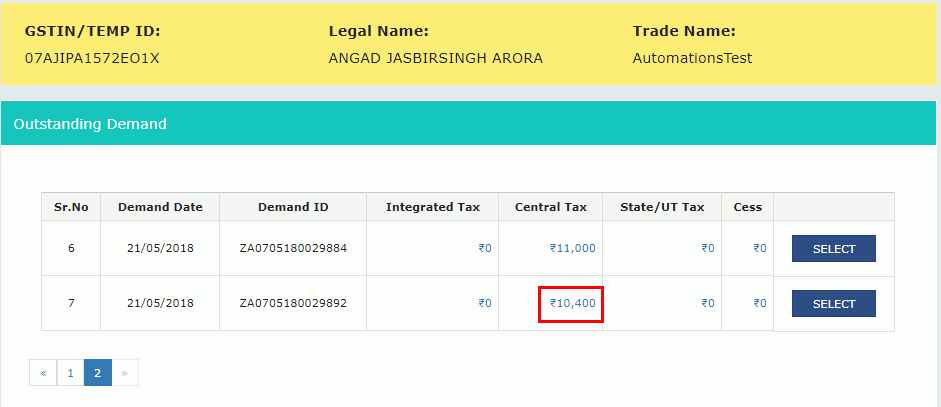
The 'Outstanding Demand' page is displayed on the screen. The taxpayer can see all the Demand IDs for which the demand is outstanding. The link under the 'Integrated Tax', 'Central Tax' 'State/ UT Tax' and 'Cess' has to clicked to view further details.
Step 3-ITC for Payment of GST DemandStep 4: Outstanding Demand
The 'Outstanding Demand' page is displayed on the screen. The taxpayer can see all the Demand IDs for which the demand is outstanding. The link under the 'Integrated Tax', 'Central Tax' 'State/ UT Tax' and 'Cess' has to clicked to view further details.
 Step 4-ITC for Payment of GST Demand
The Minor Head wise balance such as the Tax, Interest, Penalty, Fee and Others are displayed on the screen.
Step 5: Click Close
The taxpayer has to click on the 'Close' button.
Step 4-ITC for Payment of GST Demand
The Minor Head wise balance such as the Tax, Interest, Penalty, Fee and Others are displayed on the screen.
Step 5: Click Close
The taxpayer has to click on the 'Close' button.
 Step 5-ITC for Payment of GST Demand
Step 6: Select the Demand ID
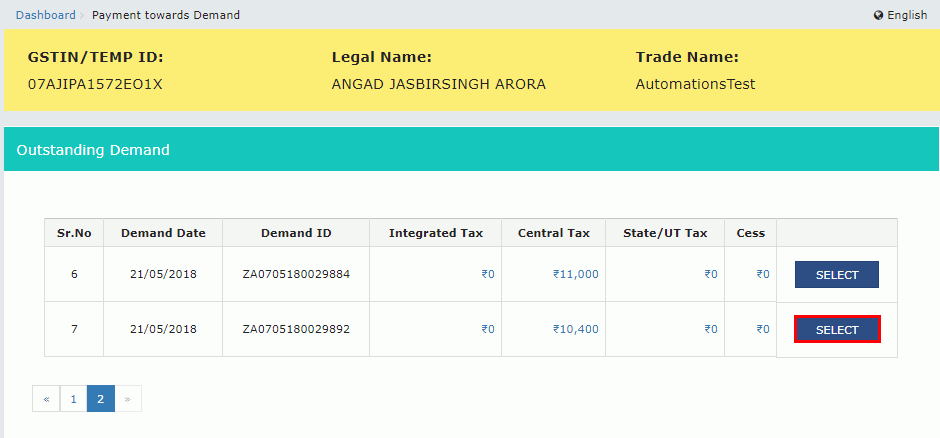
The taxpayer has to click on the 'Select' button to select the Demand ID for which the payment has to be made. Once that is done, the Outstanding Demand, Cash Ledger Balance and the Credit Ledger Balance details are displayed on the screen.
Step 5-ITC for Payment of GST Demand
Step 6: Select the Demand ID
The taxpayer has to click on the 'Select' button to select the Demand ID for which the payment has to be made. Once that is done, the Outstanding Demand, Cash Ledger Balance and the Credit Ledger Balance details are displayed on the screen.
 Step 6-ITC for Payment of GST Demand
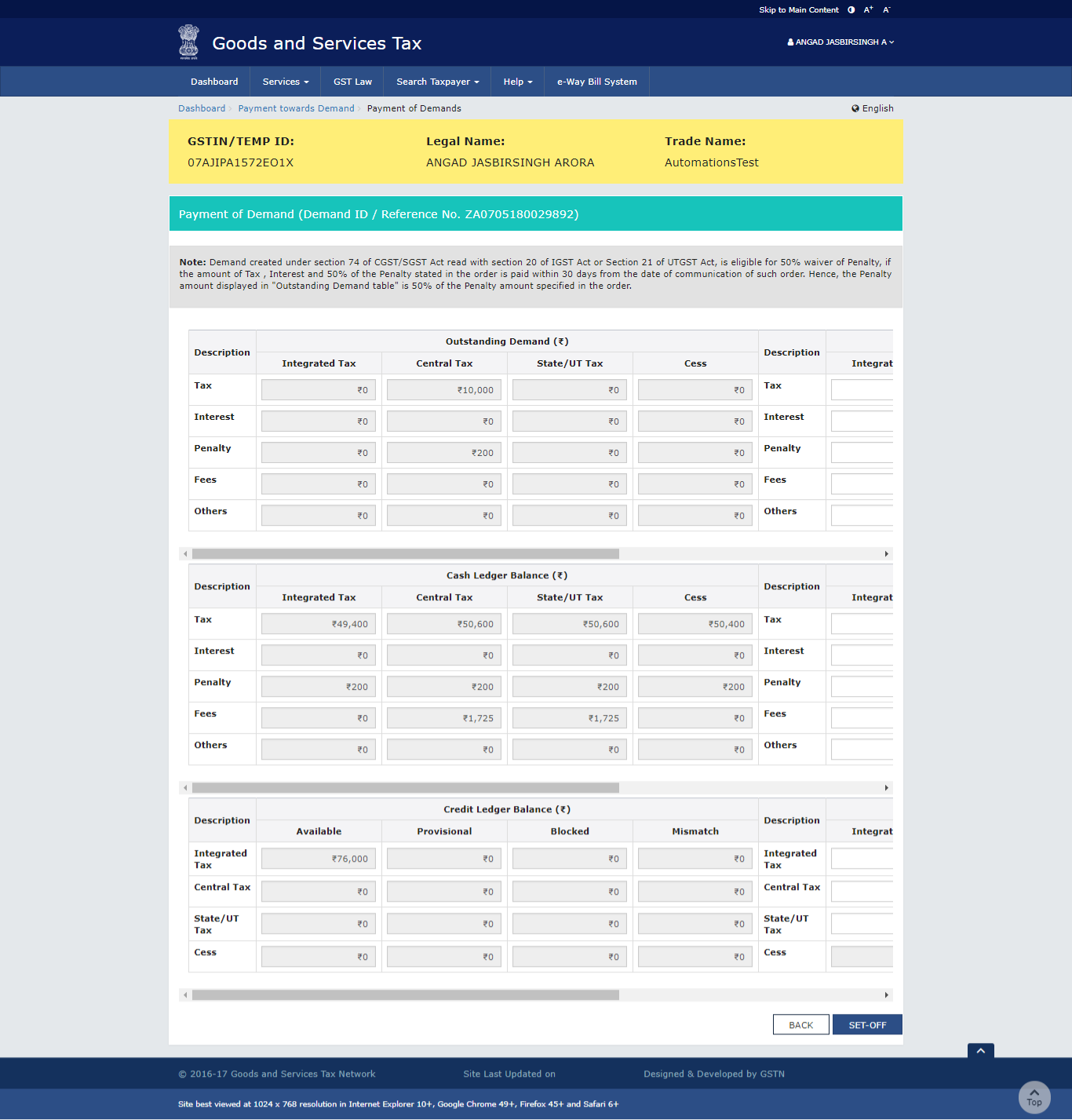
If the payment is made before 30 days, the recipient receives a message on top of the Payment Demand page stating, "Demand created under section 74 of CGST/SGST Act read with section 20 of IGST Act or Section 21 of UTGST Act, is eligible for 50% waiver of Penalty, if the amount of Tax, Interest and 50% of the Penalty stated in the order is paid within 30 days from the date of communication of such order. Hence, the Penalty amount displayed in "Outstanding Demand table" is 50% of the Penalty amount specified in the order"..
Step 6-ITC for Payment of GST Demand
If the payment is made before 30 days, the recipient receives a message on top of the Payment Demand page stating, "Demand created under section 74 of CGST/SGST Act read with section 20 of IGST Act or Section 21 of UTGST Act, is eligible for 50% waiver of Penalty, if the amount of Tax, Interest and 50% of the Penalty stated in the order is paid within 30 days from the date of communication of such order. Hence, the Penalty amount displayed in "Outstanding Demand table" is 50% of the Penalty amount specified in the order"..
 Step 6-ITC for Payment of GST Demand
Outstanding Demand
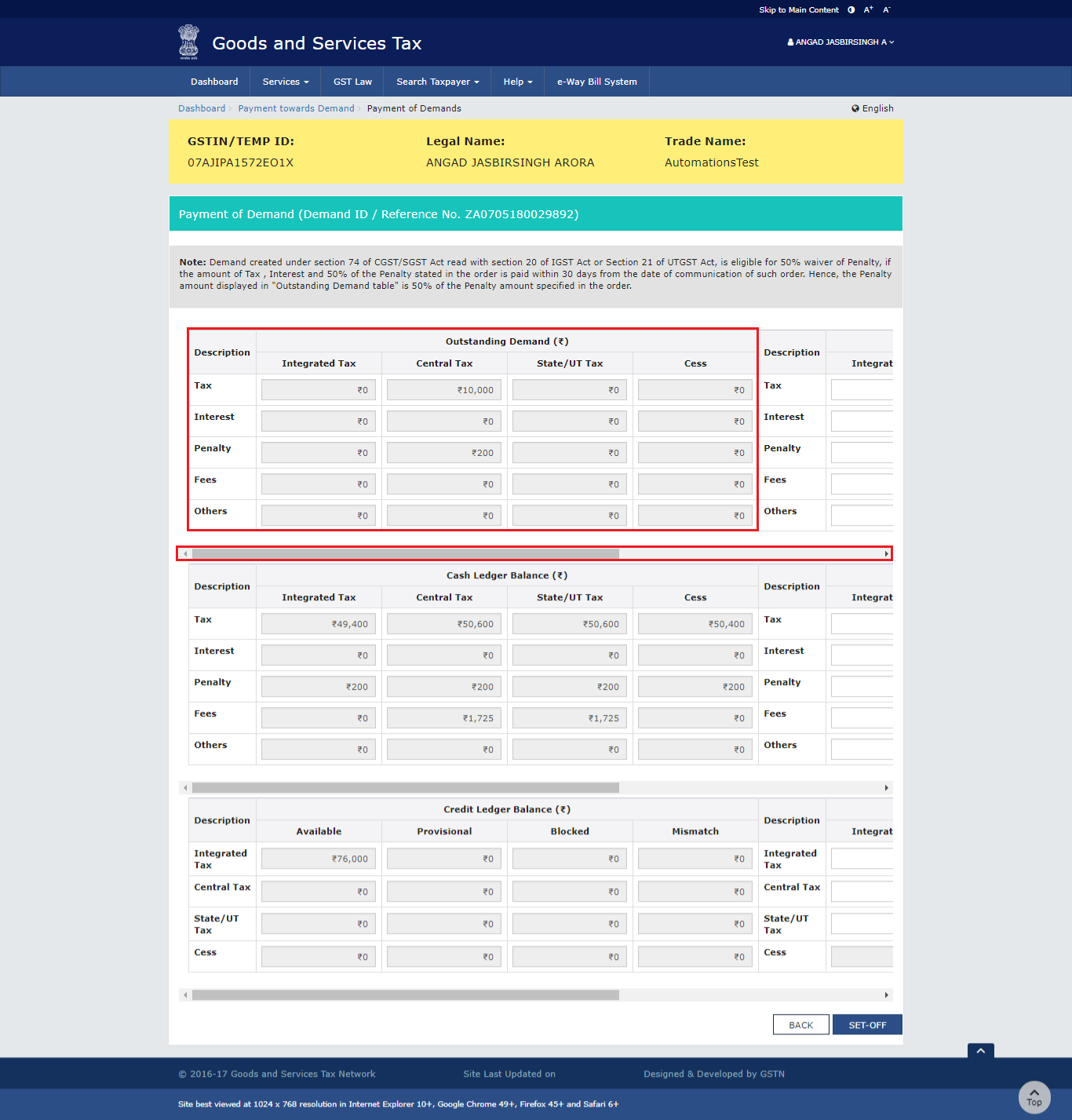
The outstanding demand against the Demand ID is given below.
Step 6-ITC for Payment of GST Demand
Outstanding Demand
The outstanding demand against the Demand ID is given below.
 Outstanding Demand
Amount Intended to be paid against the Outstanding Demand
The taxpayer has to use the scroll bar to move to the right to enter the amount intended to be paid against the Demand ID.
Outstanding Demand
Amount Intended to be paid against the Outstanding Demand
The taxpayer has to use the scroll bar to move to the right to enter the amount intended to be paid against the Demand ID.
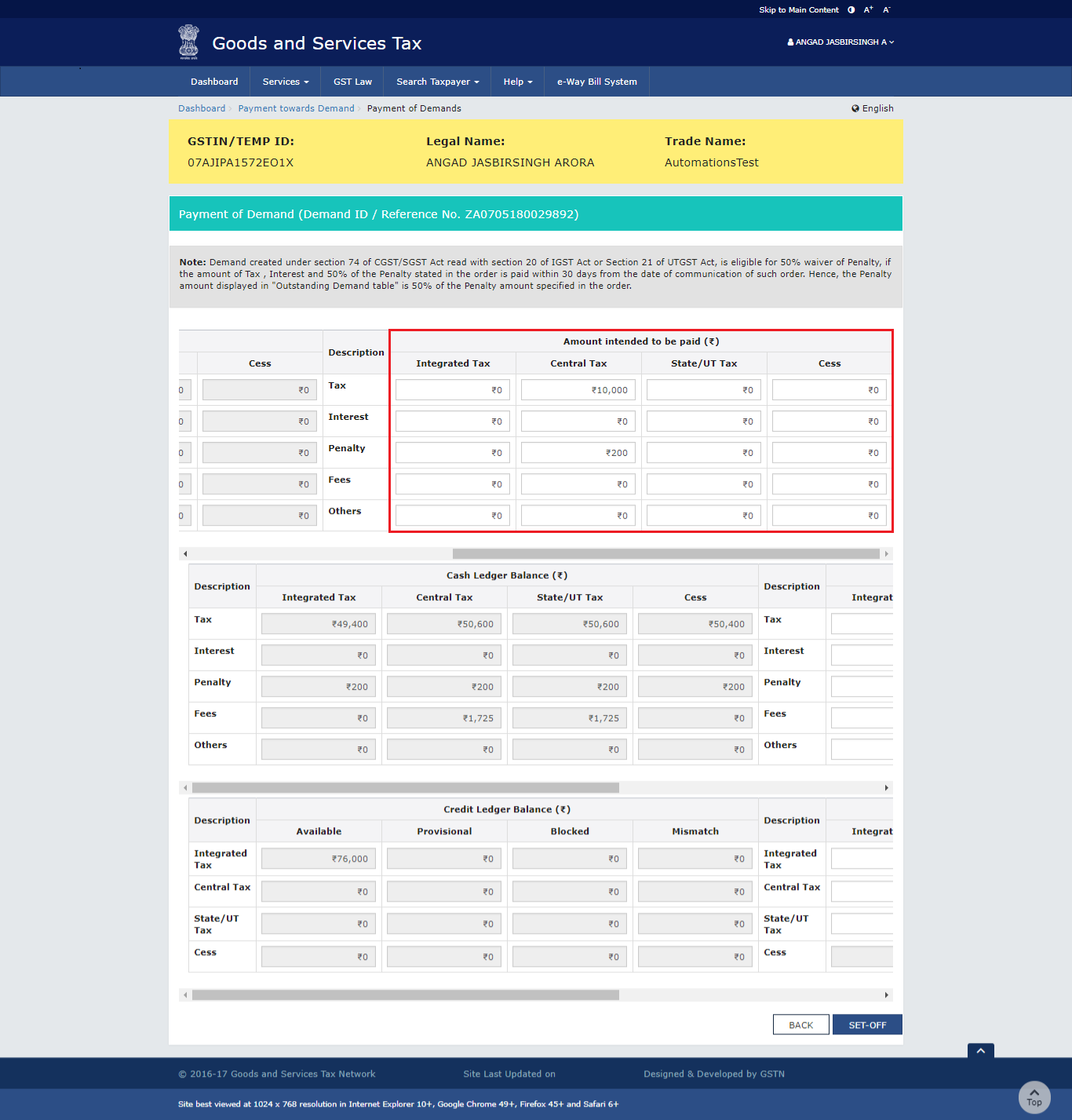 Amount Intended to be paid against the Outstanding Demand
Cash Ledger Balance
The available cash is given below.
Amount Intended to be paid against the Outstanding Demand
Cash Ledger Balance
The available cash is given below.
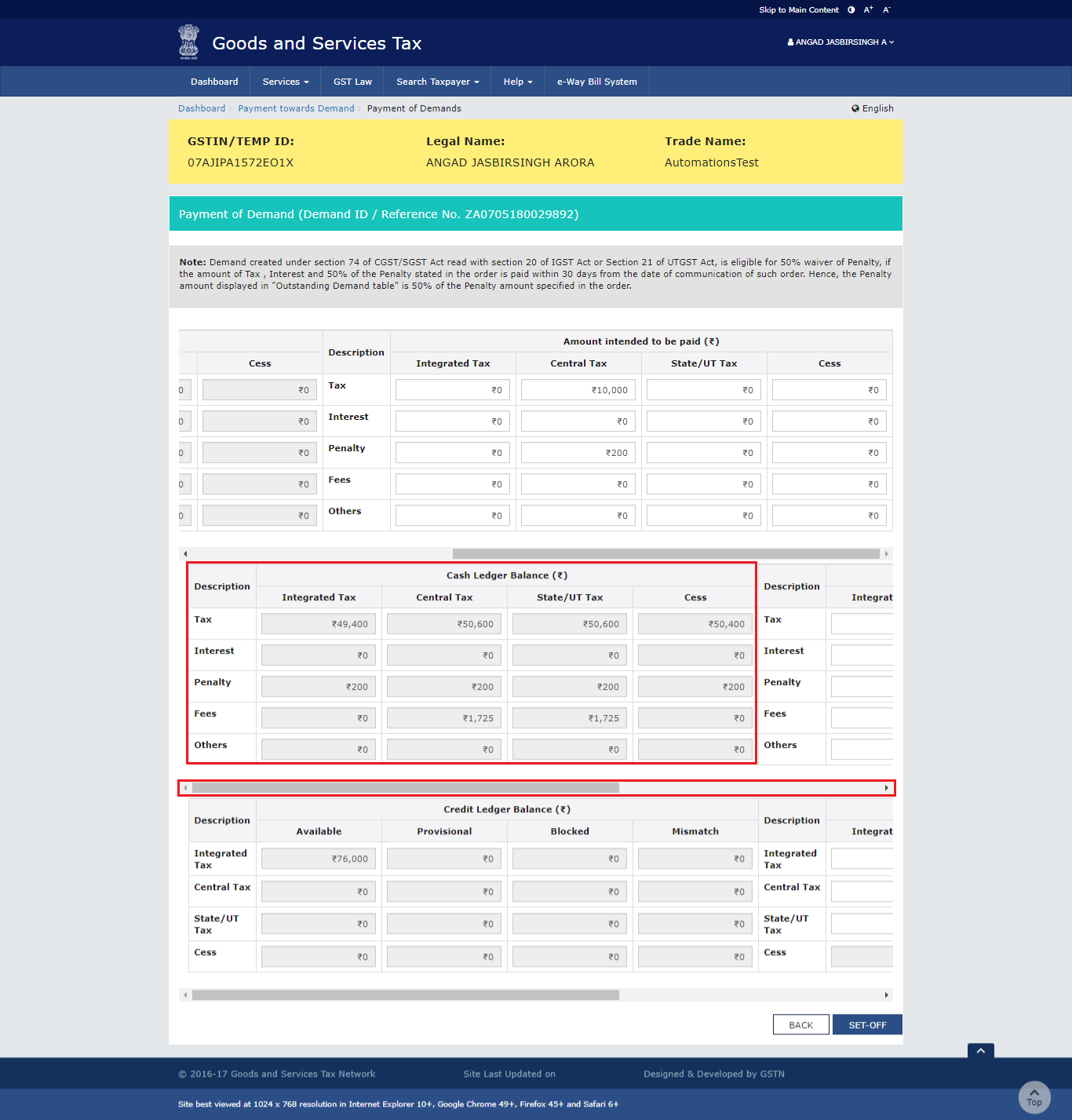 Cash Ledger Balance
Amount of Outstanding Demand Paid through Cash
The taxpayer has to use the scroll bar to move to the right to enter the amount that has to be paid through cash against the Demand ID.
Cash Ledger Balance
Amount of Outstanding Demand Paid through Cash
The taxpayer has to use the scroll bar to move to the right to enter the amount that has to be paid through cash against the Demand ID.
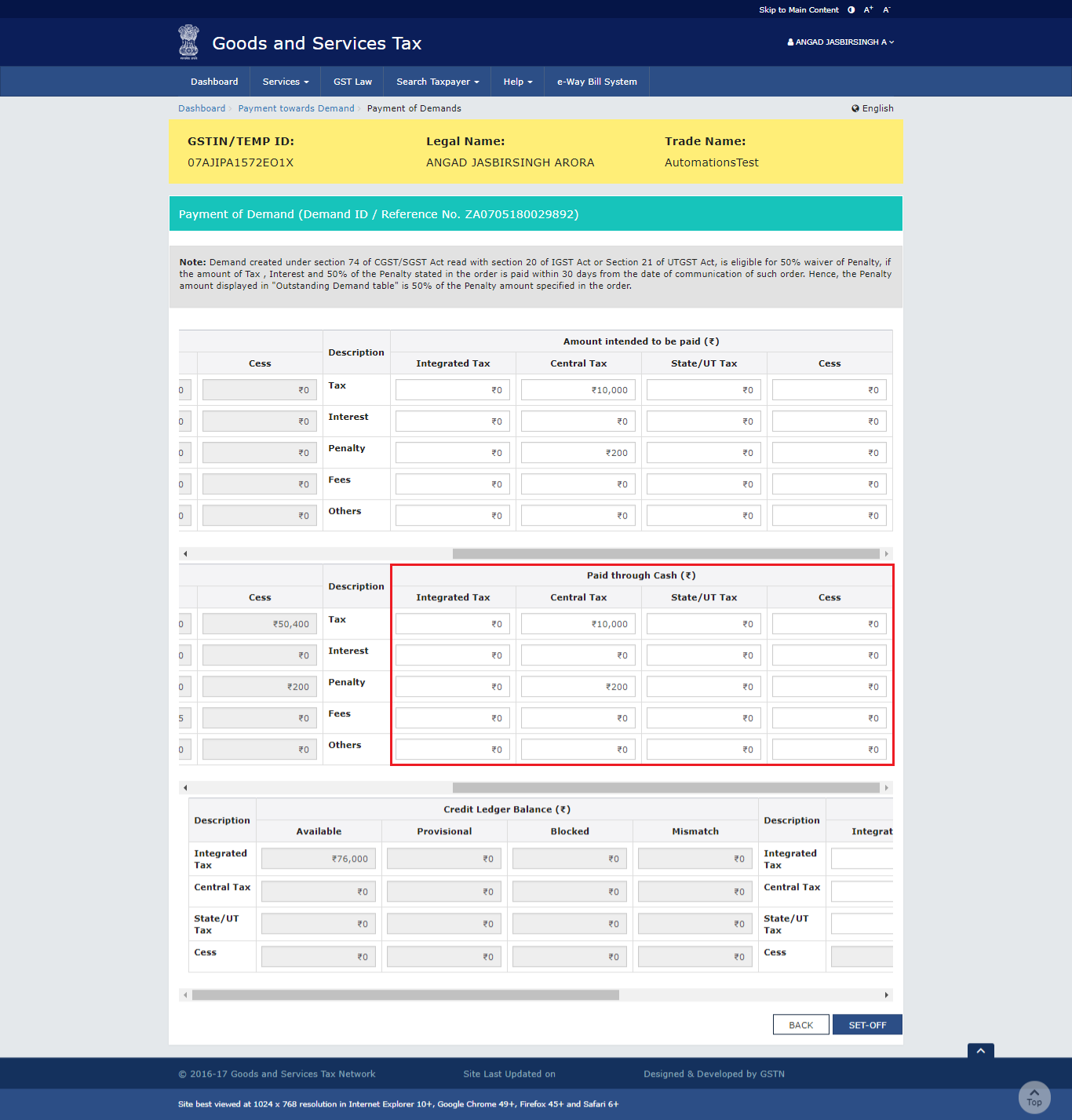 Amount of Outstanding Demand Paid through Cash
Credit Ledger Balance
The ITC available is shown below.
Amount of Outstanding Demand Paid through Cash
Credit Ledger Balance
The ITC available is shown below.
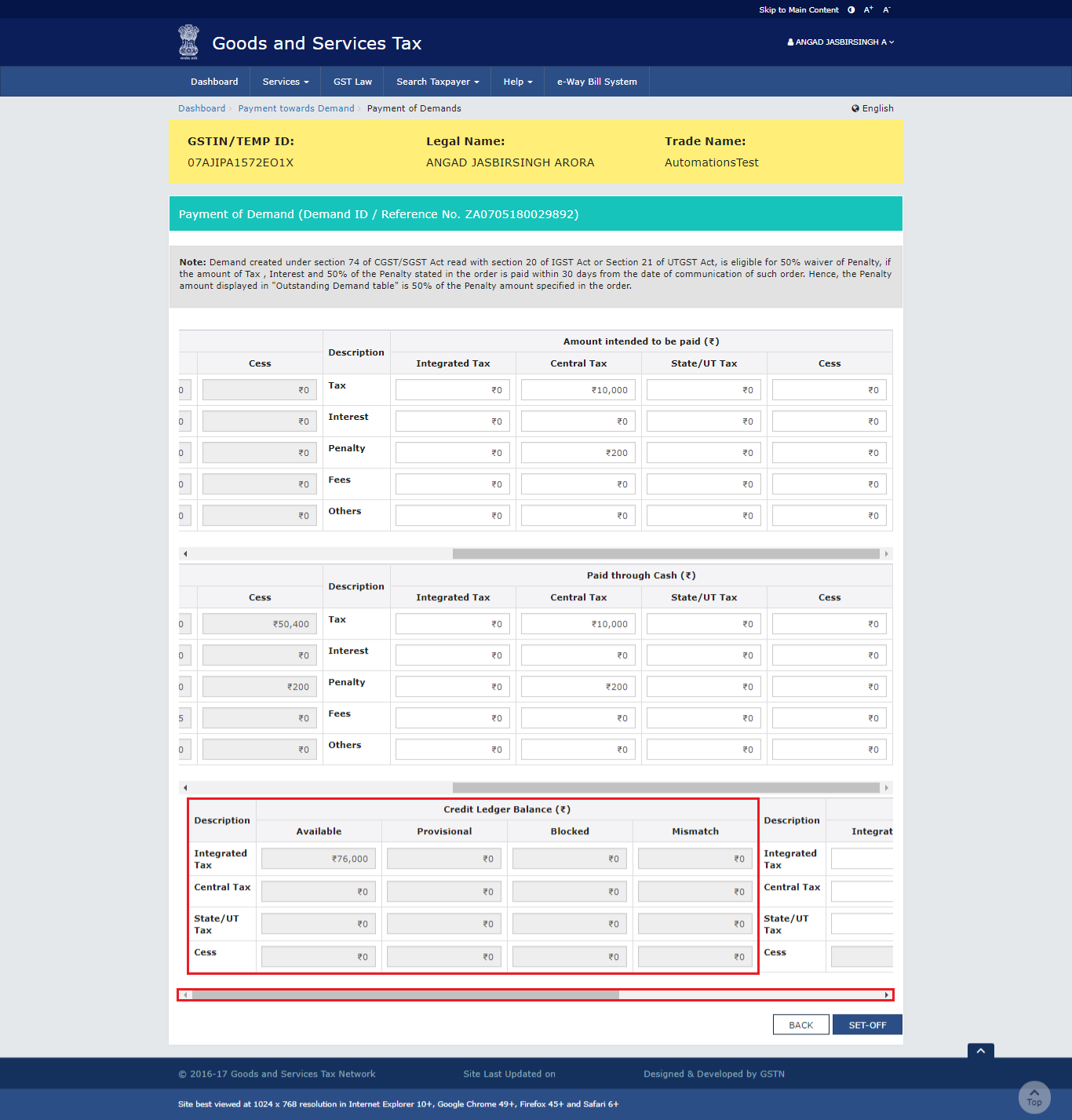 Credit Ledger BalanceAmount of Outstanding Demand Paid through Credit
The taxpayer has to use the scroll bar to move to the right to enter the amount that has to be paid through ITC against the Demand ID.
Credit Ledger BalanceAmount of Outstanding Demand Paid through Credit
The taxpayer has to use the scroll bar to move to the right to enter the amount that has to be paid through ITC against the Demand ID.
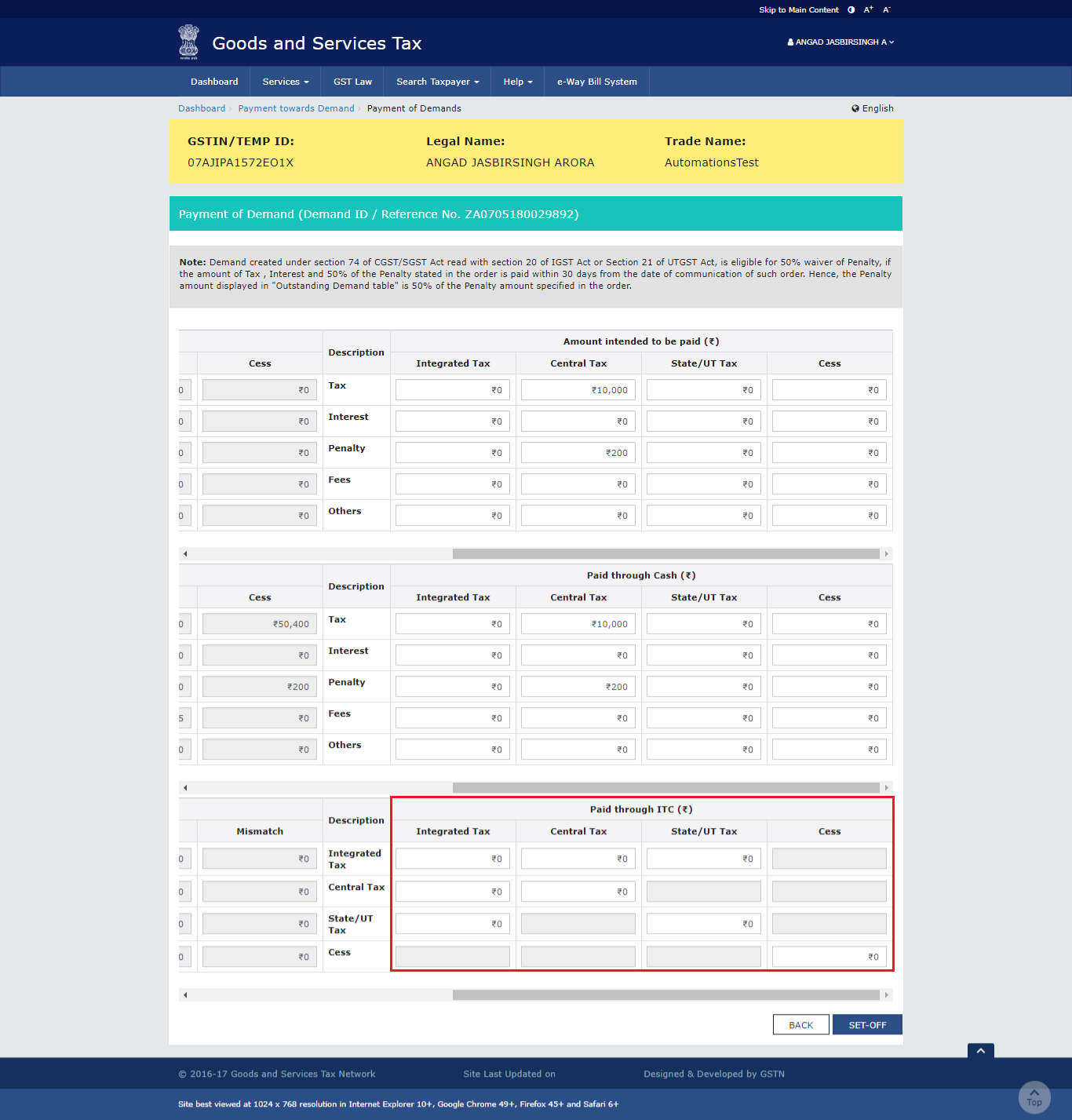 Amount of Outstanding Demand Paid through Credit
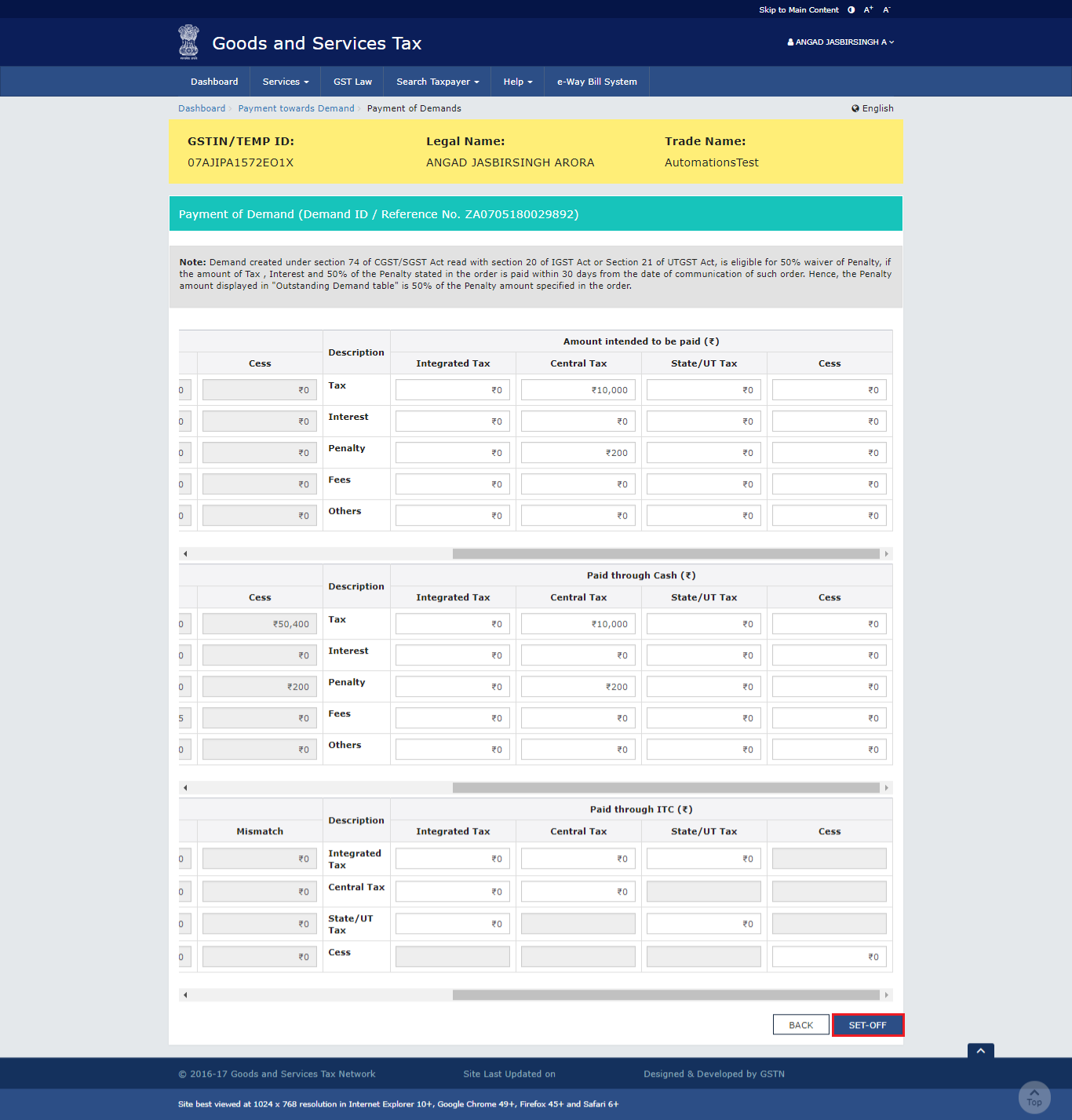
Step 7: Click the Set-Off button
Once the amount is entered, the taxpayer has to click the 'Set-Off' button.
Amount of Outstanding Demand Paid through Credit
Step 7: Click the Set-Off button
Once the amount is entered, the taxpayer has to click the 'Set-Off' button.
 Step 7-ITC for Payment of GST Demand
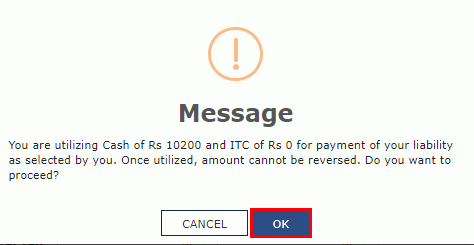
Step 8: Click OK
A confirmation message will be displayed, in which the taxpayer has to click on the 'OK' button.
Step 7-ITC for Payment of GST Demand
Step 8: Click OK
A confirmation message will be displayed, in which the taxpayer has to click on the 'OK' button.
 Step 8-ITC for Payment of GST Demand
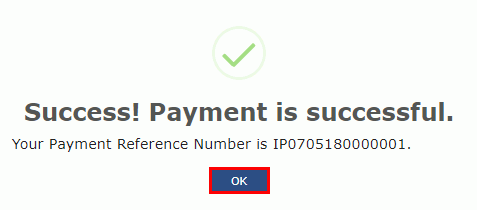
Step 9: Payment Reference Number
A success message along with the Payment Reference Number is displayed on the screen. Click 'OK' button.
Step 8-ITC for Payment of GST Demand
Step 9: Payment Reference Number
A success message along with the Payment Reference Number is displayed on the screen. Click 'OK' button.
 Step 9-ITC for Payment of GST Demand
The taxpayer has to click on the 'Services' tab, select 'Ledgers', then the 'Electronic Liability Register' and then 'Part II: Other than return related liabilities' link.
Step 9-ITC for Payment of GST Demand
The taxpayer has to click on the 'Services' tab, select 'Ledgers', then the 'Electronic Liability Register' and then 'Part II: Other than return related liabilities' link.
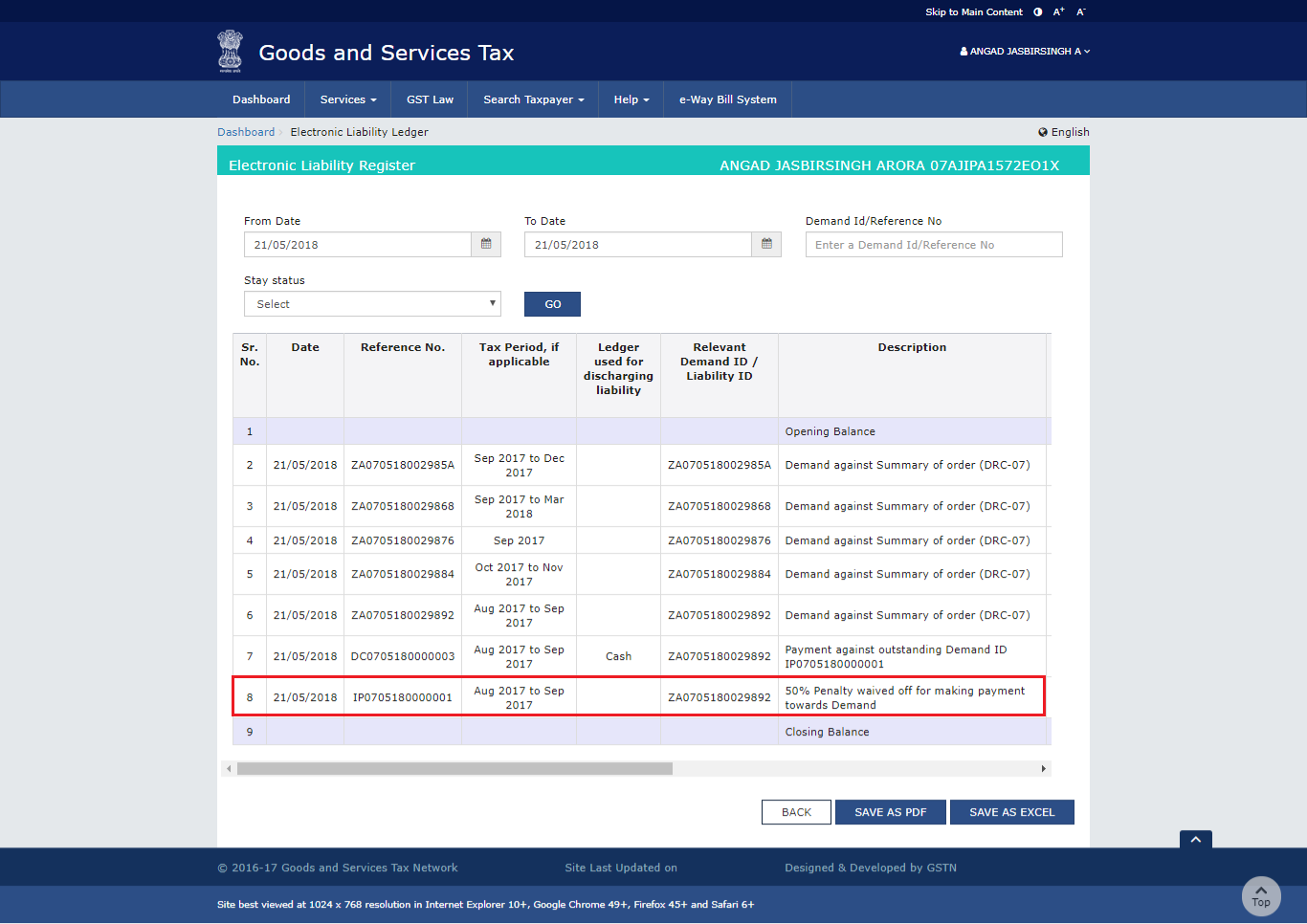
- By utilizing the ITC, a debit entry number will be generated and the posting will be done against the demand ID in Electronic Liability Register Part II and simultaneously in the Electronic Credit Ledger.
- By utilizing the cash, a debit entry number will be generated and the posting will be done against the demand ID in Electronic Liability Register Part II and simultaneously in the Electronic Cash Ledger.
- In case of full payment made under the demand order raised as per Section 74 of CGST/ SGST read with Section 20 of IGST Act or Section 21 of UTGST Act, an entry would be posted in the ELectronic Liability Register-Part II for the 50% penalty waiver.
Eligibility for Waiver of Penalty Against a Demand ID
According to Section 74 of the Act, a payment made against a Demand ID made within the specified period of 30 days from the date of communication of the order, the taxpayer is eligible for a waiver of 50% of the penalty that is levied in the order. Given below are the eligibility criteria that have to be fulfilled by the waiver.
- The amount of penalty waiver will be considered if the demands included in the order is paid off completely across the Acts.
- If the taxpayer does not pay the reduced penalty along with the tax and interest in full within 30 days, there will not be ant entries of the reduced penalty in the Liability Register-Part III.
- Non-payment of any amount in demand towards 'others' or 'fees' will not be considered for eligibility of waiver of 50% of the penalty amount.
- This norm is applicable to every demand that is created in the aforesaid section.
- Such entries of the waiver penalty will be tagged against the same demand only for which the payment is made.
 ITC for Payment of GST Demand