IndiaFilings

Expert

Published on: Jul 30, 2026

How to Upload JSON File on GST Portal?

JSON file is a type of computer file based on Java that is easy for humans to read and write. JSON file is used by the GSTN for GST return preparation and filing. GST returns can be filed on the GST Portal using a JSON file. The Government has provided an offline

GST return preparation tool that generates JSON file that can be filed on the GST Portal. LEDGERS GST software also provides JSON format GST returns that can be uploaded to GST portal for easily filing all types of GST return. In this article, we look at the procedure for uploading JSON file on GST portal.

Download JSON File for GST Return Filing

In LEDGERS, access the GSTR-1 Filing page from the top menu. GST Filing -> GSTR-1 -> Overview. Select the month you would like to file GSTR1 return from the drop-down menu. Once the data is loaded, click on "Download B2B JSON" as shown below. In LEDGERS, you can download one JSON file containing all the sections of a GSTR1 return or download the JSON files in part. JSON files can also be downloaded in parts and uploaded to the GST Portal. The following types of JSON files can be downloaded separately for GSTR1 filing:

  • JSON for B2B invoices
  • JSON for B2C large invoices
  • JSON for B2C small invoices
  • JSON for Export invoices
  • JSON for HSN summary
  • JSON for Invoice Amendments
  • JSON for GSTR1 Return (Entire return is provided in JSON Format)
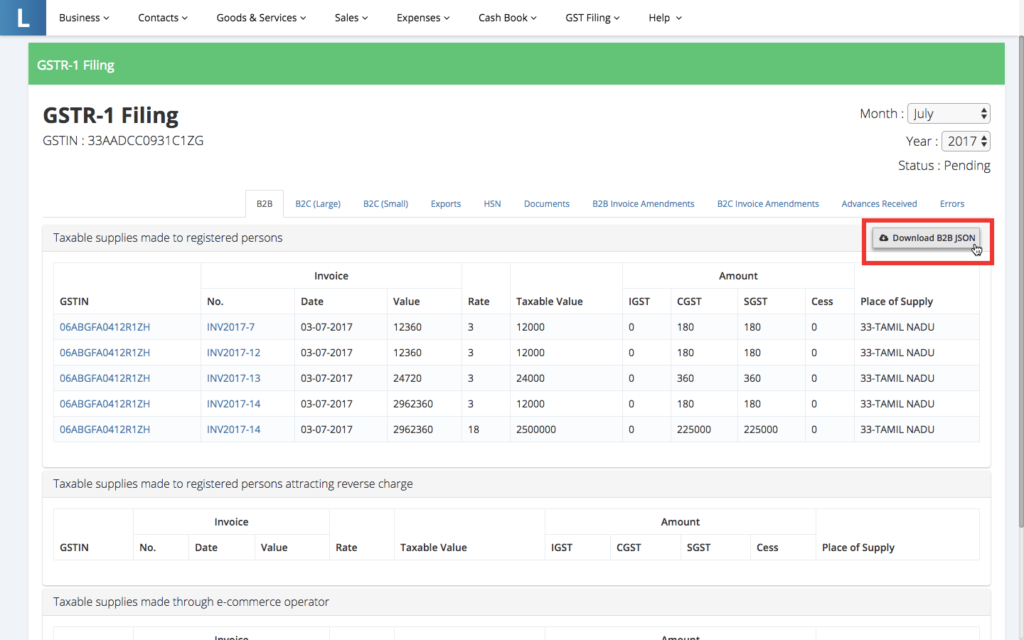
Download JSON File for GST Portal Download JSON File for GST Portal

Uploading JSON File to GST Portal

Once you have downloaded the JSON file, follow the steps below to upload the JSON file to the GST portal.

Step 1: Access your GST returns dashboard

Once you have downloaded the

GST return in JSON format from LEDGERS or offline GST return tool, proceed to login to the GST portal and access the GST return dashboard. Step 1 - Go to the Return Dashboard Step 1 - Go to the Return Dashboard
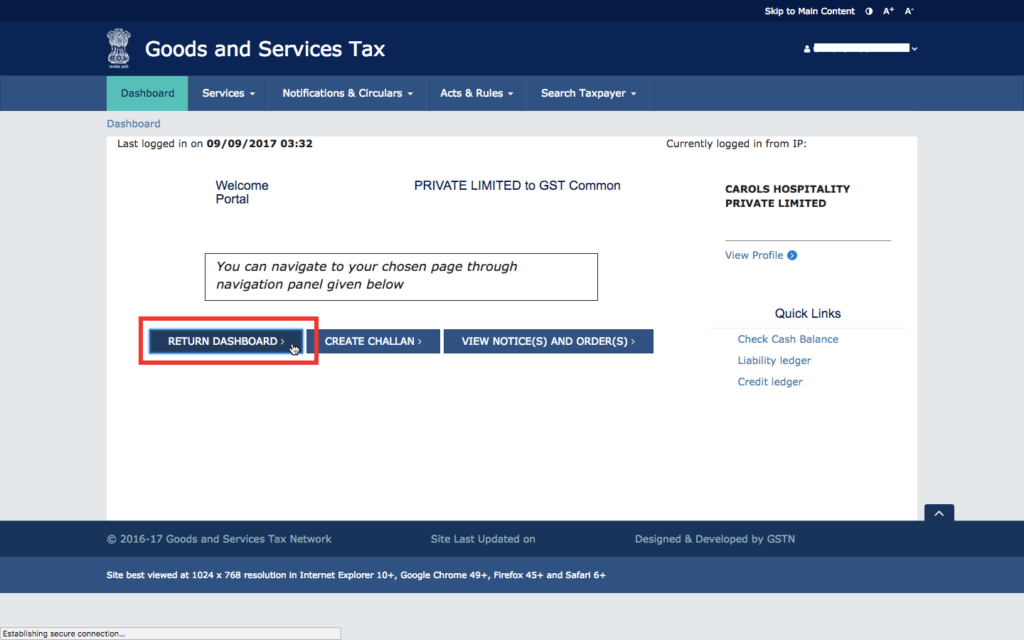
Step 2: Select the month for which GST return is to be filed

In the GST return dashboard, select the month you would like to file GST return and click "Search". From the options, select the type of GST return to and click "Prepare Offline".
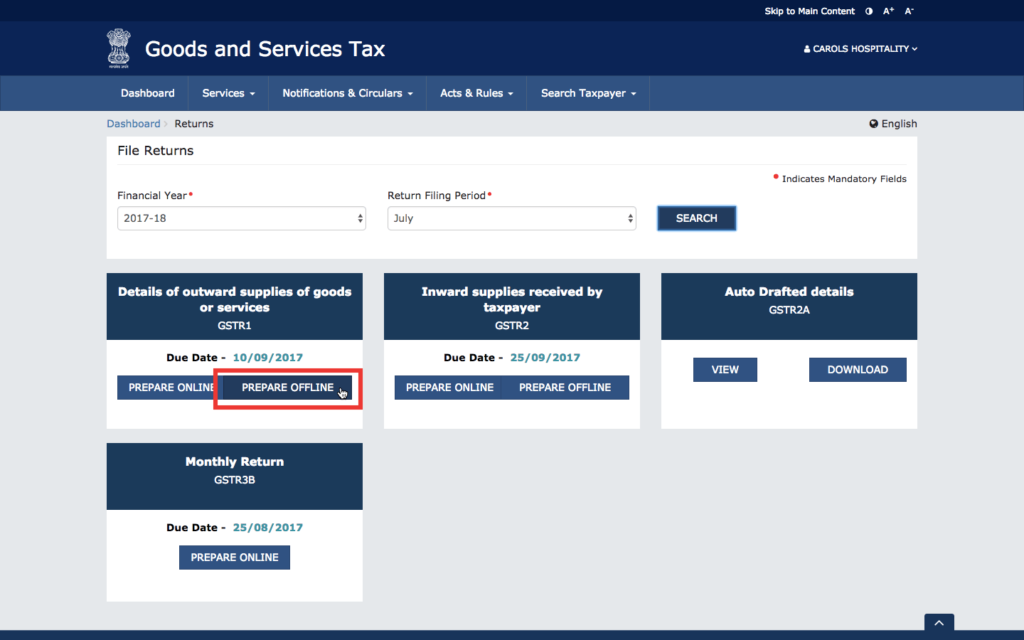
Step 2 - Select Prepare Offline Step 2 - Select Prepare Offline

Step 3: Upload JSON file to GSTN

Click on "Choose file" and select the location of the JSON file downloaded from LEDGERS in your hard drive. On selecting the file, the JSON file will be uploaded to GSTN automatically.
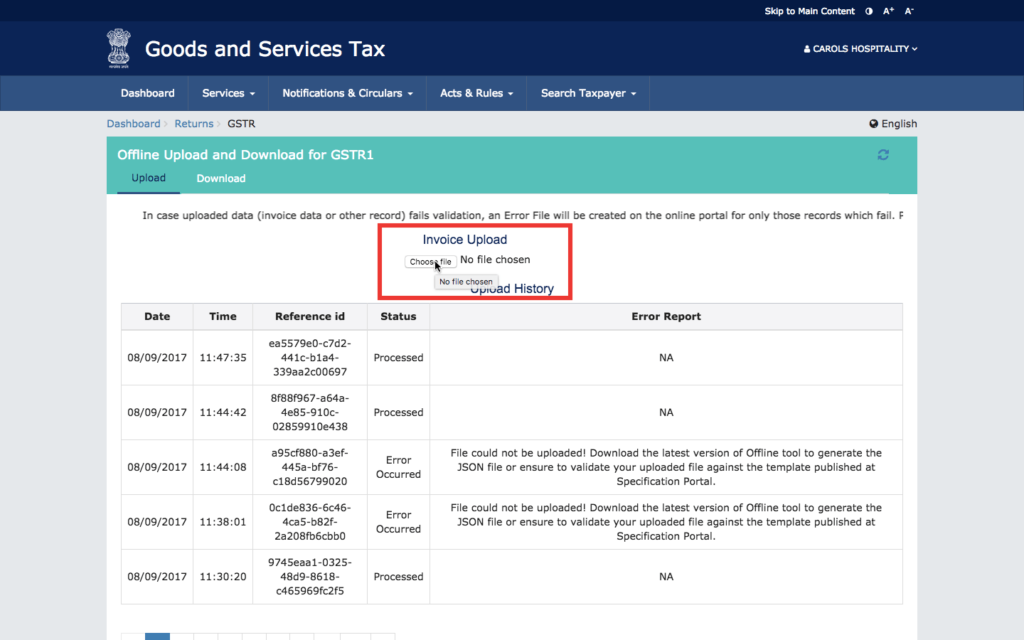
Step 3 - Upload JSON file downloaded from LEDGERS Step 3 - Upload JSON file downloaded from LEDGERS

Step 4: Ensure JSON file is uploaded successfully

After the JSON file is uploaded, a confirmation will be provided if the upload is successful. In case the JSON format or structure is wrong, an error message will be generated as shown below. If the JSON file is correct, the Error Report will be NA. Once a JSON file is uploaded, the data or invoices will be visible on the GST portal after 15 - 30 minutes. Do not upload multiple times. If the data is not shown on the GST Portal after 30 minutes, you can try re-uploading the JSON file. If JSON file is uploaded multiple times, the data will be re-written or appended.

Step 4 - Successful upload of JSON file to GSTN Step 4 - Successful upload of JSON file to GSTN

Step 5: Verify data on GST Portal

After 15 - 30 minutes of uploading a JSON file, the data will be validated by the GSTN and added to the GST portal -> returns dashboard of the taxpayer. You can click on various sections to see the data and invoices uploaded through the JSON file. Successfully uploaded invoices without errors are shown separately. You can further edit or delete the data. In case any additional data is required, the same is shown separately in the returns dashboard for additional input, edit or delete.
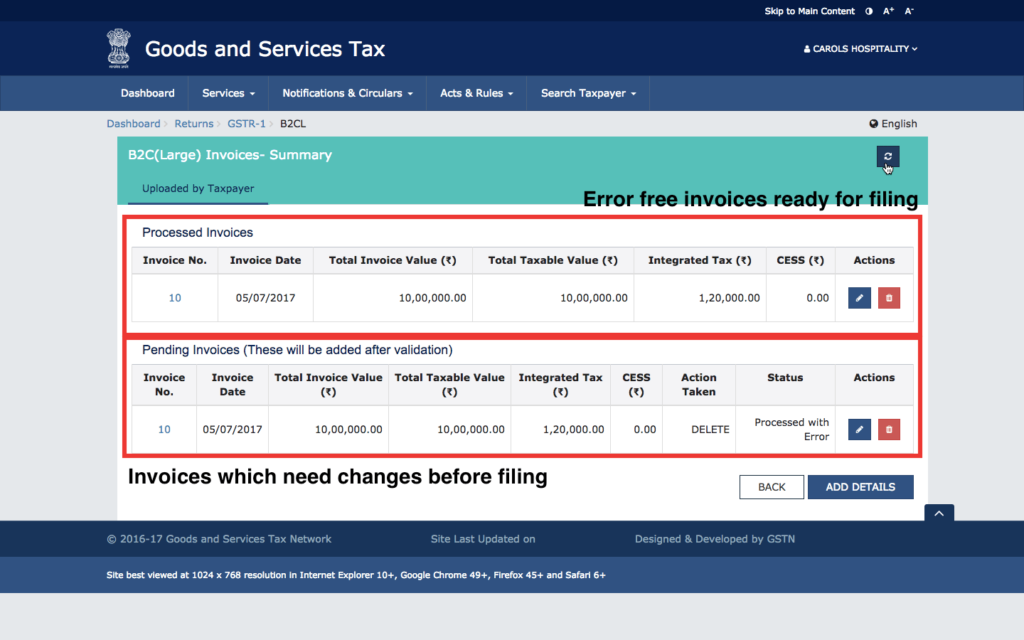
Step 5 - Uploaded invoices will be shown on GST portal Step 5 - Uploaded invoices will be shown on GST portal

For GST return filing services, visit IndiaFilings or signup for LEDGERS GST Software.

Back to Learn

Frequently Asked Questions

Common questions about Upload JSON File on GST Portal for Return Filing.

A JSON (JavaScript Object Notation) file is a lightweight data-interchange format that is easy for humans to read and write, and for machines to parse and generate. It is used for GST return filing because the GSTN (Goods and Services Tax Network) accepts GST returns in JSON format, which can be generated by GST software like LEDGERS or the government's offline GST return preparation tool.
In LEDGERS GST software, you can access the GSTR-1 Filing page from the top menu (GST Filing -> GSTR-1 -> Overview). Select the month for which you want to file the GSTR-1 return, and once the data is loaded, click on "Download B2B JSON" to download the JSON file containing all sections of the GSTR-1 return. You can also download JSON files separately for different sections like B2B invoices, B2C invoices, exports, etc.
To upload a JSON file to the GST Portal, log in to your account and access the GST returns dashboard. Select the month for which you want to file the return, click "Search", and then select "Prepare Offline". Click "Choose file" and select the location of the downloaded JSON file from your computer. The JSON file will be uploaded automatically. After a successful upload, the data will be visible on the GST Portal within 15-30 minutes.
If the JSON file upload is unsuccessful or shows an error, it could be due to an incorrect JSON format or structure. In such cases, the GST Portal will generate an error message. Ensure that the JSON file is downloaded correctly from LEDGERS or the offline tool. If the error persists, you can try re-uploading the JSON file after some time. Do not upload the same file multiple times, as it may overwrite or append the data.
Yes, after the JSON file is successfully uploaded and the data is visible on the GST Portal, you can click on various sections to view the data and invoices. Successfully uploaded invoices without errors will be shown separately, and you can further edit or delete the data as needed. If any additional data is required, it will be shown separately in the returns dashboard for input, editing, or deletion.
Yes, in LEDGERS GST software, you can download and upload JSON files separately for different sections of the GSTR-1 return, such as B2B invoices, B2C large invoices, B2C small invoices, exports, HSN summary, invoice amendments, etc. This allows you to upload the data in parts instead of uploading the entire GSTR-1 return in a single JSON file.
After successfully uploading the JSON file to the GST Portal, the data will be validated by the GSTN (Goods and Services Tax Network). It typically takes around 15-30 minutes for the uploaded data or invoices to appear on the GST Portal's returns dashboard. If the data is not visible after 30 minutes, you can try re-uploading the JSON file.
Yes, LEDGERS GST software provides the functionality to generate JSON files for various types of GST returns, including GSTR-1, GSTR-3B, GSTR-9, and others. The process of downloading and uploading the JSON files to the GST Portal remains similar across different types of returns, ensuring a seamless and efficient filing experience.
While filing GST returns using JSON files is a convenient and widely adopted method, it is not mandatory. You can also file GST returns directly on the GST Portal by manually entering the data or using the online form-filling feature provided by the portal. However, uploading JSON files is generally considered more efficient, especially for businesses with a large volume of transactions.
Yes, if you are a GST practitioner or have multiple GSTINs registered under your account, you can use the JSON file upload feature for filing GST returns for each GSTIN separately. Simply ensure that you have downloaded the JSON file for the correct GSTIN and follow the upload process on the GST Portal while being logged in with the respective GSTIN.