Sreeram Viswanath

Expert

Published on: Jul 30, 2026

Track Gst Return Filing Status

Persons having

GST registration are required to file GST returns every month. GST return filing mechanism assists the authorities concerned with calculating the liability of tax. Taxpayers who are obligated to file returns are afforded with the facility of tracking the GSTR status filed by them. In this article, we look at how to Track Gst Return Filing Status in detail.

An Overview of Return Filing

GST returns, as already stated, are the particulars of income to be filed by a taxpayer. Particulars in this context refer to the details of procurements, sales, output GST, and Input Tax Credit (ITC). The filing of returns must be supported with sales and purchase invoices.

Application Reference Number

Application Reference Number (ARN) is a unique number allotted to all taxpayers while submitting their tax returns. This number serves its purpose while tracking the status of GST return filing, the likes of which can also be performed through other methods, namely return filing period and status of the return.

How to View the Status?

The status of the submitted returns can be viewed by following the steps given below:

Step 1: GST Home Page The applicant may initiate the procedure by visiting the official GST portal. Step 2: Log in Now, the applicant is required to log in to his/her user portal by entering valid credentials. Step 3: Track the Status of Return The user may now click on the services drop-down menu, followed by the option “Returns”, and choose the “Track Return Status” command. The taxpayer will be prompted to track the application status through any of the following options:
  • ARN
  • Return Filing Period
  • Status
GST Return Status GST Return Status

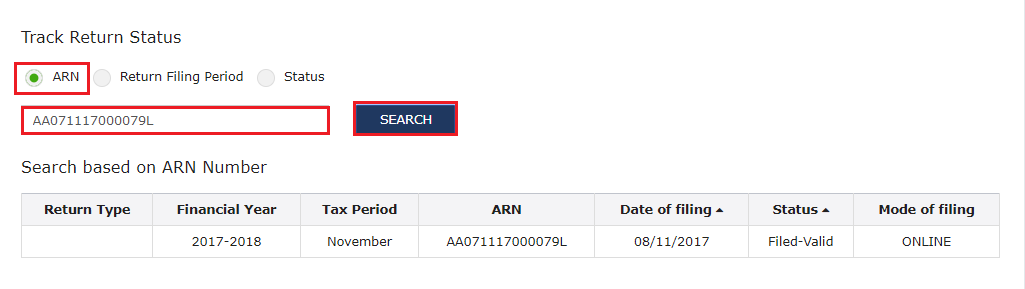
When ARN is Chosen

If the taxpayer desires to track the application through the mechanism of ARM, he/she can follow the steps below:

Step 1: Enter the ARN The taxpayer must enter the ARN which has been sent to the applicant’s e-mail address. Step 2: Search Click on the “Search” option. The status of the application will be displayed on the screen. Tracking of Status through ARN Tracking of Status through ARN    
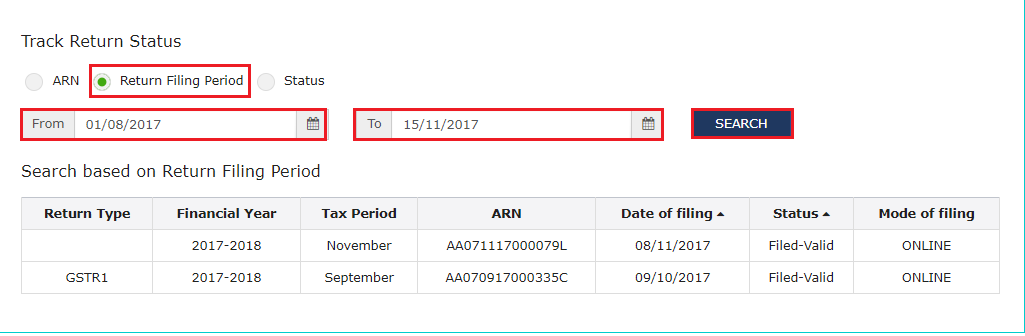
Return Filing Period

Step 1: Choose the submission period Select the period of submission of return by making use of the calendar. Step 2: Search The applicant is required to click on the “Search” option, upon which the status of the application will be displayed. Return Filing Period Return Filing Period
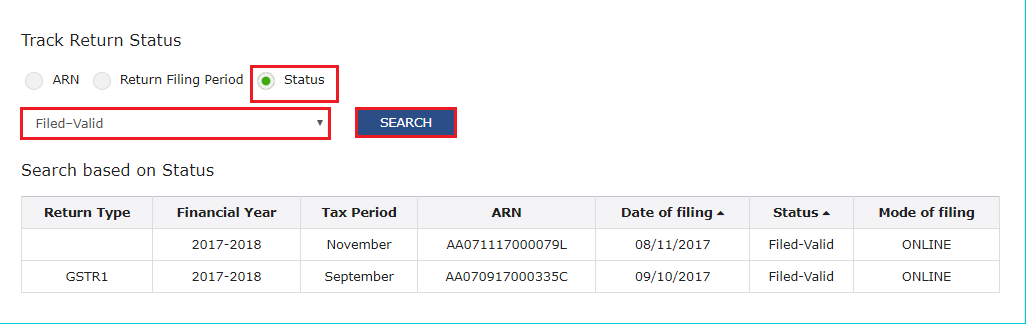
Status

Step 1: Choose the Status Choose the status of the return from the options provided in the drop-down list. Step 2: Search Click on the “Search” option. The status of the application is now displayed. Status Status
Types of Application Status

The applicant may receive any of the following statuses based on the performance of obligations:

  • To be filed – if the returns are pending to be filed.
  • Submitted but not valid – The return is validated but isn’t filed yet.
  • Filed and valid – The return is filed and found to be on par with the requirements.
  • Filed and invalid – The return is filed, but the tax remains unremitted, either partly or fully.

Consequences of Delayed Filing

Non-filing of GST returns within the specified due date will attract an interest of 18% per annum, which is calculated on the total outstanding amount. Apart from this, the taxpayer will also be required to pay a late fee of Rs. 200 for every day of default, which wouldn’t go above Rs. 5,000.
Back to Learn

Frequently Asked Questions

Common questions about Track GST Return Filing Status.

You can check the status of your GST return filing by logging into the GST portal and navigating to the "Track Return Status" option under the "Returns" section. If the status shows "Filed and valid", it means your return has been successfully filed and validated by the authorities.
An Application Reference Number (ARN) is a unique number assigned to your GST return when you submit it. This number is crucial as it allows you to track the status of your return filing using the ARN. The ARN is sent to your registered email address after submitting the return.
There are three main methods to track the status of your GST return filing: using the Application Reference Number (ARN), selecting the return filing period, or choosing the status of the return from a drop-down list. You can access these options under the "Track Return Status" section on the GST portal.
If you fail to file your GST return within the specified due date, you will be liable to pay interest at the rate of 18% per annum on the total outstanding amount. Additionally, you will have to pay a late fee of Rs. 200 for every day of default, subject to a maximum of Rs. 5,000.
No, you cannot track the status of your GST return filing without logging into the GST portal. The "Track Return Status" option is available only after you have logged in with your valid credentials on the official GST portal.
The status "Submitted but not valid" indicates that your GST return has been submitted, but it has not yet been validated by the authorities. This could be due to errors or missing information in the return, which needs to be rectified before it can be accepted as valid.
The GST return filing status is usually updated within a few hours or a day after you have submitted the return. However, it is advisable to check the status after a day or two to ensure that the system has processed your submission and updated the status accordingly.
Yes, if the status shows "To be filed", it means that your GST return is pending submission. You can proceed to file your return by following the prescribed process on the GST portal.
If the status shows "Filed and invalid", it means that your GST return has been filed, but the tax amount remains unpaid, either partially or fully. In this case, you should make the necessary tax payment and rectify any errors or discrepancies in your return to avoid penalties or interest charges.
Yes, you can track the status of GST returns filed in previous years by selecting the appropriate return filing period while using the "Track Return Status" option on the GST portal. The system maintains records of past returns, allowing you to view their respective statuses.
