
Bennisha
Expert
Published on: Aug 28, 2026
Syncing PAN with Digilocker
Digital locker, popularly known as Digilocker, is a Government initiative started as a part of Digital India, permitting Indian citizens to save certain official documents on the cloud. The service is generally used for storing all the documents online. This reduces people's physical task of taking all their documents with them. Users are given 1 GB capacity to store the documents like identification cards, education certificate, PAN, driving license, etc. For easy use, people can sync their Aadhar Card, PAN, driving license and other documents with Digilocker. In this article, let us examine the procedure for syncing PAN with Digilocker.
Syncing Procedure
Given below are the steps that should be followed by a user to sync PAN with Digilocker:
Step 1: Log on to the website The user has to log on to the official website Step 2: Signing In The user has to sign in using the Aadhar number.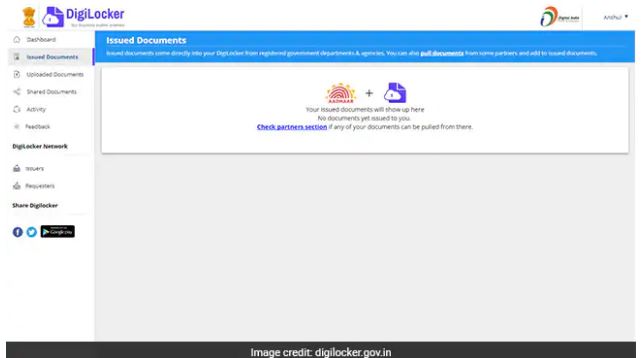 Step 2
Step 3: Click on Issued Documents
The user will be directed to a new page, where he/she has to click on 'Issued Documents'. A pop-up bar appears stating, 'Issued documents come directly into your DigiLocker from registered government departments and agencies. You can also pull documents from some partners and add to issued documents'.
Step 4: Click on Pull Documents
The user has to click on the hyperlinked option 'Pull Documents'.
Step 5: Select PAN Verification Record
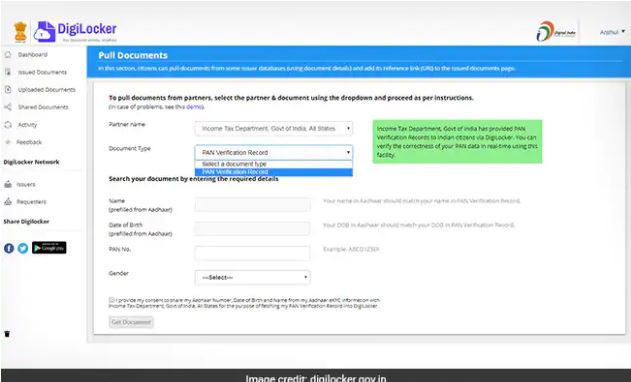
Under the partner's name, the user has to select 'Income Tax Department, Government of India' from the drop down. In document type, the user has to click on 'PAN Verification Record'.
Step 2
Step 3: Click on Issued Documents
The user will be directed to a new page, where he/she has to click on 'Issued Documents'. A pop-up bar appears stating, 'Issued documents come directly into your DigiLocker from registered government departments and agencies. You can also pull documents from some partners and add to issued documents'.
Step 4: Click on Pull Documents
The user has to click on the hyperlinked option 'Pull Documents'.
Step 5: Select PAN Verification Record
Under the partner's name, the user has to select 'Income Tax Department, Government of India' from the drop down. In document type, the user has to click on 'PAN Verification Record'.
 Step 5
Step 6: Enter the Details
The user has to click on search documents and enter the details.
Details to be entered are:
Step 5
Step 6: Enter the Details
The user has to click on search documents and enter the details.
Details to be entered are:
- Name of the user
- Date of Birth
- PAN
- Gender