

Renu Suresh
Expert
Published on: Aug 18, 2026
Procedure for Furnishing and Uploading Form No. 34BB
Central Board Direct Taxes has issued the procedure furnishing and uploading Form No. 34BB. The signed copy of Form No. 34BB shall be uploaded on the new e-filing Portal of the
Income Tax Department along with basic details for the assessee intending to exercise the option under sub-section (1) of section 245M. Online submission of Form No. 34BB shall be treated as a submission to the Assessing Officer as per sub-section (1) of section 245M of the Income Tax Act.Form No. 34BB
As per the
Income Tax Rules, the assessee can exercise the option to withdraw his application filed to the Income Tax Settlement Commission (ITSC) if such application is pending. To exercise this option, the taxpayer has to furnish and upload Form No. 34BB in the manner as prescribed in Rule 44DA of the income tax.Procedure for Furnishing Details in Form No. 34BB
The assessee who wishes to exercise the option for withdrawal application filed under Section 245C and such application is pending, shall first provide the basic details in the following format on the form placed at
NIC.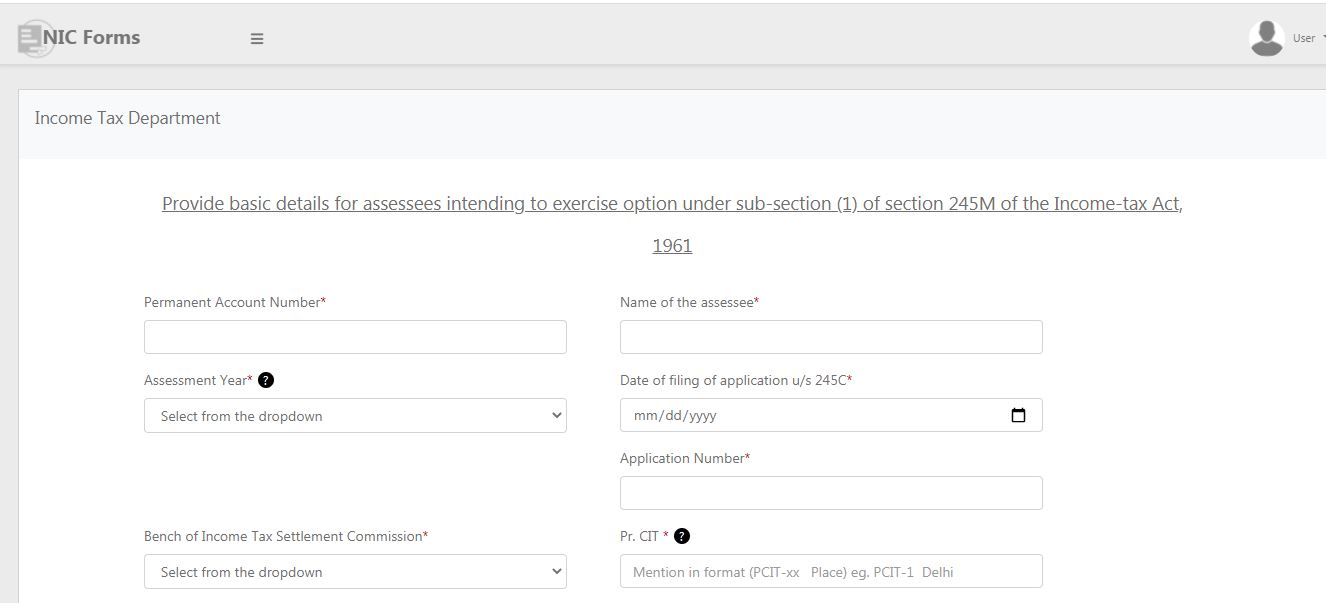 Procedure for furnishing and uploading Form No. 34BB
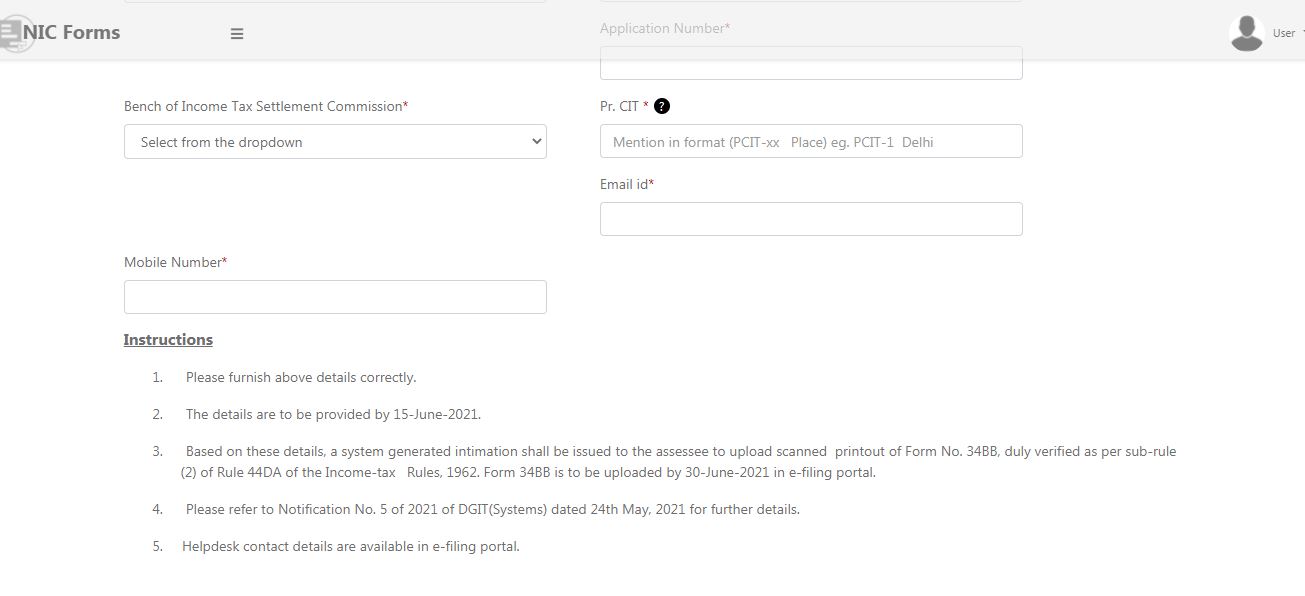 Procedure for furnishing and uploading Form No. 34BB2
Note: The details of the link has also been made available on the new e-Filing portal of the Department
The taxpayer has to furnish the following basic information:
Procedure for furnishing and uploading Form No. 34BB2
Note: The details of the link has also been made available on the new e-Filing portal of the Department
The taxpayer has to furnish the following basic information:
- PAN
- Name of the assessee
- Assessment year
- Date of filing of the application under section 245C
- Application number
- The bench of the Settlement Commission
- PCIT (in the format PCIT-xx, Place)
- Email ID
- Mobile number
Note: In case there is more than one assessment year for which the application for settlement under section 245C is made, the assessee shall provide only the 1
st year under the AY column. In the case of block assessment, the assessment year to be provided shall be the year of the block. Once the form is submitted, based on these details, a system-generated letter shall be generated through ITBA System to the assessee on his e-filing account requiring the assessee to upload a signed printout of Form No. 34B8. The taxpayer should be a registered user on the e-filing portal of the income tax department to proceed further.Upload of a signed copy of Form No. 34BB
Based on the above details, the taxpayer will receive intimation to this e-filing account requiring him to print, sign and upload the scanned copy of Form No. 34BB.
- The taxpayer needs to log in to the income tax e-filing portal. After logging in to the portal, select ‘Furnishing of Form 34BB’ under the e-proceedings tab, uploads the signed printout of the form, and submit.
- The taxpayer must upload the signed printout of the form within the date specified under the provisions of the Income Tax Act
- The date of uploading such a signed form will be considered the date of withdrawal of the application.
Viewing submitted Forms
The submitted Form can be viewed and downloaded by login into the income tax portal using the User name and password. Select e-proceedings Tab and click on Furnishing of Form 34BB. By clicking on View submission, the details will be displayed.