

DINESH P
Expert
Published on: Aug 11, 2026
Pay Later Option For The Income Tax Return Filing
Indian Income Tax Department is introducing new features to improve the taxpayer’s experience. One of the features is “Pay later,” which enables an individual to file an Income tax return (ITR) before making the tax payments. Previously, an ITR could only be filed after the due taxes were paid. It is inconvenient for taxpayers, especially those waiting for salary or other income sources. This article gives you a better understanding of the Pay Later Option and how to use it to pay income tax. File your Income Tax Returns before the deadline with IndiaFilings experts!!What is the Pay Later Option?
The "Pay Later" option offered by the Income Tax Department in India is a taxpayer-friendly feature that streamlines the income tax return (ITR) filing process. It allows individuals to electronically submit their ITR without settling the tax dues immediately.This differs from the traditional method, which involves filing and payment simultaneously. This separation provides flexibility, particularly for those who need time to arrange funds or explore tax-saving options before making the tax payment. It also helps avoid late filing penalties by ensuring timely ITR submission.
Important Consideration when using the Pay Later Option
Below, we have listed several important things you must know when using the Pay Later option.- Usage Limitations: The Pay Later option can be utilized to pay for self-assessment during the ITR filing. It cannot be used for tax payments like advance tax or TDS.
- Consequences of the option: Taxpayers who choose this option might be regarded as an “assessee in default” and will get penalties and interest for their unpaid tax amount.
- Payment deadline: The income tax department does not fix a specific deadline, but it is recommended that you pay the tax amount within the same month you filed your ITR.
- Assessment and Penalty: After processing the ITR, you will receive an intimation notice regarding the outstanding tax amounts. It is better to make a payment within 30 days of receiving the notice. However, doubt still exists whether the penal interest will come when taxpayers choose the option.
Also Read: 10 Benefits of filing Income tax return
How to use the Pay Later option?
Use the following steps to utilize the pay later option to make tax payments after filing the ITR.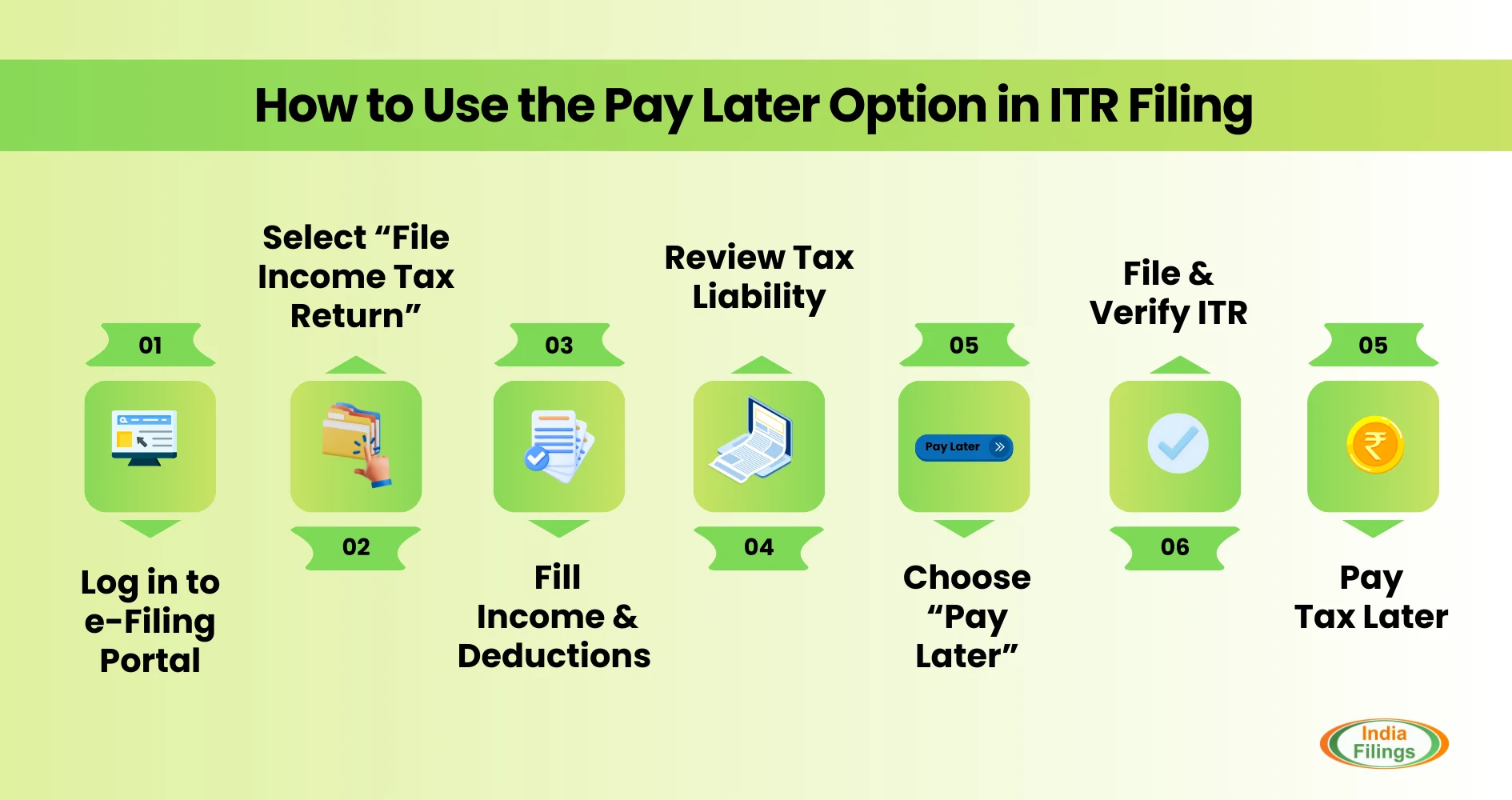
Step 1: Log In and Access ITR Filing
- Visit the official Income Tax Department e-filing portal.
- Log in using your PAN or Aadhaar number and password.
Step 2: Navigate to the ITR Filing Section
- After logging in, select the "e-file" option.
- Choose "Income Tax Return" followed by "File Income Tax Return."
Step 3: Complete ITR Filing (Income & Deductions)
- Proceed with filing your ITR as usual.
- This includes verifying personal information, entering income details, and claiming applicable deductions.
Step 4: Review Tax Liability
- The portal automatically calculates your tax liability as you enter income and deductions.
- Review and confirm the total tax amount displayed on your ITR.
Step 5: Choose Pay Later Option
- Look for the payment section, where a summary of your tax dues will be shown.
- You'll be presented with two choices: "Pay Later" and "Pay Now."
- Select the "Pay Later" option to file your ITR without immediate payment.
Step 6: File and Verify Your ITR
- Once you choose "Pay Later," finalize the filing of your ITR.
- Before submission, remember to verify your ITR using one of the provided methods (e.g., digital signature or Electronic Verification Code).
Learn more: How to file Income tax return
Methods to Pay Taxes Later using Pay Later Option
The "Pay Later" option on the Income Tax Department portal offers flexibility in filing your Income Tax Return (ITR) without immediate tax payment. Here's a breakdown of two methods to settle your dues after using "Pay Later":1. Using the e-Pay Tax Method: The e-Pay Tax method is the preferred approach to avoid penalties for late payment. After successfully filing your ITR, navigate to the e-Pay Tax section on the Income Tax Department portal. This section allows you to conveniently pay your outstanding tax dues electronically. By making your tax payment through e-Pay Tax before a tax demand notice is issued, you will likely avoid penal interest charges on your dues.
2. Paying After Receiving a Tax Demand Notice:
- If your ITR is processed and a demand notice arrives, you have two options:
- Self-Assessment Tax: The "Self-Assessment Tax" option allows you to pay your outstanding tax dues on the Income Tax Department portal even before receiving an intimation notice. This is particularly applicable if your ITR is considered defective. You have 15 days from the date of receiving the defective ITR notice to make this payment.
- Tax on Regular Assessment: This option applies when your ITR is processed and the tax authorities issue a demand notice. The notice will contain specific instructions on making the tax payment online through the Income Tax Department portal. Following these instructions carefully ensures your payment is processed accurately to avoid penalties.
Conclusion
The "Pay Later" is a valuable option for taxpayers who need flexibility in their tax filing process. While it separates ITR filing from payment, remember it's not an extension for tax dues. Be sure to settle your outstanding balance within a reasonable timeframe (ideally within the same month of filing) to avoid potential penalties and interest charges. Utilize the e-Pay Tax method or follow instructions from the tax demand notice for timely payments. Connect with IndiaFilings experts to ensure filing ITR on time and avoid the penalties.IndiaFilings takes care of your ITR filing with dedicated support!!