
Peter
Expert
Published on: Aug 17, 2026
Paperless Licensing Process For Petroleum Road Tankers
The DPIIT launched the paperless licensing process to improve ease of doing business. The paperless licensing process applies to all the road tankers who transports petroleum. The procedure shall reduce the waiting period and paperwork through multiple officials. The digital licensing strengthens the 'Digital India' and green India initiative. The license can be applied through the official website of the Petroleum and Explosives Safety Organisation (PESO). For grant of a license, the applicant shall process the application through online. The application process must include all the necessary documents, applications, and processing fees. All the processes initiated by the officials for the application process shall be informed through e-mail or SMS.
Objectives
- Increase transparency through digitalization in the application process
- Provide a simple mechanism to reduce processing time and move towards the paperless application process. Reduce the print of the license.
- Update the up to date process of the application
- To automate the application and verification process for the benefit of the petroleum road tanker owners
Application Process
Step 1: To apply for the license access the PESO application login page Step 2: Click on 'Apply Online' > Click on ' Petroleum, Gas Cylinders, SMPV (U) Rules Application Login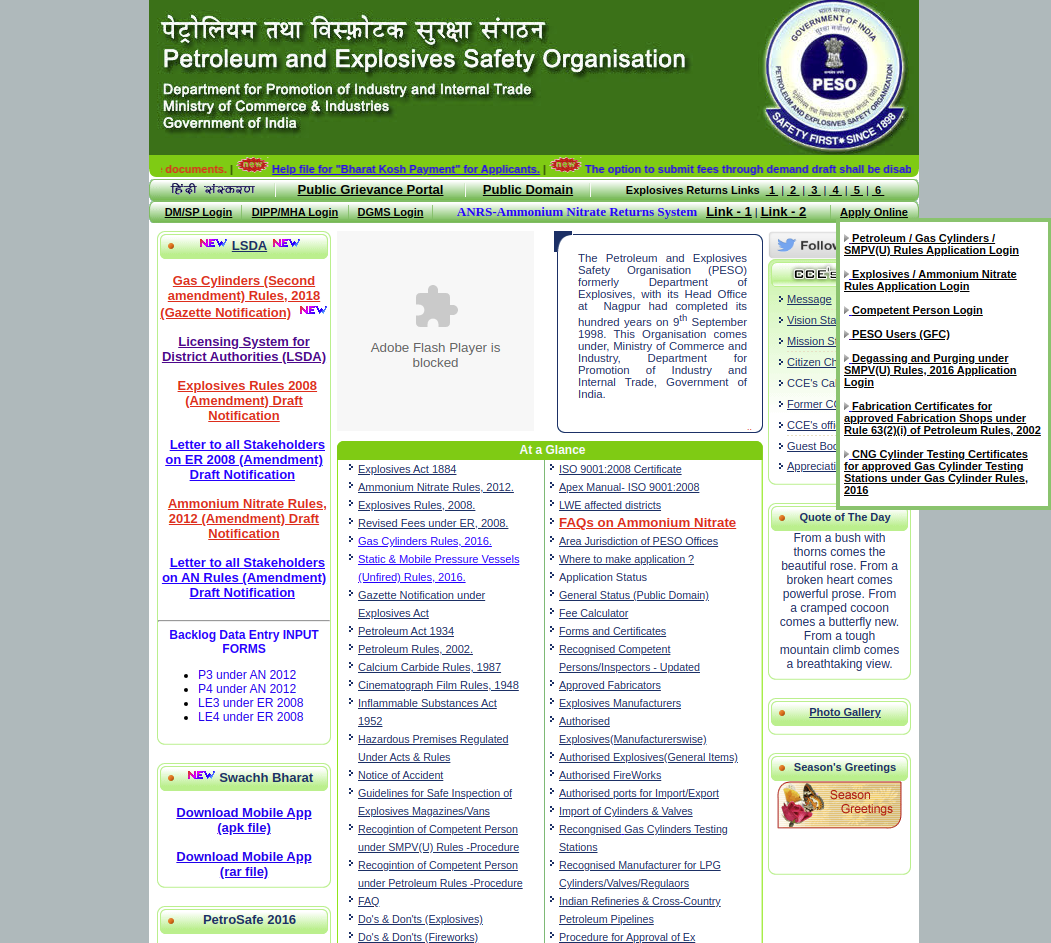 PESO official page
Step 3: If the not registered with PESO, click on 'New User'
PESO official page
Step 3: If the not registered with PESO, click on 'New User'
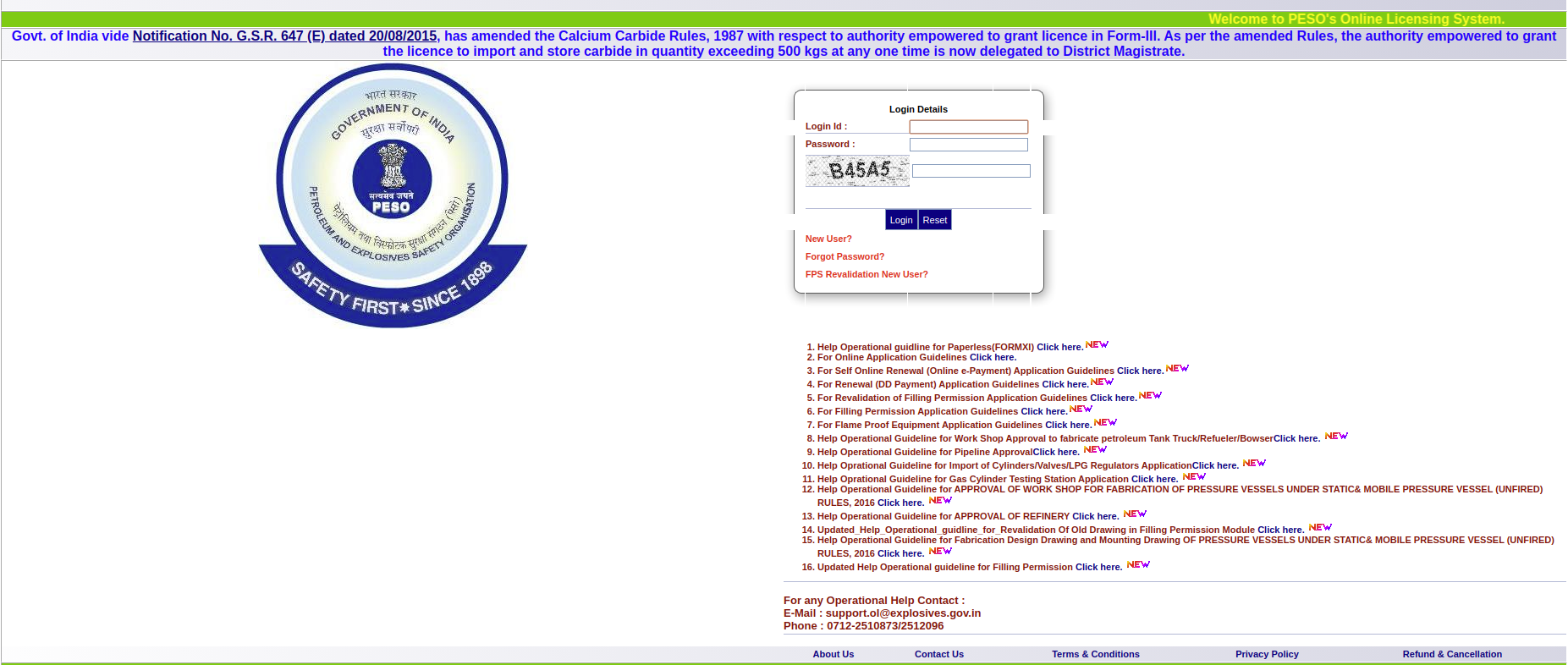 PESO Login page
Step 4: Select 'New License'. On the applicant type, select "company, individual, partnership firm, society or government." Fill all the other licensee details and click on 'Save.'
PESO Login page
Step 4: Select 'New License'. On the applicant type, select "company, individual, partnership firm, society or government." Fill all the other licensee details and click on 'Save.'
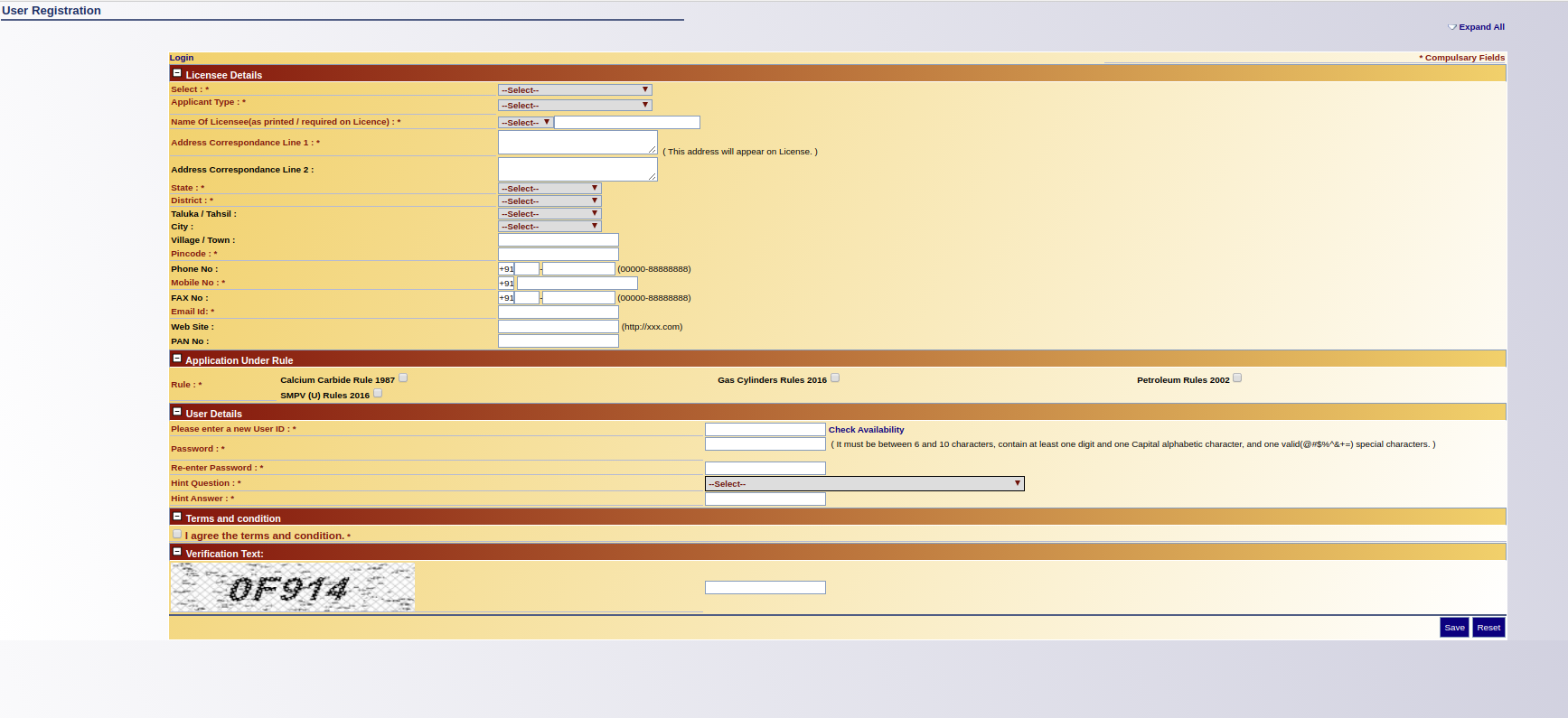 PESO New User
Step 5: Login into the PESO portal using the login ID and password
Step 6: Click on 'New Application' for applying the new license to transport Class A and B Petroleum. The application is termed as Form VII.
Step 7: Select the office type and office
Step 8: Fill all the details as per the RC Book address
Step 9: Fill all the vehicle and parking details including engine and chassis number
Step 10: Fill all the details of capacity and validity. The details must include CCE's approval number, tank manufacturing date, and the number of years license is required. If the license capacity of the tanker is less than 25KL, the applicant must choose less than 5KL for each compartment.
Step 11: After filling all the details, upload the drawing details and documents. The document should be uploaded in PDF format only. The size of the documents should not be more than 512 kb. The uploaded documents can be verified for editing. Click 'Save' after filling all the details.
Step 12: After filling all the details, print the application form and sign at the required pages. The form shall then be uploaded along with the signature of the applicant
Step 13: Click on the 'Print Online Application'
Step 14: Add the DocKey and click on 'Save.'
Step 15: To view the letter and license being granted, click on the list of licenses and click 'View.'
Step 16: In the case of discrepancy compliance, do not apply it as 'New Application.'
PESO New User
Step 5: Login into the PESO portal using the login ID and password
Step 6: Click on 'New Application' for applying the new license to transport Class A and B Petroleum. The application is termed as Form VII.
Step 7: Select the office type and office
Step 8: Fill all the details as per the RC Book address
Step 9: Fill all the vehicle and parking details including engine and chassis number
Step 10: Fill all the details of capacity and validity. The details must include CCE's approval number, tank manufacturing date, and the number of years license is required. If the license capacity of the tanker is less than 25KL, the applicant must choose less than 5KL for each compartment.
Step 11: After filling all the details, upload the drawing details and documents. The document should be uploaded in PDF format only. The size of the documents should not be more than 512 kb. The uploaded documents can be verified for editing. Click 'Save' after filling all the details.
Step 12: After filling all the details, print the application form and sign at the required pages. The form shall then be uploaded along with the signature of the applicant
Step 13: Click on the 'Print Online Application'
Step 14: Add the DocKey and click on 'Save.'
Step 15: To view the letter and license being granted, click on the list of licenses and click 'View.'
Step 16: In the case of discrepancy compliance, do not apply it as 'New Application.'
Revalidation Process
Step 1: Open the official website of PESO Step 2: Click on 'Apply Online' > Click on ' Petroleum, Gas Cylinders, SMPV (U) Rules Application Login
Step 3: Click on FPS Revalidation New User.
Step 4: Fill all the details with valid credentials. Upload the company's logo. Enter a user name and password for login purposes. Click 'Save.'
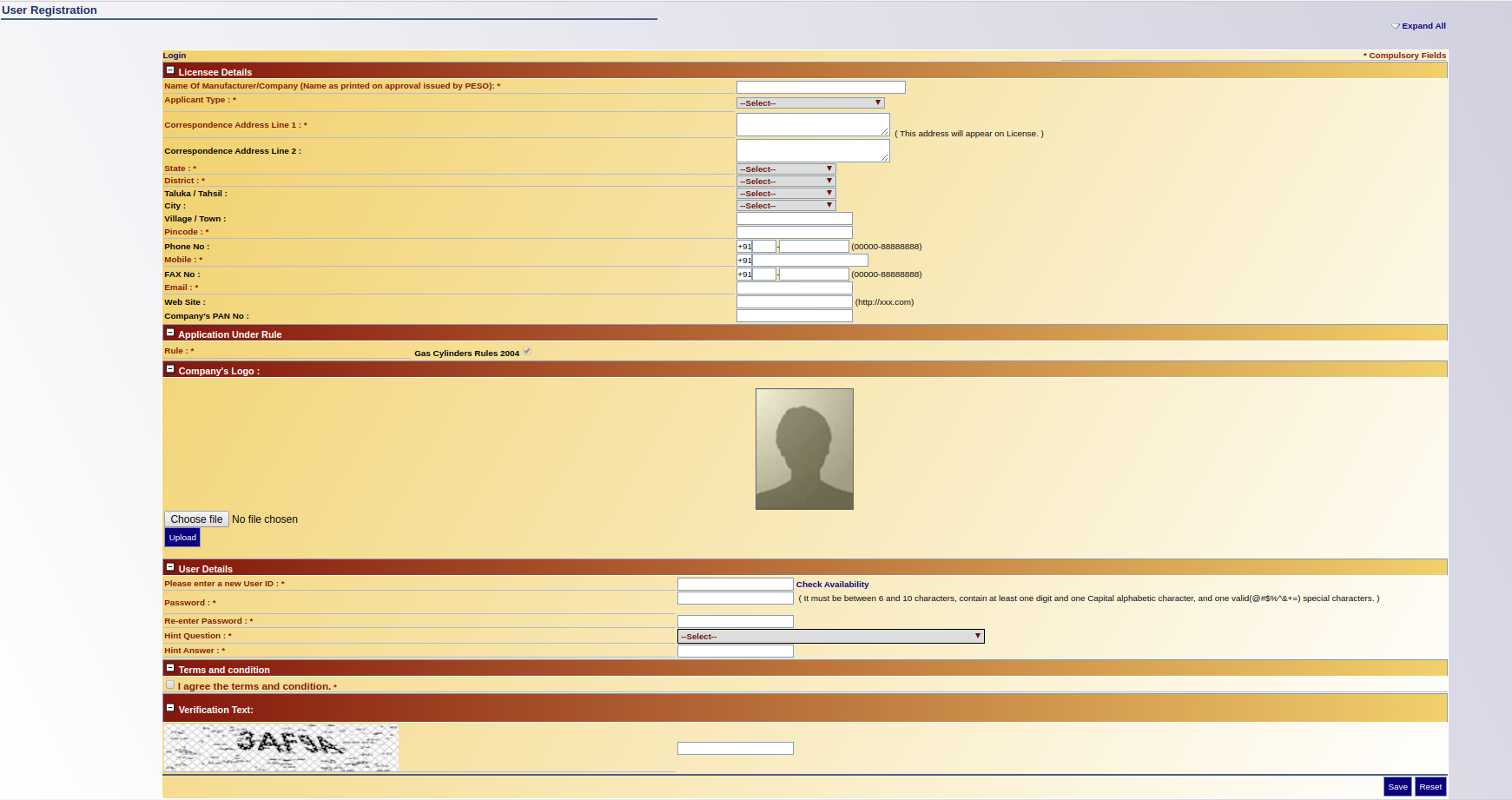 FPS Registration
Step 5: After successful registration, the User shall receive an email with an activation link. Click on the link to log into the website.
Step 6: Click on Cylinder Manufacturer (Revalidation)
Step 7: The applicant shall provide all the necessary details along with rules, purpose, and Form Number. Click on 'Save' after furnishing all the details.
Step 8: Click on 'Drawing Details > Click on 'Add drawing details'
Step 9: Fill with relevant details such as CCE's Approval Number, Type of the cylinder, subcategory, and others. Click on 'Save' after providing all the details. The user shall be provided with an option to edit for further details.
Step 10: Click on 'Organisational Setup Manpower Details' > Click on 'Add Organisational Setup Manpower Details.'
Step 11: Fill with relevant details and click 'Save.' The user shall be provided with an option to edit for further details.
Step 12: Click on 'Cylinder Manufacturing Approval Details (Under BIS Marking Scheme) > Click on 'Add Cylinder Manufacturing Approval Details' (Under BIS Marking Scheme).
Step 13: Provide BIS License Number and BIS Name. The user shall be provided with an option to edit for further details.
Step 14: Click on 'Third Party Inspection Agency Details' > Click on 'Add Third Party Inspection Agency Details.' Click on 'Save.'
Step 15: After filling all the details, click on 'Save and Submit.'
Step 16: Click on 'Print' for filing reference. For application status, the applicant can click on 'Application Status' at the bottom of the page.
FPS Registration
Step 5: After successful registration, the User shall receive an email with an activation link. Click on the link to log into the website.
Step 6: Click on Cylinder Manufacturer (Revalidation)
Step 7: The applicant shall provide all the necessary details along with rules, purpose, and Form Number. Click on 'Save' after furnishing all the details.
Step 8: Click on 'Drawing Details > Click on 'Add drawing details'
Step 9: Fill with relevant details such as CCE's Approval Number, Type of the cylinder, subcategory, and others. Click on 'Save' after providing all the details. The user shall be provided with an option to edit for further details.
Step 10: Click on 'Organisational Setup Manpower Details' > Click on 'Add Organisational Setup Manpower Details.'
Step 11: Fill with relevant details and click 'Save.' The user shall be provided with an option to edit for further details.
Step 12: Click on 'Cylinder Manufacturing Approval Details (Under BIS Marking Scheme) > Click on 'Add Cylinder Manufacturing Approval Details' (Under BIS Marking Scheme).
Step 13: Provide BIS License Number and BIS Name. The user shall be provided with an option to edit for further details.
Step 14: Click on 'Third Party Inspection Agency Details' > Click on 'Add Third Party Inspection Agency Details.' Click on 'Save.'
Step 15: After filling all the details, click on 'Save and Submit.'
Step 16: Click on 'Print' for filing reference. For application status, the applicant can click on 'Application Status' at the bottom of the page.
Renewal Payment for Licenses
The renewal payment can be made through DD or online.
Step 1: Open the official website of PESO Step 2: Click on 'Apply Online' > Click on ' Petroleum, Gas Cylinders, SMPV (U) Rules Application Login
Step 3: Log into the official website of PESO
Step 4: Click on Portfolio > Provide DocKey > Click 'Save'
Step 5: Click on Subsequent Application (Portfolio)
Step 6: Under Transaction, choose Renewal
Step 7: Select the office and click 'Save.'
Step 8: Click on 'Add Payment Details'
Step 9: Fill all the details with relevant information > click 'Submit' > Click 'Save.'