
Sinduja Shankar
Expert
Published on: Jul 30, 2026
Panaji Property Tax
Property tax is a prime source of revenue for the Panaji Municipal Council. This form of tax is to be paid annually by the property owners to the municipal corporation of the jurisdiction in which the property or land is located. The Revenue Department of the Municipal body is responsible for the administration of the property taxation for the respective urban local authorities. The system of taxation has been made mandatory by the Government for anybody who owns property in Panaji. In this article, we look at the Panaji Property Tax payment procedure in detail.
Panaji Corporation Act, 2002
The regulations under this act apply to serves the assessment of tax collected from the Municipal Corporation. Taxes would be payable in according to the rates fixed under Section 148 of the Act on the basis of annual value. According to this Act, the taxes are payable with the rates fixed under section 148 of the Act based on the yearly amount. Rebates shall be admissible in annual value and payable taxes in according with the provisions prescribed in the Act. Following the provisions in this Act, the deductions shall be admissible in annual value and payable taxes.
Purpose of Property Tax
The urban local authorities will assess the property/ land and collect the House tax. The taxes collected will be for the jurisdiction department in which the property or land is situated. The services for which the collected money are used for facilities such as education, library construction, sewer improvements, road and highway constructions, repairing roads, fire service and other services that highly benefit the concerned jurisdiction.
Eligibility Criteria
- An individual whose age is above 18 years of age.
- An individual who is a permanent resident in the state of Panaji.
- Any person who owns a property in Panaji is entitled to pay a property tax.
Calculation of Property Tax
At present, the following basic rates are adopted for calculation of tax as per office Memorandum of P.W.D., Government of Panaji. Property taxes are computed from a percentage of the assessed value of the property. Property taxes are calculated using the amount and location of the property or land. The tax assessors will value the property or land and charge an appropriate rate from the property owners using the standards set by the government authorities. Panaji Municipal Corporation allows its users to calculate property tax online by entering the area, locality, usage, type, total plinth area and age of the property. Property tax rates of Panaji Municipal Corporation can be accessed using
this link.Documents Required
The below following are the document checklist for the payment of property tax or house tax online.
- Copy of the assessment order
- Receipt of the updated property tax bill.
- Occupancy Certificate.
Procedure for Paying Property Tax – Online Mode
The applicants in Panaji must follow the below steps to make the Property Tax payment online.
Visit the Panaji Municipal Council
Step 1: The applicant will have to visit the official Panaji Municipal Council portal of Panaji to make the House tax payment.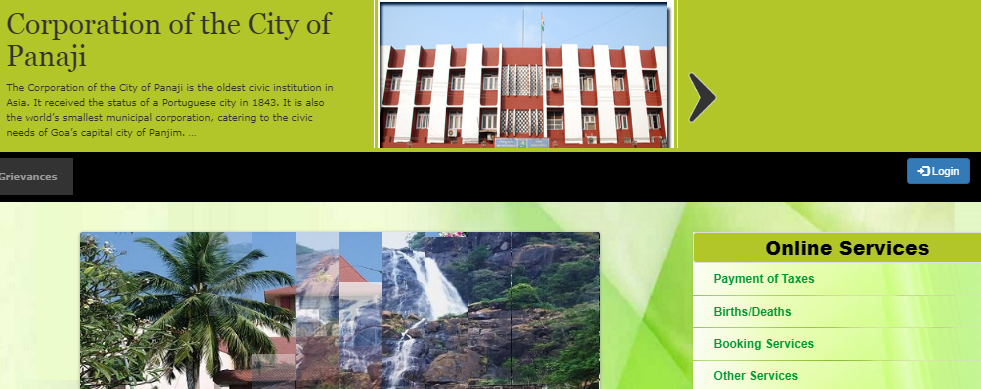 Step 1 .- Panaji Property Tax
Step 2: Then you have click on the ”Services” tab that is visible on the menu bar. Then select the “Pay House Tax online” from the dropdown list.
Step 3: Now you will be directed to the pay tax online page where you have to fill in all the requested details such as:
Step 1 .- Panaji Property Tax
Step 2: Then you have click on the ”Services” tab that is visible on the menu bar. Then select the “Pay House Tax online” from the dropdown list.
Step 3: Now you will be directed to the pay tax online page where you have to fill in all the requested details such as:
- Select Municipal Council
- House Tax Number (as shown in the previous tax bill)
- Name of payee
- E-mail address of the payee
- Mobile Number
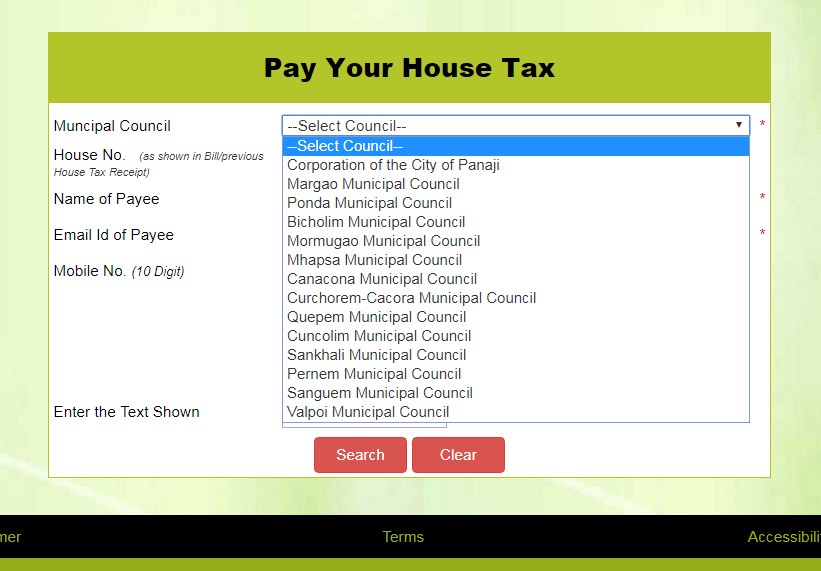 Step 3 - Panaji Property Tax
Step 4: After filling all the requested details, enter the captcha as shown. Then click on the “Search” option. Then, you will be directed to the property tax payment gateway.
Step 3 - Panaji Property Tax
Step 4: After filling all the requested details, enter the captcha as shown. Then click on the “Search” option. Then, you will be directed to the property tax payment gateway.
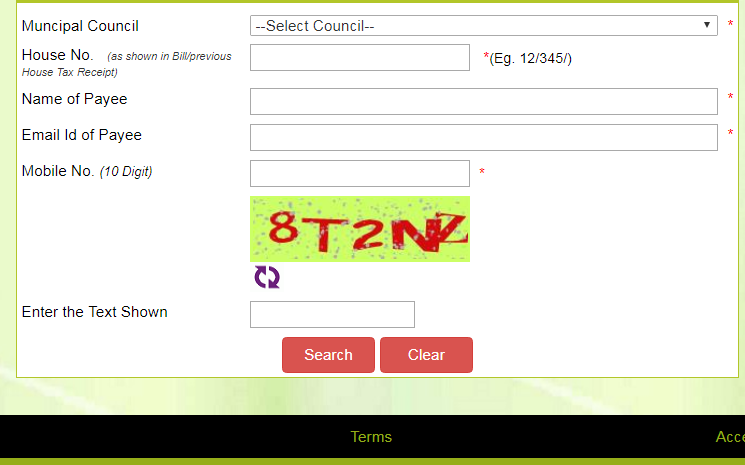 Step 4 - Panaji Property Tax
Make Payment
Step 5: Now, check the checkbox against the arrear bill for which the payment has to be made. Then have to click on the “Pay Now” button. The money can be redeemed in 3 ways:- Full Payment: In total, it is deposited for one whole year.
- Partially Payment: It will be tested in the cart – Half-an-a-half.
- Advance Payment: It can be credited to the student in their second language.
- UBL name
- Collection date
- Collection centre
- Payment mode
- Bank details
Print Tax Receipt
Step 11: After making payment, a receipt of the same will be generated as an acknowledgement slip for the amount made. You can also download/ print the receipt for the future reference. Step 12: You need to click on the “Tax Receipt” option and have to enter the details as requested. Step 13: Then you have to click on the submit button. Step 14: The challan number column shows all the Challans of paid property tax that you paid. Step 15: After that, you can click on the Challan number for which you need a printout.Track Application Status
To know your property tax application status, you have to go to the concerned municipal portal. After that, you need to click on the "Check Status" button that is visible on the home page. Then you have to select the service from the list and enter the Reference ID on the requested tabs. Then click on the "search" option to view the status of your property tax payment.
 Status of Property Tax Payment - Panaji Property Tax