

Renu Suresh
Expert
Published on: Aug 12, 2026
Miscellaneous Payments in DGFT System
In case of any online/offline process where the direct online payment option is not available, the payment is to be made online through the e-Miscellaneous Payments System (eMPS) on the DGFT Website. The present article briefs the Miscellaneous Payments in DGFT System.
eMPS System
eMPS System is designed to enable an
Exporter / Importer to use an Online Payment facility for making payments for miscellaneous purposes excluding fees for applications where an online payment facility coupled with an online application facility is already available.- Exporter / Importer will generate an ECOM Reference Number and can make the single/multiple payments against it after selecting the appropriate Subject / Scheme / DGFT RA office and other details.
- Applicants can verify an unsuccessful payment and also can print the Payment details.
Important Announcements
In case of any online/offline process where the direct online payment option is not available, the payment is to be made online through the e-Miscellaneous Payments System (eMPS) on the DGFT Website.
- Payment can be made for In-Progress and Deficient files only.
- eMPS is not allowed for closed files (approved and rejected files). The applicant needs to contact the respective RA Office for details.
- The payments from Legacy Miscellaneous Payment System (eMPS) and Legacy Draft Application cannot be used to make payments in eMPS System
Procedure to make Miscellaneous Payments
Login to the
DGFT Website navigate to My Dashboard and click on the Payment Related Functions.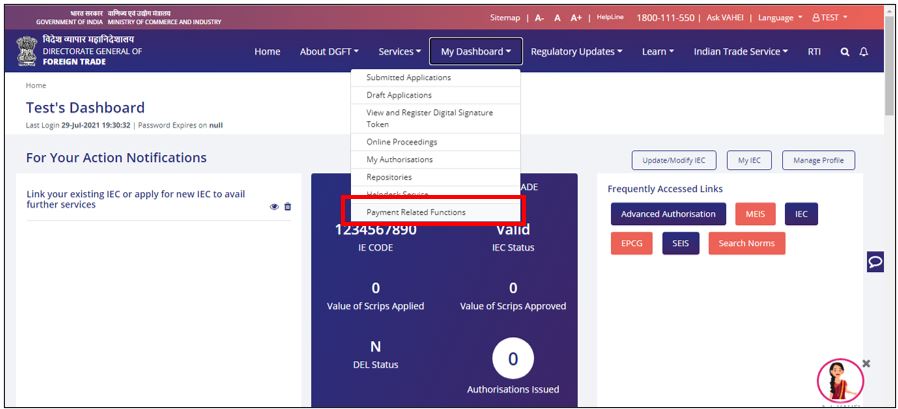 Miscellaneous Payments in DGFT System - DGFT 1
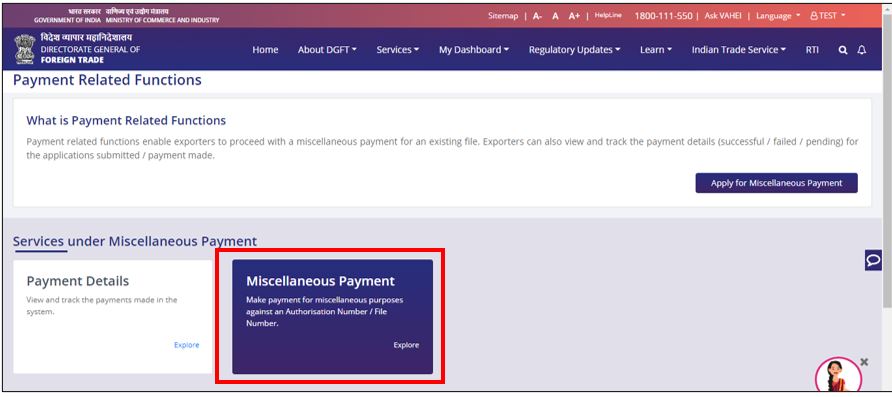
From the new page, click on the Miscellaneous Payment title. The link will redirect to the new page.
Miscellaneous Payments in DGFT System - DGFT 1
From the new page, click on the Miscellaneous Payment title. The link will redirect to the new page.
 Miscellaneous Payments in DGFT System - DGFT 2
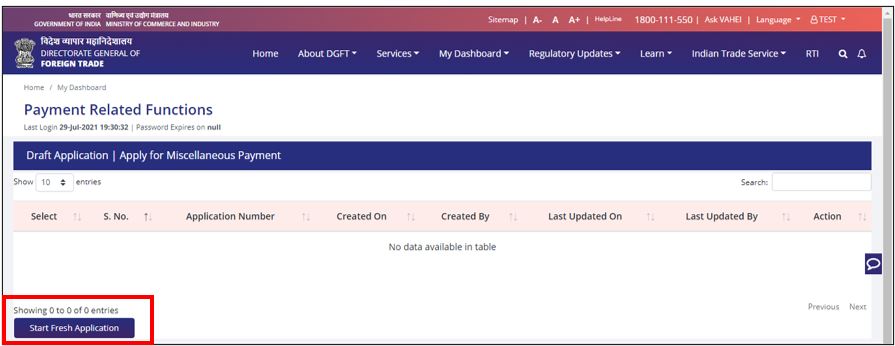
Click on Start Fresh Application. You can also continue with an existing draft application if available. Enter the File Number and tab out.
Miscellaneous Payments in DGFT System - DGFT 2
Click on Start Fresh Application. You can also continue with an existing draft application if available. Enter the File Number and tab out.
 Miscellaneous Payments in DGFT System - DGFT 3
Note: In case the file number exists in the new system, the details will be auto-populated by the system. Please validate the details carefully and proceed to enter the Amount and Remarks field.
Miscellaneous Payments in DGFT System - DGFT 3
Note: In case the file number exists in the new system, the details will be auto-populated by the system. Please validate the details carefully and proceed to enter the Amount and Remarks field.
- In case the file number is not available, the system will prompt with a warning message. You will be required to enter the corresponding file details and RA Office before proceeding with submitting the payment. The file will need to be approved by the RA Office for consumption.
- Validate the details and proceed to make the payment via existing processes.
- After making the payment applicant needs to print the receipt through the print option and present it to the concerned DGFT RA authority along with the application for which he has made payment.
- On submission, DGFT officials will authenticate the payment details using the ECOM Reference Number and mark it as USED. In case of multiple payments on a single ECOM Reference Number, the DGFT official needs to select all the payments one by one and mark them USED.
- A unique DGFT Reference Number will be generated for each payment detail which can be used by the concerned DGFT office for reference purposes.