
Karthiga
Expert
Published on: Aug 13, 2026
Madhya Pradesh Society Registration
Society is a group of the person associated together for a specified purpose which results in a non-profitable service. Societies registered under the Madhya Pradesh Societies Registration Act, 1973, holds the status of a legal entity. Registration of society is done through the Office of Registrar of Society under the Madhya Pradesh Government. In this article, we look at the procedure for Madhya Pradesh society registration in detail.
Purpose for Society Registration
The principal Act of Section 2, specifies the following purposes for which societies may be registered under the Act:
- Promotion of science, education, the literature of fine arts
- Diffusion of useful knowledge
- Diffusion of political education
- Maintenance of libraries or reading rooms for common use among the members or upon to the public
- Establishment and maintenance of galleries of paintings and other works of art
- Establishment and maintenance of public museums
- Collection of natural history, mechanical and philosophical inventions, instructions or designs
- Promotion of social welfare
Documents Required
Following documents need to be furnished along with the application for society registration in Madhya Pradesh:
- ID Proof
- Address proof
- Bye-law of the Society.
- Passport size photographs of the head.
Online Society Registration Procedure
To register for society in Madhya Pradesh, follow the steps mentioned below:
Step 1: Please visit the official website of Madhya Pradesh Government. Step 2: Click on "Citizen Service" menu and select "Application" option which is displayed on the home page.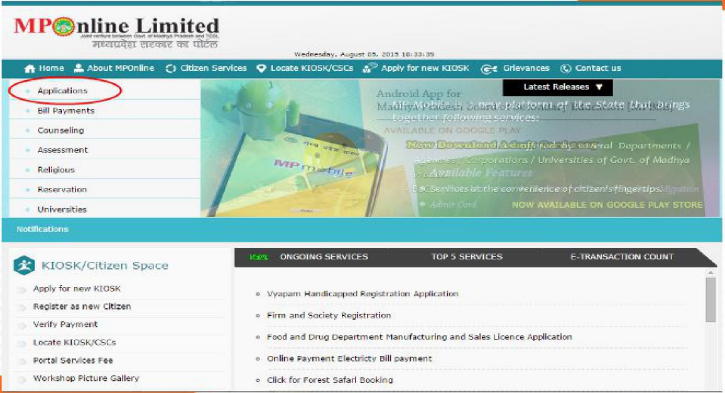 Homepage Madhya Pradesh Society Registration
Step 3: On the next page, the applicant needs to click on "Firms And Society" icon from the list of services displayed.
Homepage Madhya Pradesh Society Registration
Step 3: On the next page, the applicant needs to click on "Firms And Society" icon from the list of services displayed.
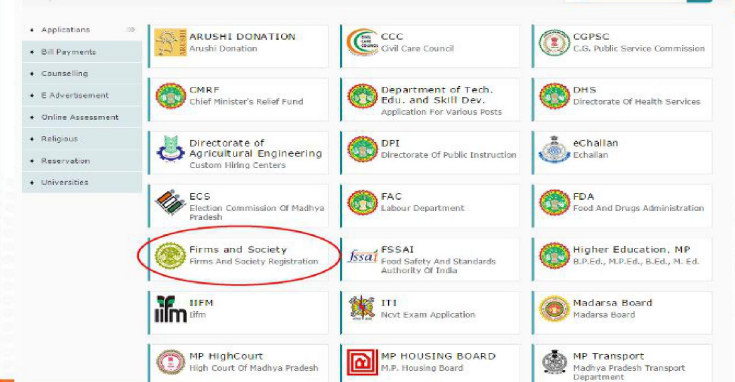 Portal list Madhya Pradesh Society Registration
Step 4: Then the applicant has to create "New User Login" for registration.
Portal list Madhya Pradesh Society Registration
Step 4: Then the applicant has to create "New User Login" for registration.
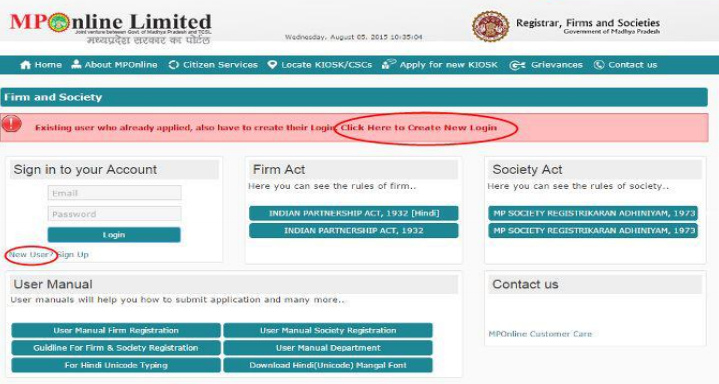 User login Madhya Pradesh Society Registration
Step 5: Click on "New User" button, and then the form will open up on the screen.
Step 6: The registration form will open up; the applicant has to fill the required details in the form and click "Register".
User login Madhya Pradesh Society Registration
Step 5: Click on "New User" button, and then the form will open up on the screen.
Step 6: The registration form will open up; the applicant has to fill the required details in the form and click "Register".
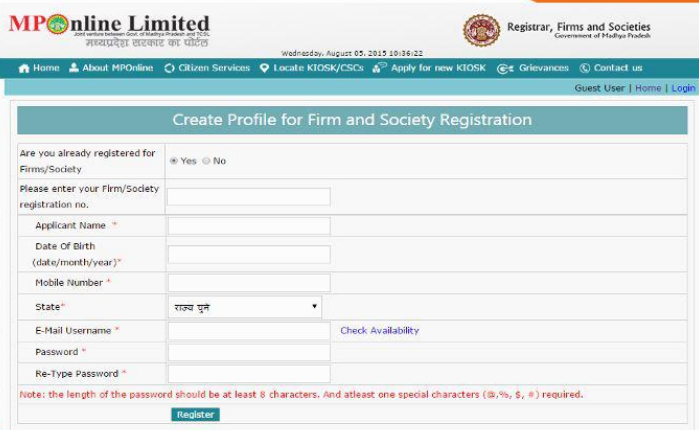 Profile Madhya Pradesh Society Registration
Step 7: Then, the user can select "Society Online Registration" option.
Profile Madhya Pradesh Society Registration
Step 7: Then, the user can select "Society Online Registration" option.
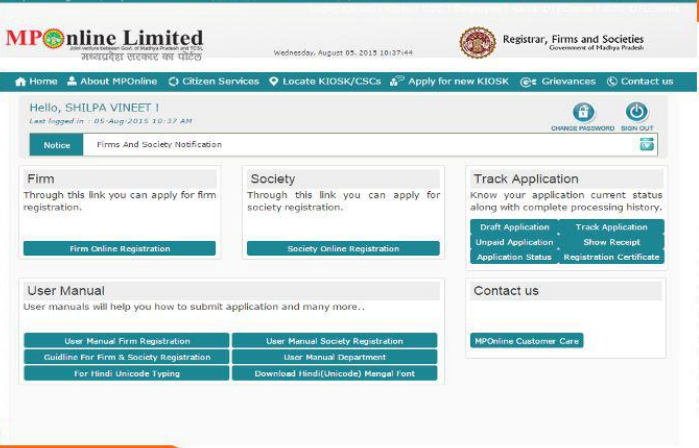 Online Registration Madhya Pradesh Society Registration
Step 8: Now follow the instructions and select "Continue" to proceed further.
Online Registration Madhya Pradesh Society Registration
Step 8: Now follow the instructions and select "Continue" to proceed further.
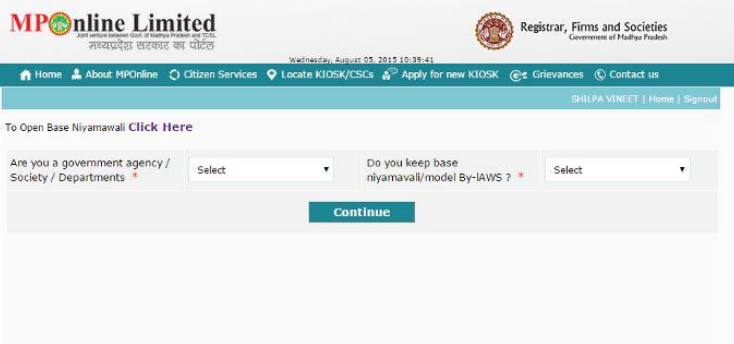 To open base niyamawali Madhya Pradesh Society Registration
Step 9: Upload the scanned document (Niyamawali or By-law) and click on the "Continue" button.
To open base niyamawali Madhya Pradesh Society Registration
Step 9: Upload the scanned document (Niyamawali or By-law) and click on the "Continue" button.
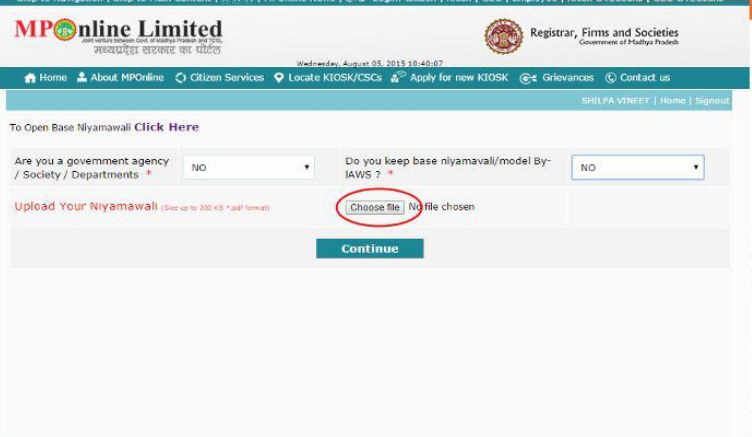 Upload documents Madhya Pradesh Society Registration
Step 10: The application form will open up; the applicant has to fill the required details in the form.
Upload documents Madhya Pradesh Society Registration
Step 10: The application form will open up; the applicant has to fill the required details in the form.
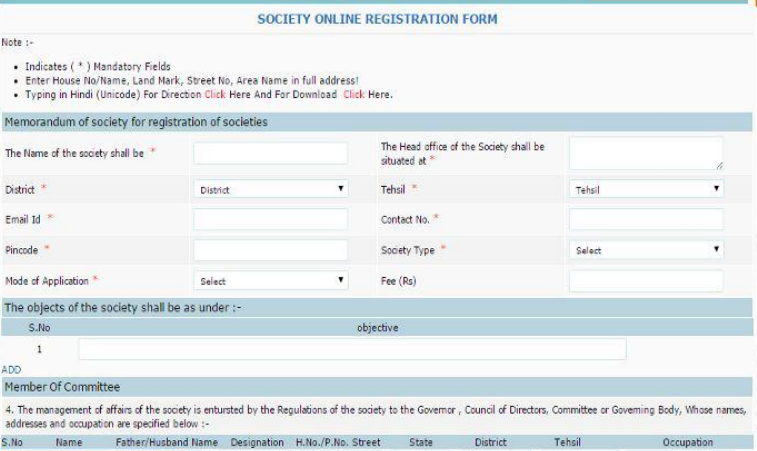 Online Registration form Madhya Pradesh Society Registration
Step 11: After filling the form, click on "Save" to save the details.
Online Registration form Madhya Pradesh Society Registration
Step 11: After filling the form, click on "Save" to save the details.
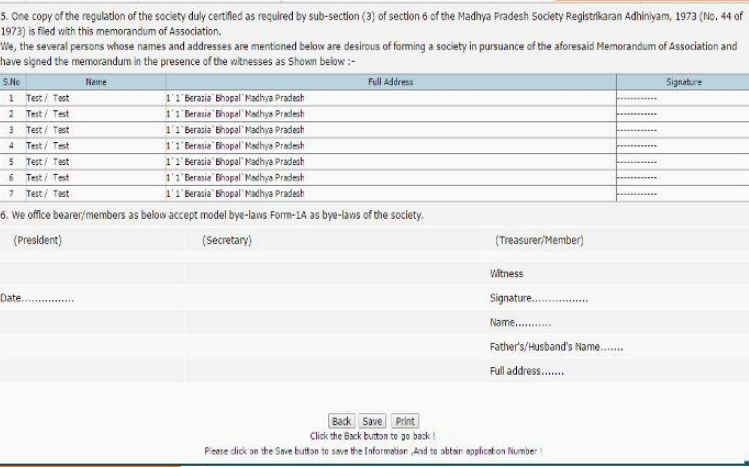 Save details Madhya Pradesh Society Registration
Generation of Challan
Step 12: Click on "Proceed to pay for registration fee" for the payment of fees.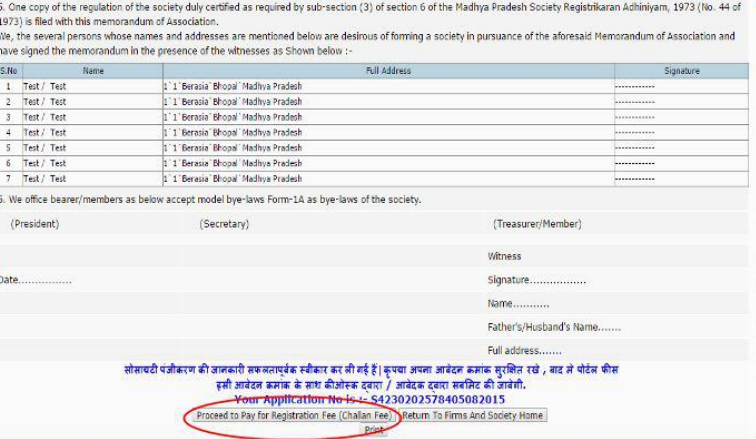 Pay for Registration fees Madhya Pradesh Society Registration
Step 13: The user needs to select "Firms and Societies" from the list of the department.
Pay for Registration fees Madhya Pradesh Society Registration
Step 13: The user needs to select "Firms and Societies" from the list of the department.
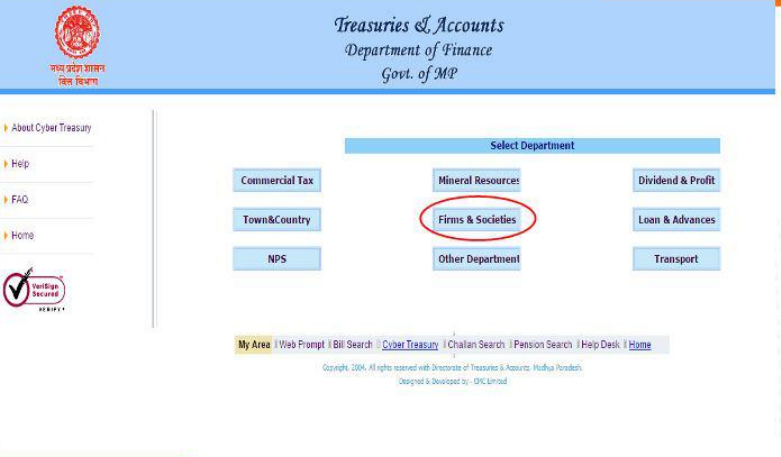 List of departments Madhya Pradesh Society Registration
Step 14: Fill the required details and submit the application form.
List of departments Madhya Pradesh Society Registration
Step 14: Fill the required details and submit the application form.
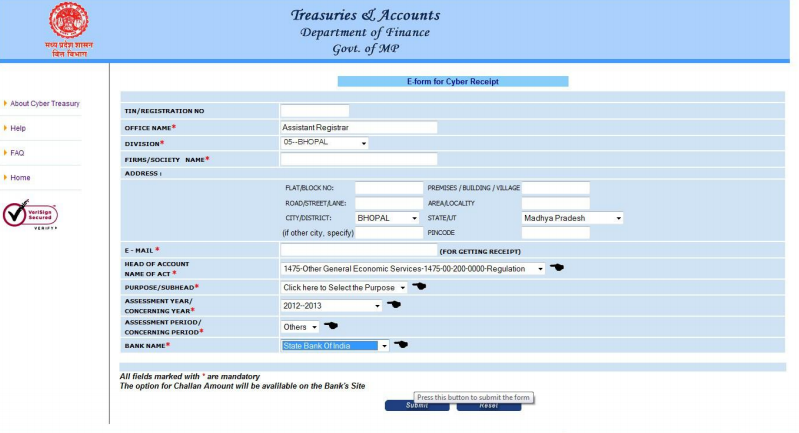 E-form for cyber receipt Madhya Pradesh Society Registration
Step 15: Upon submission, the user will be redirected to the banking website.
Step 16: Then, one needs to fill the required details and pay their amount at the selected bank’s payment portal.
E-form for cyber receipt Madhya Pradesh Society Registration
Step 15: Upon submission, the user will be redirected to the banking website.
Step 16: Then, one needs to fill the required details and pay their amount at the selected bank’s payment portal.
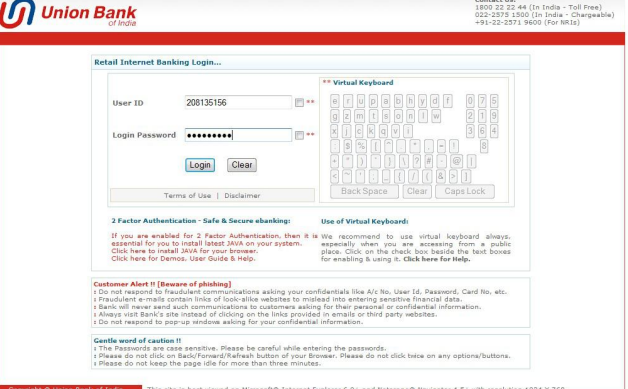 Bank payment portal Madhya Pradesh Society Registration
Step 17: Now, the application ID, Transaction ID, Challan Reference ID will be generated.
Bank payment portal Madhya Pradesh Society Registration
Step 17: Now, the application ID, Transaction ID, Challan Reference ID will be generated.
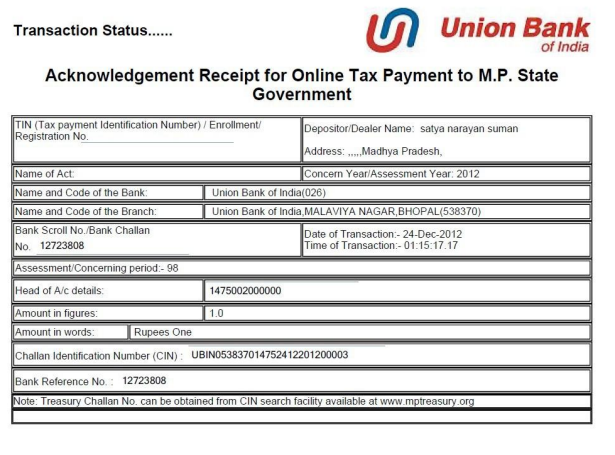 Transaction status Madhya Pradesh Society Registration
Payment for Registration
Step 18: The user has to login again into the portal.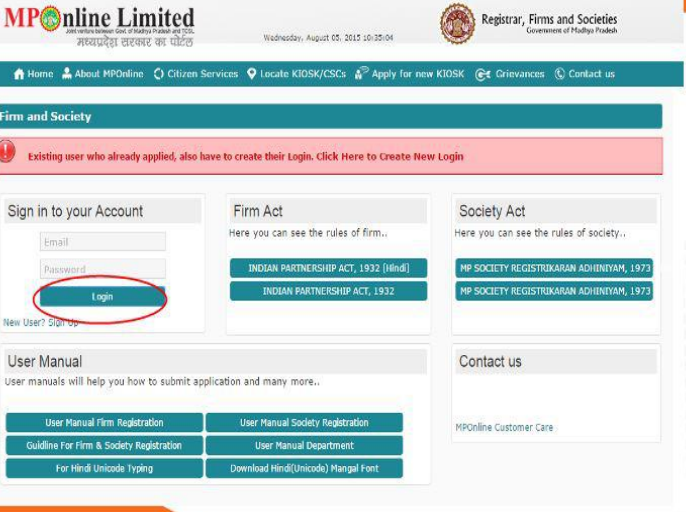 Sign in Madhya Pradesh Society Registration
Step 19: Click on "Unpaid application" which is below the track application menu.
Sign in Madhya Pradesh Society Registration
Step 19: Click on "Unpaid application" which is below the track application menu.
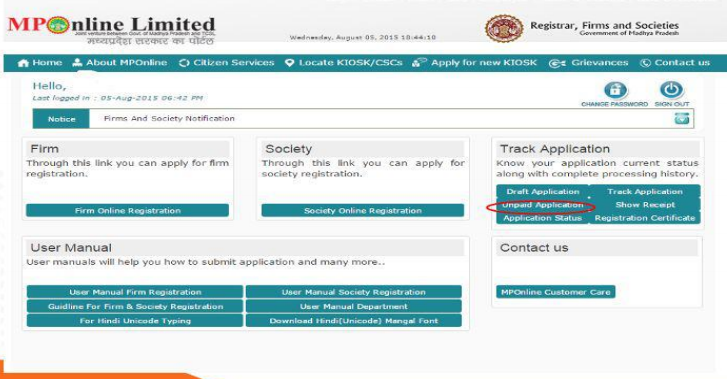 Track application Madhya Pradesh Society Registration
Step 20: Select "Society Application" to proceed with payment.
Track application Madhya Pradesh Society Registration
Step 20: Select "Society Application" to proceed with payment.
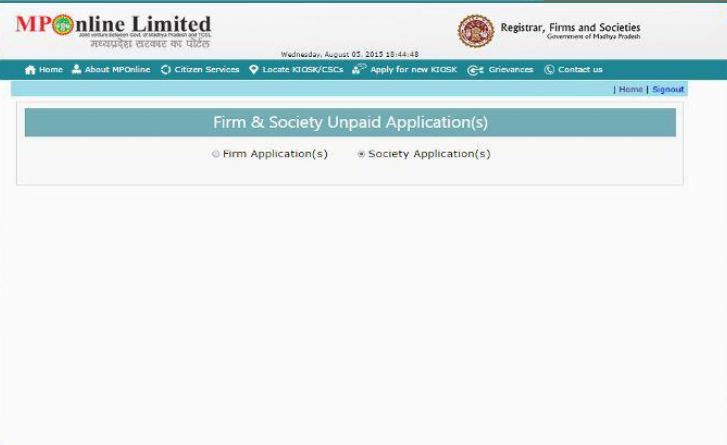 Unpaid application Madhya Pradesh Society Registration
Step 21: Fill the details and save the document and pay the portal fee for successful registration.
Unpaid application Madhya Pradesh Society Registration
Step 21: Fill the details and save the document and pay the portal fee for successful registration.
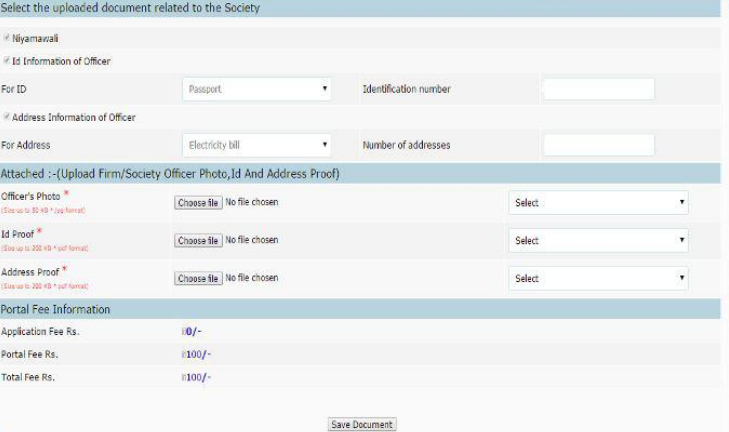 Attachment Madhya Pradesh Society Registration
Note: After registration, the status of the application can be viewed after five working days from the date of application.
Attachment Madhya Pradesh Society Registration
Note: After registration, the status of the application can be viewed after five working days from the date of application.