

Renu Suresh
Expert
Published on: Aug 13, 2026
Kerala Property Registration
The land registration process in India is governed by ‘Section 17’ of the Registration Act, 1908. All transactions that relate to the sale of immovable property should be registered to ensure the transfer of clean title to the owner. The Registration Department of Kerala manages the registration or transfer of property in Kerala. In this article, we look at the online procedure for Kerala property registration with stamp duty charges.Section 17 Indian Registration Act
Section 17 of the Indian Registration Act, 1908 says that all transactions that involve a sale of immovable property, the gift of immovable property and lease for a period exceeding 12 months of immovable property for a value Rs. 100 and above should be registered.Purpose of Property Registration (Deed registration)
Registration of an immovable property provides the following benefits:- By registering property, the document of the transfer becomes a permanent public record
- Any person can inspect a public record, and a certified copy of the document can be obtained
- Registering a property is conveying information to the public that the owner has transferred the immovable property to the buyer
Documents Required for Property Registration in Kerala
For registering property, the following documents must be submitted to the Registrar.- Proof of ownership
- Certified copy of original old sale deed, assessment of MC or mutation
- Identify proof (Ration Card, Voter ID, Driving License, Aadhaar Card or PAN Card)
- NOC
- ID proof of two witness
- Map plan and description of immovable property
- Digital photograph of property (Building or Plot)
Stamp Duty for Property Registration
Stamp duty is a legal tax payable as a proof for any sale or purchase of immovable property. Rates of stamp duty of various transactions in Kerala are here:Online Property registration
The step by step guidelines for registering property in Kerala is given below: Step 1: Visit the home page of the Registration Department of Kerala. Step 2: For online property registration in Kerala, The applicant has to login into the web portal.User Registration
Step 3: Click on “Online Application” link.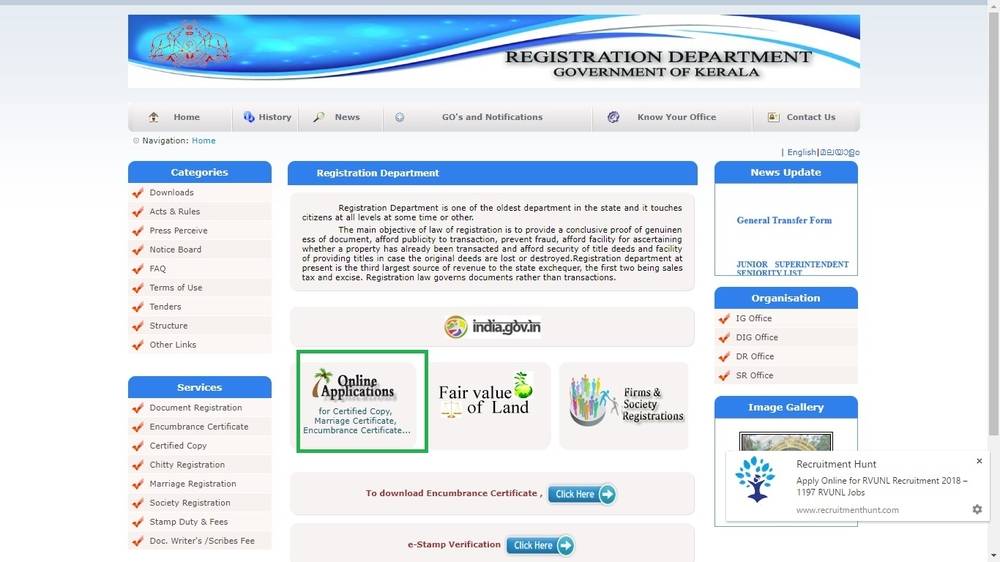 Image 1 Kerala Property Registration
Step 4: Select Online Document Details Entry user Registration from the menu.
Image 1 Kerala Property Registration
Step 4: Select Online Document Details Entry user Registration from the menu.
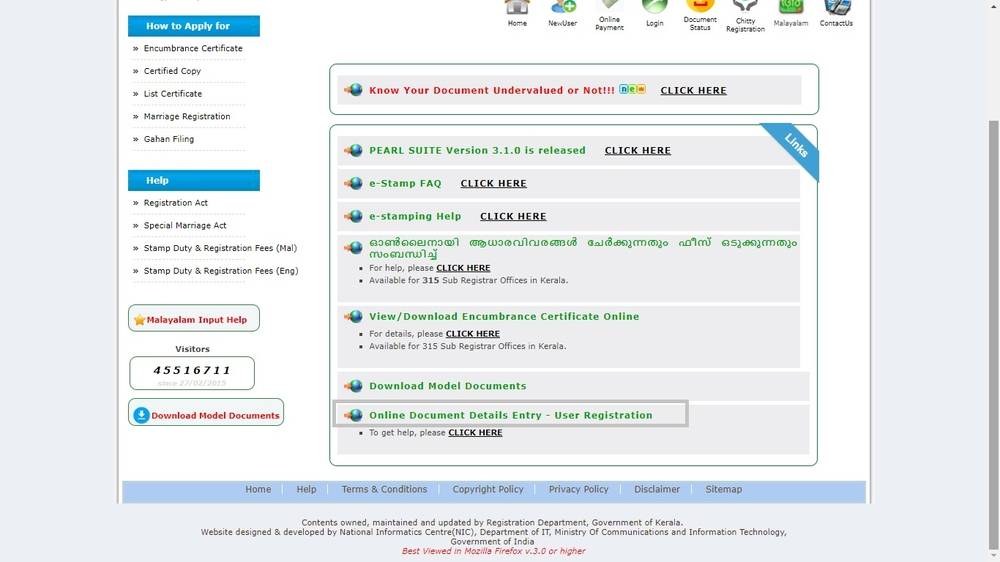 Image 2 Kerala Property Registration
Step 5: The page will redirect to the next page. The applicant needs to enter all the details.
Image 2 Kerala Property Registration
Step 5: The page will redirect to the next page. The applicant needs to enter all the details.
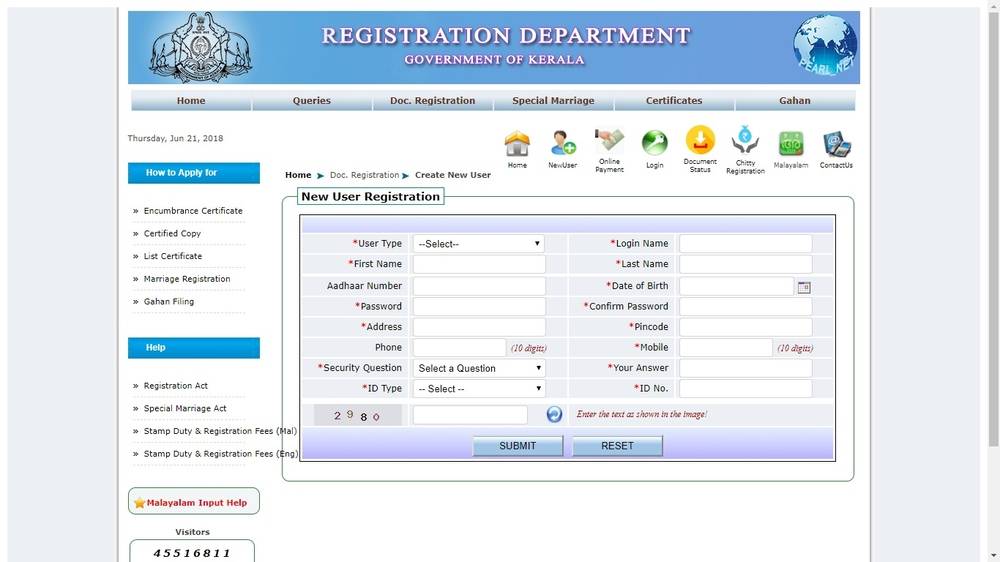 Image 3 Kerala Property Registration
Step 6: After successful registration, the message “Success” will be displayed on the screen.
Image 3 Kerala Property Registration
Step 6: After successful registration, the message “Success” will be displayed on the screen.
Login to the Portal
Step 7: Now, the applicant can log in into the portal by using the username and password.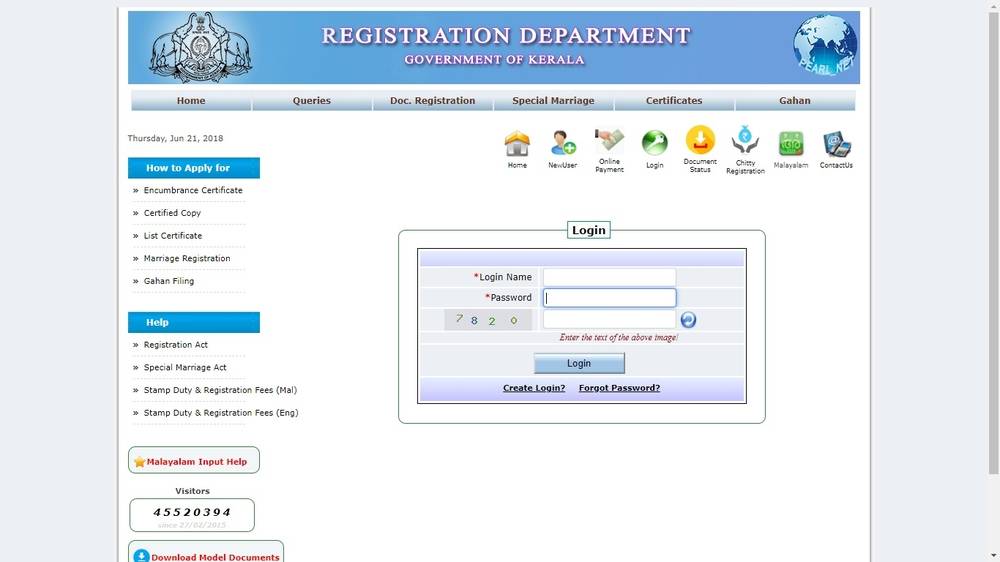 Image 4 Kerala Property Registration
Step 8: On login, the applicant will get the page for navigation.
Apply for property registration
Steps for applying for document registration are given below:
Image 4 Kerala Property Registration
Step 8: On login, the applicant will get the page for navigation.
Apply for property registration
Steps for applying for document registration are given below:
- Selection of time slot (Token)
- Presentation, documents and Claimant details
- Application submission
Search for Available Token
Step 9: The applicant needs to search available token, it includes searching and selecting a convenient time slot for presenting the document in Sub Registrar office. Step 10: After filling mandatory fields, click on View Token. The list will give time slots from the day before and after the selected date. Step 11: Choose one available slot and click on it.Make Transaction
Step 12: Now, the Transaction type selection window will appear. Step 13: In this window, choose the appropriate transaction type carefully. It can’t be modifying in later stages. Click on Submit button.Enter Presentation Details
Step 14: Enter details regarding presenter and documents. Step 15: After successful submission of presentation details, the data entered can be continued by entering the previous document details, or the applicant can continue the entry at any time as the token will be listed out in My Token window. Step 16: Click on the View button and edit the presentation details. Step 17: Click on the Next button in the presenter detail. Enter details of previous document details.Provide Claimant Details
Step 18: Provide claimant details (buyer’s details) here. The applicant can edit the claimant details by click on the edit button.Fill Executants Details
Step 19: Enter Executants details (seller’s details). Edit the details if needed. Step 20: Power of Attorney details can be entered by clicking Power of Attorney.Property Details Section
Step 21: The applicant has to enter the details of the property. If the property is having well or building, then tick yes on corresponding fields. Step 22: The applicant can edit the property details using the edit button.Enter Building Details
Step 23: This section will be displayed if the applicant has entered yes in the field of Building in Property while providing property details.Claimant-Property Link
Step 24: The claimant property link is applicable when several owners are more than one. In this section, the applicant needs to provide which property is attached to which owner. Note: Documents regarding claimant property need to be submitted in Sub Registrar at the time of presentation.Witness Details
Step 25: Provide details two individuals who will be the witness at the time of registration of the document.Stamp Paper Details
Step 26: Enter the stamp paper details. Step 27: The applicant can use an extra note to store extra details regarding the document.Submit Application to Sub Registrar Office
Step 28: The applicant can choose another slot if the selected one is not convenient by clicking 'View Token'. Then click on Accept and Submit to SR for apply. Step 29: Now, the summary of the entered details will be shown. Go through the details and make the necessary changes to avoid problems at the time of Registration. Step 30: Click on 'Accept and Continue'. Step 31: A box mentioning the 'Mode of Payment' will appear. It shows the payment of fees and Stamp Duty to register the document. Click on the 'Go' button to continue. Step 32: Make an online payment. An Acknowledgement slip will appear. Acknowledgement slip will contain the following details:- Department Reference Number
- Date of Presentation
- Time of Presentation
- Place of Presentation