
IndiaFilings
Expert
Published on: Jul 30, 2026
Income Tax E-Filing Registration
Income Tax E-Filing Registration is performed by a taxpayer to register with the free governmental facility, namely the Income Tax E-Filing website, that allows taxpayers to file the Income Tax returns online. The Income Tax E-Filing website, which is completely free for all taxpayers, is used by all types of taxpayers in India to file income tax returns. Salaried individuals and taxpayers who have opted for a presumptive taxation scheme offered by the Act can easily file ITR-1 return, ITR-2 return and ITR-4 return through the income tax e-filing website. In addition to filing income tax return, a taxpayer can also use the income tax e-filing website to view e-filed returns, check ITR status, respond to
income tax notice and know tax refund status. Hence, any person having a taxable income of more than Rs.2.5 lakhs must be aware of the procedures for using the income tax e-filing website and have an account with the E-filing website maintained by the Income Tax Department. In this article, we discuss the procedure for completing income tax e-filing registration and obtaining a user id and password for tax return filing using the income tax e-filing website.Step 1: Go to Income Tax E-Filing Website
Go to the income tax e-filing website belonging to the Income Tax Department to start the registration process.
Step 2: Register Yourself
Click on the "Register Yourself" button on the top right-hand side to begin the process.
Select the User Type (such as Individual, Firm and so on) and click on the "Continue" button.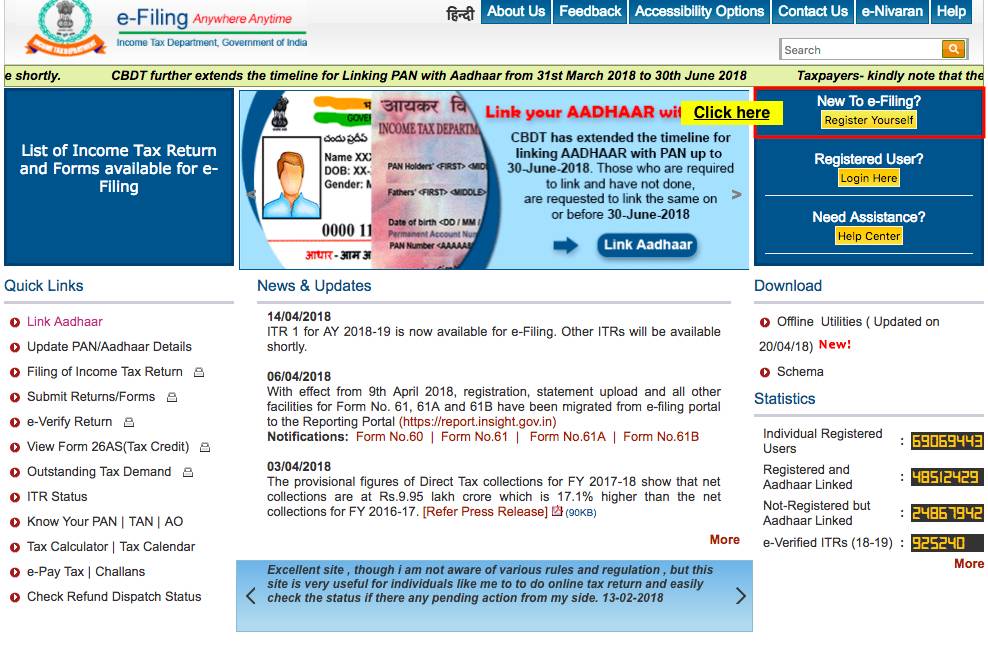 Income Tax E-Filing Registration
Step 3: Select User Type
Select the type of user for whom income tax e-filing website registration is required. Taxpayers can choose options such as individual, partnership, company, trust, and so on.
Step 4: Provide Basic Details
Provide basic details of the taxpayer for whom income tax account is being created. Basic details to be entered are:
- PAN (this is your User ID for e-Filing website)
- Name (Surname, Middle name and First name or Organization Name in case of Non-Individuals)
- Date of Birth /Date of Incorporation
- Mobile Phone (not required for Non-Residents)
Step 5: Email Verification
Once the above details are submitted an email will be sent for verification of the taxpayer's email address. Complete the email verification and enter the following details including the password to be used for income tax e-filing website and click on submit:
- Password (This is the password that taxpayers can use to access the e-filing website)
- Personal Details/ Principal Contact Details
- Contact Details
- Current Address
- Subscribe to Mailing List
- Enable Alerts, reminder and notifications
- Captcha code should be completed
Step 6: Activate E-Filing Account
On submission of the above details, the taxpayer will get a message, "Registration successful". Also, an email will be sent to the taxpayer along with an activation link and an SMS with OTP. To activate the income tax e-filing account, click on the activation link sent through email and enter the OTP received by SMS. On successfully completing the above steps, the income tax e-filing website will be activated and will be ready for
income tax e-filing.