

Renu Suresh
Expert
Published on: Jul 30, 2026
Haryana Enterprises Promotion Center - HEPC
Haryana Enterprises Promotion Centre (HEPC) is a unique
Single Window Clearance System for the benefit of the new units or units under expansion. The single-window facility aims to simplify procedures and facilitate ease in doing business with the State supported by state-of-the-art Technology platform. In this article, we will look at Haryana Enterprises Promotion Center - HEPC in detail.Objective of HEPC
The key objective of HEPC is to make Haryana as a pre-eminent investment destination and facilitate balanced regional and sustainable development supported by a dynamic governance system, wide-scale adoption of innovation & technology, and skill development for nurturing entrepreneurship and generating employment opportunities.
Departments under HEPC
Sixty-three services from 12 Departments are provided online through HEPC Portal. Following are the participating departments:
- Uttar/Dakshin Haryana Bijli Vitran Nigam
- Town and Country Planning
- Environment Department/Haryana State Pollution Control Board
- Labour Department/Chief Inspector of Factories
- Industries and Commerce Department
- Directorate of Health Services
- Excise and Taxation
- Haryana State Industrial Development Corporation Ltd
- Haryana Urban Local Bodies Department
- Revenue Department
- Non-Conventional Energy/Renewal Energy Department
- Food and Supply Department
Procedure to apply for Services in HEPC Portal
Application procedure in HEPC portal is explained in detail below: To avail the services offered for industrial users, log onto the
HEPC portal. In the case of the “First time user”, to enter into the Single Roof Clearance System click on the “Register Here” option.New User Registration
Step 1: Fill all the mandatory details for creating a new user ID. Ensure that the email and Mobile phone details are correct as the account will be verified via Email and registered mobile number.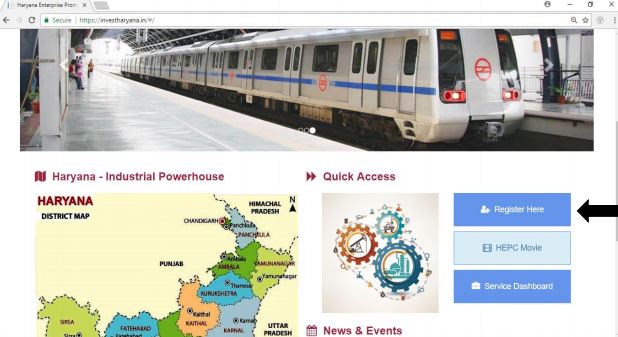 Image 1 Haryana Enterprises Promotion Center - HEPC
Step 2: After providing all details click on the “Register” option.
Image 1 Haryana Enterprises Promotion Center - HEPC
Step 2: After providing all details click on the “Register” option.
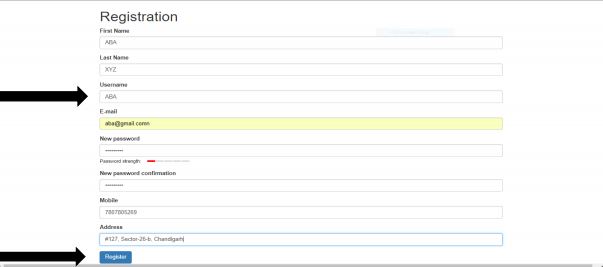 Image 2 Haryana Enterprises Promotion Center - HEPC
Note: Use the same “Username” registered here to log into the portal for further process.
Step 3: If the investor registers with an existing mail ID or username, a failure message will be displayed on the screen:
Image 2 Haryana Enterprises Promotion Center - HEPC
Note: Use the same “Username” registered here to log into the portal for further process.
Step 3: If the investor registers with an existing mail ID or username, a failure message will be displayed on the screen:
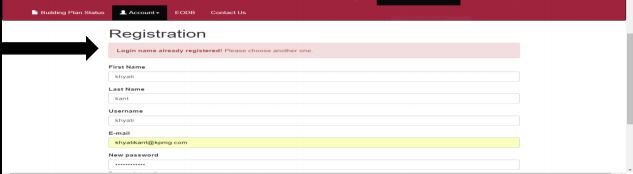 Image 3 Haryana Enterprises Promotion Center - HEPC
Registration Confirmation
Step 4: Once the registration is successful, the new registration application will be saved, and confirmation regarding the same will display on the screen.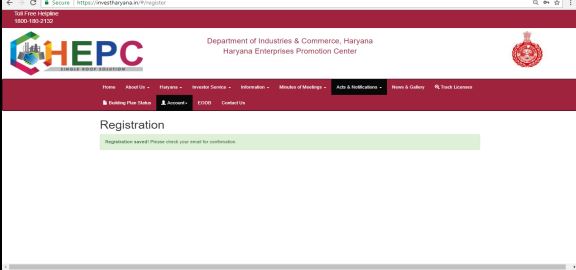 Image 4 Haryana Enterprises Promotion Center - HEPC
Verification Confirmation
Step 5: Keep the Email and Mobile phone accessible as after clicking on “Register” a verification link will be sent to the Email ID and Mobile phone.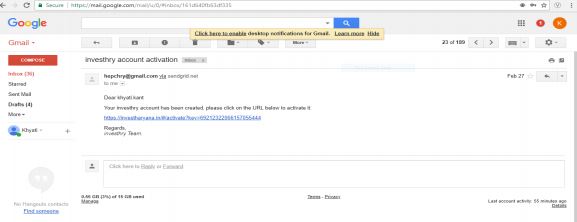 Image 5 Haryana Enterprises Promotion Center - HEPC
Step 6: Click on the link sent on the Email ID to complete the verification process; you will be redirected to HEPC Portal.
Image 5 Haryana Enterprises Promotion Center - HEPC
Step 6: Click on the link sent on the Email ID to complete the verification process; you will be redirected to HEPC Portal.
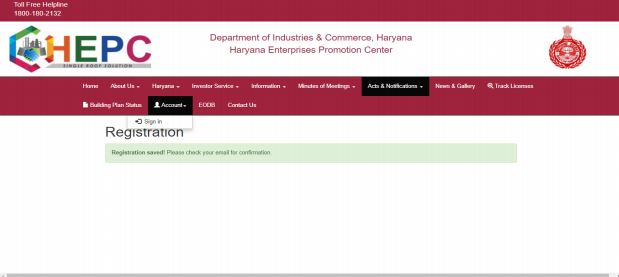 Image 6 Haryana Enterprises Promotion Center - HEPC
Step 7: Once the link is verified, the following message appears in the pop-up window. Click on the Account, then Sign in option.
Image 6 Haryana Enterprises Promotion Center - HEPC
Step 7: Once the link is verified, the following message appears in the pop-up window. Click on the Account, then Sign in option.
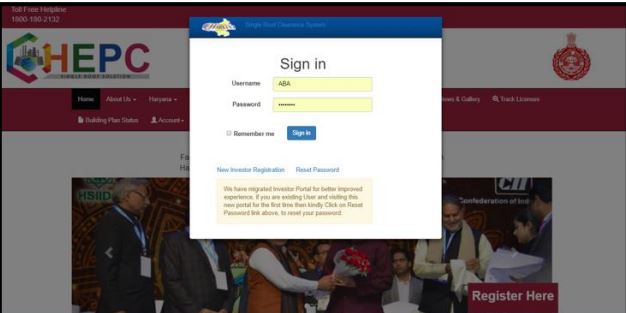 Image 7 Haryana Enterprises Promotion Center - HEPC
Step 8: Once the user clicks on Sign in option, a window as shown below will appear. Enter the username and password to sign in.
Image 7 Haryana Enterprises Promotion Center - HEPC
Step 8: Once the user clicks on Sign in option, a window as shown below will appear. Enter the username and password to sign in.
Investor Login/ Existing user-Login
Step 9: In case the investor is already registered on the portal, he/she should go to “Account” then “Sign in” option to access the portal.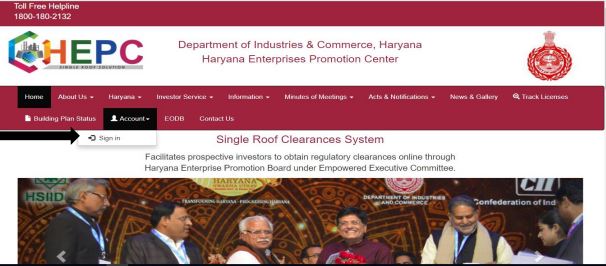 Image 9 Haryana Enterprises Promotion Center - HEPC
Step 10: A pop-up window like below will open up, enter the Username and password and Sign in to access the dashboard.
Image 9 Haryana Enterprises Promotion Center - HEPC
Step 10: A pop-up window like below will open up, enter the Username and password and Sign in to access the dashboard.
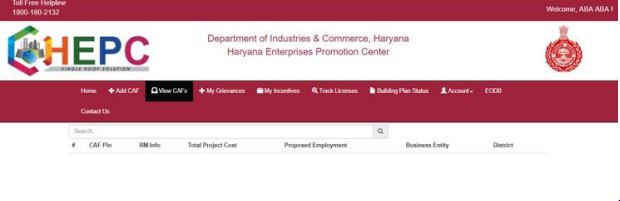 Image 11 Haryana Enterprises Promotion Center - HEPC
Creating CAF Pin
Step 11: Once, the new investor signed in, a window as below will appear as depicted below. Next, go to “Add CAF” option.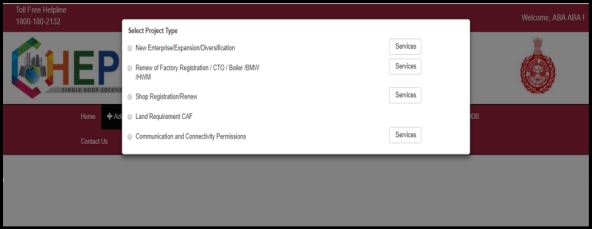 Image 12 Haryana Enterprises Promotion Center - HEPC
Step 12: After clicking on Add CAF option, a pop like below will have appeared, in which the investor can select the type of CAF according to their requirement.
Image 12 Haryana Enterprises Promotion Center - HEPC
Step 12: After clicking on Add CAF option, a pop like below will have appeared, in which the investor can select the type of CAF according to their requirement.
- New Enterprise/Expansion/Diversification-If, the investor, is a new user (wants service for a new firm) or is expanding its existing enterprise and wants service for the same.
- Renew of Factory Registration/CTO/ Boiler/BMW/HWM- If the investor wants to renew any of the services.
- Shop Registration/ Renew- If the investor wants services regarding Shops (new or renewal).
- Land Requirement CAF- In case the investor does not have any land of its own and wants to buy the property from the Government of Haryana.
- Communication and Connectivity Permissions- In case the investor wants a service relating to tower CAF
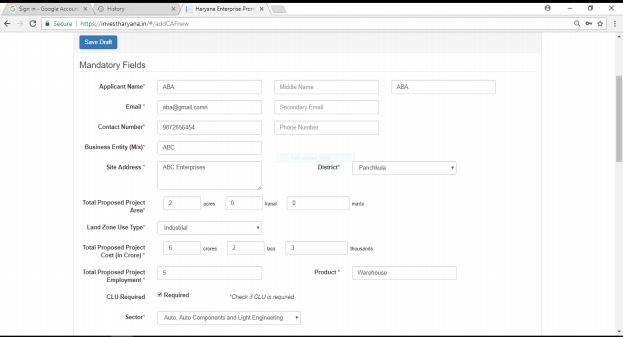 Image 13 Haryana Enterprises Promotion Center - HEPC
Step 13: Once the project type is selected, a form will appear on the screen. Provide correct and valid details in the form.
Image 13 Haryana Enterprises Promotion Center - HEPC
Step 13: Once the project type is selected, a form will appear on the screen. Provide correct and valid details in the form.
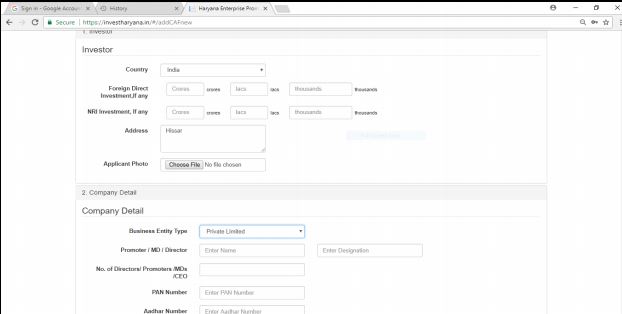 Image 14 Haryana Enterprises Promotion Center - HEPC
Step 14: Enable the “Accept Terms and Conditions” tab. Once the form is completed, press on “Submit Complete Form” to submit the form.
Image 14 Haryana Enterprises Promotion Center - HEPC
Step 14: Enable the “Accept Terms and Conditions” tab. Once the form is completed, press on “Submit Complete Form” to submit the form.
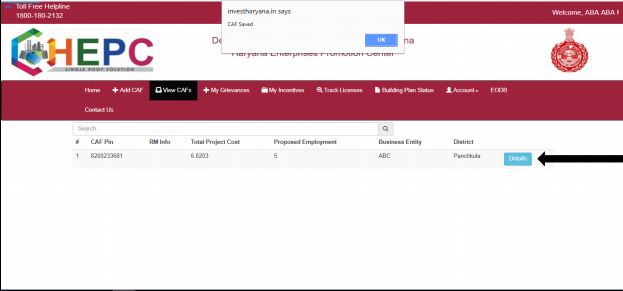 Image 15 Haryana Enterprises Promotion Center - HEPC
Note: To open and view the form, click on “Details”.
Image 15 Haryana Enterprises Promotion Center - HEPC
Note: To open and view the form, click on “Details”.
Applying for services
Step 15: To apply for the HEPC services, click on Service Clearance option. Then go to the “View Service Required” option for selecting the services that are required.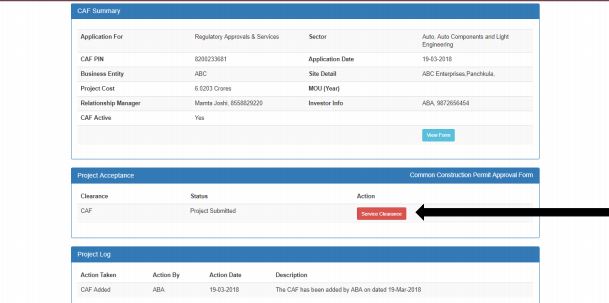 Image 16 Haryana Enterprises Promotion Center - HEPC
Step 16: A window will display, showing all the services department wise that are available in the HEPC Portal. The investor needs to click on “Required” against the service that is required.
Image 16 Haryana Enterprises Promotion Center - HEPC
Step 16: A window will display, showing all the services department wise that are available in the HEPC Portal. The investor needs to click on “Required” against the service that is required.
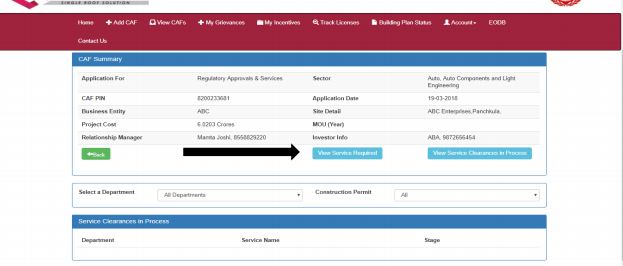 Image 17 Haryana Enterprises Promotion Center - HEPC
Step 17: Once the required service is selected, go to “View Service clearance in process” option to view the services that have been needed and further click on the “Fill Service Form” to complete the form for each service required.
Image 17 Haryana Enterprises Promotion Center - HEPC
Step 17: Once the required service is selected, go to “View Service clearance in process” option to view the services that have been needed and further click on the “Fill Service Form” to complete the form for each service required.
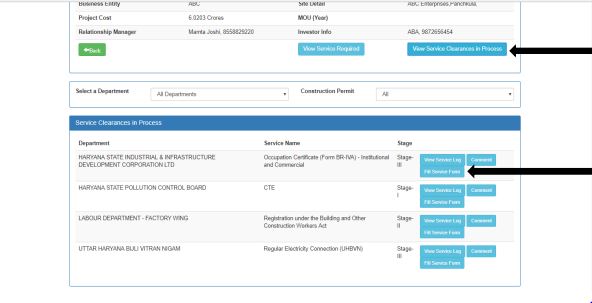 Image 19 Haryana Enterprises Promotion Center - HEPC
Step 18: Fill the forms completed for each service that has been required and submit the respective forms.
Image 19 Haryana Enterprises Promotion Center - HEPC
Step 18: Fill the forms completed for each service that has been required and submit the respective forms.
Track License
To get the status of licenses applied through HEPC, follow the simple procedure explained below: Access the home page of
Single Roof Clearances System, and then select the Track License option.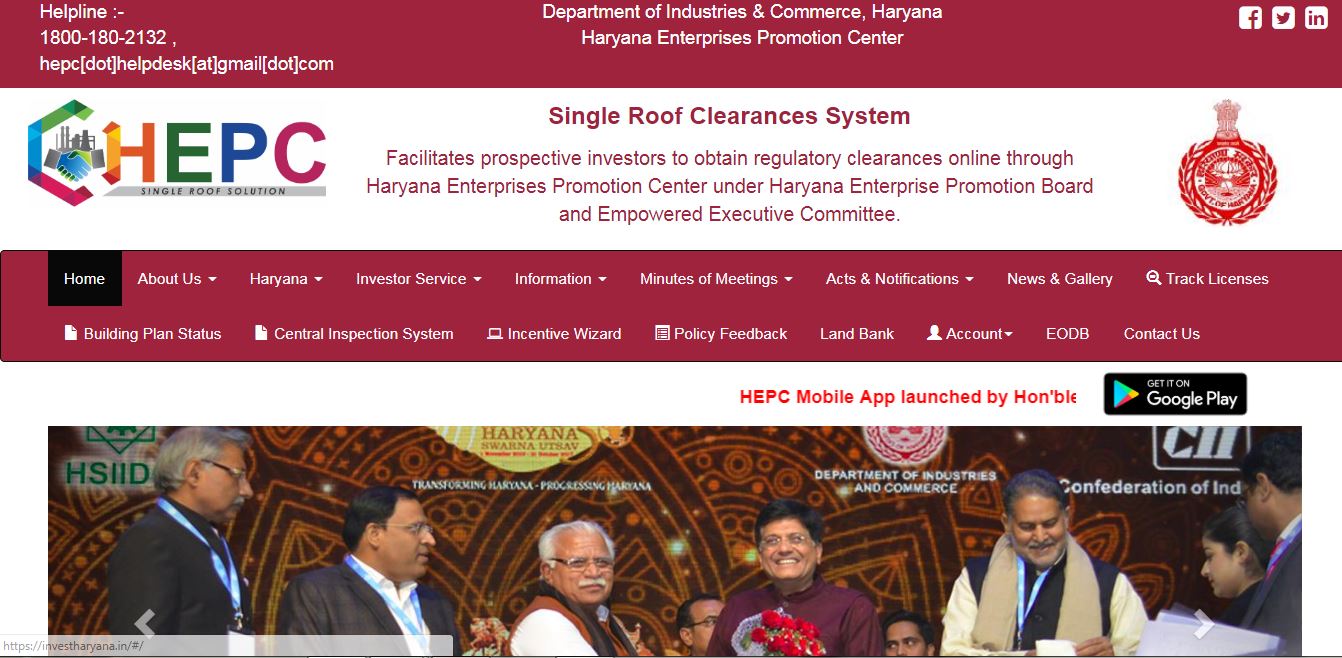 Image 20 Haryana Enterprises Promotion Center - HEPC
By clicking on the track license option, the list of services under HEPC will be displayed. Select the appropriate license which you want to check status.
Image 20 Haryana Enterprises Promotion Center - HEPC
By clicking on the track license option, the list of services under HEPC will be displayed. Select the appropriate license which you want to check status.
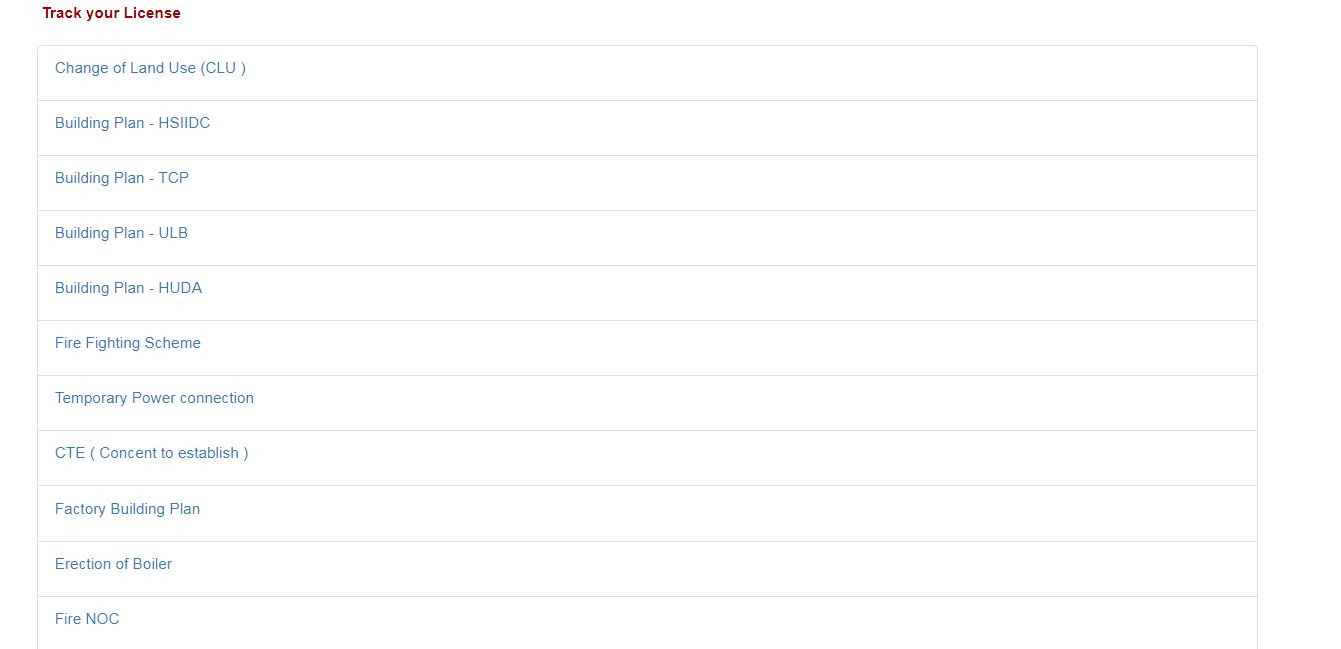 Image 21 Haryana Enterprises Promotion Center - HEPC
Once the service/license is selected, the link will redirect to the respective department official webpage.
Image 21 Haryana Enterprises Promotion Center - HEPC
Once the service/license is selected, the link will redirect to the respective department official webpage.
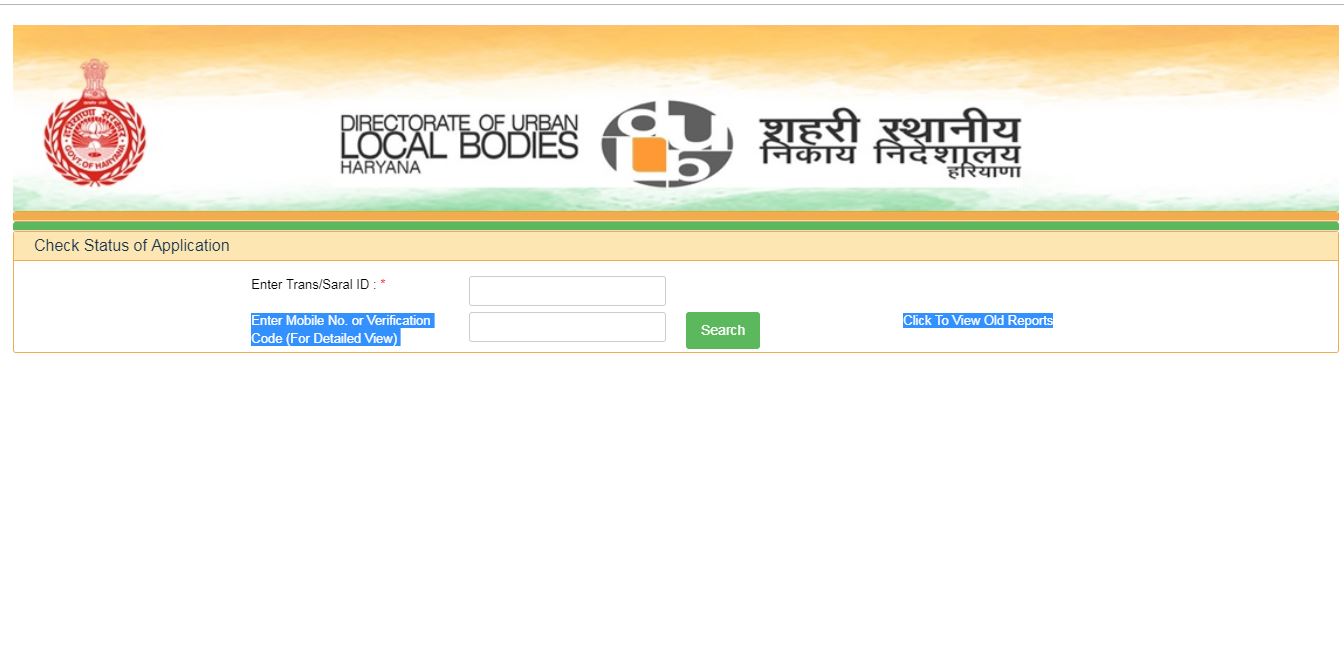 Image 22 Haryana Enterprises Promotion Center - HEPC
Provide the application /transaction number and mobile number. By clicking on the search button, the status of the license will be displayed.
Image 22 Haryana Enterprises Promotion Center - HEPC
Provide the application /transaction number and mobile number. By clicking on the search button, the status of the license will be displayed.