
Karthiga
Expert
Published on: Jul 30, 2026
GST Tran-3
Form GST Tran-3 is a statement which contains the details of
credit transfer document which is issued by a manufacturer as a proof of his Excise Duty payment on goods, which were manufactured and transacted before the date of GST implementation. In this article, we look at the procedure for filing GST Tran-3 on the GST Portal.Who needs to file Form GST Tran-3?
The Form GST Tran-3 requires to file by the following person:
- The manufacturer who has issued Credit Transfer Document to dealers.
- Dealers who have received the Credit Transfer Document (CTD) issued by manufacturers.
Form GST Tran-3 Filing Due Date
Every
registered person who was registered under the Central Excise Act, 1944 is expected to file Form GST Trans-3 through the GST common portal within sixty days from the date of GST implementation.Online Procedure to File Form GST Tran-3
To File Form GST Tran-3 through GST portal, follow the steps specified here:
Visit Official Portal Step 1: Visit the official portal of GST department. Provide Login Details Step 2: The registered taxpayer has to login to the GST Portal with valid credentials. Select Services Type Step 3: Click on “Services” tab and then select Transition forms option from the menu return.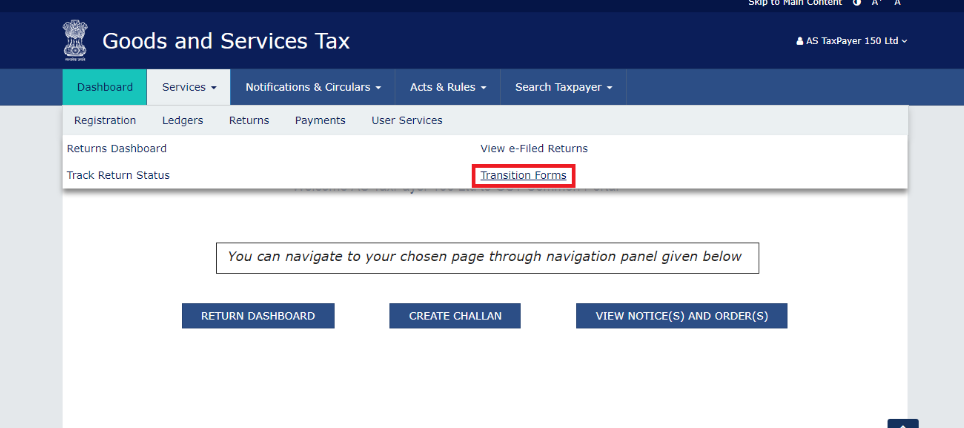 Form GST Tran-3 Filing
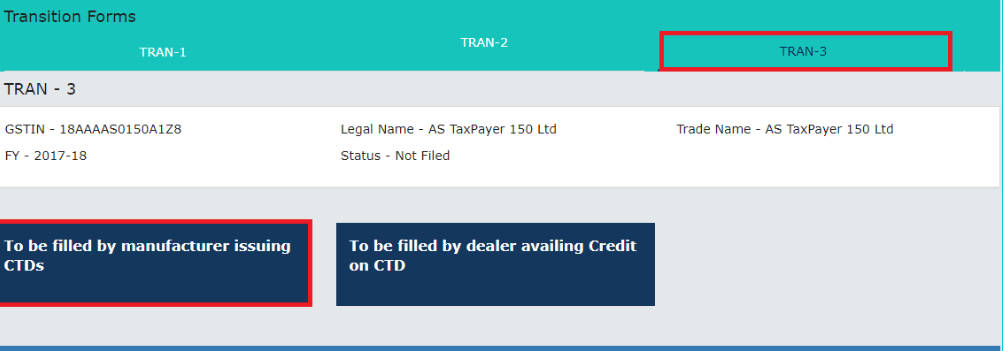
Step 4: Now, click on the tab TRAN - 3 then the TRAN-3 page will open.
Fill the Details
Step 5: Fill the necessary details in Form TRAN-3. The filing details in the Form TRAN-3 includes.
Form GST Tran-3 Filing
Step 4: Now, click on the tab TRAN - 3 then the TRAN-3 page will open.
Fill the Details
Step 5: Fill the necessary details in Form TRAN-3. The filing details in the Form TRAN-3 includes.
- Adding details to Form TRAN-3, as a manufacturer that has granted credit transfer documents.
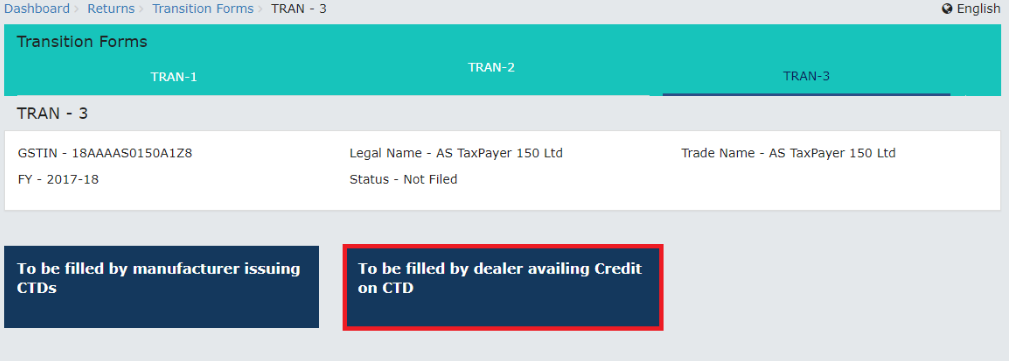
- Adding details to Form TRAN-3, as a dealer to claim an input tax credit based on the credit transfer document issued by the manufactures.
 Form GST Tran-3 Filing - Image 1
Note: The applicant has to click the appropriate link to proceed with further steps.
Form GST Tran-3 Filing - Image 1
Note: The applicant has to click the appropriate link to proceed with further steps.
Adding Details to GST Form TRAN-3 as a manufacturer that has issued Credit transfer document
Step 6: Enter details of Credit Transfer Documents issued to dealers, click on "To be filled by manufacturer issuing CTDs" link. Add Appropriate Details Step 7: Click on the Add Details button to add appropriate details.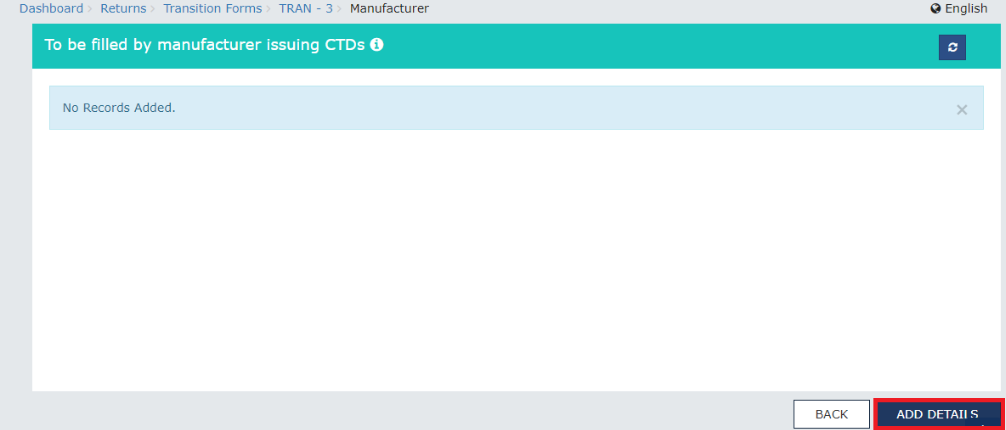 Form GST Tran-3 Filing - Image 2
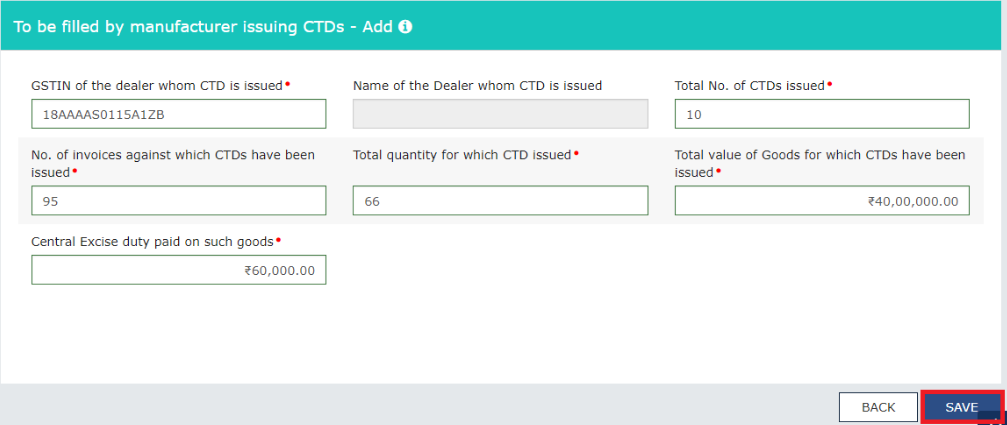
Step 8: Fill the details of credit transfer document such as GSTIN, No of CTD issued etc. and click on Save button.
Form GST Tran-3 Filing - Image 2
Step 8: Fill the details of credit transfer document such as GSTIN, No of CTD issued etc. and click on Save button.
 Form GST Tran-3 Filing - Image 3
Note: Kindly note that the GSTIN of the registered dealer and the name of the dealer will be populated in the screen. Further, separate the consolidated entry made by the manufacturer to whom CTD is granted.
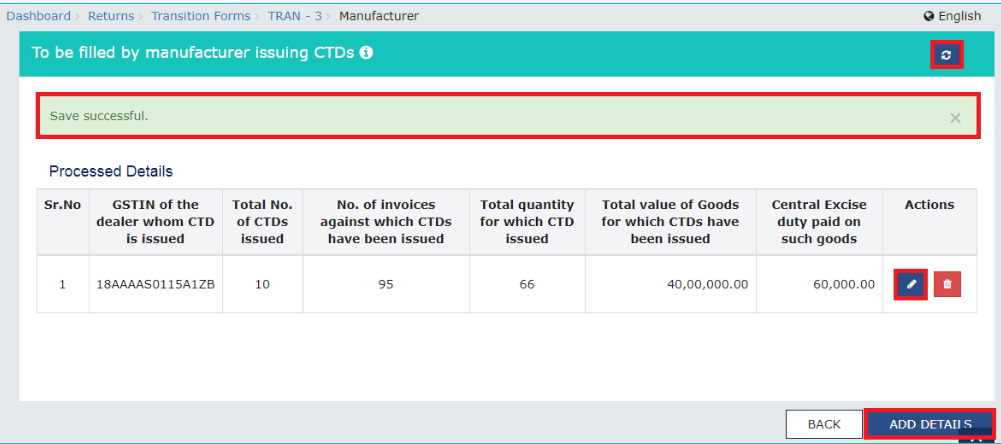
Step 9: On saving the details, successful message displays
Form GST Tran-3 Filing - Image 3
Note: Kindly note that the GSTIN of the registered dealer and the name of the dealer will be populated in the screen. Further, separate the consolidated entry made by the manufacturer to whom CTD is granted.
Step 9: On saving the details, successful message displays
 Form GST Tran-3 Filing - Image 4
Acknowledgement Received
Step 10: After the successful message displayed then the registered taxpayers can modify the details as per their convenient by.
Form GST Tran-3 Filing - Image 4
Acknowledgement Received
Step 10: After the successful message displayed then the registered taxpayers can modify the details as per their convenient by.
- Adding more details of CTDs issued to other dealers, click on Add Details button. GST Tran-3
- Refreshing the details, click on the Refresh button.
- Modifying the details, click the Edit button.
- Deleting the details added, click on the Delete button.
 Form GST Tran-3 Filing - Image 5
Add Appropriate Details
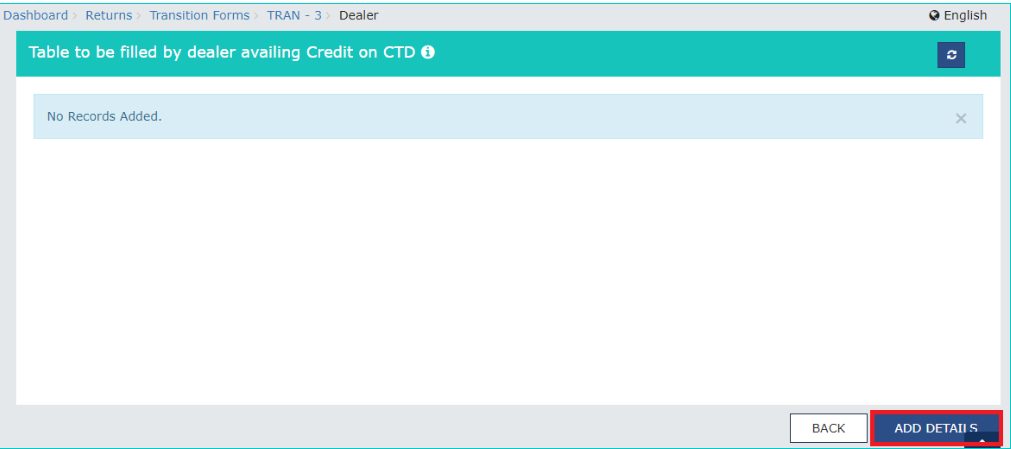
Step 13: In the page To be filled by dealer availing credit on CTD, click the Add Details button.
Form GST Tran-3 Filing - Image 5
Add Appropriate Details
Step 13: In the page To be filled by dealer availing credit on CTD, click the Add Details button.
 Form GST Tran-3 Filing - Image 6
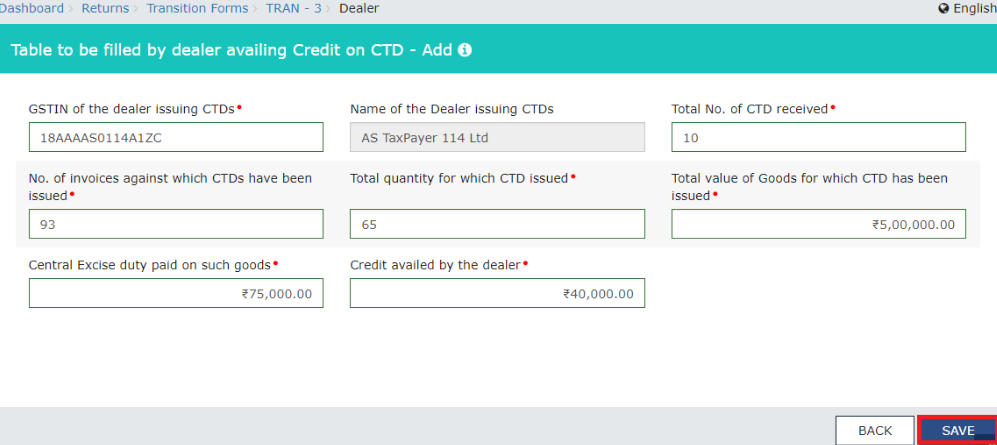
Step 14: In the page of "To be filled by dealer availing credit on CTD- Add" provide the details of credit transfer document which is issued by the manufactures like GSTIN, number of credit transfer document received and then press the save button.
Form GST Tran-3 Filing - Image 6
Step 14: In the page of "To be filled by dealer availing credit on CTD- Add" provide the details of credit transfer document which is issued by the manufactures like GSTIN, number of credit transfer document received and then press the save button.
 Form GST Tran-3 Filing - Image 7
Note: The GSTIN provided should belong to the registered taxpayers, and then the name of the dealer issuing will be automatically populated in the system. For each dealer from which the credit transfer document received the dealer utilising the credit makes the separated and consolidated entry.
Receive the Message
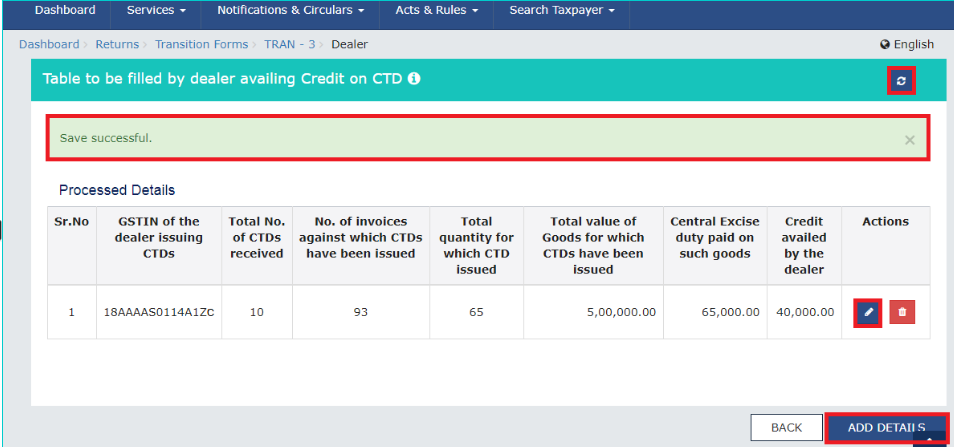
Step 15: After saving the details, a successful message displayed. Then the registered taxpayers can modify the details as per their convenient by
Form GST Tran-3 Filing - Image 7
Note: The GSTIN provided should belong to the registered taxpayers, and then the name of the dealer issuing will be automatically populated in the system. For each dealer from which the credit transfer document received the dealer utilising the credit makes the separated and consolidated entry.
Receive the Message
Step 15: After saving the details, a successful message displayed. Then the registered taxpayers can modify the details as per their convenient by
- Adding more details of CTDs issued to other dealers, click on Add Details button.
- Refreshing the details, click on the Refresh button.
- Modifying the details, click the Edit button.
- Deleting the details added, click on the Delete button.
GST Tran-3 GST Tran-3
 Form GST Tran-3 Filing - Image 8
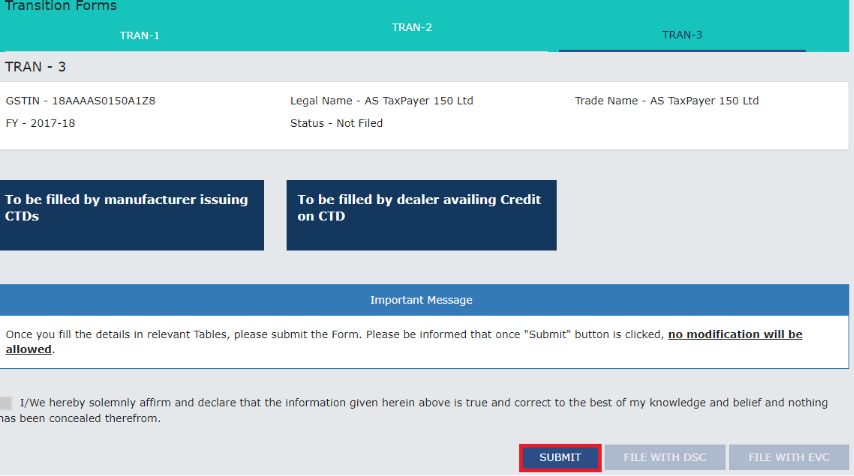
Step 16: Click the Back button after adding the details to view transition forms page.
Step 17: Click on Submit button to submit the data on the GST official portal.
Form GST Tran-3 Filing - Image 8
Step 16: Click the Back button after adding the details to view transition forms page.
Step 17: Click on Submit button to submit the data on the GST official portal.
 Form GST Tran-3 Filing - Image 9
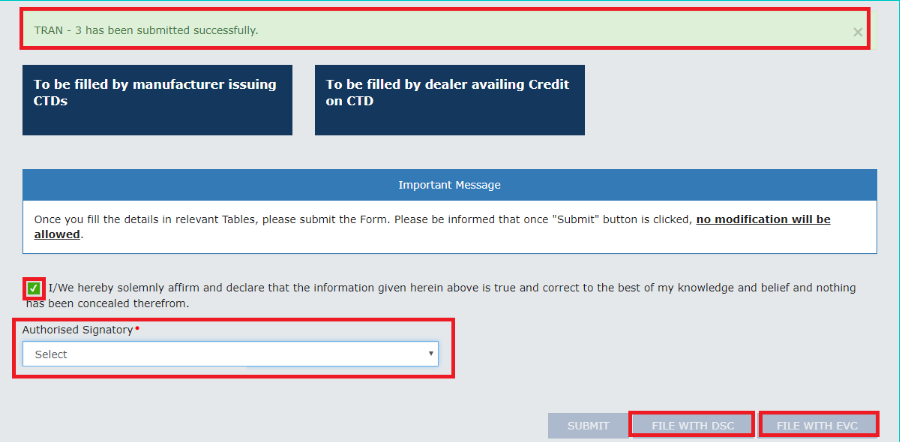
Step 18: Click on the Proceed button in the warning box to proceed further.
Select EVC or DSC
Step 19: Authenticate the Form by either DSC or by EVC. Click on File with DSC button to sign the form using DSC. Alternatively, click the File with EVC button to validate using EVC.
Form GST Tran-3 Filing - Image 9
Step 18: Click on the Proceed button in the warning box to proceed further.
Select EVC or DSC
Step 19: Authenticate the Form by either DSC or by EVC. Click on File with DSC button to sign the form using DSC. Alternatively, click the File with EVC button to validate using EVC.
 Form GST Tran-3 Filing - Image 10
Track Return Status
Step 20: Further, the registered taxpayers can check the state of the form by Click on “Services” tab and then select the Track return status option from the menu return.
Form GST Tran-3 Filing - Image 10
Track Return Status
Step 20: Further, the registered taxpayers can check the state of the form by Click on “Services” tab and then select the Track return status option from the menu return.