
Karthiga
Expert
Published on: Jul 30, 2026
GST Refund - Intra-State and Inter-State Supplies
As per the provisions of CGST/SGST Act, the tax levied on the particular supply of goods and services can be claimed for a refund by the taxpayer. Likewise, a person having
GST registration can claim for refund on tax paid for the intra-state supply which is consequently held to be inter-state supply and vice versa. In this article, we look at the online GST refund claim processing procedure on the GST Portal.Intra-State Supply
If the place of the supplier and the location of the supply of goods or services are in the same state or the same Union territory, then it will be treated as
intra-State supply.Inter-State Supply
If the place of the supplier and the location of the supply of goods or services are in different states, it will be considered inter-state supplies.
Eligibility Criteria
As per section 77 of the CGST Act, the following conditions are eligible to file the refund application in form GST RFD-01A.
- A registered taxpayer who has paid the Central tax and State tax or Union territory tax is considered by the taxpayer to be an intrastate supply, but which is consequently held to be an inter-State supply is eligible for the refund amount for the tax paid.
- A registered taxpayer who has paid the integrated tax is considered by the taxpayer to be an inter-State supply, but which is consequently held to be an intrastate supply. In such cases, it is not required to pay any interest on the amount of central tax and State tax or the Union territory tax payable.
Documents Required
The applicant has to furnish the
required documents along with Form RFD-01A, as notified under CGST Rules or Circulars stated. Additionally, Statement-6 having details of invoices for which refund amount is to be claimed or any other documentation can be uploaded by the taxpayer, if needed by the sanctioning authority.Procedure to Claim an Online Refund
To claim for refund on account of tax imposed on an Intra-State Supply which is consequently held to be Inter-State supply, follow the steps mentioned below:
Step 1: The applicant has to visit the official portal of GST department.Provide Login Details
Step 2: Log in to the GST Portal with accurate details like username and password and click on the “Login” button. Step 3: Click the Services and select “Application for refund” option from Refund menu. GST-Refund-Intra-State-and-Inter-State-Supplies-Login-Details
Select Refund Type
Step 4: Select the tax paid on an intra-State supply which is subsequently held to be inter-State supply and vice versa option from the refund type.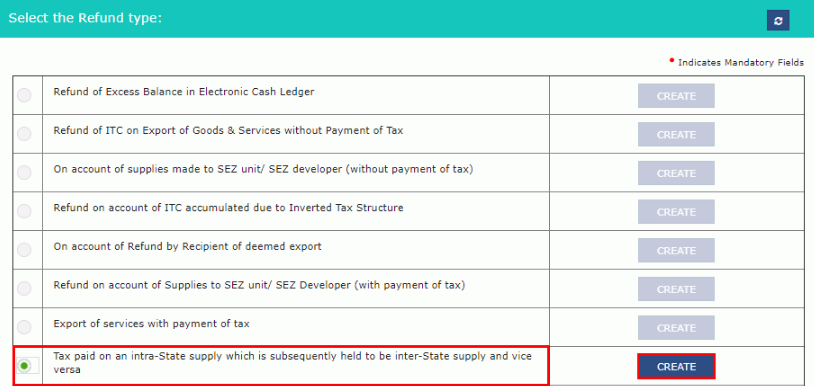 GST-Refund-Intra-State-and-Inter-State-Supplies-Refund-Type
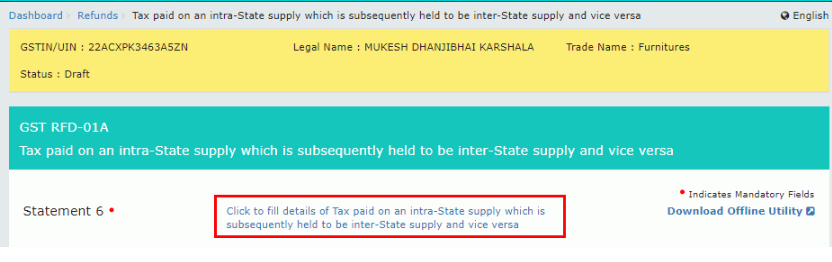
Step 5: The Tax paid on an intra-State supply which is subsequently held to be inter-State supply and vice versa page is displayed.
Note: To download the offline utility, upload the information regarding invoices in statement-6 along with POS for which refund is to be claimed.
GST-Refund-Intra-State-and-Inter-State-Supplies-Refund-Type
Step 5: The Tax paid on an intra-State supply which is subsequently held to be inter-State supply and vice versa page is displayed.
Note: To download the offline utility, upload the information regarding invoices in statement-6 along with POS for which refund is to be claimed.
Download Offline Utility
Step 6: Click the “Download Offline Utility” link and press the “Proceed” button to continue.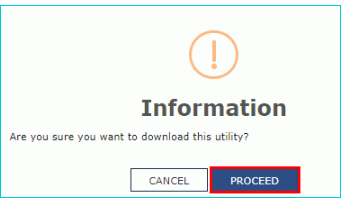 GST-Refund-Intra-State-and-Inter-State-Supplies-Download-Offline-Utility
Step 7: Now the file which is downloaded is Zip file that has to be extracted by right click and select “Extract All” to unzip the downloaded file.
Step 8: The file(statement-6) is downloaded now open the excel sheet and enter the GSTIN and From and To Return Period in the prescribed format.
Step 9: Enter the Order details, invoice details, details of invoices covering transaction considered as intra-State or inter-State transaction earlier and details of the transaction which were inter-State or intra-State supply subsequently.
Step 10: Click on “Validate and calculate” button.
GST-Refund-Intra-State-and-Inter-State-Supplies-Download-Offline-Utility
Step 7: Now the file which is downloaded is Zip file that has to be extracted by right click and select “Extract All” to unzip the downloaded file.
Step 8: The file(statement-6) is downloaded now open the excel sheet and enter the GSTIN and From and To Return Period in the prescribed format.
Step 9: Enter the Order details, invoice details, details of invoices covering transaction considered as intra-State or inter-State transaction earlier and details of the transaction which were inter-State or intra-State supply subsequently.
Step 10: Click on “Validate and calculate” button.
 GST-Refund-Intra-State-and-Inter-State-Supplies-Validate-Details
Step 11: The total number of records in the sheet is displayed. Click the “Ok” button.
Step 12: Click the “Create File to Upload” button and save the file.
GST-Refund-Intra-State-and-Inter-State-Supplies-Validate-Details
Step 11: The total number of records in the sheet is displayed. Click the “Ok” button.
Step 12: Click the “Create File to Upload” button and save the file.
 GST Refund- Intra-State Supply & Inter-State Supply-Upload-File
Step 13: Provide the name of the file and click the “Save” button.
Step 14: The message that the file has been created is displayed and then click on the “Ok” button to proceed with uploading the file on the portal.
Upload Tax Paid Details on an Intra-State Supply which is held to be Inter-State Supply
Step 15: Click the tab Click to fill details of Tax paid on an Intra-State Supply which is consequently held to be Inter-State supply and vice versa.
GST Refund- Intra-State Supply & Inter-State Supply-Upload-File
Step 13: Provide the name of the file and click the “Save” button.
Step 14: The message that the file has been created is displayed and then click on the “Ok” button to proceed with uploading the file on the portal.
Upload Tax Paid Details on an Intra-State Supply which is held to be Inter-State Supply
Step 15: Click the tab Click to fill details of Tax paid on an Intra-State Supply which is consequently held to be Inter-State supply and vice versa.
 GST-Refund-Intra-State-and-Inter-State-Supplies-Tax-Paid-Details
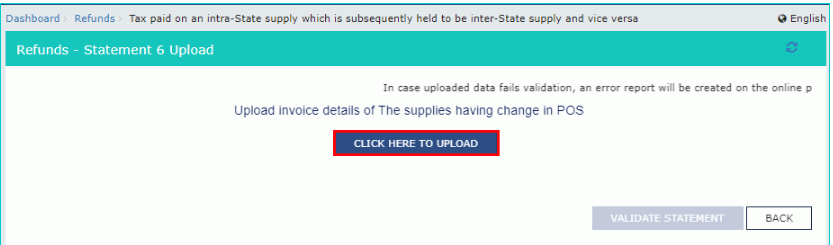
Step 16: Now, press “Click here to upload“ button.
GST-Refund-Intra-State-and-Inter-State-Supplies-Tax-Paid-Details
Step 16: Now, press “Click here to upload“ button.
 GST-Refund-Intra-State-and-Inter-State-Supplies-Upload-Details
Step 17: Now save the refund statement file and click the “Open” button.
Step 18: Click the “Download Unique Invoices” tab to view the invoices that have been uploaded successfully and click Validate statement button.
GST-Refund-Intra-State-and-Inter-State-Supplies-Upload-Details
Step 17: Now save the refund statement file and click the “Open” button.
Step 18: Click the “Download Unique Invoices” tab to view the invoices that have been uploaded successfully and click Validate statement button.
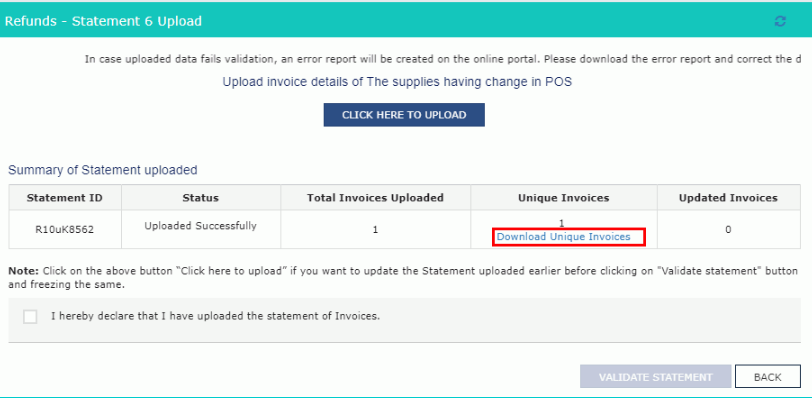 GST-Refund-Intra-State-and-Inter-State-Supplies-Download-Invoices
Step 19: Upon statement validation, a confirmation message on the screen that the statement has been submitted successfully for validation. Click the “Back” button.
GST-Refund-Intra-State-and-Inter-State-Supplies-Download-Invoices
Step 19: Upon statement validation, a confirmation message on the screen that the statement has been submitted successfully for validation. Click the “Back” button.
Refund of Tax imposed on an Intra-State Supply which is treated to be Inter-State supply and vice versa.
Step 20: Enter the value in statement-6 below for the tax period for which the refund to be claimed. Step 21: The amount of refund will get auto-populated based on the statement uploaded in the refund amount claimed table. Step 22: Click the hyperlink Click to view Electronic Liability Ledger to see details of Electronic Liability Ledger that displays liabilities/ dues of Returns and other than Returns and press the Go back to refund form to return to the refund application page. Step 23: Select the Bank Account Number from the drop-down list, upload supporting documents and click the “Submit” button. Step 24: After the statement successfully submitted a message is displayed for confirmation and click on the “Proceed” button. Step 25: Select the name of authorised signatory in the name of the authorised signatory drop-down list. Choose the File with DSC or File with EVC button.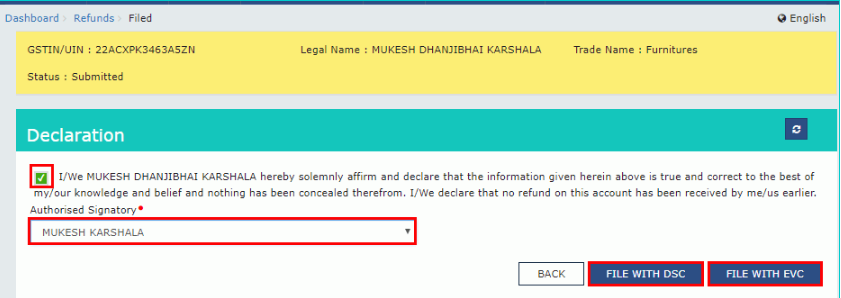 GST-Refund-Intra-State-and-Inter-State-Supplies-Refund-Tax
File With DSC- Method
- Click the “Proceed” button and select the certificate and click the “Sign.”
File With EVC – Method
- Enter the OTP sent on email and mobile number of the Authorized Signatory registered at the GST Portal and click the Verify button.
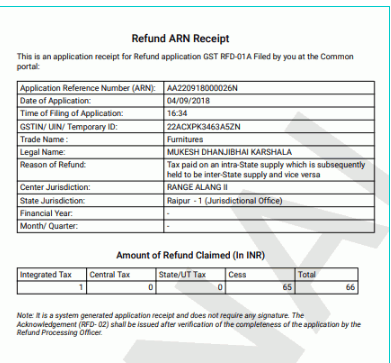 GST-Refund-Intra-State-and-Inter-State-Supplies-ARN-receipt
Note: Once the Application Reference Number is generated on the filing of form RFD-01A, a refund application is assigned to refund processing officer for processing. The request will be processed, and refund status will be updated in the portal.
GST-Refund-Intra-State-and-Inter-State-Supplies-ARN-receipt
Note: Once the Application Reference Number is generated on the filing of form RFD-01A, a refund application is assigned to refund processing officer for processing. The request will be processed, and refund status will be updated in the portal.