
IndiaFilings
Expert
Published on: Jul 30, 2026
GST LUT - File Letter of Undertaking (LUT) Online
Letter of Undertaking is commonly known as LUT. The
GST LUT is prescribed to be furnished in form GST RFD 11 under rule 96A, whereby the exporter declares that he/she would fulfill all the requirements prescribed under GST while exporting without making IGST payment. Know more about exports under GST.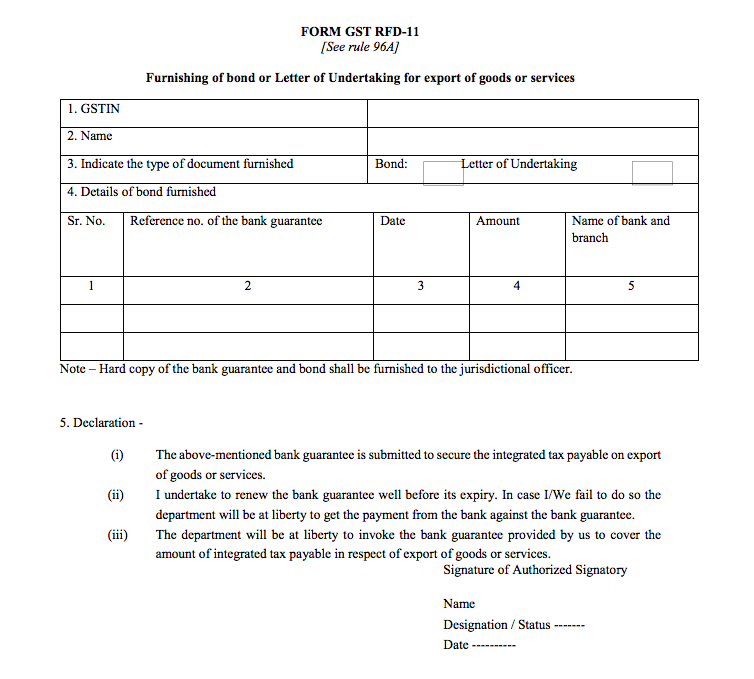 GST RFD-11
Filing Letter of Undertaking is mandatory to export goods or service or both without payment of Integrated Taxes (IGST). If LUT has not been furnished, the export can only be made through payment of IGST or by furnishing an export bond.
Initially, only the options of export bond was allowed. However, to improve ease of doing business, the Government introduced LUT. LUT was to be filed offline at the concerned GST office. Now, the Government has made the process of filing GST LUT online. Now, exporters can file LUT online through their respective GST Portal account easily by following the steps below.
GST RFD-11
Filing Letter of Undertaking is mandatory to export goods or service or both without payment of Integrated Taxes (IGST). If LUT has not been furnished, the export can only be made through payment of IGST or by furnishing an export bond.
Initially, only the options of export bond was allowed. However, to improve ease of doing business, the Government introduced LUT. LUT was to be filed offline at the concerned GST office. Now, the Government has made the process of filing GST LUT online. Now, exporters can file LUT online through their respective GST Portal account easily by following the steps below.
Eligibility for Export under LUT
All GST registered goods and service exporters are eligible to submit LUT except the exporters who have been prosecuted for any offence and the amount of tax evasion exceeds Rs.250 lakhs under the CGST Act or the Integrated Goods and Services Tax Act,2017 or any of the existing laws. In such cases, where the exporter is not eligible to file LUT, they would have to furnish an
export bond.Procedure for Filing Online LUT under GST
As mentioned above, filing of LUT has been made online through the GST Portal. You can follow the steps below to file LUT online:
- Login to the GST Portal with valid credentials.
- Go to menu bar and select ‘Service’ option. Under ‘Service’ option go to ‘User Service’ option’ and select the Tab “Furnishing Letter of Undertaking”.
- Now, Form GST RFD-11 is displayed.
- Select the Financial Year for which period you want to furnish the LUT.
- You can also upload LUT that belong to an earlier period by clicking on the choose file option and uploading the LUT file.
- If you have already furnished LUT Offline, for previous period, please attach the same here and continue to file your application.
- If you’re filing LUT, please read and select all the three check boxes for accepting the conditions prescribed in Letter of Undertaking.
- In name, address and occupation of the independent witnesses section, enter name and address of two witness.
- In the Place field, enter the place where the form is filed.
- Next step is to select name of Primary Authorized signatory or other Authorized signatory who will sign the Application form.
- You can click the PREVIEW button to preview the form.
- You can click the SAVE button to save the form and retrieve later.
- Click the SIGN AND FILE WITH DSC or SIGN AND FILE WITH EVC button.
- Once signed and filed, Form cannot be edited. Kindly recheck at least once before signing and submitting.